ShareStore
v1.1.0

Share Store is a web-based file sharing and storage application built using Django and Python for the backend, and JavaScript and Bootstrap for the frontend. It is the final project for CS50's Web Programming with Python and JavaScript. This project contains a single app 'drive'.
Share Store allows users to register, log in, upload files, and manage access permissions for those files. Users can share their files with specific individuals or make them accessible to everyone. Additionally, users can view files shared with them by others. Share Store employs Firebase Storage for file storage and retrieval. It provides features like user authentication, file upload/download, access control, password change, and account deletion, making it a versatile file-sharing platform.
Project Demo
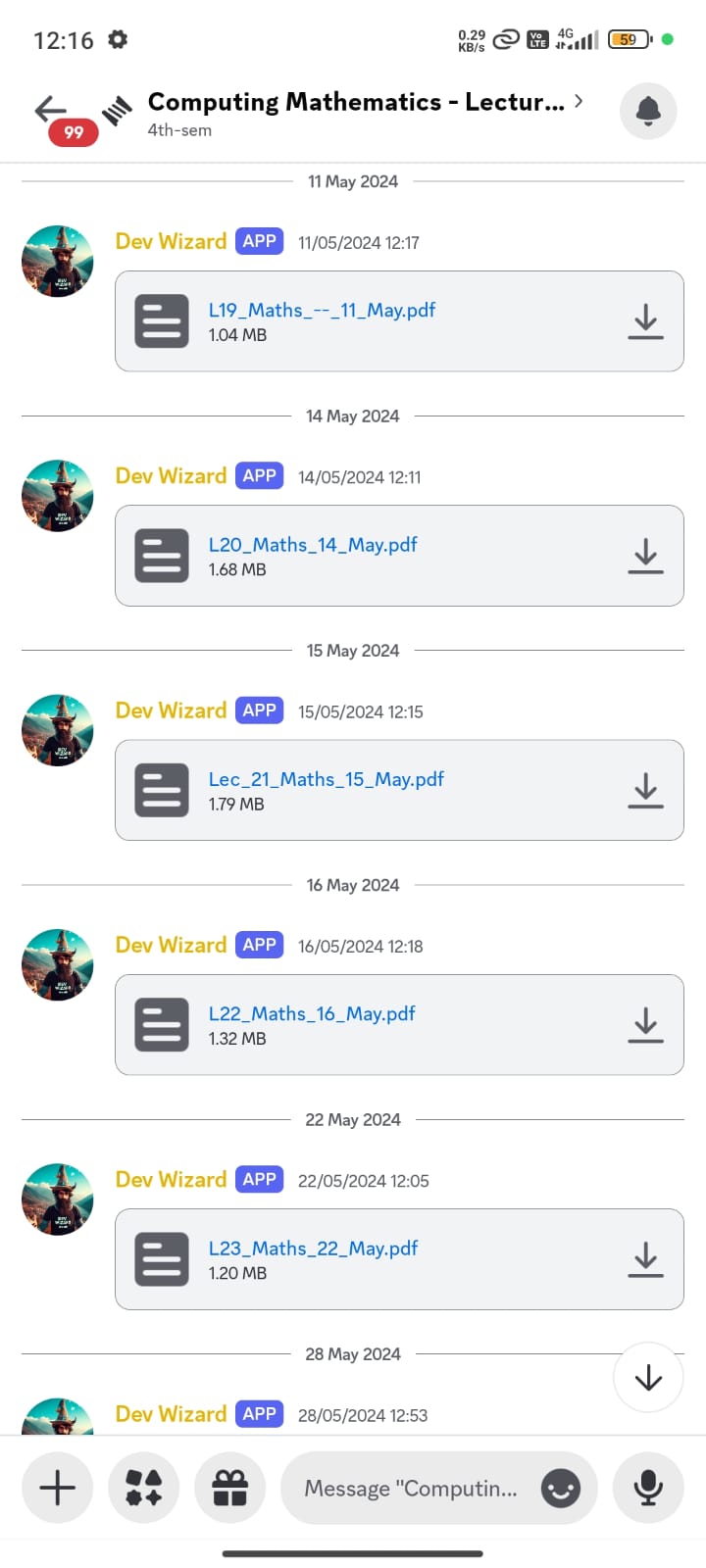
(college lecture slides in my case) to Discord. Now, when users upload files containing specific keywords (e.g., lecture names or topics like Math or TOC) from their accounts, these files are automatically sent to a designated Discord channel, as specified in the environment variables. This integration eliminates the need for manual file transfers, saving time and ensuring that the content is promptly shared with the relevant Discord community.Screenshots
Note
The screenshot below demonstrates the Discord integration feature, specifically how the bot posts files to a designated thread/channel on your Discord server. This functionality is triggered by the CHANNEL_MAPPINGS configuration, such as including "Maths": "maths thread/channel ID" to direct math-related files to the appropriate Discord location.
Project demo video is a bit old, so it does not showcase this feature.
static/drive: Contains JavaScript for handling access permissions, the application's logo, and a stylesheet for styling.
templates/drive: Contains HTML templates responsible for rendering web pages.
firebase.py: Initializes the Firebase Admin SDK and creates a reference to Firebase Storage.
models.py: Defines data models for the application, including File, User, and Share.
tests.py: Includes database tests for creating files, shares, and users.
urls.py: Defines URL patterns for the 'drive' app.
utils.py: Contains a utility function for iterating over files fetched from external URLs.
views.py: Houses view functions that handle HTTP requests and define how web pages are rendered.
discord_integration.py: Manages the automation of uploading files to a specified Discord channel based on certain criteria, utilizing the Discord API.
requirements.txt: Lists external Python packages and dependencies required for the project.
Note: A brief guide on how to create a Firebase project and find the JSON service account key file for this project is given at the end.
Create a Virtual Environment (Optional): If you prefer to work within a virtual environment (recommended for isolation), you can create and activate one. Navigate to your project directory and run the following commands:
# Create a virtual environment
python -m venv myenv

# Activate the virtual environment (Windows)
myenvScriptsactivate

# Activate the virtual environment (macOS/Linux)
source myenv/bin/activate
Install Requirements:
Make sure you have Python installed on your system.
Navigate to your project directory and install the required Python packages listed in requirements.txt. You can do this using pip:
pip install -r requirements.txt
Create .env File: Create a file named .env in your project directory. In the .env file, add the following lines, replacing placeholder values with your actual configuration details:
STORAGE_BUCKET="Storage Bucket Name"
GOOGLE_APPLICATION_CREDENTIALS="Path to your Firebase Admin SDK JSON credential file"
SECRET_KEY="Your Django secret key"
CONNECTION_STRING="Your database connection string (production only)"
SERVER_ID="Your Discord Server ID"
BOT_TOKEN="Your Discord Bot Token"
CHANNEL_MAPPINGS={"substring_1": "Channel_ID_1", "substring_2": "Channel_ID_2"}
P_USERNAME="Specific platform username whose files will be checked for Discord posting."
Each of these variables serves a specific purpose in your application, such as connecting to databases, integrating with Discord, and configuring Firebase services.
Tip
If you want to look for more substrings, just add the mapping in the CHANNEL_MAPPINGS environment variable like so: CHANNEL_MAPPINGS={"substring_1": "Channel_ID_1", "substring_2": "Channel_ID_2", "additional_substring": "Additional_Channel_ID"}.
Note
You should obtain the Firebase Admin SDK JSON credential file from your Firebase project settings. If you haven't already created a Firebase project, you can do so here: Firebase Console
Additionally, for setting up and obtaining your Discord Bot Token, refer to the Discord Developer Portal. Detailed instructions for creating a bot and inviting it to your server can be found here: Discord Developer Portal.
python manage.py makemigrations
python manage.py migrate
python manage.py runserver
GOOGLE_APPLICATION_CREDENTIALS environment variable in your Share Store's .env file to the path of the downloaded JSON key file.We welcome contributions to Share Store! To get started, please read our Contributing Guidelines and follow the instructions for submitting issues and pull requests.
Please read our Code of Conduct to understand our expectations for participants and contributors.







