PromptX3
1.0.0

English | Chinese
Master ChatGPT, Claude, Midjourney, Stable Diffusion prompt word technology, so that questions, imagination and thinking become the primary productive force

Check out Feishu PromptX3 to learn about PromptX3 related prompt word technology.
The Prompt X3 page displays all prompt words by default, and the page is divided into a tag area, a search area and a prompt word display area.

The tag area is divided according to the field and function of the prompt word, and can be selected according to different scenarios and needs. Use it in conjunction with the "Tag Filter Rule Toggle" button in the upper right corner of the tag area to perform multi-label filtering. The default state is OR, that is, all prompt words under the tag are selected. After switching to AND, prompt words with multiple tags selected will be filtered.

The keyword search range includes the title, introduction, content and Chinese translation of the prompt word. After entering the keyword, the prompt word display area will immediately display the filtered content. If the tag is selected, keyword search is limited to the tag filtering range. For PC, after the search box content changes, the new search results will be displayed after 800 milliseconds. Mobile is refreshed instantly.

Through tag filtering and keyword search, click the "Copy" button on the upper right side of the card to get the prompt word, paste it in ChatGPT, and refer to the Chinese prompt to adjust the demand text to get a reply from the specified field. If the Chinese notes in the prompt word are not explained clearly, you can click the green title of the prompt word to view the source web page.
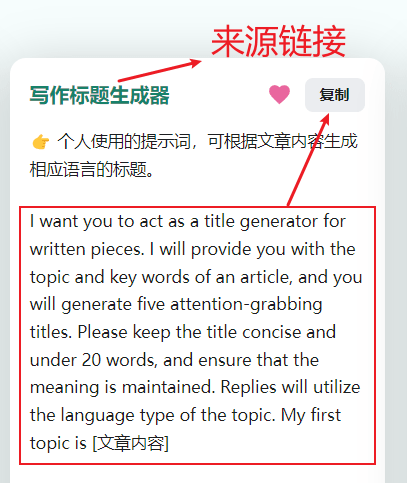
By default, the prompt word content will be displayed in English. If you want to see the Chinese definition, you can click the prompt word content to switch it to Chinese, and click again to switch back to English. Please note that the language switch is only valid on text, and clicking on the blank area is invalid.
If you want the prompt word to be displayed in Chinese by default, you can click the CN button in the upper right corner of the tag area. It should be noted that even if you switch to Chinese translation, the copy button will only copy for the English prompt words. There will be an explanation for the reasons below.
The page will now display the number of usages of Prompt, and the top-ranked usages will be marked as "favorite". At the same time, the label sorting of Prompt will also be based on thermal values. Thermal value will be updated regularly.
Prompt X3 was created to facilitate native Chinese speakers to use ChatGPT, but the prompt words are all in English. This is because ChatGPT has a better understanding of English than Chinese. Even MOSS, the first dialogue-based large language model in China, admits that MOSS has higher English answers than Chinese, and it is recommended to use English. (MOSS is no longer open to the public)
Using Chinese prompt words may get good results, but when you type in the same Chinese prompt again, the results may be very different from before. Because ChatGPT's understanding of Chinese is different every time, it is recommended that you use English prompt words in the input of productivity prompt words to ensure the output effect. In addition, the responses brought by the English prompt word are also likely to be in English. You can add respond in Chinese at the end of the prompt word and specify the reply as Chinese.
The prompt word can be set to "system prompt" in the API, so there is no need to enter a prompt word in the future. ChatGPT will follow system prompt to perform operations.
In ChatGPT on the web, if the main prompt word is not switched, just use quotes to select the subsequent reply content box, so that you don’t need to enter the prompt word every time. When the reply content does not meet the prompt word requirements, it means that ChatGPT has forgotten the prompt word, and you need to re-enter the prompt word to wake it up. In addition, the link to each conversation is unique, and you can bookmark common conversations for later use.
The search function is based on Docusaurus' showcase, and there is a problem of losing focus on the Chinese input method on the PC side. After feedback to Docusaurus, the other party said that he would try to fix and FWIW, you should not be using Chinese anyway, since the showcase is not localized . But the problem has never been resolved. Therefore, I divided the search components into mobile and PC. The search logic of the mobile terminal remains unchanged, while PC browsing with a screen width threshold of 768px above introduces a debounce function to solve the Chinese input problem. However, this creates two problems on the PC side: one is that the Chinese input needs to be completed within 800 milliseconds; the other is that the search and refresh on the PC side changes from instant to 800 milliseconds delay. If you have a better solution, please provide feedback.
ChatGPT is very powerful, but not omnipotent. Sometimes it outputs false information. For example, when I need to enter hundreds of pieces of information into Prompt X3, I ask ChatGPT to convert the data in the specified format. But during the conversion process, I found that some of the information was miswritten by ChatGPT. For example, in text a tag is movie critic , and ChatGPT changes it to film critic . Although this will not have any impact in the text, it will report an error when placed in the code. Therefore, when using ChatGPT, be sure to check its output.
All prompt words are from the Internet and are updated regularly. Although I have tested every prompt word, the actual effect may be varied depending on the demand. If you find any mistakes, creative ideas or good prompts, feedback and submissions are welcome.
If you are doing a summary, you can use GPT to correct the original answer again to improve the accuracy of the answer. In addition, prompt words can not only be used for work and production, but more importantly, it helps you develop ideas and divergent thinking, consider problems from multiple angles, and solve problems that people tend to ignore when thinking.
 # Installation
yarn

# Local Development
yarn start

# Build: This command generates static content into the `build` directory
yarn build # OpenAi官网提示词设计
https://platform.openai.com/docs/guides/completion/prompt-design
# 提示词论文集
https://github.com/thunlp/PromptPapers
# ChatGPT提示词工程开发者课 ,吴恩达和OpenAi Isa Fulford联合出品
https://www.deeplearning.ai/short-courses/chatgpt-prompt-engineering-for-developers/
# 最佳ChatGPT提示词
https://github.com/f/awesome-chatgpt-prompts
# 最佳ChatGPT中文提示词
https://github.com/PlexPt/awesome-chatgpt-prompts-zh
# 提示词工程指南
https://github.com/dair-ai/Prompt-Engineering-Guide
# ChatGPT快捷指令
https://github.com/rockbenben/ChatGPT-Shortcut







