Resume Ranking Application
Overview
The Resume Ranking Application is an AI-powered recruitment tool that leverages Large Language Models (LLM) and advanced NLP techniques to automatically evaluate, analyze, and rank resumes based on job requirements. Built with FastAPI, Next.js, and OpenAI's GPT models, it provides intelligent candidate-job matching with detailed scoring and analysis.
Demo Video
Click the image above to watch the demo video on YouTube.
Architecture
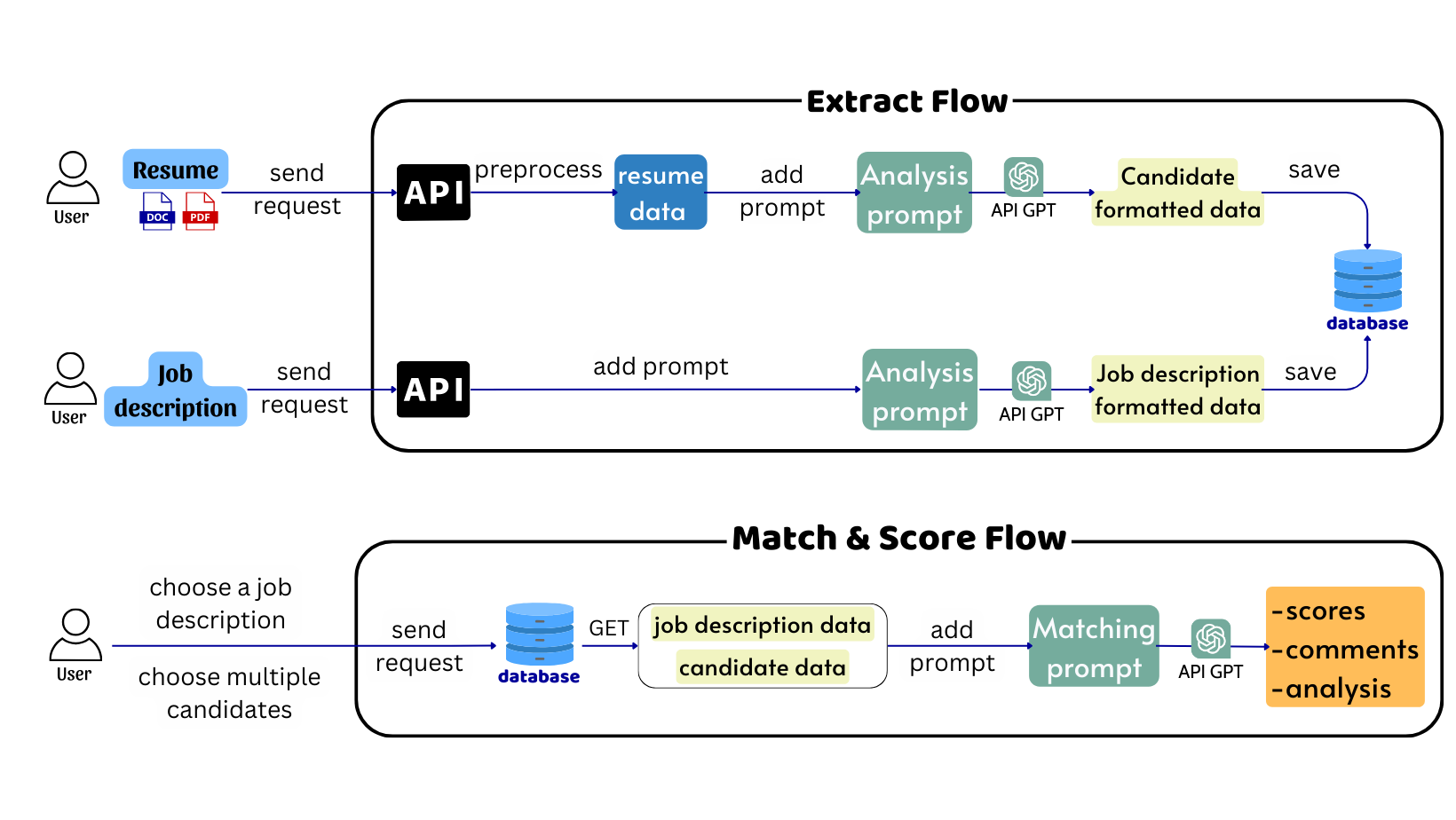
System Architecture
Key Technologies
- Backend: FastAPI, Flask, MongoDB
- Frontend: Next.js, TypeScript, TailwindCSS
- AI/ML: OpenAI GPT models, LangChain
- Infrastructure: Docker, Nginx, GitHub Actions, AWS
Features
Job Description Analysis
- Intelligent JD Parsing:
- Extracts key requirements, skills, and qualifications using LLM
- Structures data into standardized format for matching
- Supports multiple languages through GPT's multilingual capabilities
- Average processing time: 3 seconds
Resume Analysis
- Advanced CV Processing:
- Handles PDF and Word documents
- Extracts and structures candidate information using LLM
- Identifies skills, experience, and qualifications
- Supports multilingual resumes
- Average processing time: 5-10 seconds
AI-Powered Matching
- Sophisticated Matching Algorithm:
- Uses LangChain for orchestrating complex LLM operations
- Function calling for structured data extraction
- Semantic understanding of job requirements and candidate qualifications
- Many-to-many relationship support
- Average processing time: 3-5 seconds
Intelligent Ranking
- Smart Evaluation System:
- Generates detailed match analysis using GPT models
- Provides scoring based on multiple criteria
- Offers AI-generated feedback and comments
- Ranks candidates based on overall fit
Technical Features
Documentation
Detailed documentation on system architecture, API endpoints, and configuration options is available in the User Guide.
Getting Started
-
Clone the Repository:
git clone https://github.com/vectornguyen76/resume-ranking.git
-
Configure Environment:
- Set up OpenAI API key:
# analysis_service/.env
OPENAI_API_KEY="your-key"
- Configure frontend API URL:
# frontend/.env.production
NEXT_PUBLIC_API_URL=http://<your-ip-address>/backend
-
Build and Run:
cd resume-ranking
docker compose build
docker compose up
-
Access Application:
- Frontend:
http://your-ip-address
Development
-
Code Quality:
- Ruff for Python linting
- ESLint for TypeScript/JavaScript
- Pre-commit hooks for code formatting
-
Testing:
- Unit tests with pytest
- Integration tests for API endpoints
- Frontend testing with React Testing Library
-
CI/CD:
- Automated testing with GitHub Actions
- Docker image builds
- Deployment automation
Contributors
- Pham Phu Ngoc Trai
- Vector Nguyen
License
This project is licensed under the MIT License.









