sql mother
1.0.0

Pure front-end implementation of SQL self-study network
By programmer fish skin, one person is in full service
Online experience: http://sqlmother.yupi.icu
Video demonstration: https://www.bilibili.com/video/BV1pV4y1i7LW
A completely free SQL self-study tutorial website, combined with Yusie's own SQL learning and practical experience, has written more than 30 levels. Users can submit SQL code online to do questions and pass the levels. The goal is to help everyone master the commonly used SQL syntax from 0 to 1.
In addition, the website supports free selection of levels, custom levels, SQL online practice square and other functions.
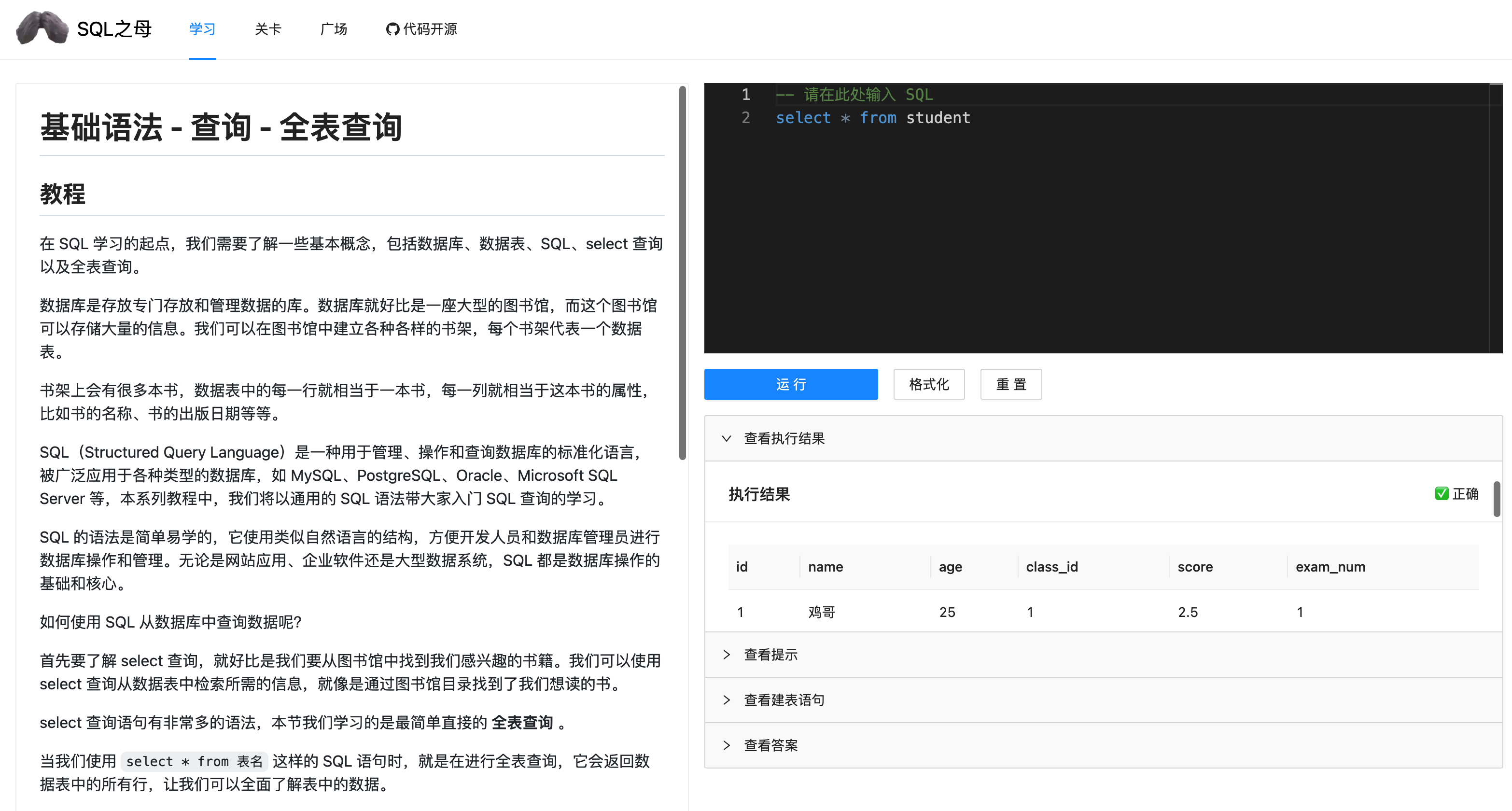
First of all, SQL knowledge is extremely important and is almost a necessary skill for programmers, product managers, and data analysis classmates.
For SQL learning, it is more suitable to get started through practical practice than reading tutorials. Although there are similar SQL self-study networks online, they are either charged or not systematic enough.
So Yuxi decided to do it yourself and set up an open source SQL learning network. On the one hand, I hope that it can help everyone get started with SQL more easily; on the other hand, I also hope that the project code can also give you some inspiration, so that more students have the opportunity to participate and become contributors and do a good job together!
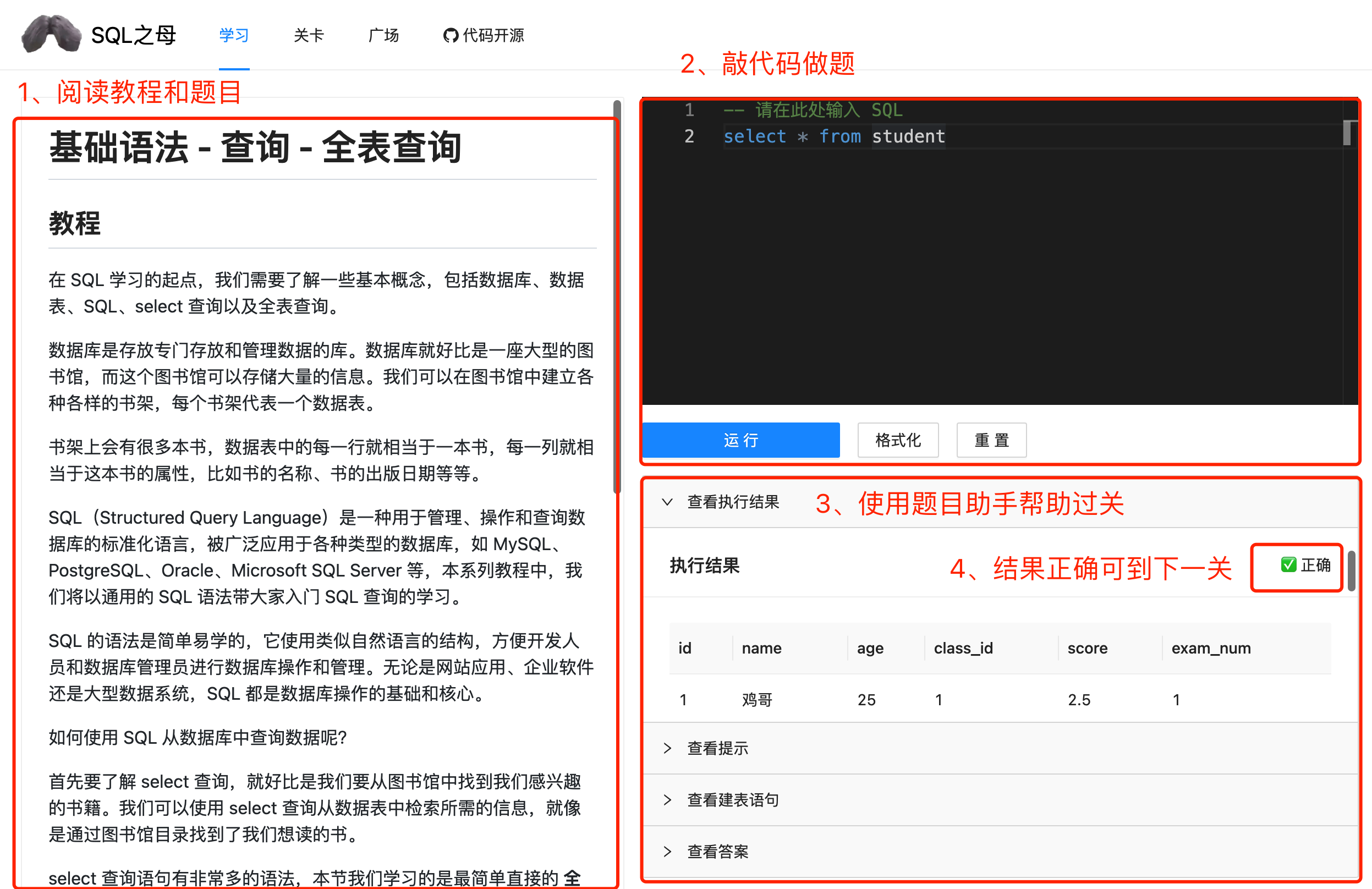
1) Go directly to the home page, and the tutorial and question area on the left is. Please read it in full first
2) Write SQL code in the upper right area to do the questions, click Run to submit the results
3) You can help yourself with the question assistant area on the lower right
4) After the execution result is correct, you can enter the next level
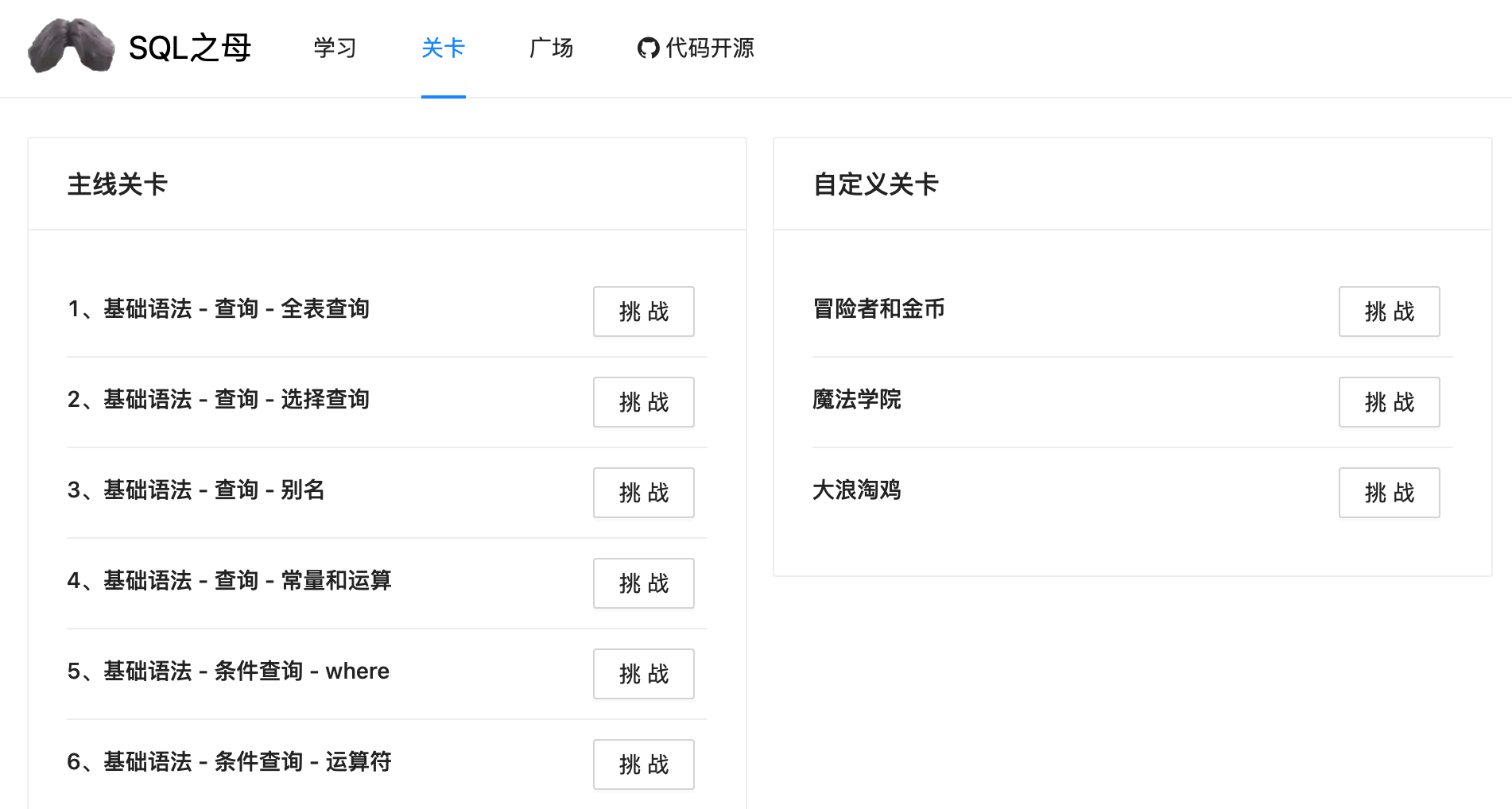
You can also choose levels to challenge them freely. There are no restrictions on all levels, and you don’t have to do the questions in order:
Since the project is implemented with a pure front-end, it is very easy to start the project locally!
There are many online visitors and may be stuttered, so it is recommended that you use it locally~
1) Download the code of this project
2) Enter the project root directory and execute npm install to install the project dependencies
3) Execute npm run dev local startup
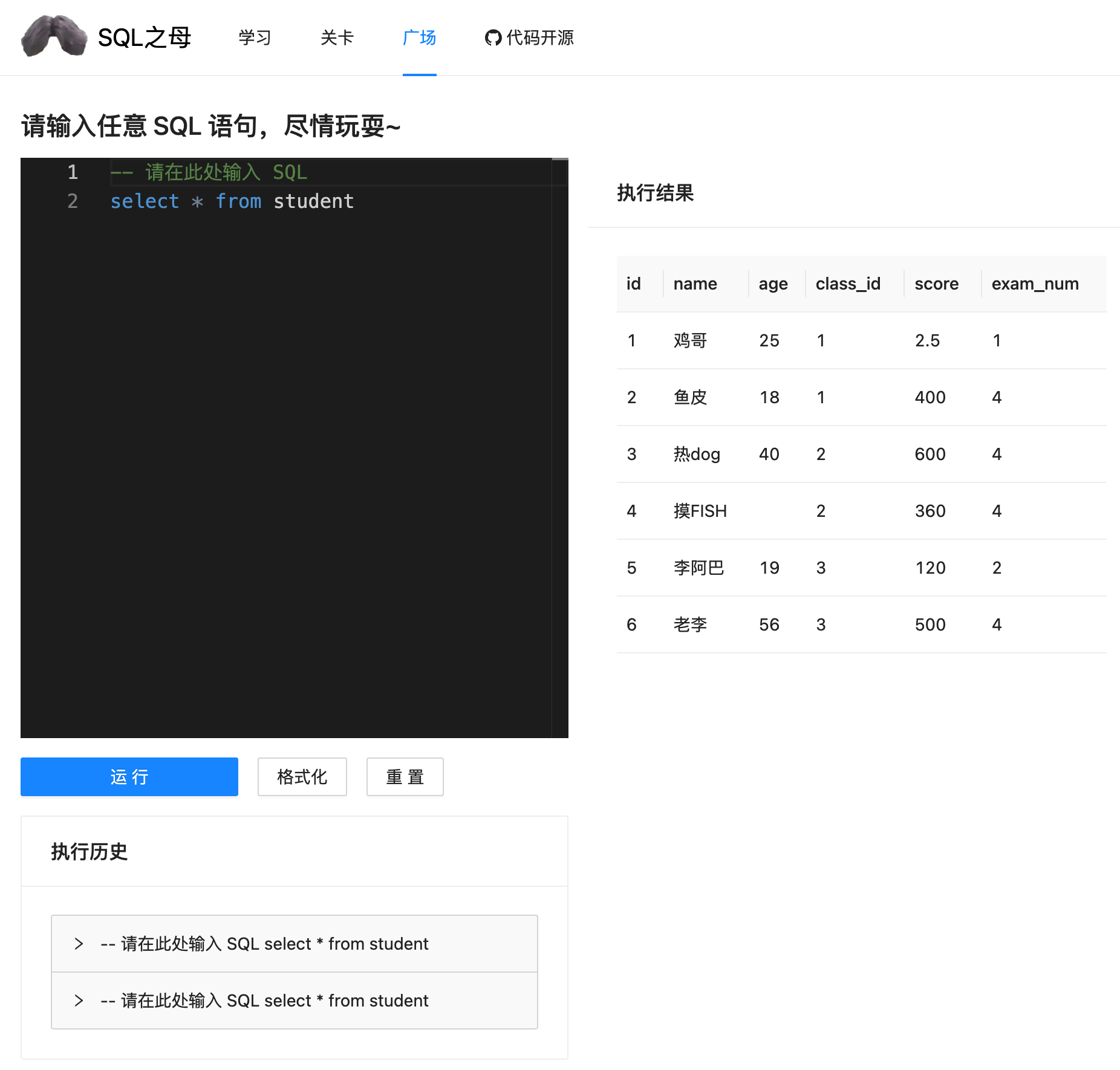
This project is implemented using a pure front-end, and does not require any front-end knowledge of the back-end~
Q: Why use pure front-end implementation?
A: Reduce attack risk + save money + new learning attempts
Adopting the modular development idea, the question-based page (home page) is divided into the question browsing area, the SQL coding area, and the question result area. Each area is an independent Vue component file, which realizes logical isolation and component reuse (for example, the SQL coding area can also be reused to the SQL practice square page).
Then these components can be introduced in IndexPage.vue , and level information, running results and other data can be passed to the components, and assembled into a complete page.
Although there is no back-end database, all relevant data should still be managed uniformly, so levels directory is defined to store level-related data uniformly.
First, we divide the levels into two categories, mainline levels (tutorials) and custom levels (for easy expansion), and are managed in mainLevels.ts and customLevels.ts files respectively.
Each level is a separate directory, enabling isolation between levels.
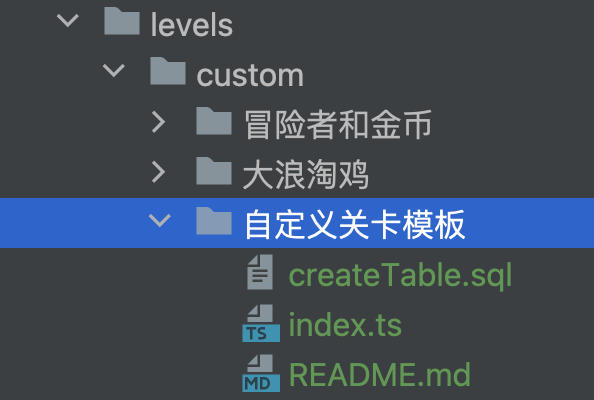
Since the tutorial articles for each level may be very long and writing them directly in the ts file is not conducive to reading and management, the strategy here is to write all articles in the .md Markdown file and read the .md file in the level definition file index.ts .
The sample code is as follows, and the information of each level is independently defined and isolated from each other:
 import md from "./README.md?raw" ;
import sql from "./createTable.sql?raw" ;

export default {
  key : "level1" ,
  title : "基础语法 - 查询 - 全表查询" ,
  initSQL : sql ,
  content : md ,
  defaultSQL : "select * from student" ,
  answer : "select * from student" ,
  hint : "请仔细查看本关给出的示例" ,
  type : "main" ,
} as LevelType ; How does a pure front-end operate the database and execute SQL? Students with front-end experience will instinctively think of webassembly technology.
That's right, through webassembly technology, we can execute languages other than JS (such as C++) in the browser. But there is no need to implement SQL execution logic by yourself. Standing on the shoulders of giants, directly using the open source sql.js library, you can execute your own SQL operations on the front end.
The core code is in src/core/sqlExecutor.ts , which defines two functions: initializing DB and executing SQL, which is very simple:
 import initSqlJs , { Database , SqlJsStatic } from "sql.js" ;

/**
 * SQL 执行器
 *
 * @author coder_yupi https://github.com/liyupi
 */
let SQL : SqlJsStatic ;

/**
 * 获取初始化 DB
 * @param initSql
 */
export const initDB = async ( initSql ?: string ) => {
  if ( ! SQL ) {
    SQL = await initSqlJs ( {
      // Required to load the wasm binary asynchronously
      locateFile : ( ) =>
        "https://cdn.bootcdn.net/ajax/libs/sql.js/1.7.0/sql-wasm.wasm" ,
    } ) ;
  }
  // Create a database
  const db = new SQL . Database ( ) ;
  if ( initSql ) {
    // Execute a single SQL string that contains multiple statements
    db . run ( initSql ) ; // Run the query without returning anything
  }
  return db ;
} ;

/**
 * 执行 SQL
 * @param db
 * @param sql
 */
export const runSQL = ( db : Database , sql : string ) => {
  return db . exec ( sql ) ;
} ;
When the level is loaded, the initialization SQL statement corresponding to the level will be executed first to complete the table creation and import sample data, and then the user can write the data in the SQL query table.
All code related to the question-based judgment is centrally defined in the src/core/result.ts file, including functions that define several execution states and determine whether the result is correct.
How to determine whether the user's SQL statement is correct?
Instead of directly comparing whether the user's input statement is consistent with our preset answer (that's too rigid), we perform the following 3 operations in turn:
Here, the author used a trick method to compare the data, directly converting the two result sets into JSON format, and comparing whether the JSON strings are consistent, rather than multiple for loops.
We welcome all kinds of heroes to participate in the contributions and benefit others and oneself~
There are currently several recommended contribution methods:
Before contributing to the level, make sure you understand how this project loads the level.
To ensure the consistency of the tutorial, it is recommended to contribute自定义关卡instead of main levels, which are easier to be merged.
Steps to contribute to a custom level:
1) Copy src/levels/custom/自定义关卡模板and change the directory name to your own level Chinese name
2) Modify the createTable.sql table creation statement in the template and import the default data
3) Modify the index.ts file in the template, set the level's Chinese and English name, default SQL, answer SQL, prompts, etc.
4) Modify the README.md file in the template, change the title and title content, and give the table structure information and try to express the question clearly (for example, it must be output in a certain order)
5) Introduce custom levels in the customLevels.ts file.
Note that this project only supports SQLite syntax (basically general SQL)! Don't use too fancy functions!
For example, fixing errors in levels, optimizing copywriting to make it easier to understand or adding more information, adjusting the difficulty of levels, etc.
This project is only developed by Fish Skin alone, with limited time and energy. Many places have not been improved. Everyone is welcome to expand the project and create their own series of products such as the Son of SQL, the Grandson of SQL, and the Great-grandson of SQL. . .
Some possible extension ideas:
Thank you for reading, and welcome to join the author’s programming learning circle to learn more original projects~







