TSW
v2.6.8

Tencent Server Web (TSW) is a Node.js infrastructure for WEB front-end developers, with the original intention of improving problem positioning efficiency, and provides dyeing packet capture and holographic logging . TSW focuses on the operation and maintenance monitoring capabilities of the business, suitable for business scenarios of http and https protocols, and can be seamlessly integrated with existing applications (Koa and Express).
TSW 2.0 is based on 1.0, supplemented by a modern design model, removing a lot of dross in 1.0, and is also more friendly to containerization and cloud native. Achieve non-invasive and low-cost access.
0 Intrusion | ?Holographic log | ?Request to catch the packet |
|---|---|---|
| Functions are implemented through Hack NodeJS underlying code. Invade the original business code 0. | The microscope-level holographic log clustered according to the request clustering, giving developers a perfect live restore. | The complete package content of all requests sent by the Server side to the outside can be crawled, and communication with the background is no longer accessible. |
npm install --save @tswjs/tsw
// yarn add @tswjs/tsw The configuration file is a configuration file loaded into the runtime when TSW is started, mainly declaring a list of plug-ins to use. By default, the tswconfig.js file in the root directory of the project will be loaded, and the configuration file path can be manually specified by starting parameters -c or --config .
Note : There is no logic related to the integration of open platform in 2.0, but it is encapsulated into a plug-in for users to use on demand. See the Plug-in chapter for details.
Configuration file example:
 module . exports = {
  plugins : [
    new MyPlugin ( { } )
  ]
}
Parameter list :
| Name | Type | default | Optional | Description |
|---|---|---|---|---|
| plugins | Array<Plugin> | - | yes | Plugin list |
| cleanLog | boolean | false | yes | Whether to turn off default printing |
| logLevel | DEBUG/INFO/WARN/ERROR | DEBUG | yes | Set log level |
| winstonTransports | Array<TransportStream> | - | yes | Winston log channel |
npx @tswjs/tsw ./index.js Note : The original CLI parameters in node --inspect ./index.js , such as --inspect , need to be converted into the environment variable NODE_OPTIONS for execution, such as NODE_OPTIONS="--inspect" npx @tswjs/tsw ./index.js .
Use ts : When ensuring that the project has a ts-node dependency package, the ts file can be loaded directly as follows.
NODE_OPTIONS= " --require=ts-node/register " npx @tswjs/tsw ./index.ts Use npx @tswjs/tsw --help to get the CLI option.
We provide some sample projects to get to know the project as soon as possible.
cd ~git clone https://github.com/Tencent/TSW.gitcd TSWcd examples/koayarnyarn serve or npm run servecurl -v localhost:4443/path/to/foo -X POST -d "hello, server" The core implementation method of TSW is Hack NodeJS's own http.request and http.createServer to implement the packet capture mechanism. Before and after the server processes the request, before and after the server sends packets to other servers, etc., corresponding events will be thrown for users to customize processing. In order to make it more convenient for users to reuse and propagate such groups of customized processing, we abstracted them and formed a plug-in mechanism.
 export . modules = class MyPlugin ( ) {
  constructor ( ) {
    this . name = "MyPlugin"
  }

  async init ( eventBus , config ) {
    eventBus . on ( "RESPONSE_CLOSE" , ( payload ) => {
      console . log ( payload ) ;
    } )
  }
}
init method is necessary. This method will be called at the beginning of the plug-in loading, either synchronous or asynchronous.
eventBus eventBus is obtained through new EventEmitter() . The TSW core will trigger the above events at various critical moments.
| key | Meaning (trigger timing) | payload |
|---|---|---|
DNS_LOOKUP_SUCCESS | Triggered after each DNS query is successful | string | dns.LookupAddress[] |
DNS_LOOKUP_ERROR | Triggered after each DNS query failure | NodeJS.ErrorException |
RESPONSE_START | Triggered every time the server starts returning a response (execute writeHead ) | ResponseEventPayload |
RESPONSE_FINISH | Triggered at the end of the response ( res.on("finish") ) | ResponseEventPayload |
RESPONSE_CLOSE | Triggered when the underlying link is closed ( res.on("close") ) | ResponseEventPayload |
REQUEST_START | Triggered every time the server receives a new request | RequestEventPayload |
By default, TSW will just crawl all logs and packet capture content and send them to the event bus for plug-in consumption. Therefore, the implementation of logs and packet capture content generally requires users to write plug-ins and provide storage by themselves, which is too expensive to use.
Therefore, TSW officially provides a public service platform https://tswjs.org, allowing users to use TSW at a low cost, faster and more convenient level. For details, please refer to the Open Platform Usage Guidelines.
TSW 2.0 is designed in the face of containerization and cloud nativeness, so there is no built-in Cluster-related functions. It is recommended to directly use container health checks to complete the lossless restart and fault restart mechanism of the service. For scenarios where containerization schemes are not used, we recommend using pm2 similar tools to implement multi-process mode.
 // ecosystem.config.json

{
  "apps" : [
    {
      "name" : "app-name" ,
      "script" : "built/index.js" ,
      "interpreter" : "node" ,
      "interpreter_args" : "./node_modules/@tswjs/tsw/dist/cli.js" ,
      // other options
    }
  ]
}
// package.json
{
...
"scripts" : {
"start" : "pm2 start ecosystem.config.json"
} ,
...
} winston is a universal and lightweight log package. winston supports multiple log channels and can define log priorities separately. In addition to the three built-in log transmission channels Console , File , and HTTP , some transmission modules are also maintained outside the Winston project. Check out winston official documentation.
TSW 2.0 supports log information using winston transmission channel. Users can add winston.transports instances to the configuration file, and the logs will fall into the corresponding configuration.
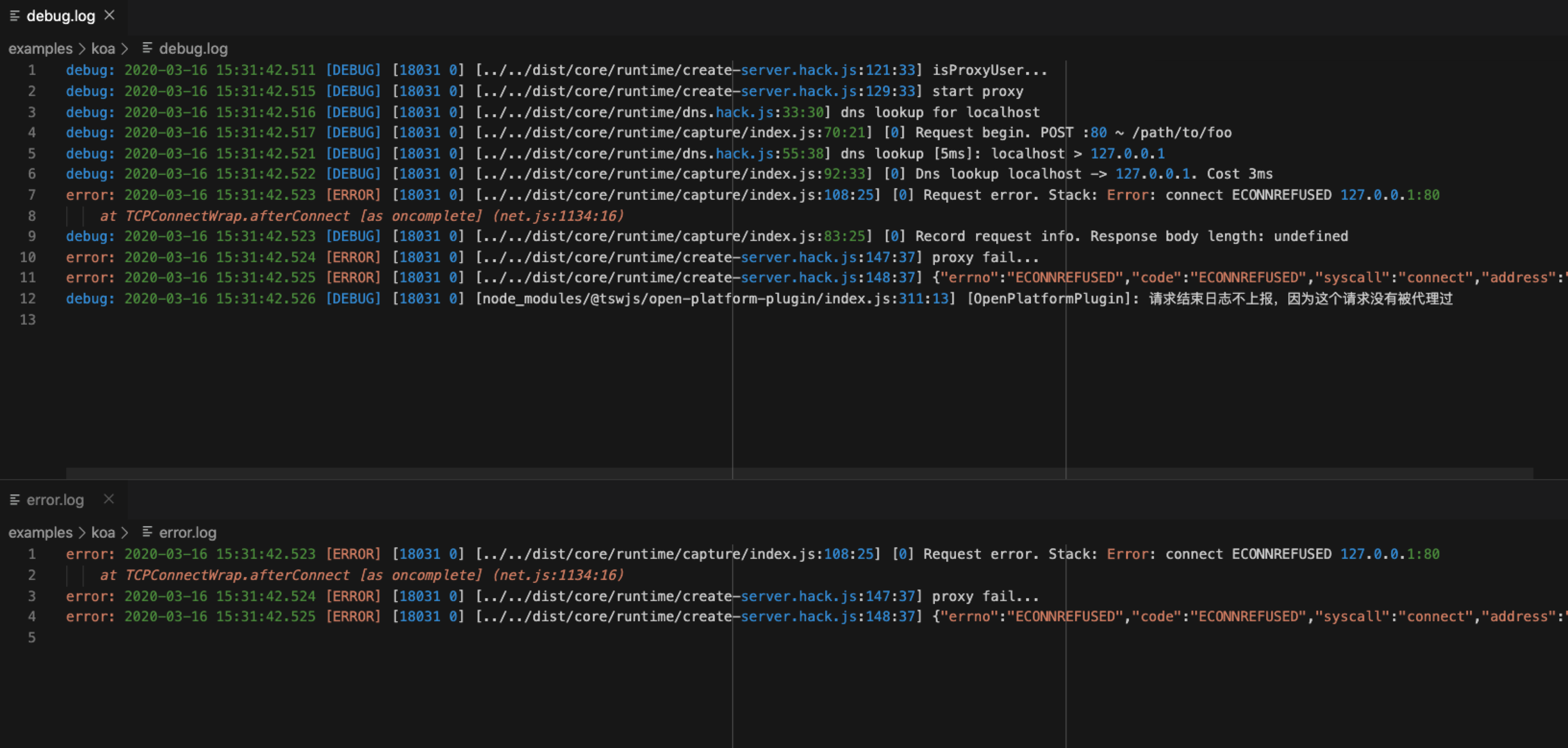
Use winston to record log information below error level and debug level to the corresponding file. The current config file is configured as follows:
 module . exports = {
  winstonTransports : [
    new winston . transports . File ( { filename : 'error.log' , level : 'error' } ) ,
    new winston . transports . File ( { filename : 'debug.log' , level : 'debug' } )
  ]
}
Logging


























The open source protocol of Tencent Server Web is MIT, see LICENSE for details.







