Vantpy
1.0.0

Vantpy updated content:
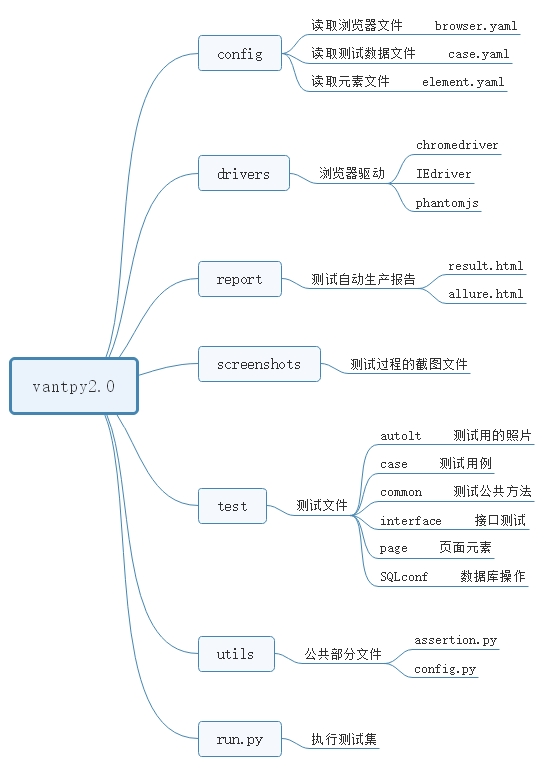
https://github.com/G2Bent/Vantpy.gitpip install requirements.txtThe WebUI automation test framework built by Vantpy framework based on python3+selenium+unittest
pip install requirements.txt
Based on all browsers supported by Selenium
 browser == "Chrome"
browser == "firefox"
browser == "IE"
browser == "phantomjs"
browser == "opera"
browser == "edge"
geckodriver(Firefox): https://github.com/mozilla/geckodriver/releases
Chromedriver(Chrome): https://sites.google.com/a/chromium.org/chromiumdriver/home
IEDriverServer(IE): http://selenium-release.storage.googleapis.com/index.html
operadriver(Opera): https://github.com/operasoftware/operachromiumdriver/releases
Microsoft WebDriver(Edge): https://developer.microsoft.com/en-us/microsoft-edge/tools/webdriver
 class BaiduPage(BasePage):
    """
    在这里写定位器,通过元素属性定位元素对象
    """
    search_loc =(By.XPATH,'//*[@id="kw"]')#定位百度文本框

    def input_baidu_text(self,text):
        self.send_key(self.search_loc,text)
 2018-06-02 14:58:13,521  - INFO - You had select Chrome browser.
2018-06-02 14:58:13,524  - INFO - The test url is: https://www.baidu.com
2018-06-02 14:58:19,629  - INFO - Starting Chrome browser.
2018-06-02 14:58:20,456  - INFO - Open url: https://www.baidu.com
2018-06-02 14:58:21,607  - INFO - Maximize the current window.
2018-06-02 14:58:21,609  - INFO - Set implicitly wait 5 seconds.
2018-06-02 14:58:21,609  - INFO - Clear input-box: //*[@id="kw"]...
2018-06-02 14:58:22,723  - INFO - Input element by xpath: //*[@id="kw"]...
2018-06-02 14:58:22,723  - INFO - Input: selenium
 def report():
    if len(sys.argv) > 1:
        report_name = os.path.dirname(os.getcwd()) + '\report\' + sys.argv[1] + '_result.html'
    else:
        now = time.strftime("%Y-%m-%d_%H_%M_%S_")
        # 需要查看每段时间的测试报告,可以这样写:
        # report_name = os.getcwd() + '\report\'+now+'result.html'
        report_name = os.path.dirname(os.getcwd()) + '\report\result.html'
    return report_name

fp = open(report(), 'wb')
Runner = HTMLTestRunner(
    stream=fp,
    title='测试报告',
    description='测试用例执行情况'
)







