PhpCodeArcheology
PhpCodeArcheology analyzes your PHP project, providing detailed metrics on files, classes, methods, and functions. The comprehensive HTML report equips you with deep insights necessary for evaluating your project.
Why PhpCodeArcheology?
PhpCodeArcheology was created to help developers gain a deeper understanding of their PHP codebase by providing detailed metrics and insights. Whether you are maintaining a legacy system or working on a new project, this tool aims to facilitate better code quality and maintainability.
Prerequisites
Ensure your environment meets the following requirements:
- PHP version 8.2 or higher
- Composer installed
Installation
Install PhpCodeArcheology using Composer by running the following command in your terminal:
composer require --dev php-code-archeology/php-code-archeology
Quick start
To start PhpCodeArcheology, run the following command in your project root:
./vendor/bin/phpcodearcheology
Out of the box, PhpCodeArcheology scans your src dir and creates the report in tmp/report.
To customize scanning, such as including or excluding folders, defining custom PHP file extensions, or other settings, create a php-codearch-config.yaml configuration file in your project root. Refer to this sample configuration file for guidance.
The report
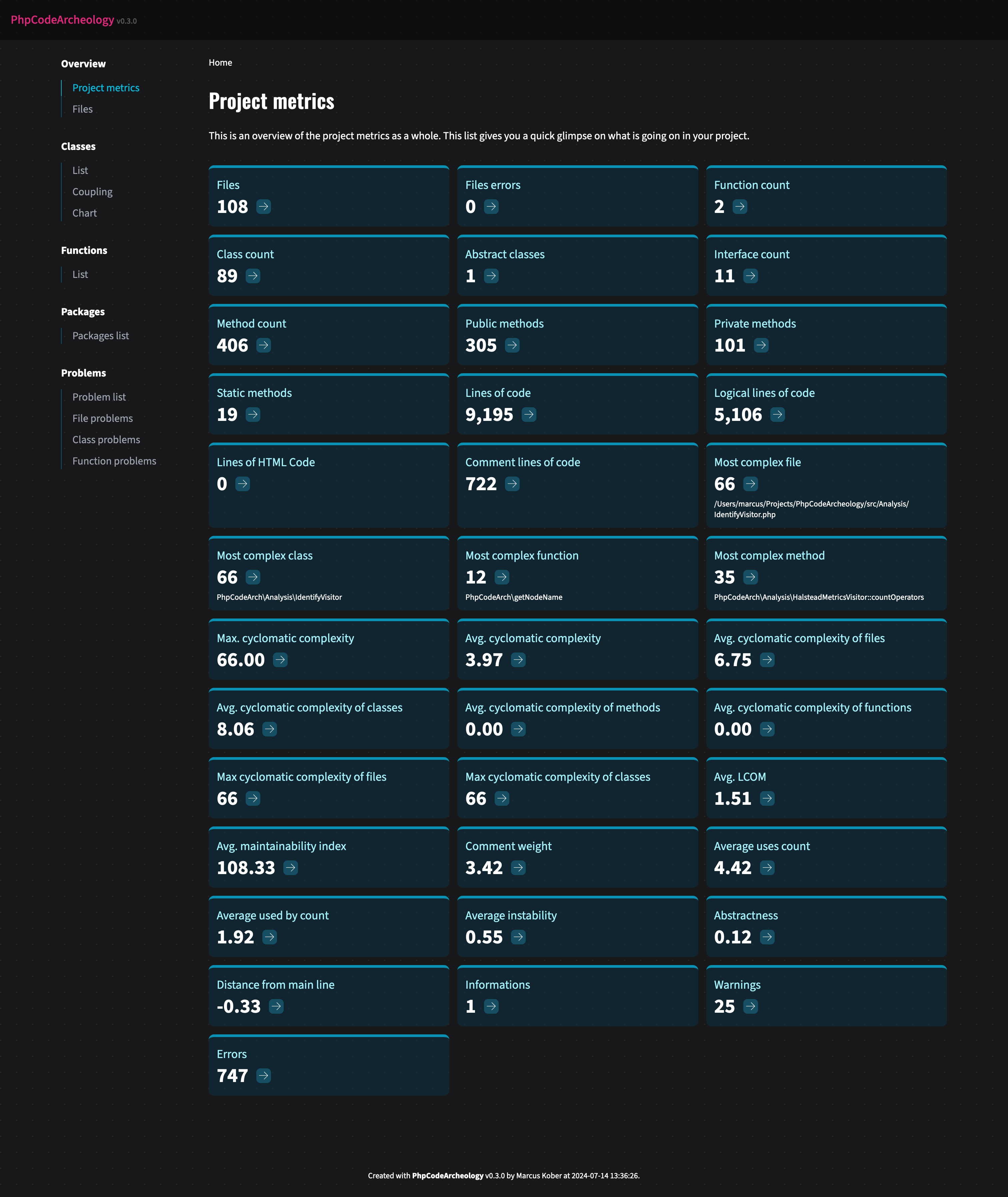
A typical report generated by PhpCodeArcheology includes metrics such as:
- Files: Total number of files in the project.
- File errors: Count of errors found in files.
- Function count: Total number of functions.
- Class count: Total number of classes.
- Abstract classes: Count of abstract classes.
- Interface count: Total number of interfaces.
- Method count: Total number of methods, including public, private, and static methods.
- Public methods: Count of public methods.
- Private methods: Count of private methods.
- Static methods: Count of static methods.
- Output statements: Count of echo and printf calls.
- Lines of code (LOC): Total lines of code, including comments and empty lines.
- Logical lines of code (LLOC): Total lines of code excluding comments and empty lines.
- Comment lines of code (CLOC): Lines of code that contain comments.
- HTML lines of code: Lines of code that contain HTML.
- Cyclomatic complexity (CC): A measure of the code's complexity.
- Maintainability index (MI): An index that indicates the maintainability of the code.
- LCOM: Lack of cohesion of methods in classes.
- Instability: Measure of a class's stability based on its dependencies.
- Efferent coupling (Ce): Number of classes that a class depends on.
- Afferent coupling (Ca): Number of classes that depend on a class.
- Difficulty: Measure of how difficult the code is to understand.
- Effort: Estimate of the effort required to understand the code.
- Vocabulary: Number of unique operators and operands in the code.
- Length: Total number of operators and operands in the code.
- Volume: The size of the code's vocabulary and length.
- Comment weight: The weight of comments in the code.
- Distance from main line: Measure of how abstract and stable a class is.
Here is a sample screenshot of the HTML report:
Documentation
I am currently working on the documentation. Since I primarily use the tool for my own projects and am focused on its ongoing development, it might take some time to complete a comprehensive documentation.
Author
Marcus Kober, @mrcskbr, GitHub



