llvm analysis and transform passes
1.0.0

#LLVM Analysis And Transform Passes
This project uses Clang and LLVM to analyze and transform C++ source code.
Clang is a front end to LLVM, it compiles C++ into IR. Intermediate Representation is far simpler then C++, making it easier to analyze and transform.
LLVM has a variety of libraries that can be used to analyze and transform IR. Instructions for an analysis or a transformation are called a pass.
Video Demo of The Passes
Done See Below
Done See Below
LLVM and Clang are required to compile and apply the passes. CMake is required to build LLVM and Clang.
CLang is used to compile c++ to bytecode
LLVM is used to implment an analysis pass
The StaticCount pass goes through every instruction in the byetecode and prints out what type it is. It also uses LLVM to keep track of certian statistics which it prints out at the end of the analysis.
Before following this guide you should have downloaded and built LLVM.
This project and guide were made using macOS.
In order to apply a pass to some c code there are a number of steps that must be tacken, they are as follows.
<LLVM_Source_Directory>/lib/Transforms.StaticCount from the cloned repository into the directory listed above.Transforms directory there should be a number of directorys and only one file CMakeLists.txt.CMakeLists.txt and add the line add_subdirectory(StaticCount).<LLVM_Build_Directory> and run cmake --build . this will build all of LLVM including the pass we just added.HeapTimeTestProgram directory inside the cloned repository.clang -O0 -emit-llvm -c main.cpp -o bctest.bc this uses clang to compile our c++ file down to bytecode that llvm can work with.opt -load <LLVM_Build_Directory>/lib/llvmstaticcount.dylib -StaticCount -stats< bctest.bc > /dev/null The printed statments are a result of the static analysis using llvm. Note - This is not the complete output of the pass. It is reduced it so that the commands above are visible.
Trouble? Please contact me.
CLang is used to compile c++ to bytecode
LLVM is used to implment an analysis pass
The DynCount pass goes through every Basic Block in the byetecode and adds a call to a runtime library. The functions in the library are only output statments for this milestone.
First the pass is compiled just like the first one, next we compile the test program into bytecode. After that the runtime library is compiled into bytecode. These two bytecode files are then linked into a single bytecode file using llvm. After this the pass is applied, unlike in The first pass there will be no output at that point. since this is a dynamic pass we will get the results at runtime. Finally we run the program and get our result, there will be output statments at every occorence of several different Basic Block types.
Before following this guide you should have downloaded and built LLVM.
This project and guide were made using macOS.
In order to apply a pass to C code there are a number of steps that must be tacken, they are as follows.
<LLVM_Source_Directory>/lib/Transforms.DynCount from the cloned repository into the directory listed above.Transforms directory there should be a number of directorys and only one file CMakeLists.txt.CMakeLists.txt and add the line add_subdirectory(DynCount).<LLVM_Build_Directory> and run cmake --build . this will build all of LLVM including the pass we just added.SmallTestProgram directory inside the cloned repository.clang -O0 -emit-llvm -c smallProgram.c -o sp.bc this uses clang to compile our c file down to bytecode that llvm can work with.clang -O0 -emit-llvm -c print -o p.bc this uses clang to compile our runtime library down to bytecode that can be linked with the program we compiled above.llvm-link p.bc sp.bc -S -o smallprogramandprint.bc this links our program to be analysed and our runtime library.opt -load <LLVM_Build_Directory>/lib/llvmDynCount.dylib -DynCount <smallprogramandprint.bc> instrumentedprogram.bc This applys the pass to the program, modifying the bytecode with calls to the runtime library that we linked to it.lli instrumentedprogram.bc This runs the instrumented program so that we can see the result of the pass.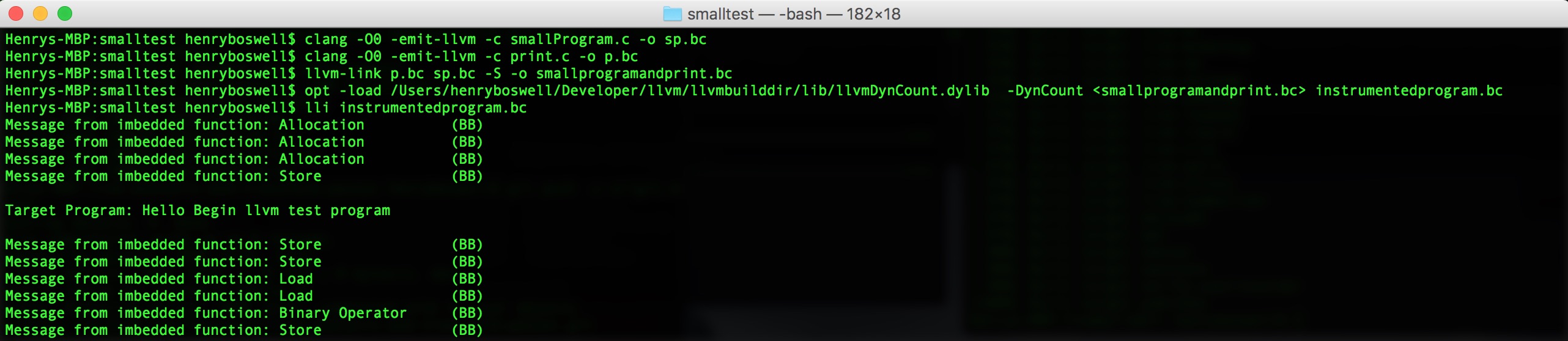
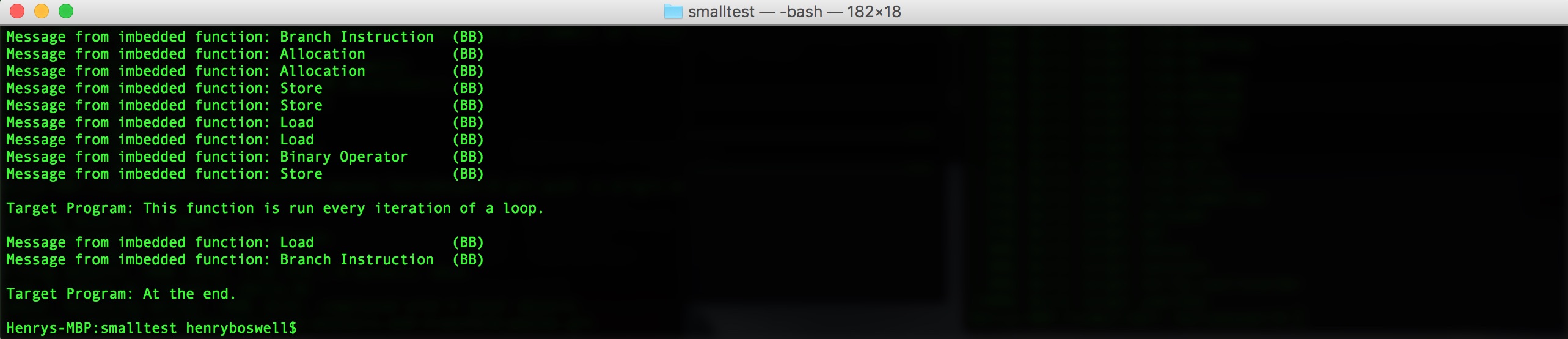 Note - This is not the complete output of the pass. It is reduced it so that the commands above are visible.
Trouble? Please contact me.







