contrastscan action
v3.0.2

This GitHub action lets you use Contrast Security's industry leading Code Scanner (Contrast Scan) to find vulnerabilities in your code. The Action compares the code scanning analysis of the PR to the last code scan analysis of the destination branch. GitHub fails the check if new vulnerabilities have been introduced.
If you are not familiar with GitHub actions read the GitHub Actions documentation to learn what GitHub Actions are and how to set them up. After which, complete the following steps:
Configure the following GitHub secrets CONTRAST_API_KEY, CONTRAST_ORGANIZATION_ID, CONTRAST_AUTH_HEADER and CONTRAST_API_URL
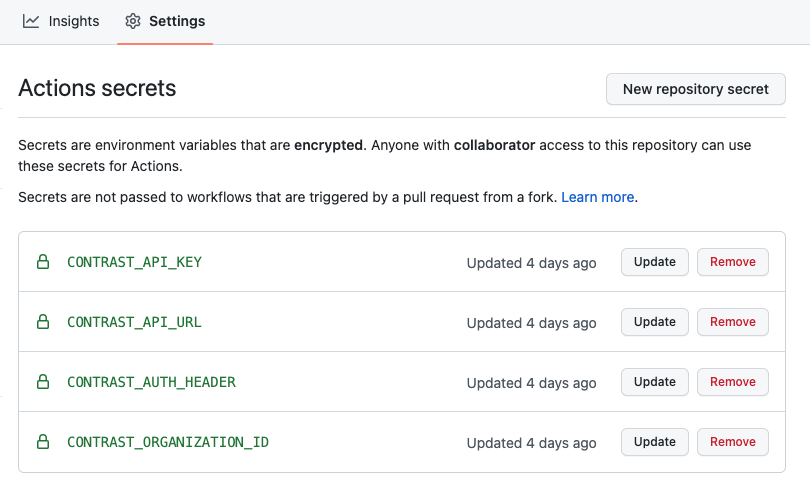
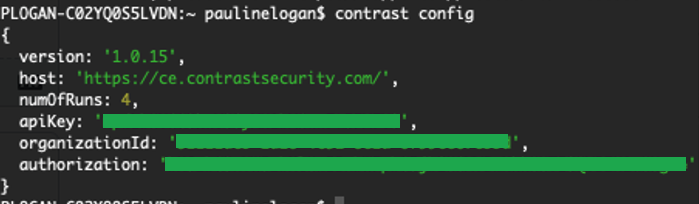
CodeSec by Contrast Security users: Retrieve authentication details for the secrets using the CLI.
Installation instructions here : https://www.contrastsecurity.com/developer/codesec
If you are a new user, create an account with the 'contrast auth' command
Run the 'contrast config' command in the CLI to collect the required credentials
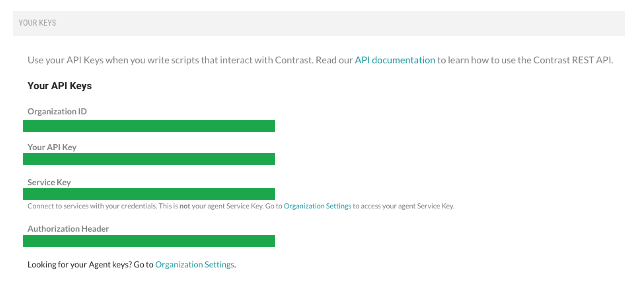
Licensed Contrast Security users: Get your authentication details for the secrets from the 'User Settings' menu in the Contrast web interface: You will need the following
Copy sample workflow below and create a branch of your code to add Contrast security Scan. This branch is typically located at .github/workflows/build.yml
Update the workflow file to specify when the action should run (for example on pull_request, on push)
on:
  # Trigger analysis when pushing to main or an existing pull requests.  Also trigger on
  # new pull requests
  push:
    branches:
      - main
  pull_request:
      types: [opened, synchronize, reopened]
Update the filepath in the workflow file to specfy the location of the built artifact or file to scan
    with:
      artifact: mypath/target/myartifact.jar
To fail based on severity of vulnerability found set severity (critical/high/medium or low) and fail to true
     severity: high
     fail: true
In order for GitHub to list vulnerabilities in the Security Tab of the repo, the contrast action must be accompanied by this GitHub action
    - name: Upload SARIF file
      uses: github/codeql-action/upload-sarif@v2
      with:
        sarif_file: results.sarif
The value of sarif_file must be results.sarif which is the name that Contrast Scan Action will write the sarif to.
After committing, create a Pull Request (PR) to merge the update back to your main branch. Creating the PR triggers the scan to run. The extra "Code Scanning" check appears in the PR
Since it’s likely there will be new findings when you add Contrast Scan, we don't want to fail and block merging the PR that adds Contrast Scan, forcing the owner of the PR to now fix all the newly exposed vulnerabilities that already existed in the code base.
After Contrast Scan runs on the main branch, all new PRs that you create where the Contrast Scan is run fail the code scanning check if they introduce new vulnerabilities beyond the baseline you just established.
All Contrast-related account secrets should be configured as GitHub secrets and will be passed to the scanner via environment variables in the GitHub runner. A simple workflow to get going is:
on:
  # Trigger analysis when pushing to main or an existing pull requests.  Also trigger on
  # new pull requests
  push:
    branches:
      - main
  pull_request:
      types: [opened, synchronize, reopened]
name: Contrast Security Scan
jobs:
  build_and_scan:
    permissions:
        contents: read # for actions/checkout
        security-events: write # for github/codeql-action/upload-sarif
        actions: read # only required for a private repository by github/codeql-action/upload-sarif to get the Action run status
    runs-on: ubuntu-latest
    # check out project
    steps:
    - uses: actions/checkout@v2
    # steps to build the artifact you want to scan
    # -name: Build Project
    # ...
    # Scan Artifact
    - name: Contrast Scan Action
      uses: Contrast-Security-OSS/[email protected]
      with:
        artifact: mypath/target/myartifact.jar
        apiKey: ${{ secrets.CONTRAST_API_KEY }}
        orgId: ${{ secrets.CONTRAST_ORGANIZATION_ID }}
        authHeader: ${{ secrets.CONTRAST_AUTH_HEADER }}
        severity: high
        fail: true
    # To list vulnerabilities in the GitHub Security Tab of the repo include GitHub upload-sarif action
    # The value of `sarif_file` must be `results.sarif`
    - name: Upload SARIF file
      uses: github/codeql-action/upload-sarif@v2
      with:
sarif_file: results.sarifThis GitHub action and the Contrast Maven plugin accomplish the same thing. You cannot use both at the same time. For example, if you are using maven to build your code and you run org.contrastsecurity.maven:scan during the build, do not use the Contrast Scan GitHub action.







