jar analyzer v1 gui
1.1

This project is no longer maintained
It is recommended to use the new version Jar Analyzer V2 https://github.com/jar-analyzer/jar-analyzer
Jar-Analyzer command line version
Jar-Analyzer Cli Version
A brief introduction: https://mp.weixin.qq.com/s/Rrx6x5M_28YRcQQCdxuEeQ
There is no English document, foreigners please translate it yourself
A GUI tool for analyzing jar packages, especially suitable for code security audits. Multiple jar files can be analyzed at the same time, and the target method can be easily searched. Supports decompiling bytecode and automatically constructing relationships between classes and methods to help Java security researchers work more efficiently.
Note: Do not analyze too large or too many Jar packages, it is recommended to not exceed 300M
Go to download
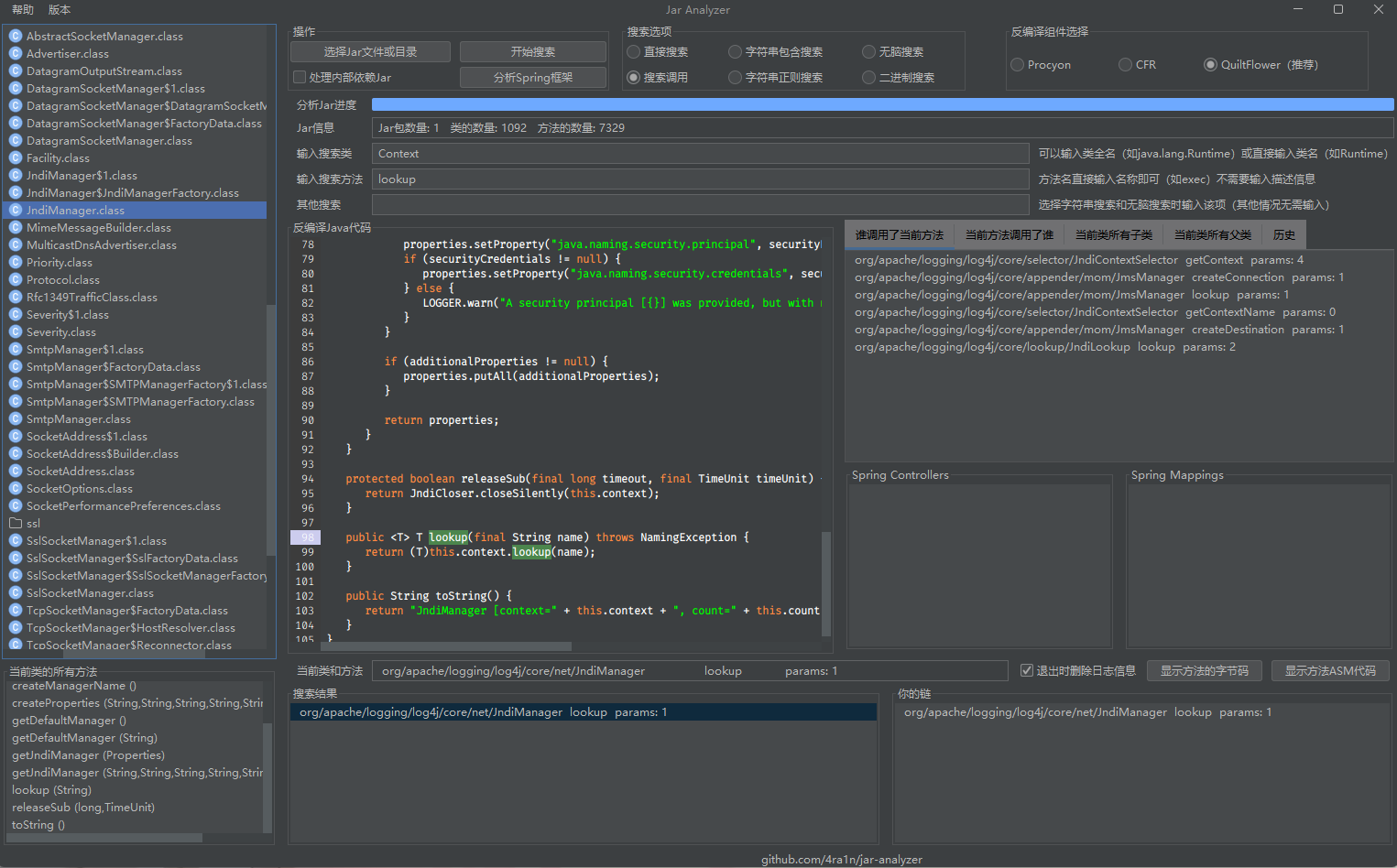
Can accurately locate the method (highlighted on the left)
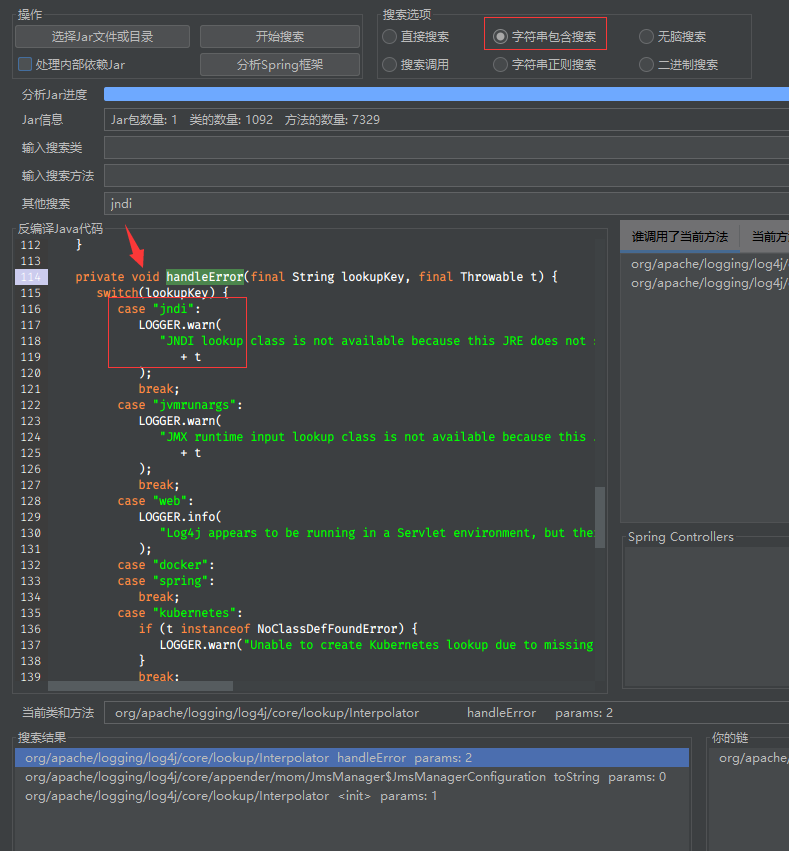
You can directly locate strings (analyze constant pool related instructions to achieve precise positioning)
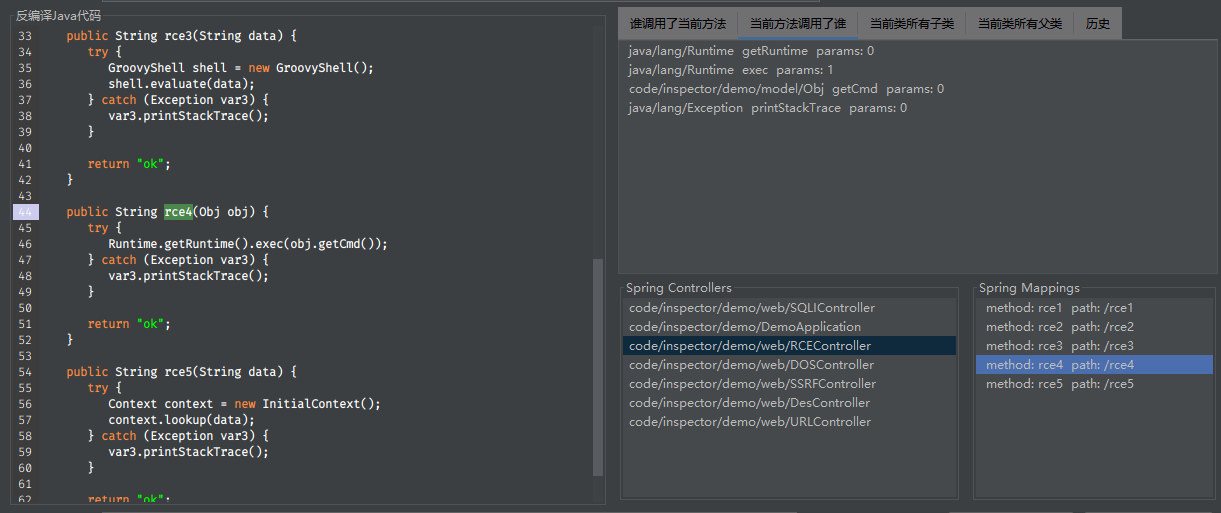
Can directly analyze projects written by Spring framework
Why not choose IDEA analysis: Because IDEA does not support analysis of passive code Jar packages
Supports six search methods:
LDC instructions to find the exact location)LDC instruction to find the exact location)Supports selection of three decompilation methods:
Use class customization of JSyntaxPane components (unofficial) to show Java code
(A lot of black technology is added to the library https://code.google.com/archive/p/jsyntaxpane )
Supports a super strong expression search, which can be combined as you want to search for information you want
| expression | parameter | effect |
|---|---|---|
| nameContains | String | Method name contains |
| startWith | String | Method prefix |
| endWith | String | Method suffix |
| classNameContains | String | Class name contains |
| returnType | String | Method return type |
| paramTypeMap | int String | Method parameter correspondence |
| paramsNum | int | Number of methods parameters |
| isStatic | boolean | Is the method static? |
| isSubClassOf | String | Whose subclass is it |
| isSuperClassOf | String | Whose parent class is it |
| hasAnno | String | Annotation of the method |
| hasClassAnno | String | Class annotation |
| hasField | String | Class fields |
Notice:
returnType and paramTypeMap require similar complete class names, such as java.lang.String , and write the basic type directly, for example, intisSubClassOf and isSuperClassOf require full class names, such as java.awt.ComponenthasAnno and hasClassAnno do not require the complete class name, just write it directly, for example, Controller 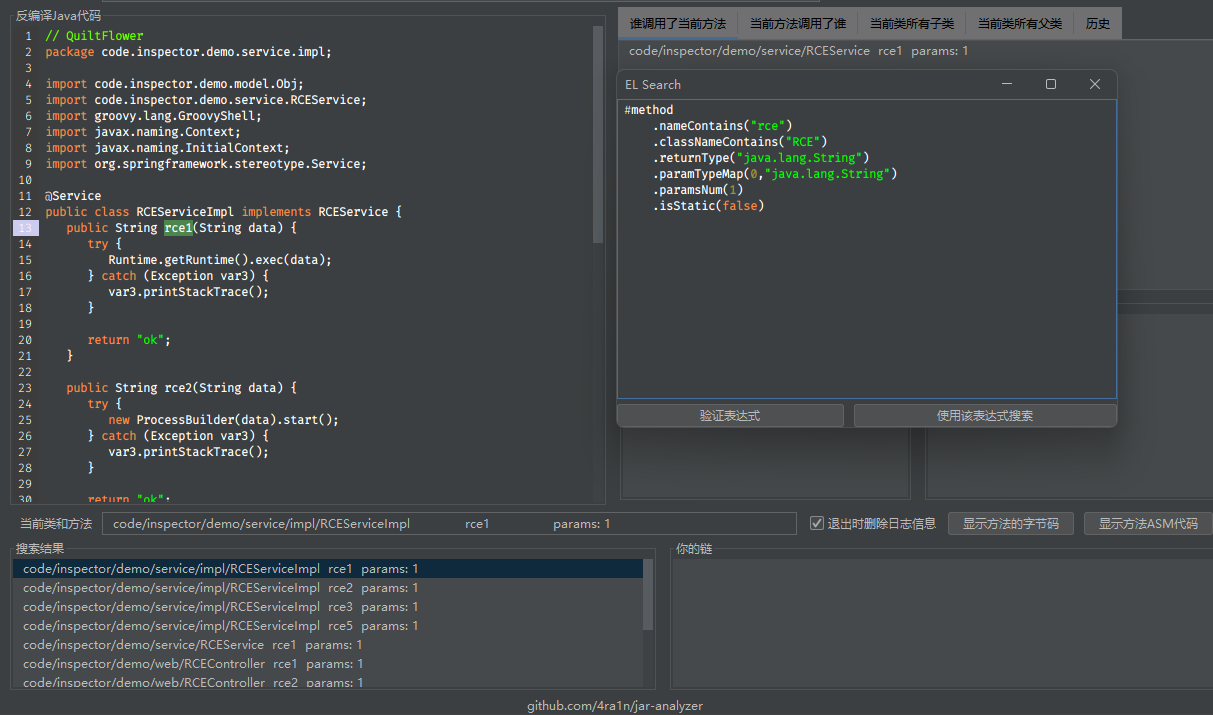
The basis of search is the method, what method do you want to search for
For example, I want the search method to start with set and end with value
# method
        . startWith ( "set" )
        . endWith ( "value" )
For example, I want to search for methods whose class name contains Context and method name contains lookup
# method
        . nameContains ( "lookup" )
        . classNameContains ( "Context" )
For example, I want to search for a method that returns a total of 3 parameters of Process type and the second parameter is String
# method
        . returnType ( "java.lang.Process" )
        . paramsNum ( 3 )
. paramTypeMap ( 1 , "java.lang.String" ) For example, we want to find all subclasses of javax.naming.spi.ObjectFactory (including subclasses of subclasses, etc.)
Just write the following rules, and the program will recursively look for all parent classes
# method
        . isSubClassOf ( "javax.naming.spi.ObjectFactory" )
If you want to find all the parent classes of a certain class, just use isSuperClassOf (note the full class name)
Note that the above will directly find all methods that meet the criteria, so I suggest adding some filtering
For example
# method
        . isSubClassOf ( "javax.naming.spi.ObjectFactory" )
        . startWith ( "xxx" )
. paramsNum ( 0 ) For example, we want to find all methods of all classes annotated by @Controller
Write the following rules
# method
        . hasClassAnno ( "Controller" )
For example, I want to find all methods of @RequestMapping annotation
# method
        . hasAnno ( "RequestMapping" )
Similarly, since all methods that meet the criteria class are found, I suggest adding some more filtering
According to the Swing RCE conditions provided by the online master:
Component subclass (including indirect subclasses)So we write a rule
# method
        . startWith ( "set" )
        . paramsNum ( 1 )
        . paramTypeMap ( 0 , "java.lang.String" )
        . isSubClassOf ( "java.awt.Component" )
Search results
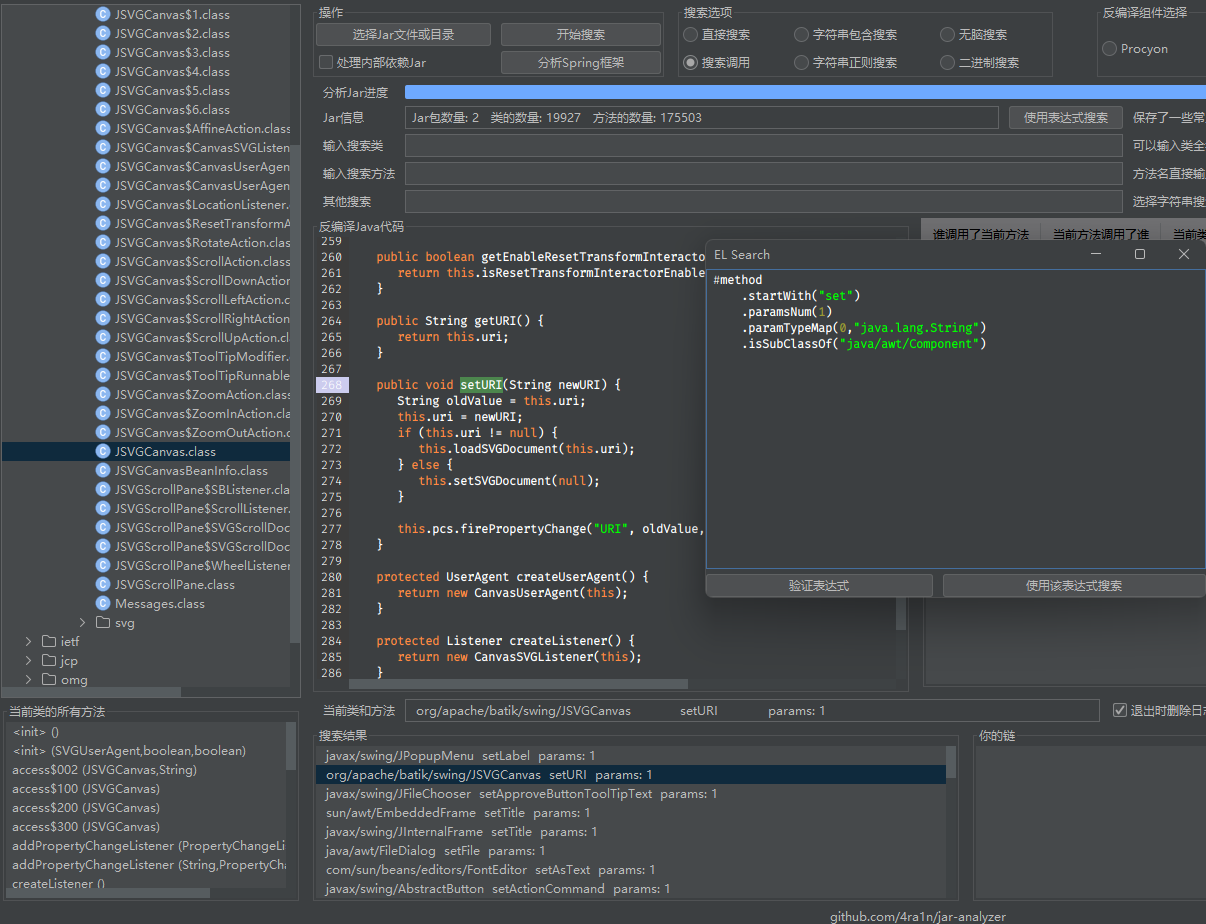
Important: Please use Java 8+ to run (11 recommended and EXE version of built-in Java 11 JRE is provided)
(A better font was used in Java 11 , other versions use default fonts)
(1) Step 1: Add jar file (supports single jar file and jar directory)
Select Jar File to open the jar filePlease don't worry, it takes a little time to analyze the jar file
Note: Please wait until the progress bar is full and the analysis is completed.
(2) Step 2: Enter the information you searched for
We support input in three formats:
javax.naming.Context (for example)javax/naming/ContextContext (will search for all *.Context classes)Provides a way to quickly enter
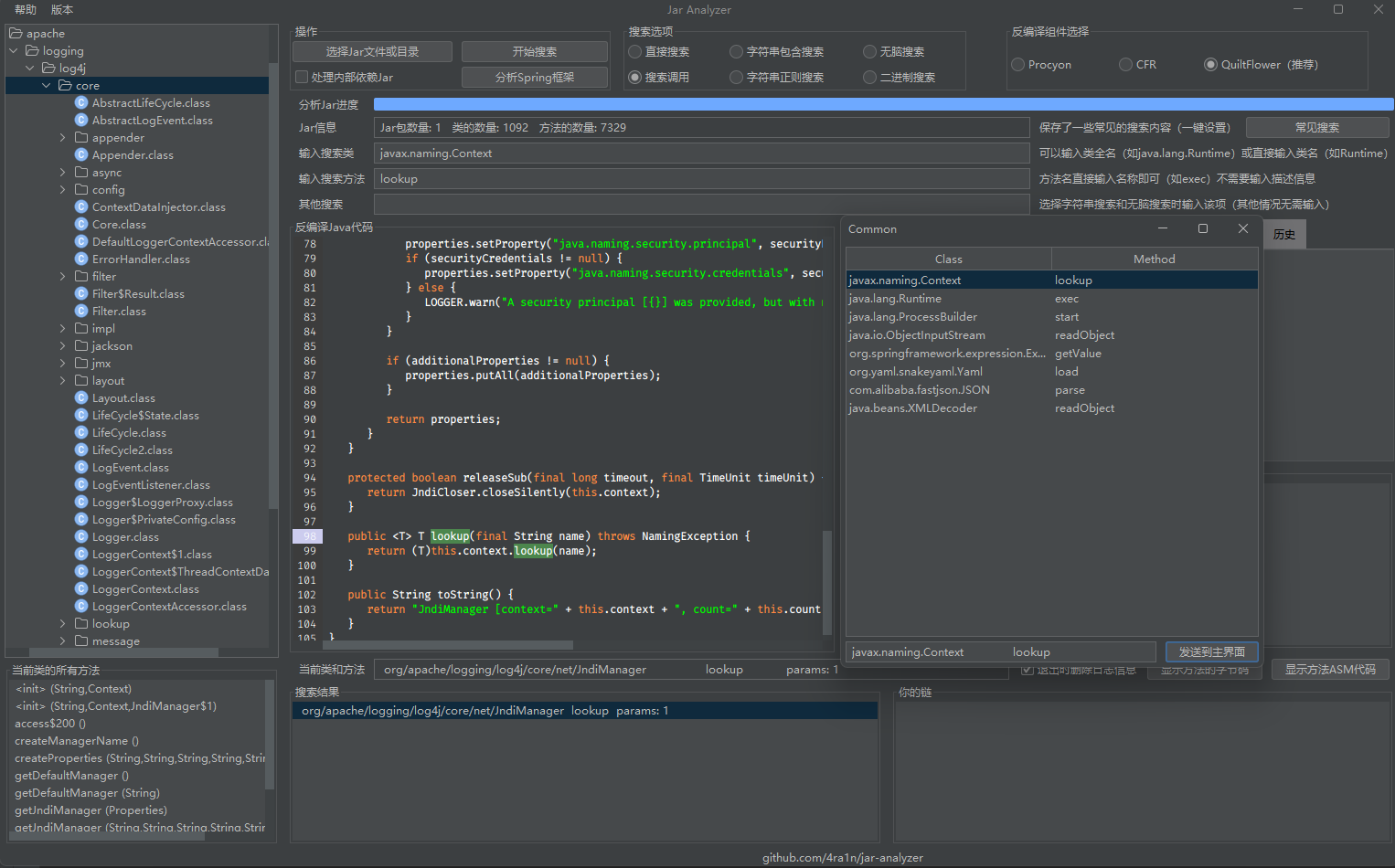
Note: Common search content here can be customized for supplements
Create a new search.txt file in the current directory, split the class name and method one by one with # , for example
 java.lang.Runtime#getRuntime
java.lang.String#equals
Binary search will only return whether it exists or not, and will not return specific information.
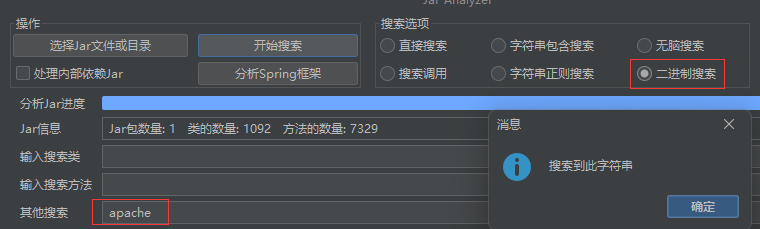
(3) Step 3: You can double-click to decompile
The cursor will point exactly to the location of the method call
During decompilation, the relationship between methods will be constructed
You can double-click anywhere on the panel to decompile and build new method call relationships and presentations
Please note: If you encounter a situation where you cannot decompile, you need to load the correct jar file
For example, I can't decompile javax.naming.Context because I didn't join the rt.jar file, if you join it, it can be decompiled normally
You can use Ctrl+F to search for code and edit
You can click on any option and the method details will be displayed next
You can right-click to send the option to the chain. You can understand a link as a favorite or record. In the chain, you can also double-click the decompile, and then display the new method call relationship, or display the details on a stand-alone basis. If an option in the chain is something you do not want, you can right-click to delete the option from the chain
Therefore, you can build a call chain that belongs only to you
谁调用了当前方法and当前方法调用了谁all the method in which the relationship between the method can also be decompiled, click to see the details, right-click to join the chain
You can view the current class byte code with one click
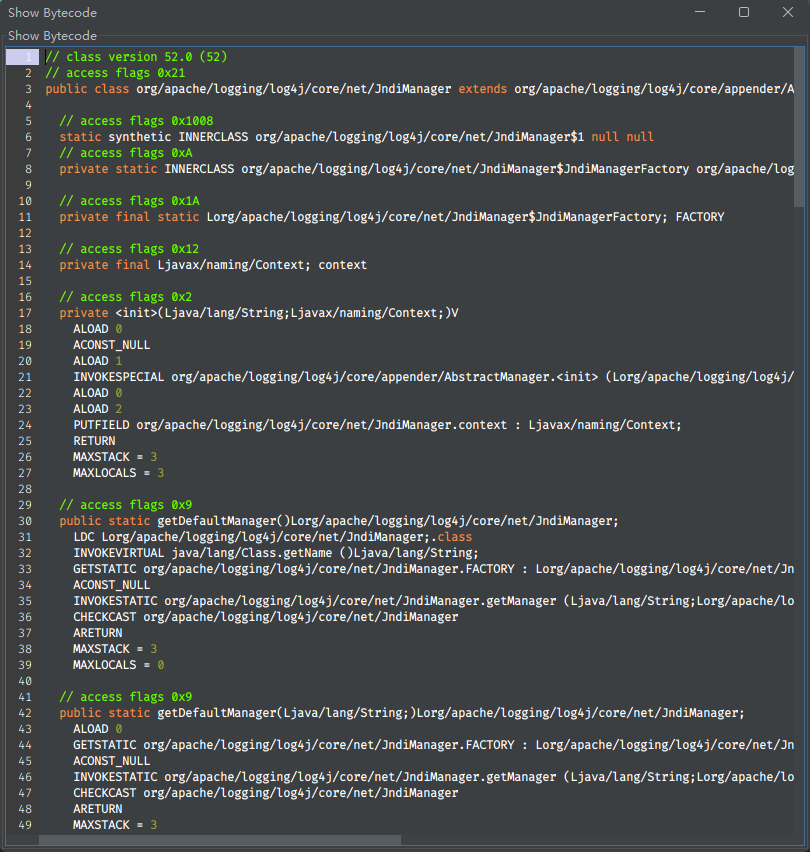
(1) What is the relationship between methods
 class Test {
    void a (){
        new Test (). b ();
    }

    void b (){
        Test . c ();
    }

    static void c (){
        // code
    }
}
If the current method is b
Who called the current method: Test class a method
Who is calling the current method: Test class c method
(2) How to solve the problem of interface implementation
 class Demo {
    void demo (){
        new Test (). test ();
    }
}

interface Test {
    void test ();
}

class Test1Impl implements Test {
    @ Override
    public void test () {
        // code
    }
}

class Test2Impl implements Test {
    @ Override
    public void test () {
        // code
    }
}
Now we have Demo.demo -> Test.test data, but in fact it is Demo.demo -> TestImpl.test .
So we added new rules: Test.test -> Test1Impl.test and Test.test -> Test2Impl.test .
First make sure that the data is not lost, then we can manually analyze the decompiled code by ourselves
Demo.demo -> Test.testTest.test -> Test1Impl.test / Test.test -> Test2Impl.test(3) How to resolve inheritance relationship
 class Zoo {
    void run (){
        Animal dog = new Dog ();
        dog . eat ();
    }
}

class Animal {
    void eat () {
        // code
    }
}

class Dog extends Animal {
    @ Override
    void eat () {
        // code
    }
}

class Cat extends Animal {
    @ Override
    void eat () {
        // code
    }
}
Zoo.run -> dog.cat 's bytecode is INVOKEVIRTUAL Animal.eat ()V , but we only have this rule Zoo.run -> Animal.eat , and Zoo.run -> Dog.eat rule is missing
In this case we added new rules: Animal.eat -> Dog.eat and Animal.eat -> Cat.eat
First make sure that the data is not lost, then we can manually analyze the decompiled code by ourselves
Zoo.run -> Animal.eatAnimal.eat -> Dog.eat / Animal.eat -> Cat.eat This project is developed using JetBrains IDEA. Thanks to JetBrains for providing me with a free license, which is a strong support for me.







