WebesTodoApp201806
1.0.0

Netacademia "My First Web C# Project: To-DO Application" Course Supplementary Code Tour
General DotNet Group on Facebook: Dotnet sharks
                               +------------------------+
                               |   Desktop számítógép   |
                               |                        |
                               |    +-------------+     |
+---------------+              |    |  Alkalmazás |     |
|               |              |    |             |     |
|  Felhasználó  |              |    +-------------+     |
|               |              |                        |
|               |              |                        |
+---------------+              |                        |
                               +------------------------+


    Hagyományos Desktop/Mobil alkalmazásfejlesztés
                                                                          +--------------------------+
                                                                          |  Szerver számítógép      |
                               +------------------------+                 |                          |
                               |   Desktop számítógép   |                 |                          |
                               |    Mobil eszköz        |    Hálózati     |                          |
                               |                        |    kapcsolat    | +----------------------+ |
+---------------+              |                        |                 | |                      | |
|               |              |    +-------------+     +---------------> | |  Szerver alkalmazás  | |
|  Felhasználó  |              |    | Alkalmazás  |     |                 | |  (WebSzerveren futó  | |
|               |              |    | (Böngésző)  |     | <---------------+ |  app)                | |
|               |              |    +-------------+     |                 | |                      | |
+---------------+              |                        |        ^        | +----------------------+ |
                               +------------------------+        |        |                          |
                                                                 |        |              ^           |
                                            ^                    |        |              |           |
                                            |                    |        |              |           |
                                            |                    |        |              |           |
                                            |                    |        +--------------------------+
                                            |                    |                       |
                                            +                    +                       +
                                          HTML                 HTTP                     MVC


                                               Webes Alkalmazásfejlesztés
Because the environment and development workflow is complex for these types of developments, it is not manually created by hand, but with the help of the Visula Studio Template.
With the wizard we create the ASP.NET MVC Web Application (.NET Framework), as follows:
Create a new project: 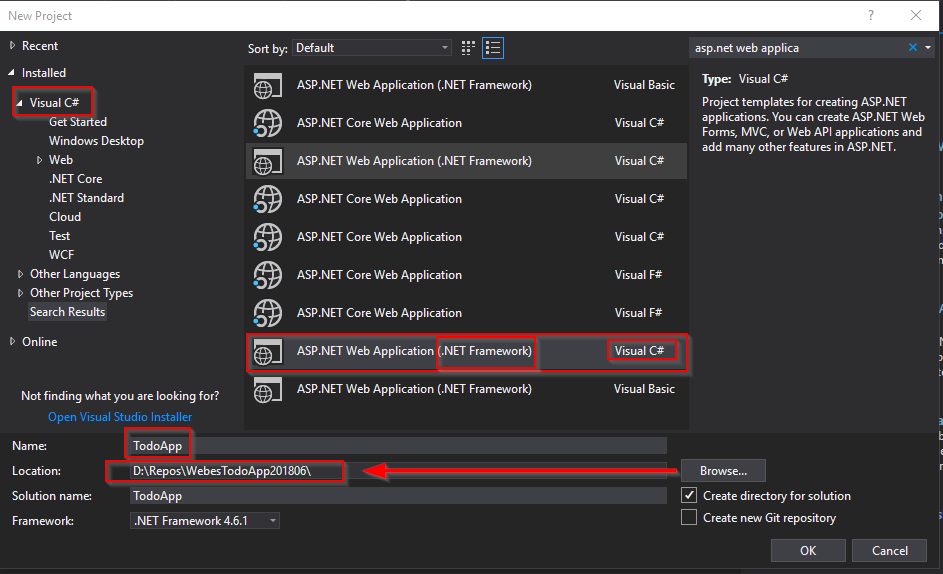
MVC application selection 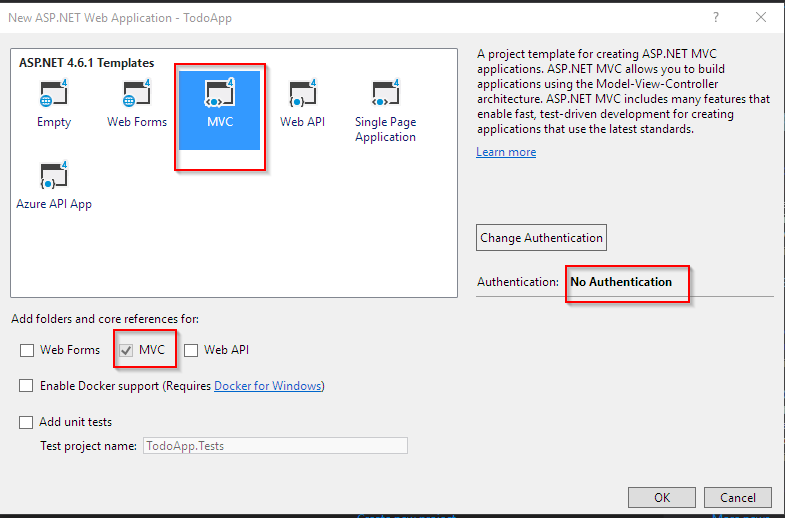
If we create an HTML file in the application directory, it is default by our ASP.NET application. That is, if the browser asks for this file, the server will send it back to him:
This request (from the browser to the server):
GET http://localhost:39399/SajatHtmlOldal.html
(the server in the browser) returns the HTML page (website):
 <!DOCTYPE html >
< html >
< head >
    < meta charset =" utf-8 " />
    < title > Ez a saját html oldalunk címe </ title >
</ head >
< body >
    Ez pedig a saját html oldalunk tartalma, ezt fogja a böngésző megmutatni.
</ body >
</ html >
It works the same way by opening the file from the browser:
file:///D:/Repos/WebesTodoApp201806/TodoApp/TodoApp/SajatHtmlOldal.html
it still displays it the same way.
The task of the HTTP is to describe requests and the format of the answers if you want to query a content through the network.
The http request consists of four parts
We are interested in the first two.
Method: eg get, post, put, delete, etc. Details on Wikipedia
It is also important that the HTTP protocol does not handle the condition, so the requests are completely independent.
If you do not want to display static cards in a row, but:
It's a nice task, the ASP.NET MVC is for that.
 +-----------------+
|                 |
| Bevásárlólista  |
|                 |
+-----------------+
|                 |
| Só              |
|                 |
| Cukor           |
|                 |
| Spagetti        |
|                 |
| Marhahús        |
|                 |
| Paradicsom      |
|                 |
+-----------------+
In the case of display
Question: How does the request get to the controller? Answer: Based on the title of the request.
For example:
GET http://localhost:39399/Home/About
Here the first half of the title points to the application:
http://localhost:39399
The second half of the title and the method mean something within the application:
GET /Home/About
It is the responsibility of the routing to process this. In the title, "/" is a sign of separation, that is, the entire title can be disassembled into meaningful parts that can be processed by the application .
According to the ASP.NET MVC convention - the first part of this title is addressed to the controller (in the example: home). Controller: Controller - The second part is the action that serves the request. Action: function
This can be used to organize each request into functions and the functions into control units.
It is important that the rest of the title, which follows the first two units (controller/action), will contain the parameters of the request in some form.
The ASP.NET MVC framework is extremely highly built on name convention: the name of each element plays a decisive role in the operation of the application.
There are two important routing rules: - If the action is not specified, then that is the index . - If the controller is not specified, then is the Home/Index
Based on viewsion:
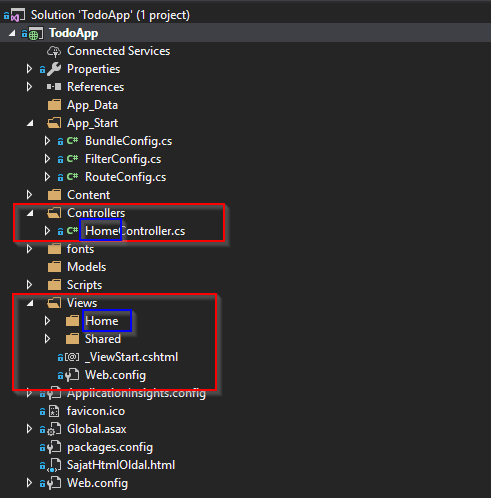
Generally, the views for the controller are in the Views folder of our web application, grouped per control, the name of the grouping folder is the same as the controller routing name.
For example: Homecontroller views are in the Views Home folder.
And: The name of each view file is the same as the name Controller Action, which they belong to.
Note: This convention can be broken: you can also select a specific View for an Action.
That is, the view of the homecontroller.todolist () Action automatically belongs to: views home todolist.chtml
You can use this tutorial to write the HTML code.
The view can define the type of data model that works on.
Crud: C Reate, R EAD, U PDATE, D ELET
A short screen sketch as a specification:
 +------------------------------------------------+
|                                                |
|  +------------------+---------+--------+       |
|  | elem 1           | módosít | töröl  |       |
|  +-------------------------------------+       |
|  | elem 2           | módosít | töröl  |       |
|  +-------------------------------------+       |
|  | elem 3           | módosít | töröl  | <-----------------------------+--+  Műveletek kezdeményezésére
|  +------------------+---------+--------+       |                       |     szolgáló elemek, amivel
|  |                                     |       |                       |     a felhasználó kezdeményezni
|  +-------------------------------------+       |                       |     tudja az adott műveletet
|  |                                     |       |                       |     (link, gomb, stb.)
|  +-------------------------------------+       |                       |
|  |                                     |       |                       |
|  +-------------------------------------+       |                       |
|  |                                     |       |                       |
|  +-------------------------------------+       |                       |
|                                                |                       |
|                                                |                       |
|                                                |                       |
|  +-----------------+   +----------+            |                       v
|  | beviteli mező   |   | rögzítés | <---------------------------------+
|  +-----------------+   +----------+            |
|                                                |
|                                                |
+------------------------------------------------+
The index is a request for the controller's overview view, and from here it was named after. That is, our initial overview view, the Index Action, must be taken. It follows that we renamed the current one.
<form></form> to this - you need a <input /> that has a name ( <input name="valami megnevezés"/> ) - need a button (or <input type="submit" /> or <button></button> >) Input field contents in the call parameters, so: http://localhost:39399/Todo/Create?Tennival%C3%B3=agaadfgafgadf 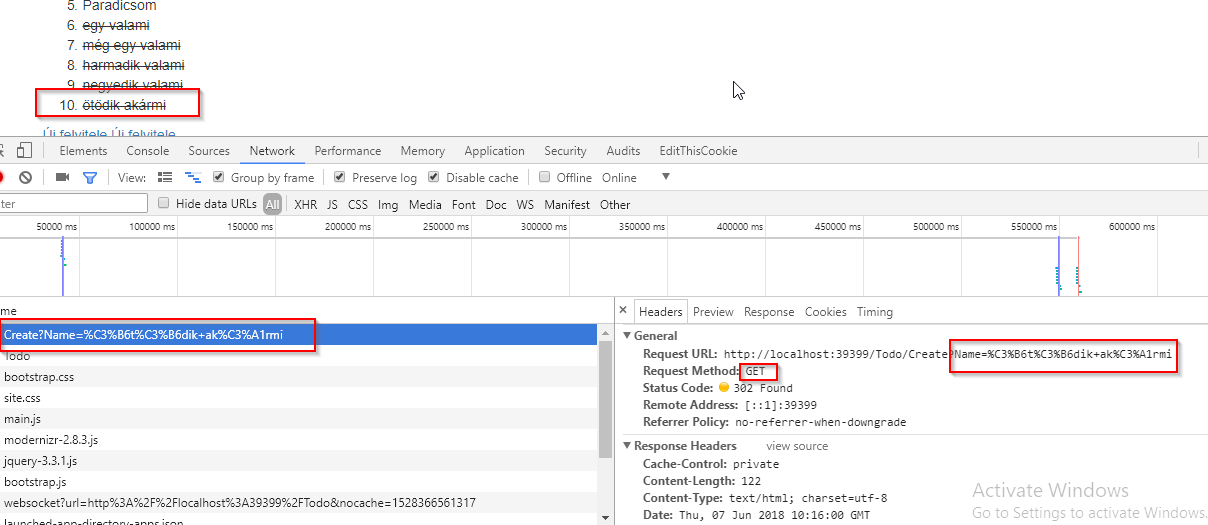
   Folyamat:
        1. /Todo/Create paraméter nélkül feladja a Create nézetet
        2. /Todo/Create paraméterrel rögzíti az adatot és átirányít az Index-re

    Sajnos az adatok mindig inicializálódnak, azt még meg kell oldani.

    De a legnagyobb elvi baj ezzel, hogy az adatok felküldése GET metódust használ, ami (mivel adatmódosítás történik) nem szabványos.
    Helyette POST kell.
To make an input page available on the index page (link: http: // localhost: 39399/todo/create) Concept for relative address can
Test data that remains between requests
Programming Data Input with Post The data comes as a form parameter:
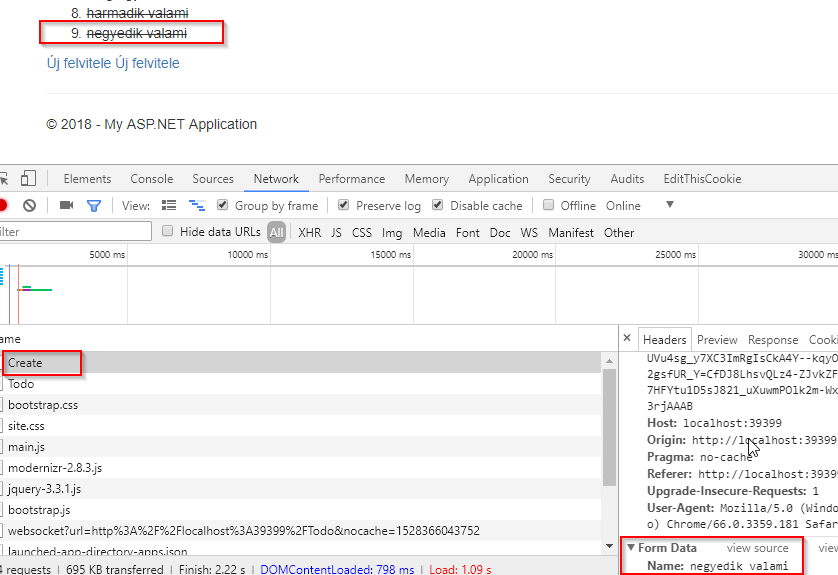
Amit a Model Binder segítségével ugyanúgy függvény paraméterként tudunk átvenni az Action definícióban:
                                                           GET: URL paraméter        Model binding:név alapján egyeztet
+----------------------------------------------+           (Query string)              +-----+
|    Böngésző                                  |         ^ +--------------->           |     |
+----------------------------------------------+         |                             |     |           Alkalmazás
|                                              |         |                             |     |         +--------------+
|                                              |         |                             |     |         |              |
|              +------------------+            |         |                             |     |         |              |
|              | Adat1=érték1     |            | +------->                             |     | Adatok  |              |
|              |                  |            |                                       |     | +-----> |              |
|              +------------------+            |                                       |     |         |              |
|              | Adat2=érték2     |            | +------->                             |     |         |              |
|              |                  |            |         |                             |     |         |              |
|              +------------------+            |         |                             |     |         |              |
|                                              |         |                             |     |         |              |
|                                              |         |                             |     |         +--------------+
|                                              |         |                             |     |
|                                              |         | POST: Form data             |     |
|                                              |         v------------------------->   |     |
|                                              |                                       |     |
|                                              |                                       |     |
|                                              |                                       +-----+
|                                              |
|                                              |
|                                              |
|                                              |
|                                              |
|                                              |
|                                              |
|                                              |
+----------------------------------------------+
Somehow the directions should be separated when serving the data/view. That is,
Index Input Field Theorem and Programming Input
Microsoft SQL server is installed with Chocolatey, these packages are installed:
cinst sql-server-express
cinst sql-server-management-studio
And for Chocolatey installation, this command must be run from an administrator command line:
@"%SystemRoot%System32WindowsPowerShellv1.0powershell.exe" -NoProfile -InputFormat None -ExecutionPolicy Bypass -Command "iex ((New-Object System.Net.WebClient).DownloadString('https://chocolatey.org/install.ps1'))" && SET "PATH=%PATH%;%ALLUSERSPROFILE%chocolateybin"
To create a database:
Examining error options for Single
 var item = db . TodoItems . FirstOrDefault ( x => x . Name . Contains ( "a" ) ) ;
if ( item == null )
{ // ha nincs ilyen elem

}
else
{ // ha megvan

} var item = db . TodoItems . SingleOrDefault ( x => x . Id == id ) ;
if ( item == null )
{ // ha nincs ilyen elem
}
else
{ // ha megvan
}find the difference in the
<input id="isDone" name="isDone" type="checkbox" value="true" >The latter generates this:
 <input name="isDone" id="isDone" type="checkbox" value="true">
<input name="isDone" type="hidden" value="false">
It works by checkbox only comes up with FormData if it is ticked . If not, the browser simply does not send it up . In this case, (if there is no tick) the hidden field comes from the browser, which is false worth just as if the checkbox was not ticked. And if the tick is there, both values will come up , a true and a false , and the modelbinder chooses the first one based on their order true
 +--------------------------------+    +---------------------------------+          +----------------------------------+
|                                |    |                                 |          |                                  |
|                                |    |     EntityFramework             |          |                                  |
|        Alkalmazás              |    |     Code First                  |          |      Adatbázis                   |
|                                |    |                                 |          |                                  |
|                                |    |                                 |          |  +---------------+               |
|                                |    |     1. A kód alapján kitalálja  |          |  |  TodoItems    |               |
|                                |    |        hogy hogy lenne jó       |          |  |               |               |
|           Adatok osztályba     |    |   +->  adatbázisba írni az  +-> | +------> |  |  TodoItem     |               |
|           szervezve            |    |   |    adatokat                 |          |  |  TodoItem     |               |
|           (TodoItem)           |    |   |                             |          |  |  TodoItem     |               |
|                                |    |   |                             |          |  |  ...          |               |
|                         +--->  | +> | +->                             |          |  |               |               |
|                         +      |    |                                 |          |  |               |               |
|           Adatelérési osztály  |    |                                 |  <-----------------+        |               |
|           (DbContext)          |    |     2. Ha pedig adatot akarok   |  |       |  |      ^        |               |
|           DbSet<TodoItem>      |    |        lekérdezni, akkor a Linq |  v       |  |      |        |               |
|              TodoItems   <-----------------+ felületen keresztül      | <+       |  +---------------+               |
|                                |    |        fogadja a kérést és      |          |         ^                        |
|                                |    |        SQL lekérdezéssé alakítja|          |         +                        |
|   db.TodoItems.Single() +---------------->   a visszakapott adatokat  | +-------------> SELECT                      |
|                                |    |        pedig betölti a TodoItems|          |        Id, Name, Done            |
|                                |    |        DbSet-be                 |          |      WHERE                       |
|                                |    |                                 |          |        Id == @id                 |
|                                |    |                                 |          |                                  |
+--------------------------------+    +---------------------------------+          +----------------------------------+
HTML and CSS Manufacture Hand Free Course
Using styles The HTML description tongue allows you to enter style parameter to all HTML members. In this, you can enter the settings for coloring, formatting, and location. More on the W3schools page is worth looking at.
Use uniform styles for this for CSS: styles are separated from the HTML code, HTML is content, CSS is a definition of shape. You can look at this site in detail.
CSS settings can be tested in browsers by calling out Developer Tools (F12).
A web package from Twitter's graphic artists and one of its programmers, which is capable of displaying a particular website (automatically adapted to different sizes). The package is available here, its source code is on the Github.
One of the foundations of the bootstrap is the Grid system.
The other principle is to create different display elements by providing the class parameter, without any other CSS and JavaScript knowledge. A list of each component.
Steps to generate the HTML page:
@ {
    Layout = null ;
}<head></head> section, and the javascript is used at the end of the <body></body> section. @Styles.Render("~/Content/css")
@Scripts.Render("~/bundles/modernizr")
In the HTML frame, you miss two places:
@RenderBody() line indicates the part where the view is determined by the Action.<body></body> , leave it out of this @RenderSection ( "scripts" , required : false )By the end, JavaScrips will be loaded from your own Bundle:
 @Scripts.Render("~/bundles/jquery")
@Scripts.Render("~/bundles/bootstrap")
So serving a request: Action selects View, it selects Layout, generate the content part of the HTML code based on the View, generate the HTML page based on the layout code, and the View generated by View is extended to the entire page.





