AspNetCore.Authentication.Static
v1.0.1

This repo contains the security and authorization Static middleware for ASP.NET Core from Proge-Software.
Whether you are doing exploratory or automatic integration tests, testing the authentication of an ASP.NET Core application can be complex and ineffective.
You may need to set up dedicated accounts in your Active Directory, go through the login process and ensure cookies are always playing the same way.
AspNetCore.Authentication.Static is an unambitious middleware for ASP.NET Core aiming at simplifying authentication when testing your application.
You may define your users in the application's configuration file, and switch between them using query string, headers or environment variables.
As simple as that.
Install the NuGet package using the package manager:
Install-Package ProgeSoftware.AspNetCore.Authentication.Static
or the .NET CLI:
dotnet add package ProgeSoftware.AspNetCore.Authentication.Static
Add the middleware to the ConfigureServices method in your Startup.cs file:
services
    .AddAuthentication(StaticAuthenticationDefaults.AuthenticationScheme)
    .AddStatic(options =>
    {
        Configuration.GetSection("StaticAuthentication").Bind(options);
    });
Configure it in your appsettings.json file (you should better do it using User Secrets):
{
"StaticAuthentication": {
    "Identities": {
        "User": {
            "AuthenticationType": "Custom",
            "NameIdentifier": "bt8rcnk3z7nhwb7e",
            "Name": "Giorgio Di Nardo",
            "Claims": [
                {
                    "Type": "http://schemas.microsoft.com/ws/2008/06/identity/claims/role",
                    "Value": "User"
                }
            ]
        }
    }
}
Run!
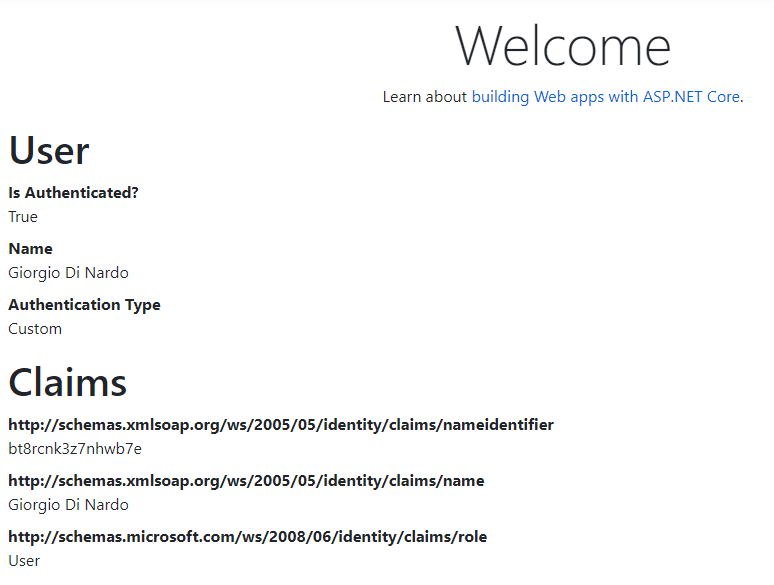
You may have a look at our samples to learn more on how to use it.





