aspxpivotgrid field calculation bindings
1.0.0

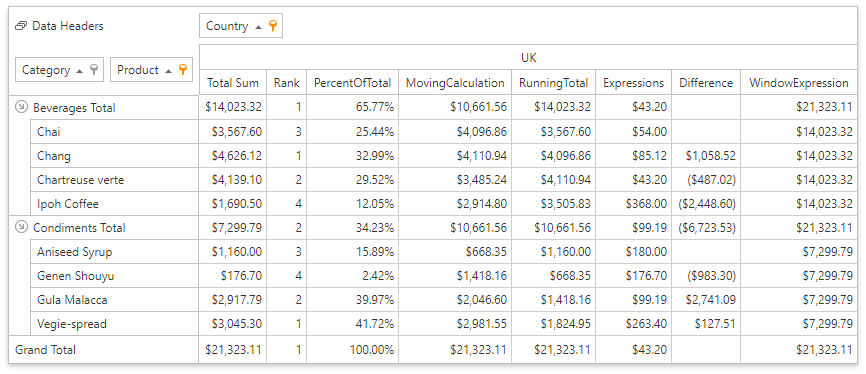
The example illustrates how to use Data Binding API to bind the Pivot Grid field to data. A window in this example is the combination of the Category/Product and Country dimensions.
Default.aspx
DataSourceColumnBinding
Defines a data binding to a source data column.
DifferenceBinding
Calculates the difference between values in the window.
PercentOfTotalBinding
Calculates a percentage of all values in the window.
RankBinding
Displays a rank according to each value in the window.
RunningTotalBinding
Aggregates values cumulatively in the window.
WindowExpressionBinding
Uses a custom string expression with window functions for calculation. The expression Total(Sum([Extended Price])) displays sub-totals for outer row fields (the equivalent for Total and Grand total values).
ExpressionDataBinding
Defines a calculation based on a string expression. The Expression Min([Extended Price]) displays a minimum value from the underlying data grouped by the specified window.
MovingCalculationBinding
Calculates aggregations across a specified number of values before and/or after the current value.
(you will be redirected to DevExpress.com to submit your response)





