goit js hw 11
1.0.0

Read in Other Languages: Ukrainian, English.
goit-js-hw-11 repository was created.GitHub Pages .async/await syntax is used.Prettier .Create a front of the application of the search and viewing of images by keyword. Add the design of interface elements. See the demo-video of the application.
The form first contains in the HTML document. The user will enter a line to search into a text box, and the form of the form must be made by HTTP request.
 < form class =" search-form " id =" search-form " >
  < input
    type =" text "
    name =" searchQuery "
    autocomplete =" off "
    placeholder =" Search images... "
  />
  < button type =" submit " > Search </ button >
</ form > Use a Pixabay Public API for a backing. Register, get your unique access key and get acquainted with the documentation.
List of the Query String Options that you must indicate:
key is your unique access key to API.q is the term for search. What the user will enter.image_type - image type. Only photos are needed, so put photo .orientation - orientation of the photo. Put the value of horizontal .safesearch - Filter by age. Put a true value.The answer will be an array of images that satisfied the criteria of the query parameters. Each image is described by an object from which you are only interested in the following properties:
webformatURL - Link to a small image for the card list.largeImageURL - Link to a large image.tags - a line with an image description. Suitable for an attribute alt .likes - the number of likes.views - the number of views.comments - the number of comments.downloads - the number of downloads. If a backing returns an empty array, then nothing suitable was found. In this case, show a message with the text "Sorry, there are no images matching your search query. Please try again." . Use the Notiflix library for messages.
The div.gallery element is first contained in the HTML document, and it must be rented for image card markings. When searching for a new keyword, you need to completely clean the contents of the gallery so as not to mix the results.
 < div class =" gallery " >
  <!-- Картки зображень -->
</ div >
Card markup template of one image for the gallery.
 < div class =" photo-card " >
  < img src ="" alt ="" loading =" lazy " />
  < div class =" info " >
    < p class =" info-item " >
      < b > Likes </ b >
    </ p >
    < p class =" info-item " >
      < b > Views </ b >
    </ p >
    < p class =" info-item " >
      < b > Comments </ b >
    </ p >
    < p class =" info-item " >
      < b > Downloads </ b >
    </ p >
  </ div >
</ div > Pixabay API supports the pagination and provides page and per_page parameters. Make sure that each answer comes 40 objects (default 20).
page parameter must be 1 .1 .page value must be returned to the original one, as there will be a fleece on a new image collection.The HTML document already contains a button marking, on the click on which you need to make a request for the next group of images and add the marking to the existing elements of the gallery.
< button type =" button " class =" load-more " > Load more </ button > In response, backing returns totalHits property - the total number of images that meet the search criterion (for a free account). If the user has reached the end of the collection, hide the button and output a message with the text "We're sorry, but you've reached the end of search results." .
️ The following functionality is not required for the task, but will be a good extra practice.
After the first request with each new search, get a message that will say how many images were found ( totalHits ). Message text - "Hooray! We found totalHits images."
SimpleLightbox LibraryAdd a large version of the image with the SimplelightBox library for a full -fledged gallery.
refresh() mattode, which must be called every time a new image group is added.In order to connect the CSS library code to the project, you need to add another import, except as described in the documentation.
 // Описаний в документації
import SimpleLightbox from 'simplelightbox' ;
// Додатковий імпорт стилів
import 'simplelightbox/dist/simple-lightbox.min.css' ;Make a smooth scrolling of the page after requesting and playing each subsequent image group. Here's a code code, but understand it yourself.
 const { height : cardHeight } = document
  . querySelector ( '.gallery' )
  . firstElementChild . getBoundingClientRect ( ) ;

window . scrollBy ( {
  top : cardHeight * 2 ,
  behavior : 'smooth' ,
} ) ;Instead of the Load More button, you can make an endless download of images while scrolling. We give you full freedom of action in implementation, you can use any libraries.
This project was a Sozdan at Parcel. For the marking and adjustment of the anchorage of exposure to be selected for documentation.
parcel-project-template NASH NASHMI.npm install team.npm start command.src/sass Papquet and are imported in the File files of pages. For example, for index.html the style file is called index.scss .src/images folder. The chorusian optimizes them, but only with the deploration of the project version of the project. Everything goes into the sight of your computer, so as it can be a lot of time on the weak cars. To adjust the project depaza, it is necessary to draw a lot of additional shags on the setting of your repository. Come on Settings tab and in the Actions Subsecations Select the General item.
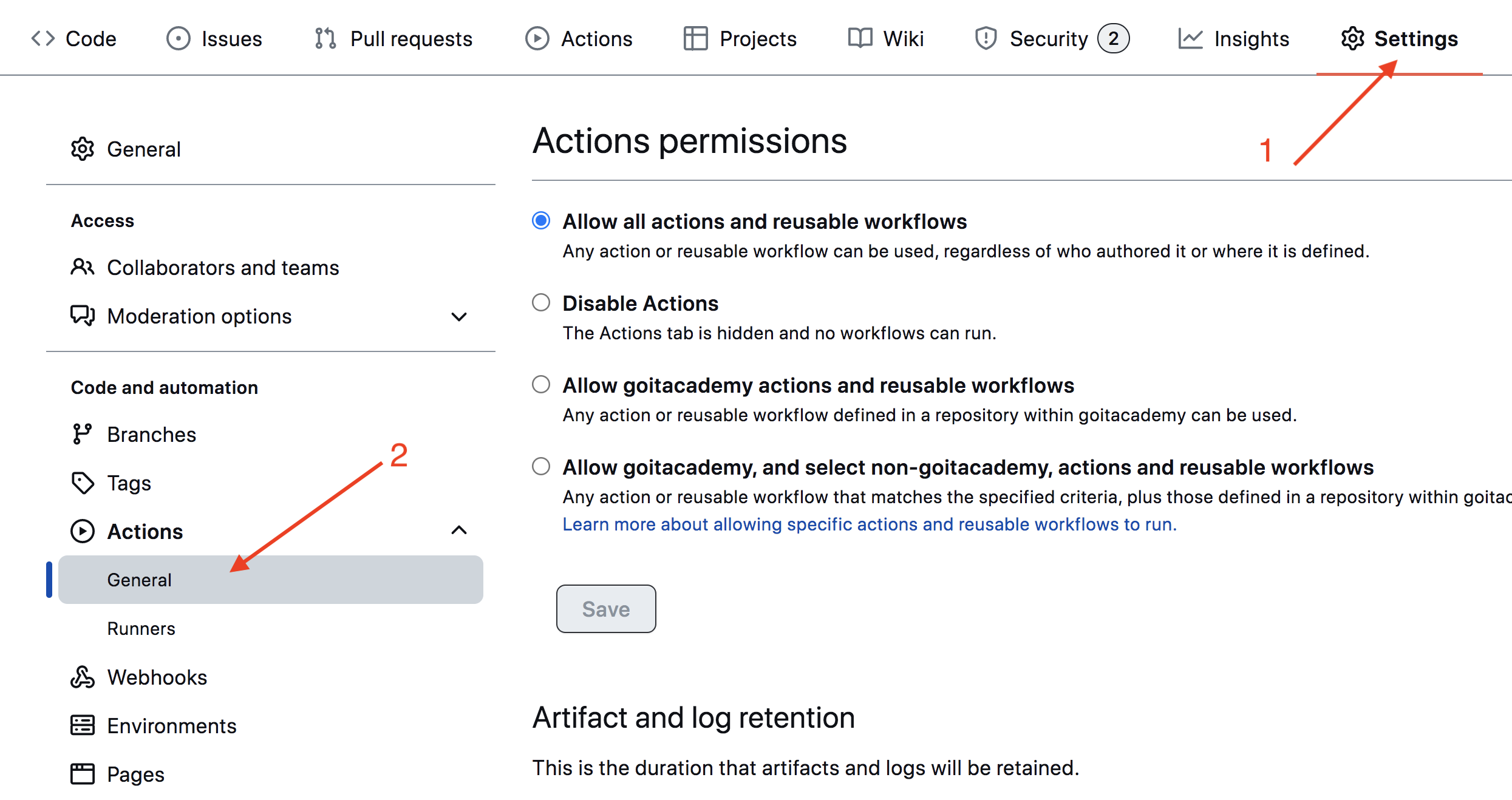
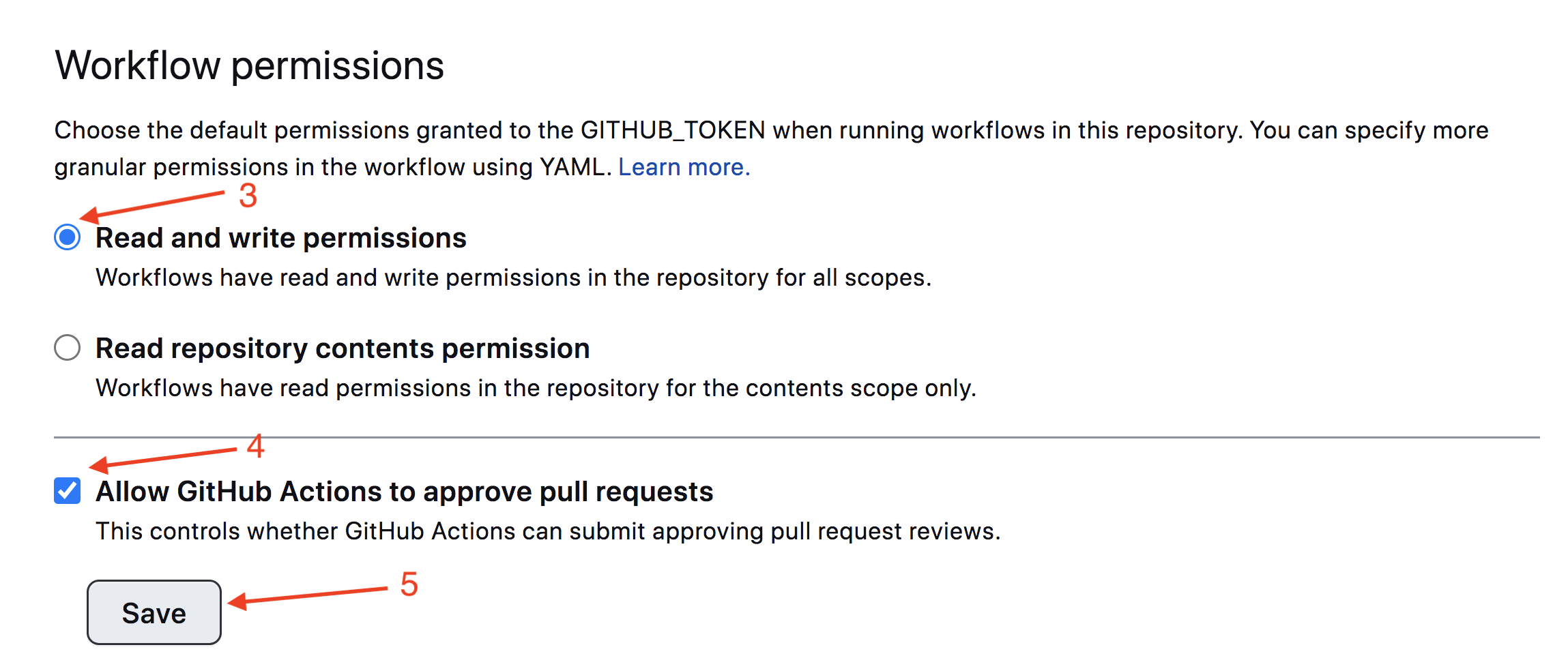
Slide the plot to the post -Secia, in which the opacia is taken in the track on the trace of the image and the sake of Save . Without these tunks in the scoops, there will be unburrency for automating the process of deployed.
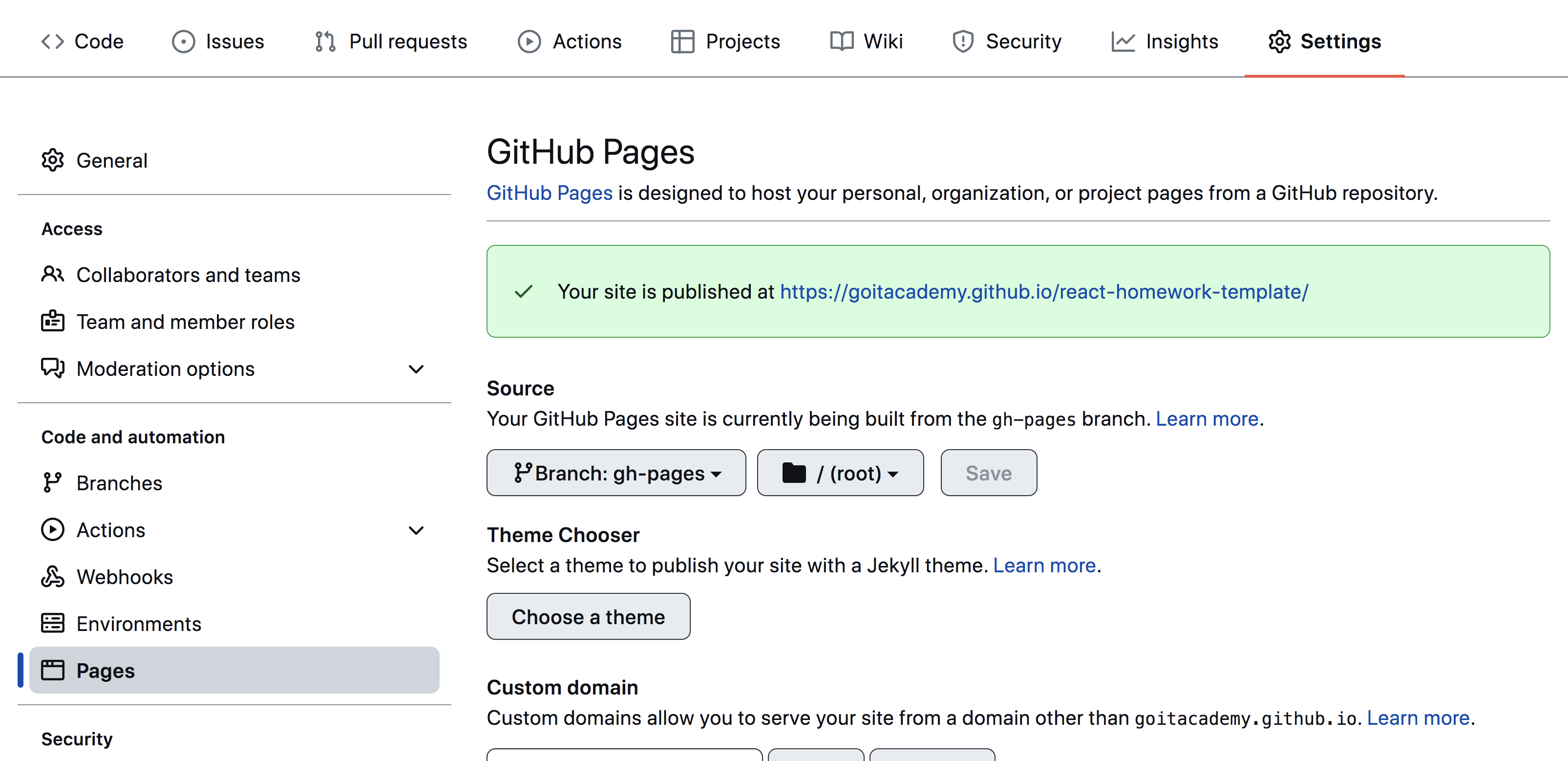
The project version of the project will be automatic and stopped on the Github pages, in the gh-pages Wet, the time of the cogd is updated main Wet. For example, a straight pusha or a pool-retested pusha or a straight pusha. For this, you need to file a package.json file homepage and script build , muffled your_username and your_repo_name for your own, and send the name on Github.
 "homepage" : " https://your_username.github.io/your_repo_name/ " ,
"scripts" : {
  "build" : " parcel build src/*.html --public-url /your_repo_name/ "
},
Nearly go into the github-repository tuning ( Settings > Pages ) and will draw out the production of File File from the folder /root of gh-pages , if this is not a lot of automatic.
The status of a deploy of an extreme commuty is conquered by the icon of ego of the yoditicator.
The painful detailed information about the status can be soaked in the icon, and in the exceeding the windows switch on Details .

Because of the time, a couple of fleets, I live the plot, you can simmer at the address indicated in homepage . For example, I live a mand for this repository https://goitacademy.github.io/parcel-project-template.
If a desert plot is opened, to kill Console tab of the nor to the sight of the incorporated packs of CSS and JS project files ( 404 ). Stork all in Taby Irregular Meaning of homepage or build script in file package.json .
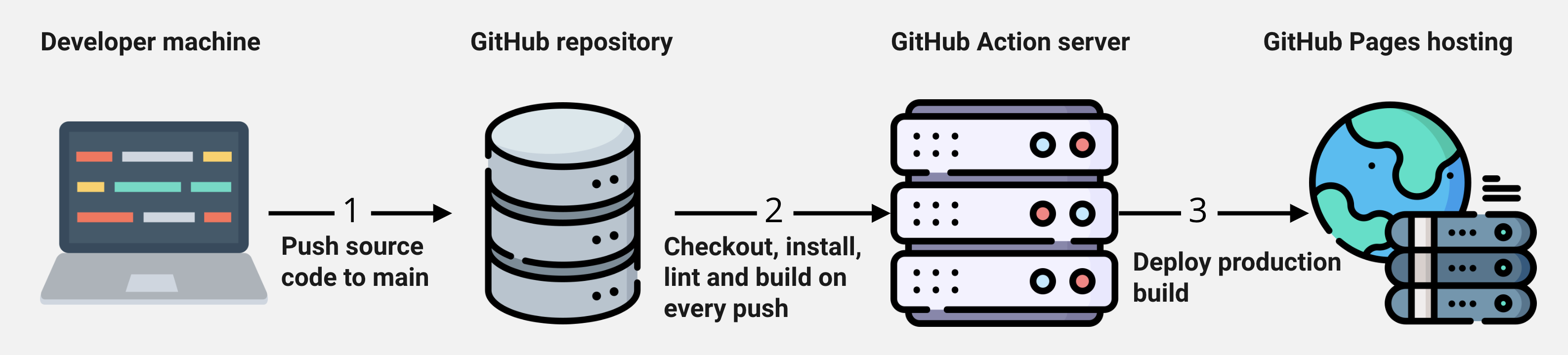
main special script (Github Action) from the .github/workflows/deploy.yml file is launched.gh-pages vet. In the opposite case, in the logic script will be given in the problem.




