youtube setl
1.0.0

Youtube SETL is a project that aims at providing a starting point to practice the SETL Framework: https://github.com/SETL-Developers/setl. The idea is to give a context project involving Extract, Transform and Load operations. There are three levels of difficulty for the exercise: Easy mode, Normal mode and Hard mode.
The data that is used is from Kaggle, https://www.kaggle.com/datasnaek/youtube-new.
I used JetBrains IntelliJ IDEA Community Edition for this project, with Scala and Apache Spark.
The data is divided in multiples regions: Canada (CA), Germany (DE), France (FR), Great Britain (GB), India (IN), Japan (JP), South Korea (KR), Mexico (MX), Russia (RU) and the United States (US). For each of these regions, there are two files:
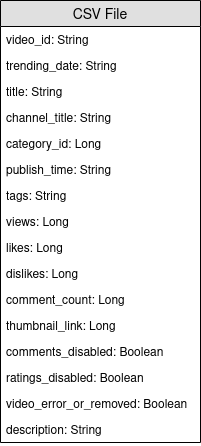
Everyday, YouTube provides about 200 of the most trending videos in each country. YouTube measures how much a video is trendy based on a combination of factors that is not made fully public. This dataset consists in a collection of everyday's top trending videos. As a consequence, it is possible for the same video to appear multiple times, meaning that it is trending for multiple days.
Basically, the elements of the items fields allow us to map the category_id of the CSV file to the full name category.
We are going to analyze this dataset and determine "popular" videos. But, how do we define a popular video ? We are going to define the popularity of a video based on its number of views, likes, dislikes, number of comments, and number of trending days.
This definition is clearly debatable and arbitrary, and we are not looking to find out the best definition for the popularity of a video. We will only focus on the purpose of this project: practice with the SETL Framework.
The goal of this project is to find the 100 most "popular" videos, and the most "popular" video categories. But how do we defined the popularity of a video ? The formula is going to be: number of views * views weight + number of trending days * trending days weight + normalized likes percentage * likes weight + normalized comments * comments weight.
The likes percentage is the ratio of likes over dislikes. This ratio is normalized over the number of views. The same normalization is done with the number of comments.
Below are the instructions for each difficulty level to realize the project. For each difficulty level, you can clone the repo with the specific branch to have a starting project.
For this project, we assume that you already have a basic knowledge of Scala and Apache Spark.
entity which contains the case classes or the objects ; factory which contains transformers ; and transformer which contains the data transformations.Factory or Transformer, you can use Ctrl+i to automatically create the needed functions.The first thing we are going to do is, of course, read the inputs: the CSV files, that I will call the videos files, and the JSON files, the categories files.
Let's start with the categories files. All the categories files are JSON files. Create a case class that represents a Category, then a Factory with a Transformer that will process the categories files into the case class.
local.conf file. An object has already been created in order to read the categories files.org.apache.spark.sql.functions.coalesce when saving a file.We can now work with the videos files. Similarly, create a case class that represents a Video for reading the inputs, then a Factory with one or several Transformers that will do the processing. Because the videos files are separated from regions, there is not the region information for each record in the dataset. Try to add this information by using another case class VideoCountry which is very similar to Video, and merge all the records in a single DataFrame/Dataset.
Transformers will be useful: one for adding the country column, and one for merging all the videos into a single Dataset.Because a video can be a top trending one for a day and the next day, it is possible for a video to have multiple rows, where each have different numbers in terms of views, likes, dislikes, comments... As a consequence, we have to retrieve the latest statistics available for a single video, for each region, because these statistics are incremental. At the same time, we are going to compute the number of trending days for every video.
Create a case class VideoStats, that is very similar to the previous case classes, but with the trending days information.
First, compute the number of trending days of each video.
window function from org.apache.spark.sql.functions.To retrieve the latest statistics, you have to retrieve the latest trending day of each video. It is in fact the latest available statistics.
window. The first one was for computing the number of trending days, and the second to retrieve the latest statistics.rank function.Sort the results by region, number of trending days, views, likes and then comments. It will prepare the data for the next achievement.
We are now going to compute the popularity score of each video, after getting their latest statistics. As said previously, our formula is very simple and may not represent the reality.
Let's normalize the number of likes/dislikes over the number of views. For each record, divide the number of likes by the number of views, and then the number of dislikes by the number of views. After that, get the percentage of "normalized" likes.
Let's now normalize the number of comments. For each record, divide the number of comments by the number of views.
We can now compute the popularity score. Remind that the formula is: views * viewsWeight + trendingDays * trendingDaysWeight + normalizedLikesPercentage * likesWeight + normalizedComments * commentsWeight.
However, there are videos where comments are disabled. In this case, the formula becomes: views * viewsWeight + trendingDays * trendingDaysWeight + normalizedLikesPercentage * (likesWeight + commentsWeight). We arbitrarily decided the weights to be:
viewsWeight = 0.4trendingDaysWeight = 0.35likesWeight = 0.2commentsWeight = 0.05Set them up as Input so they can be easily modified.
when and otherwise functions from org.apache.spark.sql.functions.Sort by the score in descending order, and take the 100 first records. You now have the 100 most "popular" videos from the 10 regions.
The first thing we are going to do is, of course, reading the inputs: the CSV files, that I will call the videos files, and the JSON files, the categories files.
Let's start with the categories files. All the categories files are JSON files. Here is the workflow: we are going to define a configuration file that will indicates the categories files to read ; create a case class that represents a Category ; then a Factory with a Transformer that will process the categories files into the case class. Finally, we are going to add the Stage into the Pipeline to trigger the transformations.
The configuration object has already been created in resources/local.conf. Pay attention at the storage and path options. Move the categories files accordingly. If multiple files are in the same folder and the folder is used as a path, SETL will consider the files as partitions of a single file. Next, check out the App.scala. You can see that we used the setConnector() and setSparkRepository() methods. Every time you want to use a repository, you will need to add a configuration in the configuration and register it in the setl object.
Create a case class named Category in the entity folder. Now examine, in the categories files, the fields that we will need.
We will need the id and the title of the category. Make sure to check the files and use the same spelling to create the Category case class.
The skeleton of the Factory has already been provided. Make sure you understand the logical structure.
Delivery in the form of a Connector allows us to retrieve the inputs. Another Delivery will act as a SparkRepository, where we will write the output of the transformation. Check out the id of each Delivery and the deliveryId in App.scala. They are used so there are no ambiguity when SETL fetch the repositories. To be able to read the two previous deliveries, we are going to use two other variables: a DataFrame for reading the Connector, and a Dataset for storing the output SparkRepository. The difference between them is that a SparkRepository is typed, hence the Dataset.Factory:
read: the idea is to take the Connector or SparkRepository Delivery inputs, preprocess them if needed, and store them into variables to use them in the next function.process: here is where all the data transformations will be done. Create an instance of the Transformer you are using, call the transform() method, use the transformed getter and store the result into a variable.write: as its name suggests, it is used to save the output of the transformations after they have been done. A Connector uses the write() method to save a DataFrame, and a SparkRepository uses the save() method to save a Dataset.get: this function is used to pass the output into the next Stage of the Pipeline. Just return the Dataset.process function, there can be multiple Transformer. We are going to try to follow this structure throughout the rest of the project.Factory will be automatically transferred to the next Stage through the get function. However, writing the output of every Factory will be easier for visualization and debugging.Again, the skeleton of the Transformer has already been provided. However, you will be the one who will write the data transformation.
Transformer takes an argument. Usually, it is the DataFrame or the Dataset that we want to process. Depending on your application, you may add other arguments.transformedData is the variable that will store the result of the data transformation.transformed is the getter that will be called by a Factory to retrieve the result of the data transformation.transform() is the method that will do the data transformations.items field. If you check out the categories files, the information we need is on this field.items field is an array. We want to explode this array and take only the id field and the title field from the snippet field. To do that, use the explode function from org.apache.spark.sql.functions. Then, to get specific fields, use the withColumn method and the getField() method on id, snippet and title. Don't forget to cast the types accordingly to the case class that you created.id and the title columns. Then, cast the DataFrame into a Dataset with as[T].Transformer. To see what it does, you can run the App.scala file that has already been created. It simply runs the Factory that contains the Transformer you just wrote, and it will output the result to the path of the configuration file. Note that the corresponding Factory has been added via addStage() that makes the Pipeline run it.Connector, using the @Delivery annotation, with deliveryId.Transformer in the process method of a Factory.write method of a Factory.Let's now process the videos files. We would like to merge all the files in a single DataFrame/Dataset or in the same CSV file, while keeping the information of the region for each video. All videos files are CSV files and they have the same columns, as previously stated in the Context section. The workflow is similar to the last one: configuration ; case class ; Factory ; Transformer ; add the Stage into the Pipeline. This time, we are going to set multiple configuration objects.
We are going to set multiple configuration objects in resources/local.conf, one per region. In each configuration object, you will have to set storage, path, inferSchema, delimiter, header, multiLine and dateFormat.
videos<region>Repository.Factory.Create a case class named Video in the entity folder. Now examine, in the videos files, the fields that we will need. Remind that the objective is to compute the popularity score, and that the formula is number of views * views weight + number of trending days * trending days weight + normalized likes percentage * likes weight + normalized comments * comments weight. It will help to select the fields.
Create another case class named VideoCountry. It will have exactly the same fields as Video, but with the country/region field in addition.
@ColumnName annotation of the framework. Try to use it as it can be useful in some real-life business situations.java.sql.Date for a date type field.We would like to have the videoId, title, channel_title, category_id, trending_date, views, likes, dislikes, comment_count, comments_disabled and video_error_or_removed fields.
The goal of this factory is to merge all the videos files into a single one, without removing the region information. That means that we are going to use two kind of Transformer.
Delivery in the form of a SparkRepository[Video]. Set a last Delivery as a SparkRepository[VideoCountry], where we will write the output of the transformation. Set as many variables Dataset[Video] as the number of inputs.Factory:
read: preprocess the SparkRepository by filtering the videos that are removed or error. Then, "cast" them as Dataset[Video] and store them into the corresponding variables.process: Apply the first Transformer for each of the inputs, and apply the results to the second Transformer.write: write the output SparkRepository[VideoCountry].get: just return the result of the final Transformer.Connector to read the input files and a SparkRepository for the output ?SparkRepository to read the inputs just to provide a structure for the input files.SparkRepository and a lot of corresponding variables, and I don't find this pretty/consise. Isn't there another solution ?Delivery in the form of a SparkRepository, you can use deliveries in the form of a Dataset with autoLoad = true option. So, instead of having:
@Delivery(id = "id")
var videosRegionRepo: SparkRepository[Video] = _
var videosRegion: Dataset[Video]
@Delivery(id = "id", autoLoad = true)
var videosRegion: Dataset[Video]
The main goal of the first Transformer is to add the region/country information. Build a Transformer that takes two inputs, a Dataset[Video] and a string. Add the column country and return a Dataset[VideoCountry]. You can also filter the videos that are labeled as removed or error. Of course, this last step can be placed elsewhere.
The main goal of the second Transformer is to regroup all the videos together, while keeping the region information.
reduce and union functions.To check the result of your work, go to App.scala, set the SparkRepositories, add the stage VideoFactory, and run the code. It will create the output file in the corresponding path.
Connector and SparkRepository.Deliveries into a Transformer or a Connector.Transformers in a Factory.Because a video can be a top trending one for a day and the next day, it will have different numbers in terms of views, likes, dislikes, comments... As a consequence, we have to retrieve the latest statistics available for a single video, for each region. At the same time, we are going to compute the number of trending days for every video.
But how are we going to do that ? First of all, we are going to group the records that correspond to the same video, and count the number of records, which is basically the number of trending days. Then, we are going to rank these grouped records and take the latest one, to retrieve the latest statistics.
The configuration file for the output of VideoFactory is already set in the previous achievement so it can be saved. You will need to read it and process it to get the latest videos statistics. Do not forget to add a configuration file for the output of this new Factory.
Create a case class named VideoStats which have similar fields to VideoCountry, but you need to take into account the number of trending days.
In this factory, all you need to do is to read the input, pass it to the Transformer that will do the data processing, and write the output. It should be pretty simple; you can try to imitate the other Factories.
Deliveries.As previously said, we are going to group the videos together. For that, we are going to use org.apache.spark.sql.expressions.Window. Make sure you know what a Window does beforehand.
Window that you will partition by for counting the number of trending days for each video. To know which fields you are going to partition by, look at what fields will be the same for a single video.Window that will be used for ranking the videos by their trending date. By selecting the most recent date, we can retrieve the latest statistics of each video.Windows, you now can add new columns trendingDays for the number of trending days and rank for the ranking of the trending date by descending order.rank, taking only the records with the rank 1.DataFrame to Dataset[VideoStats].partitionBy and orderBy methods for the Window ; and the count, rank methods from org.apache.spark.sql.functions when working with the Dataset.To check the result of your work, go to App.scala, set the SparkRepositories, add the stage, and run the code. It will create the output file in the corresponding path.
Pipeline.Connector and a SparkRepository, and how to set Deliveries of them.We are now going to compute the popularity score of each video, after getting their latest statistics. As said previously, our formula is very simple and may not represent the reality. Let's remind that the formula is views * viewsWeight + trendingDays * trendingDaysWeight + normalizedLikesPercentage * likesWeight + normalizedComments * commentsWeight. Using the previous result of VideoStats, we are simply going to apply the formula, and sort the data by the highest score to the lowest.
This is the last data transformation. Set the configuration so that you can save this last Dataset[VideoStats]. To add the constants used for the formula, you will need to set Inputs in the Pipeline. Before adding stages in the Pipeline, use setInput[T](<value>, <id>) to set the constants. These inputs are retrievable anytime in any Factories once added to the Pipeline.
No entity will be needed here. We will simply sort the previous data and drop the columns used for computing the score so that we can still use the VideoStats entity.
In this factory, all you need to do is to read the input, pass it to the Transformer that will do the data processing, and write the output. It should be pretty simple ; you can try to imitate the other Factories.
Deliverable: Connector, SparkRepository and/or Input.Let's normalize the number of likes/dislikes over the number of views. For each record, divide the number of likes by the number of views, and then the number of dislikes by the number of views. After that, get the percentage of "normalized" likes.
Let's now normalize the number of comments. For each record, divide the number of comments by the number of views.
We can now compute the popularity score. Remind that the formula is: views * viewsWeight + trendingDays * trendingDaysWeight + normalizedLikesPercentage * likesWeight + normalizedComments * commentsWeight.
However, there are videos where comments are disabled. In this case, the formula becomes: views * viewsWeight + trendingDays * trendingDaysWeight + normalizedLikesPercentage * (likesWeight + commentsWeight). We arbitrarily decided the weights to be:
viewsWeight = 0.4trendingDaysWeight = 0.35likesWeight = 0.2commentsWeight = 0.05when and otherwise functions from org.apache.spark.sql.functions.Sort by the score in descending order, and take the 100 first records. You now have the 100 most "popular" videos from the 10 regions.
To check the result of your work, go to App.scala, set the Inputs if they are not set already, set the output SparkRepository, add the stage, and run the code. It will create the output file in the corresponding path.
Deliveries: Input, Connector and SparkRepository, with deliveryId.Stage, including the Factory and the Transformer(s).If you liked this project, please check out SETL Framework here: https://github.com/SETL-Developers/setl, and why not bring your contribution!





