evrz hackathon
1.0.0

A Python Telegram bot that processes archive files, extracts project structures, parses code, and generates review report based on the provided knowledge base.
unrar is installed on your system:
sudo apt-get install unrarbrew install unrarIf running the bot locally (outside Docker), you'll need to handle PyTorch installation separately:
pip install torch==2.1.2 --index-url https://download.pytorch.org/whl/cputorch dependency in pyproject.toml and try to install it, but it may fail.Clone the Repository
git clone https://github.com/isofinly/telegram_review_bot.git
cd telegram_review_bot
Configure Environment Variables
Create a .env file with the following required variables:
BOT_TOKEN=your_telegram_bot_token
MINIO_ENDPOINT=your_minio_endpoint
MINIO_ACCESS_KEY=your_minio_access_key
MINIO_SECRET_KEY=your_minio_secret_key
MINIO_SECURE=true_or_false
MODEL_API_KEY=your_model_api_key
Note: MinIO credentials will be provided via manager and cloud drive document.
Choose Your Installation Method
Docker (Recommended):
docker-compose up -dThis will start both the bot and MinIO server containers.
Local Installation:
poetry install
poetry run telegram-review-botStart the Bot
Open Telegram and search for your bot. Start a conversation by sending /start.
2.1 Send a File
Send a file to the bot.
2.2 Send an Archive
Or you can send an archive file (RAR, ZIP, 7z) to the bot.
Receive Outputs
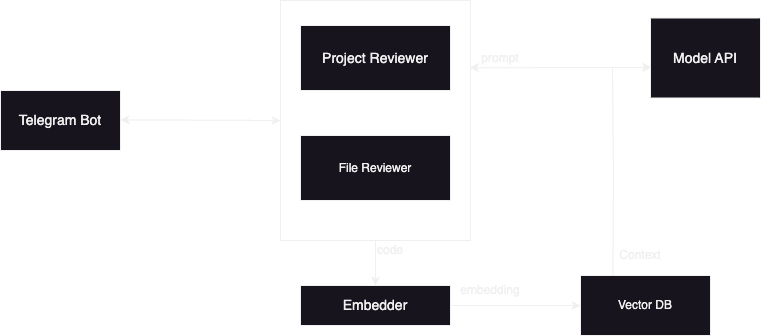
src/bot — Telegram bot code.src/review — Code review logic.src/review/parsers - Code chunking logicContributions are welcome! Please open an issue or submit a pull request for any improvements or bug fixes.
MIT





