QChatAi
1.0.0

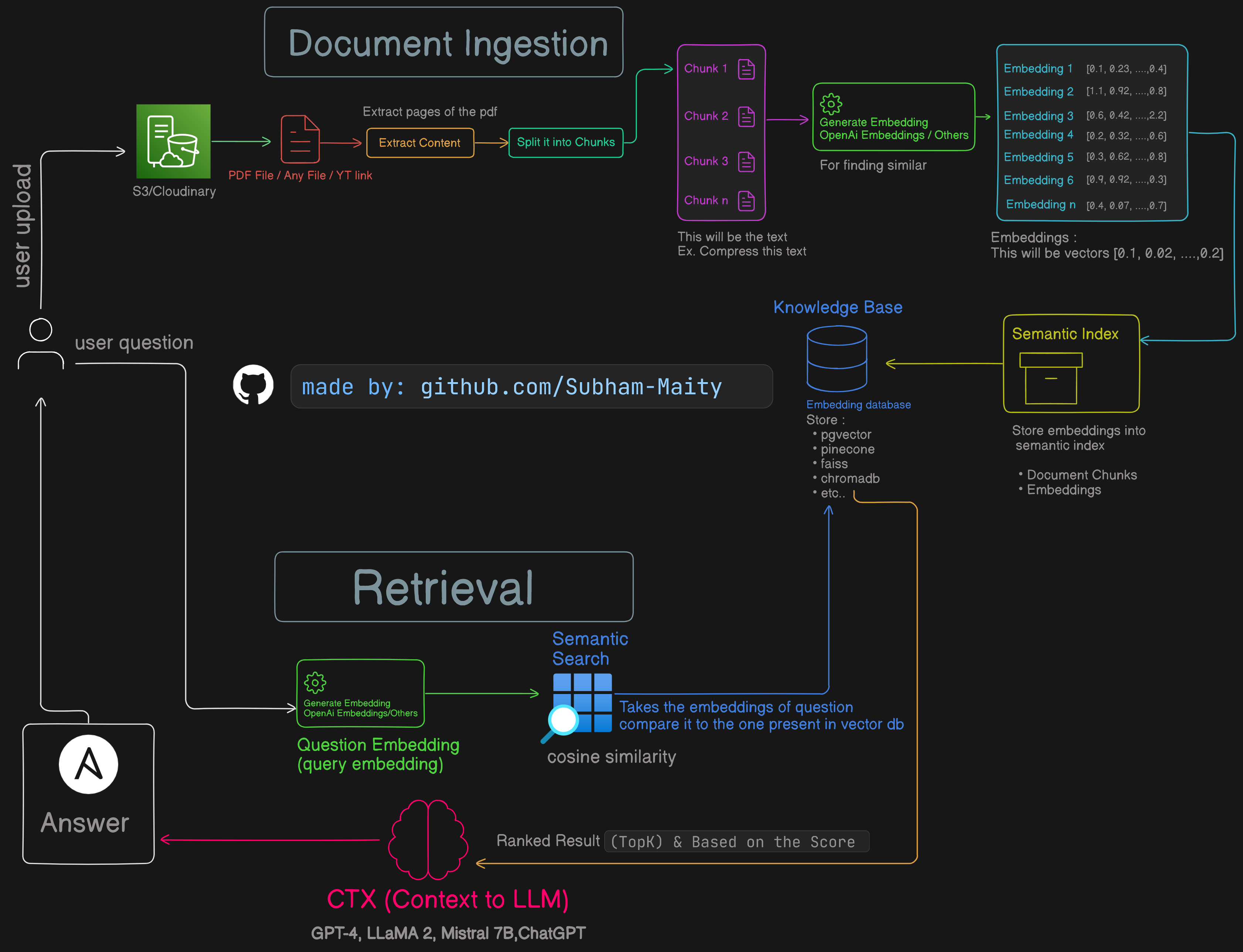
Sign In: Start by signing in from the landing page. Once signed in, you'll see a Let's Start button. Click on this button to begin.
Create a Project: After clicking Let's Start, you can create a project. Provide a title, description, and upload a PDF file. The PDF will be uploaded to a cloud bucket (such as S3) and stored in PostgreSQL.
PDF Processing: On the backend, the PDF file is processed to generate vector embeddings of the content. These embeddings are then stored for future use.
Asynchronous Processing: The entire processing is handled asynchronously using BullMQ, ensuring that it is efficient and does not block other operations, allowing you to proceed without waiting for the chat interface to be ready.
Dashboard Monitoring: You can view all your projects on the frontend dashboard. Each project will display a status: 'creating', 'failed', or 'created'. This allows you to track the progress and know when your project is ready. If any issues occur, you will be able to see the status and take appropriate action.
Chat Interface: Once a project is ready, you can open it to access a user-friendly chat interface. Here, you can ask questions and receive relevant answers based on the content of your PDF.
cd client
pnpm i

cd server
yarncd client
pnpm run dev
cd server
yarn start:devdocker compose upNote: We use both server actions and a NestJS server. Occasionally, Docker may throw an error. If you encounter an issue, please raise an issue.
.env file in the server directory (server/.env):
# Server port
PORT=3333
DATABASE_URL="postgresql://neondb_owner:********/neondb?sslmode=require"

# S3
AWS_ACCESS_KEY_ID=A********P**T********VN
AWS_SECRET_ACCESS_KEY=M********U9J********aYr4********Yostzb
AWS_S3_REGION=us-east-1
AWS_S3_BUCKET_NAME=********

# Rate Limit
UPLOAD_RATE_TTL=60
UPLOAD_RATE_LIMIT=3

# Pinecone
PINECONE_API_KEY=e1******-56**-43**-8f**-f**7**3**2**

# OpenAI
OPENAI_API_KEY=sk-p******j-f******og******Nr0P******FJt******JiBl******EvExEK

# Clerk
CLERK_SECRET_KEY=sk_t******rL5******BkF******7******2hF******aL

# Redis
REDIS_HOST="redis-*****tysub*****1-8*****.a.aivencloud.com"
REDIS_PORT=*****
REDIS_USERNAME="*****"
REDIS_PASSWORD="AVNS_*****Mi*****S*****a".env.local file in the client directory (client/.env.local):
NEXT_PUBLIC_CLERK_PUBLISHABLE_KEY=pk_test_******reWx******M******su******b3******uZG******A
CLERK_SECRET_KEY=sk_test_SI******B******Kw******Qgdx7V******9aL

NEXT_PUBLIC_CLERK_SIGN_IN_URL=/sign-in
NEXT_PUBLIC_CLERK_SIGN_UP_URL=/sign-up
NEXT_PUBLIC_CLERK_AFTER_SIGN_IN_URL=/
NEXT_PUBLIC_CLERK_AFTER_SIGN_UP_URL=/
NEXT_PUBLIC_CLERK_AFTER_SIGN_OUT_URL=/

# OpenAI
OPENAI_API_KEY=sk-p******j-f******og******Nr0P******FJt******JiBl******EvExEKNestJS optimally utilizes Express (Node.js), achieving performance and scalability not easily attained with a conventional setup.
server/src/app.module.ts:
providers: [
  {
    provide: APP_GUARD,
    useClass: ClerkAuthGuard,
  }
]a. Use Prisma commands:
npx prisma studio
npx prisma migrate dev --name init
b. S3
Bucket policy - EditPaste this but make sure - Edit Block public access - Disable
2.1 S3 policy (arn:aws:s3:::<bucket-name>):
{
  "Version": "2012-10-17",
  "Statement": [
    {
      "Sid": "PublicReadGetObject",
      "Effect": "Allow",
      "Principal": "*",
      "Action": "s3:GetObject",
      "Resource": "arn:aws:s3:::<bucket-name>/*"
    }
  ]
}
2.2 . CORS configuration:
Cross-origin resource sharing (CORS) - edit
[
  {
    "AllowedHeaders": ["*"],
    "AllowedMethods": ["PUT", "POST", "DELETE", "GET"],
    "AllowedOrigins": ["*"],
    "ExposeHeaders": []
  }
]




