PDF AI SaaS App
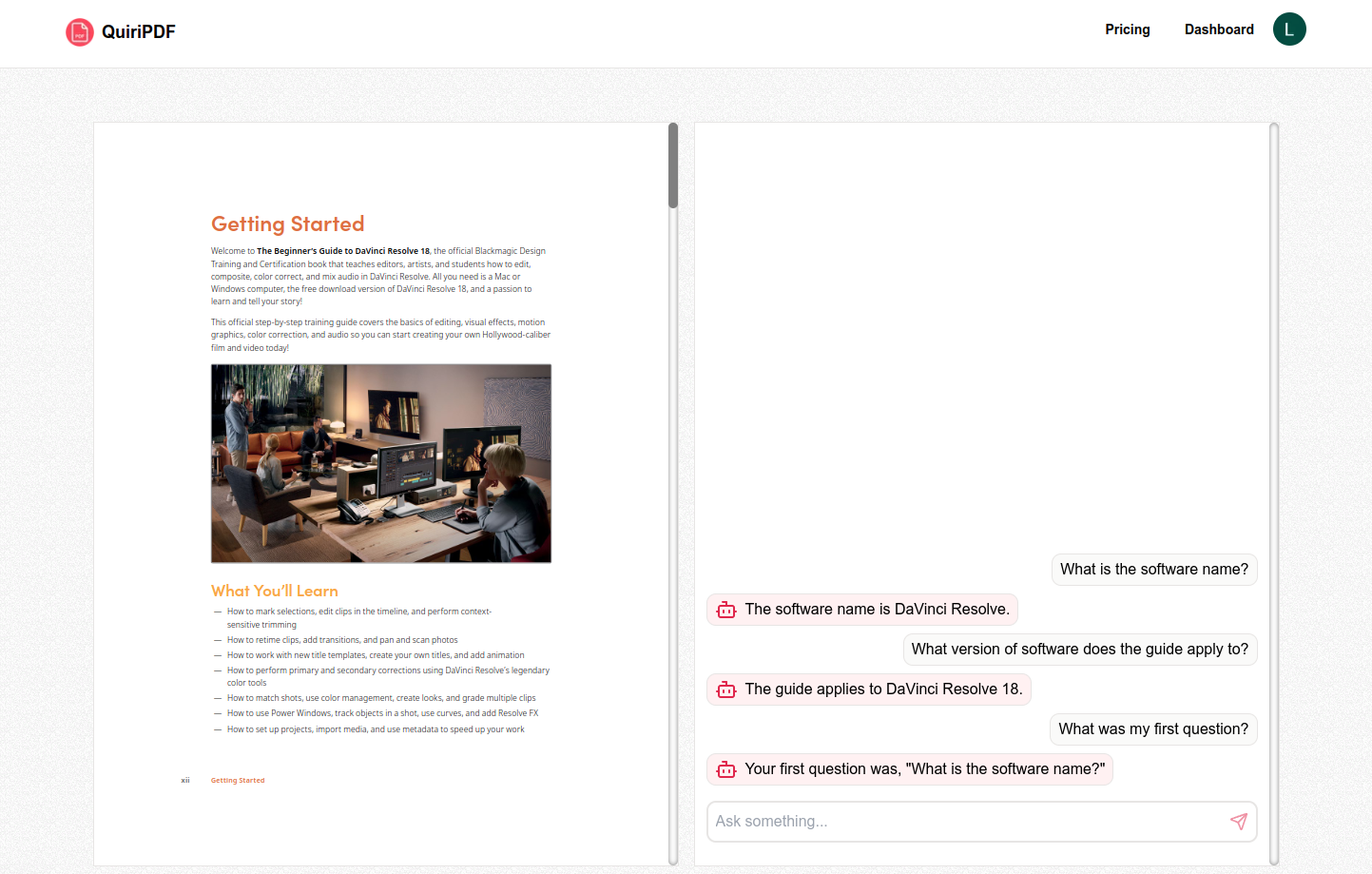
A PDF AI SaaS full stack app has built with Next.js framework, Shadcn UI, OpenAI, LangChain, Stripe and more. The app allows users to upload any PDF document with size limit based on the subscription plan and search for specific information inside this document. Only authenticated users can use the platform. There are 2 options: Free plan with limited usage and Pro plan to give more features into the user.
Demo video: Link
Features
- Allow user to log in to the platform
- Allow user to upload any PDF document and search for any content inside this
- Intuitive Drag n' Drop Uploads
- PDF Viewer to see the uploaded PDF document
- 100% written in TypeScript
- OpeanAI text embedding model has been used to embedding the pdf file and gpt-4o to chat with the document
- LangChain use to integrate LLM into the app
- Pinecone Vector Database has been used to store embeds data into vector space
- MongoDB NoSQL Database has been used to store user, document and chat informations
- Stripe payment is used with webhook for payment in order to retrive information about the status of the payment
- Next.js framework is used to create full stack app
- Tailwind CSS is used with Shadcn UI component library to built beautiful design
- Prisma ORM is used to communicate with database
How to run from local repository
- Clone the repository
- Run
npm install command in your terminal
- Generate auth secret, which automatically create .env.local file for environment variables (you can use .env later and put the secret into it):
npx auth secret
- Set up Google OAuth: Google
- Create stripe account and get keys link.
- Add stripe webhook endpoint link.
- Activate stripe billing portal link.
- Create pinecone index link.
- Add environment variables into the .env file:
AUTH_SECRET="<YOUR-SECRET>"
AUTH_GOOGLE_ID="<YOUR-GOOGLE-ID>"
AUTH_GOOGLE_SECRET="<YOUR-GOOGLE-SECRET>"
DATABASE_URL="<YOUR-DATABASE-URL>"
UPLOADTHING_TOKEN="<YOUR-UPLOADTHING-TOKEN>"
PINECONE_API_KEY="<YOUR-PINECONE-TOKEN>"
OPENAI_API_KEY="<YOUR-OPENAI-TOKEN>"
STRIPE_SECRET_KEY="<YOUR-STRIPE-SECRET-TOKEN>"
STRIPE_WEBHOOK_SECRET="<YOUR-STRIPE-WEBHOOK-SECRET-TOKEN>"
STRIPE_PRODUCT_PRICE_ID="<YOUR-STRIPE-PRO-PLAN-PRICE-ID>"
- Create new product with features on stripe: link
- Run
npm run prisma:generate in order to apply prisma schema
- Run
npm run prisma:push to push db to MongoDB
- Run
npm run dev command in your terminal
- Server running at
http://localhost:3000/
Useful links and informations
- Prisma env.local handling:
- Prisma and MongoDB edge compatibility:
- Auth.js code example:
- Google Provider config page:
- Stripe, checkout session, webhook:
- GitHub #1
- GitHub #2
- Linkedin.com
- Dev.to
- Medium.com
- Stripe Test cards:
Dependencies
- Next.js
- React
- React DOM
- Typescript
- TanStack Query
- Lucide Icons
- Tailwind CSS
- Shadcn UI
- React Dropzone
- React PDF
- Sonner
- date-fns
- Sharp Image optimalization
- Auth.js
- Prisma
- MongoDB
- OpenAI API
- Langchain
- Pinecone
- Uploadthing
- pdf-parse
- Stripe
Layout