Groupd Mobile Application
1.0.0

A mobile application, developed using the ionic 2 framework, that acts as another front-end for Groupd - a social networking application to find team mates for start up projects. Third Year, Software Development.
Groupd-Mobile-Application was undertaken as an assignment for a semester long third year project. This assignment was devised and developed as a group project with ImErvin. Groupd-Mobile-Application, the cross platform mobile application, is one of three repositories. The other two repositories include Groupd-BackEnd, the groupd API with contributions from both parties, and Groupd-FrontEnd, the web application developed by ImErvin. For more details about Groupd, please go to the About Groupd section.
Points to consider:
Groupd is a social networking site devised to help users find team mates to work on a project idea they may have. Groupd was designed with developers in mind, however, Groupd encourages and welcomes users of all professions and needs to use this platform to find teammates. Together, Ervin and I developed a shared database(see Why Groupd for database schema) and RESTful API to manage our database and administer our CRUD features to assist our two front-ends(see Groupd-BackEnd for full documentation). We wanted Groupd to allow users post their desired projects, communicate with other users and to work on projects with other users. Groupd can be used to recreationaly and/or to gain experience and to eventually build a portfolio from projects they have worked on. Groupd is also useful for finding team members for a start up business.
See Groupd-FrontEnd for full docmentation on the web application.
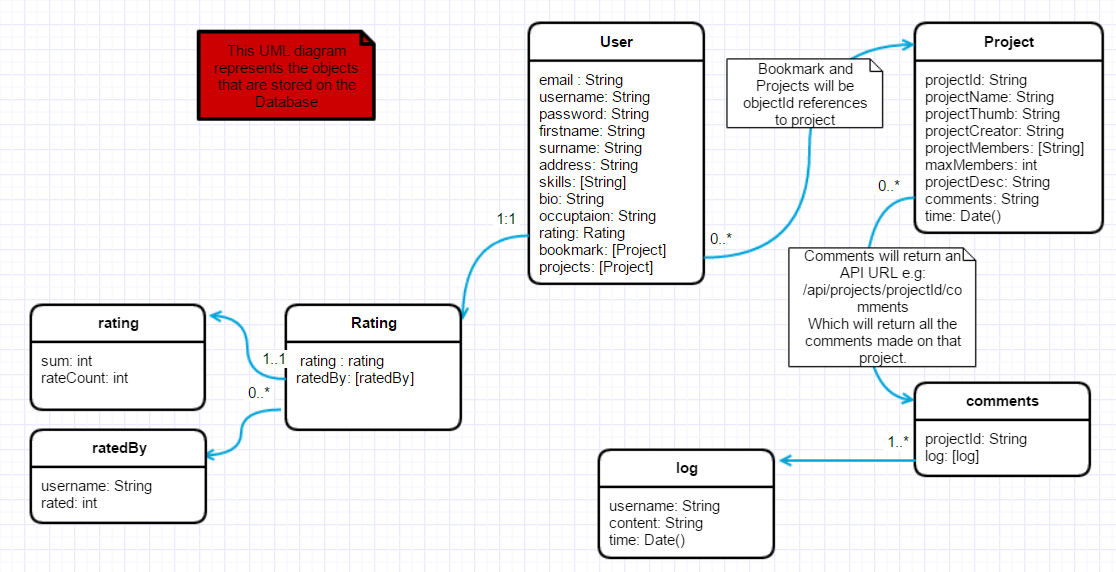
After my detachment from my original idea, I joined a classmate's project, ImErvin, who's project seemed very amicable to me. We were also both eager to work in group to experience and practice collaborating on Github. Ervin welcomed the idea of a mobile application equivalent to his web application. Joining to form a group we could add extra features. Together, we designed a new database schema, attached below, and updated the API to correspond with these changes.
My original idea was to build a windows desktop security app, Encrypt Keeper.
Encrypt Keeper would:
Issues:
Although I have abandoned this idea as my end of year project, I do not wish to give up on implementing this project, maybe not as a windows store application. I have already implemented the facial recognition for an assignment where we had to create a Windows Universal Platform Application this semester, this WUP application can be found on Github: Safe-Note, and on the Windows Store: Note Safe(the name Safe Note was not available at the time of submission).
Main Features:
Additional Features
I designed the Groupd-Mobile-Application with a sidemenu that intelligently knows when data changes. The user data provider is called to log a user in or out, and triggers a logged in event to change the side menu. The user data also sets the user by storing the current user in local storage and triggering an event to alert any resources of the change. On every page load and reload the current user is reloaded from the API and user data provider will alert any resources of the changes, where the resources will asynchronously get the new data from storage.
The logged out menu is made up of two sections:
The logged in menu is made up of three sections:
Sign Up
The sign up page consists of a set of slides, with a form in each slide to take in the sign up data. I used angular 2's formbuilder to validate the input in real time with built in validators and custom validators. Unfortunatly, I could not get the asynchronous custom username-availability-validator to work, as the validator's methods are static, I could not figure out how to use a http call inside the validator. The validation for the username's availabilty is done once the data is submit. If the username is already taken, the user will automatically be taken to the necessary slide and be alerted that the username is taken. If the username is available, data is saved as a user, the form's are reset, and the user is alerted to the success and given the option to go to straight to the log in page.
Log In
The log in page is pretty self explanatory, the user can log in with their username and password. If the username doesn't exist, the user will be alerted that the user name was not found. If the username exists and the password is invalid, the user will also be alerted of this. If the username and password is a match, the user will be logged in by the user provider as described above, and relocated to the home page as a logged in user. The log in state will be saved in storage so that the user will already be logged in on the following application start-ups, unless the user logs out.
Tutorial
A set of slides explaining Groupd and a brief description of how to use it.
Home
The home page consists of a list of all the projects displayed in seperate cards, each project card has the project name, the project thumbnail description, the time created and the amount of available positions. Each card also has two buttons; one to add or remove the project to or from the user's favourites/bookmarks, and one to view the project in the project page.
Project Page
The project page takes the project ID in as a parameter, from there it gets the project's data and the creator's data. This page consists of two cards, the project card and the creator card. If the creator of the project has deleted their account or was not found the creator card does not appear.
The creator card consists of the placeholder icon determined by the creator's gender (male or female - default is female), the creator name and a button. If the viewer is the creator, the button will bring the viewer to the edit project page. If the viewer is not the creator, the button would bring the user to the creator's profile.
The project card consists of the project name, project thumbnail description, project description, maximum positions, positions available, tags, and members. If the project member is clicked, Groupd will check if this member still exists(the member may have deleted their profile, then another new user may have taken their name). If the member does exist, the viewer will be relocated to the member's profile. The project card also has two buttons located at the footer of the card; the comments button, which shows and hides the comments section, and the favourite button to add or remove the project to or from the viewer's projects.
The comments section consists of a list of the project comments, with an input box to add a comment underneath.
Edit Project
The edit project page is simply a form with the projects previously entered/saved data loaded into the input boxes. The edit project page's form is very similar to the project page's form, the difference being in the edit project page, the creator can add members. The creator can only add members who exist in the database. The creator is given two options, save changes or delete. Both options are received with an alert warning when clicked. On save changes the user document of any members changed are updated and the project document is also updated. On delete, any instance of the project in the creator and members is removed and the project is deleted permanently.
New Project
Similar to the edit project page, the new project page is a form with real time valitation. It has a single button to add the new project.
Search
Search is a tabbed page, with the tabs being: search project and search users.
Search projects uses a custom pipe to search for projects by project name or tags in real time. This is ideal for users looking for projects to work on. The layout of the list of projects is the same as the home page.
Search users uses a custom pipe to search for users by username or skills in real time. This is ideal for users looking for users to work on their projects. Each user displayed is displayed in a card, with the following details: gender icon, occupation, email, and tags. The card also has a button to go to the selected user's page.
Profile
The profile page takes the username in as a parameter, it then gets the user document and checks if it is the viewer's profile. The profile displays the user's username, location, occupation, email, rating, and skills. If it is the viewers profile the viewer is shown an edit button, that will relocate to the edit account page(described below), and a show raters button, that will have a modal pop up with a list of all the raters and their rates. The viewer can also click on the rater's usernames to relocate to their profiles. If it is not the viewer's profile, the viewer will be shown a rate button. If the rate button is clicked, an alert will pop up with an input box to enter rating. If the viewer has rated this person before, it will overwrite their last rate. The user's projects, whether a member or creator, are also displayed in the same format as the projects in the home page.
Favourites
The favourite page will display all of the projects saved in the user's favourites. The layout of the list of projects is the same as the home page.
Edit Account
The edit account page is simply a form with the projects previously entered/saved data loaded into the input boxes. The viewer is given two options, save changes or delete. Both options are received with an alert warning when clicked. On save changes the user document is updated. On delete, the user's ratings are removed from any other user's ratings(if the rating were not deleted, the ratings may become problematic if another user takes the same username once it's available) and the user document is deleted from the database.
Log out
The log out page has a button that calls the user data provider to tigger the logout event to change the menu, to clear the local storage and relocate to the log in page.
Ionic
The Ionic Framework can be used to create of cross platform mobile applications or web applications with HTML, CSS and JavaScript(Angular).
Ionic 1 vs Ionic 2
Ionic 1 uses angular 1, html and css whereas Ionic 2 uses angular 2, html and scss.
Why Ionic 2?
As Ervin had already began using angular 1, it could be seen as more sensible to use Ionic 1 to build my mobile application as he already had a bulk of the work done. I, however, chose Ionic 2 as I would rather my work be completely dignified as my own, and the main reason being that Ionic 2 offers many improvements. Josh Morony effectively describes these improvements here. In my opinion, Ionic 2, being the newer and improved version of Ionic, will continue to be improved and will be the focus of Ionic's team. The same can be said for the angularjs team, in angular 2's case. I was also quite eager to experience using typescript.
Follow the steps in Groupd-BackEnd: How to Run.
If you do not have Ionic 2 installed, follow the installation steps on the Ionic website found here.
Clone this repository and run the command:
npm install
Once everything else is set up and running. Make sure you current directory is: groupd-mobile-application (a sub-directory of the repository). Then run the following command:
ionic lab
To conclude, this project has been a rewarding experience. Working in a group and using Ionic 2 for the first time both being great contributors to this. If I were to re-do the project, I would start on this project idea from the beginning, rather than after another project idea attempt. I would also reference a seperate comments document, rather than embeding the comments in the projects document, as the comments are related data to the project, however the comments change with differing volatiliy to the rest of the project data. Comments can also grow quite rapidly to a possibly infinite amount, and should not burden the project document with it's possible great size. Finally, I would consider using a unique ID in the place of the unique username, and I would definitely add a property like, "dormant": true/false. This property would be used in the place of actually deleting the user document, would solve the problem of the referenced usernames(or IDs if that would be changed) being confused with old/new users, and would serve useful to offer old users a recovery option.
References:
Ionic Framework
http://stackoverflow.com/questions/13935733/mongoose-limit-offset-and-count-query
https://www.w3schools.com/jsref/jsref_indexof.asp
https://ionicframework.com/docs/storage/
http://ionicframework.com/docs/ionicons/
https://www.joshmorony.com/custom-pipes-in-ionic-2/
https://www.npmjs.com/package/ng2-search-filter
https://www.youtube.com/watch?v=-zW1zHqsdyc
https://www.youtube.com/watch?v=8Gz-KBbDDXM
http://stackoverflow.com/questions/32069388/repeatedly-background-task-ionic-framework
https://github.com/yannbf/ionic2-components
http://stackoverflow.com/questions/17616624/detect-if-string-contains-any-spaces
https://www.joshmorony.com/advanced-forms-validation-in-ionic-2/
http://stackoverflow.com/questions/35039610/angular2-manually-set-value-for-formbuilder-control
https://ionicframework.com/docs/v2/cli/generate/
https://www.youtube.com/watch?v=-yNJ-QrHvgc
https://ionicframework.com/docs/v2/resources/forms/
https://www.youtube.com/watch?v=-o_VGpJP-Q0
http://blog.ionic.io/10-minutes-with-ionic-2-adding-pages-and-navigation/
https://www.joshmorony.com/a-simple-guide-to-navigation-in-ionic-2/
http://reactivex.io/documentation/observable.html
https://www.youtube.com/watch?v=ei7FsoXKPl0
https://egghead.io/lessons/javascript-introducing-the-observable
https://www.youtube.com/watch?v=_frPHsE2PZk
http://stackoverflow.com/questions/36655379/ionic-2-templates
https://github.com/driftyco/ionic2-starter-sidemenu
https://ionicframework.com/docs/v2/api/components/menu/Menu/
https://blog.khophi.co/ionic-2-side-menu-tabs/
https://developer.mozilla.org/en/docs/Web/JavaScript/Reference/Global_Objects/String/trim
http://pointdeveloper.com/how-to-place-ionic-2-tabs-at-the-bottom-or-top-of-the-screen/
http://www.neilberry.com/how-to-run-your-ionic-app-on-real-devices/
Tara O'Kelly - [email protected]





