CAP0104 Capstone Project
1.0.0

Angkoot is an app that has a purpose to digitalize Angkot Transportation in Surabaya, Indonesia. The services that Angkoot provides now are fare prediction for the order, trip distance estimation, and user registration.
For the fare prediction we are inspired from Dimitre Oliveira: https://github.com/dimitreOliveira/NewYorkCityTaxiFare
And the fare prediction dataset that we used is from Kaggle. [dataset]
The deployment process with Flask to Google Compute Engine has been done using helps from Alara Dirik's tutorial: https://github.com/alaradirik/google-cloud-flask-tutorial [deployment]
For the fare prediction, we are using only around 500.000 data from the whole dataset. And then we preprocess the dataset based on Dimitre Oliveira Data Preparation with some adjustments. And then we build the model using Keras model. At first we try to use Tensorflow Estimator, same with Dimitre's one. But then we make some adjustment so that we only use Keras in our project. After that, we do the training and export the saved model. Next, the saved model is deployed using Flask, with addition of Nginx and Unicorn, into Google Compute Engine. From that, we get the API that later will be triggered from the Android app in order to make some predictions.
These are steps that you could do:
git clone https://github.com/anriza-fanani-bangkit/CAP0104-Capstone-Project/pip install -r requirements.txtWe are basically doing these things from Alara Dirik's tutorial above with some adjustment. The details could be read [here]
# update system packages, install the required packages, and miniconda
sudo apt-get update
sudo apt-get install bzip2 libxml2-dev libsm6 libxrender1 libfontconfig1
wget https://repo.anaconda.com/miniconda/Miniconda3-4.7.10-Linux-x86_64.sh
bash Miniconda3-4.7.10-Linux-x86_64.sh
# make conda executable
export PATH=/home/<based on your Google Cloud's name>/miniconda3/bin:$PATH
rm Miniconda3-4.7.10-Linux-x86_64.sh
# create and activate a new virtual environment
conda create -n angkoot python=3.7
conda activate angkootCAP0104-Capstone-Project
│ README.md
│ flask_model.py # Functions to preprocess the input data
│ keras_model.h5 # Keras saved model to be loaded in Flask
│ main.py # Flask model app to predict continuosly
│ main_dataform.py # Flask model app to predict with data form
│ requirements.txt # To install the dependencies
cd CAP0104-Capstone-Project
pip install -r requirements.txt
python main.py# you need to go out from repo folder
cd
sudo apt-get install nginx-full
sudo /etc/init.d/nginx start# remove default configuration file
sudo rm /etc/nginx/sites-enabled/default
# create a new site configuration file
sudo touch /etc/nginx/sites-available/angkoot_project
sudo ln -s /etc/nginx/sites-available/angkoot_project /etc/nginx/sites-enabled/angkoot_projectsudo nano /etc/nginx/sites-enabled/angkoot_projectthen, add this code below:
server {
    client_max_body_size 100M;
    location / {
        proxy_pass http://0.0.0.0:5000;
    }
}sudo /etc/init.d/nginx restartcd CAP0104-Capstone-Project
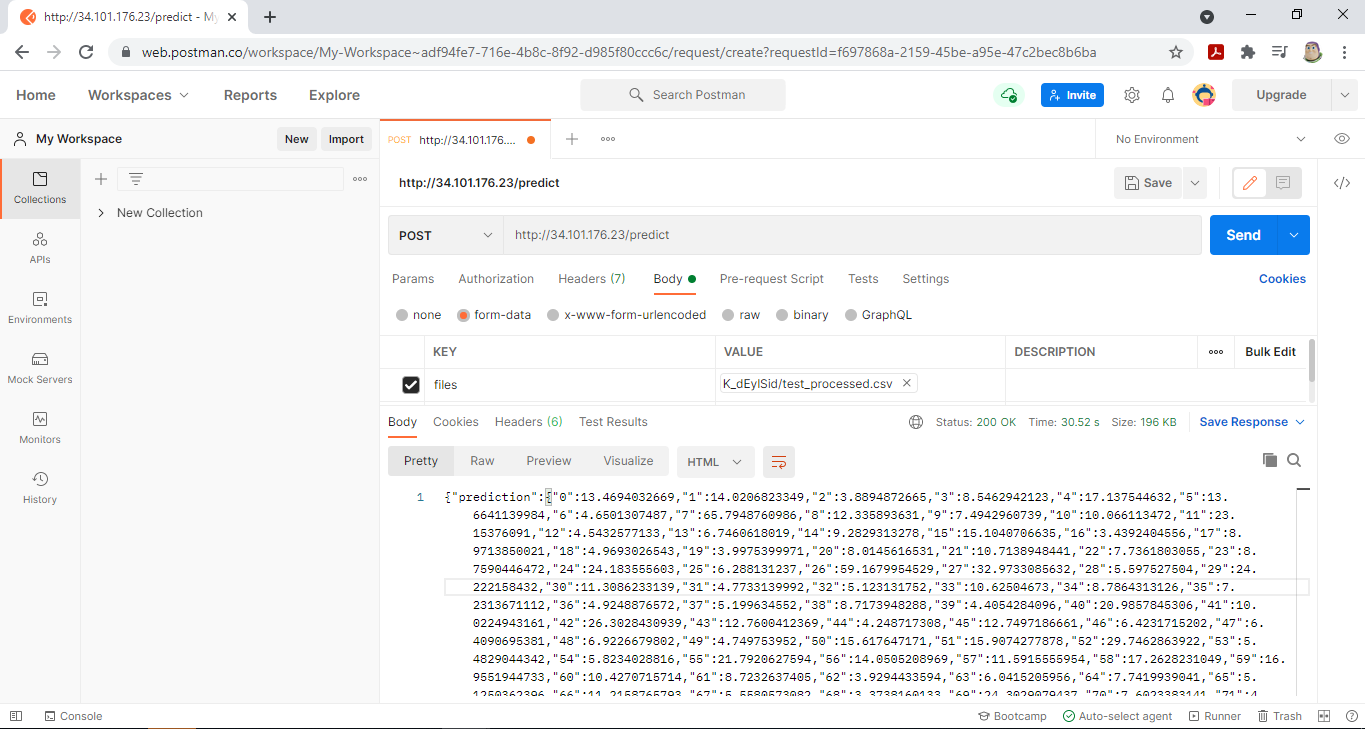
gunicorn --bind 0.0.0.0:5000 main:appBecause of the Android app is still under development, you may check the result by GET requests and POST requests with test_processed.csv with key values 'files' to http://34.101.176.23/ for GET requests (it should show "Kirimas was here") and http://34.101.176.23/predict for POST requests (it should show json file as a result of model predictions) as shown below: