gonnect
v1.0.0

GOnnect is an opinionated, simple, easy to use VoIP client, designed for Linux / Flatpak based installations. It makes use of various Flatpak portals and is meant to integrate well into modern Desktop Environments like KDE or GNOME.
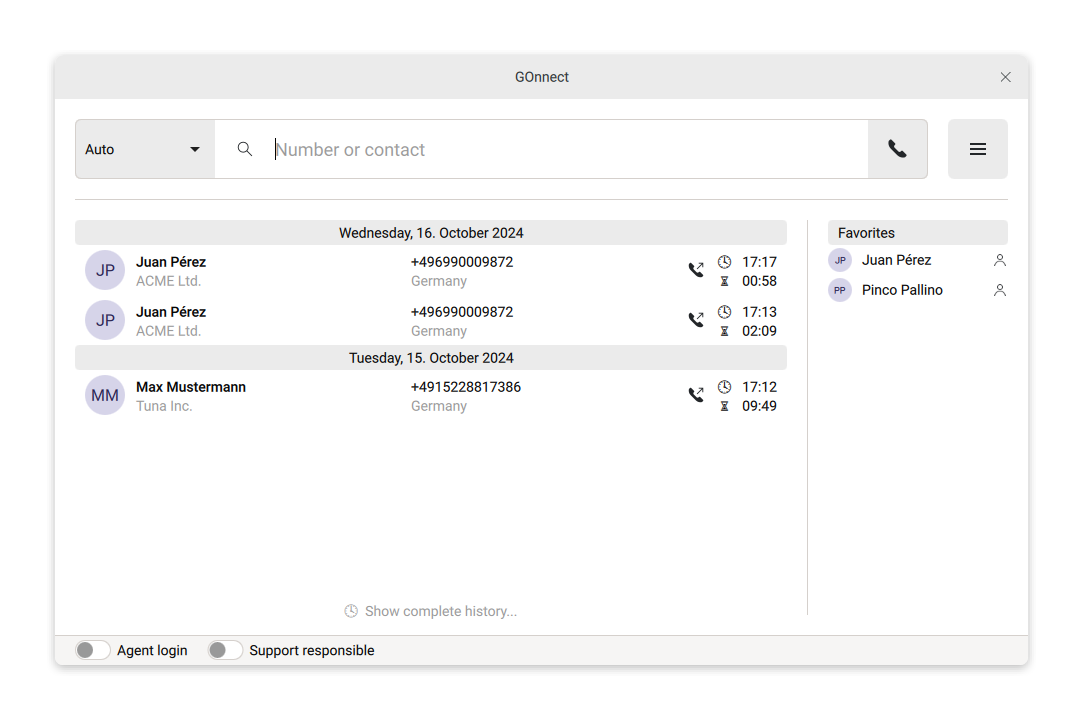
What is special about GOnnect is that is meant to be provisioned. For that reason it has no configuration wizard or settings dialog and requires a working configuration file in place.
Here's a short feature list:
tel: / sip: URLsGOnnect is distributed via Flathub only. To install it, either visit the Flathub page or search for GOnnect in GNOME-Software or KDE's discover.
TODO: flathub link
After you have installed GOnnect, either adjust the provided
sample.conf and place it in ~/.var/app/de.gonicus.gonnect/config/gonnect/99-user.conf,
or head over to the documentation.
GOnnect is licensed unter the terms of the GNU GENERAL PUBLIC LICENSE Version 2, or at your opinion any later version.
See LICENSE for the full content of the license.
GOnnect is based on Qt / C++ and requires a set of libraries to be buildable. There are may ways to achieve a build, but we'll describe just one of them in the following paragraphs.
As we use immutable desktops here at GONICUS and development takes place in a dedicated distrobox for each project, we also use this procedure for GOnnect.
Make sure to have distrobox installed. On Fedora for example run:
sudo dnf install distroboxAfter distrobox is installed, create the distrobox for GOnnect development by running
distrobox assemble createin the directory of your GOnnect checkout.
Assuming you're using the documented distrobox approach above, enter the distrobox and start the ordinary CMake build:
distrobox enter gonnect
mkdir build && cd build
cmake -GNinja ..
cmake --build . --parallel $(nproc --all)
Alternatively you can simply run qtcreator inside the distrobox and open the
project as usual be selecting the CMakeLists.txt.
As GOnnect is mainly developed for use in Flatpak, some features only work in this kind of environment. If you want to build the Flatpak locally, you can do this by the following commands on your host shell:
flatpak uninstall de.gonicus.gonnect
flatpak run --command=flatpak-builder org.flatpak.Builder build --user --install-deps-from=flathub --disable-rofiles-fuse --force-clean --repo=repo resources/flatpak/de.gonicus.gonnect.yml
flatpak --user remote-add --no-gpg-verify gonnect-repo repo
flatpak --user install gonnect-repo de.gonicus.gonnect
Make sure to cleanup repo, build and .flatpak-builder to make QtCreator not eat
up your CPU, memory and the whole computer as a desert.





