flutter_base_project
1.0.0

State Management
Localization
Cache
Network
Serializable
Base
Can be moved from project to project. The structures it contains can be used smoothly in every project.
In a project based on MVVM architecture, we create the base structures of Model-View-ViewModel layers from here.
Constants
Folder where values that will not change throughout the application and can be used from start to finish are kept.
Includes Navigation names that will be used by application Path, Enum values, Image constants, Navigation paths.
Extensions
Extensions that can be used in every part of the project in terms of clean code mentality are essential.
context_extension => the place where values such as width, height, padding, and duration are kept within the application.
Init
The place where important controls such as cache, lang, navigation, network, notifier, and theme are managed for a mobile application.
cache => contains locale manager for managing application cache in this section.
lang => contains language manager for localization. For localization, the languages that will be localized should be put into folders such as en-US.json, tr-TR.json under assets/lang. After any changes made in these folders, the command "flutter pub run easy_localization:generate -O lib/core/init/lang -f keys -o locale_keys.g.dart -S assets/lang" should be written in the terminal.
navigation => the place where navigation service and navigation routes are provided.
network => used for managing web scraping operations from websites using Dio
notifier => manages theme changes between dark and light themes with theme notifier.
theme => used for managing the application's theme.
After completing the architectural development processes specified in the Project Layers section, we can start filling the views and viewModels of the application in general.
In this section, we see how we can use our application's views and viewModels in an integrated way with the code we wrote in the base layer.
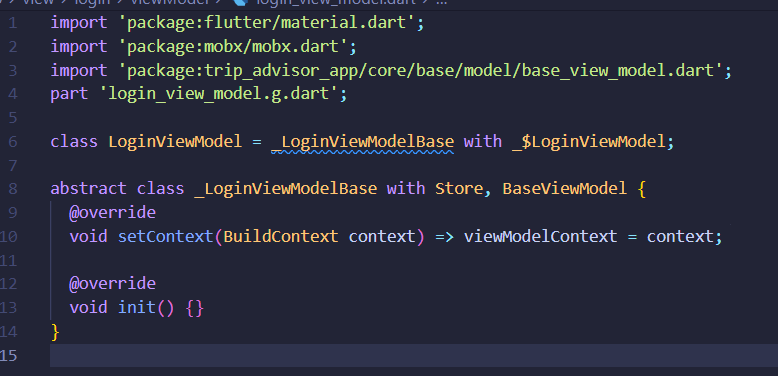
When we start to make the ViewModel section, we first start to generate a viewModel code using the mobx snippet. (Note that build_runner_watch is active during this process.)
After completing this process, mobx_codegen starts writing the generated codes to the viewModel.g.dart folder on our behalf.
While developing our ViewModel, we use the base_view_model we made in the base section. For this process, we add the class with Store, BaseViewModel structure to the class to derive it from the BaseViewModel class.
After adding these structures, we integrate our setContext() and init() functions from our base_view_model."
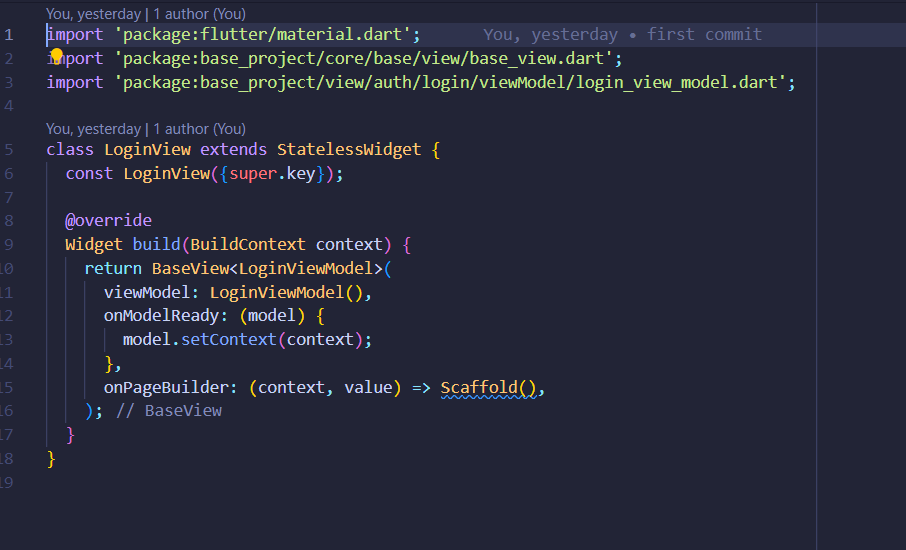
When starting to fill the View section, we first utilize the view_base we developed in the base section.
To draw our page, we add our BaseView to the return section, but this BaseView must be derived from the viewModel (e.g.: BaseView())
After integrating the BaseView, we start filling in the code we wrote in the base_view section here.
viewModel => We give the viewModel of the page we drew as explained above.
onModelReady => We control the context interaction of the model we gave.
onPageBuilder => This is the section where we start drawing our page.