xone
1.0.0

Xone provides you a lightweight full stack environment on top of Node.js to develop beautiful applications for every use (based on HTML5 and JavaScript) and enables the optimal integration of an universal codebase into a wide range of systems (e.g. mobile devices, tablets, desktops, browser environments).
Xone will get some major changes. This was required to open capabilities for upcoming features we are working now like Xone Native. The plan is to release a final architecture until v.1.0.0 and then also to be done with most of the breaking changes.
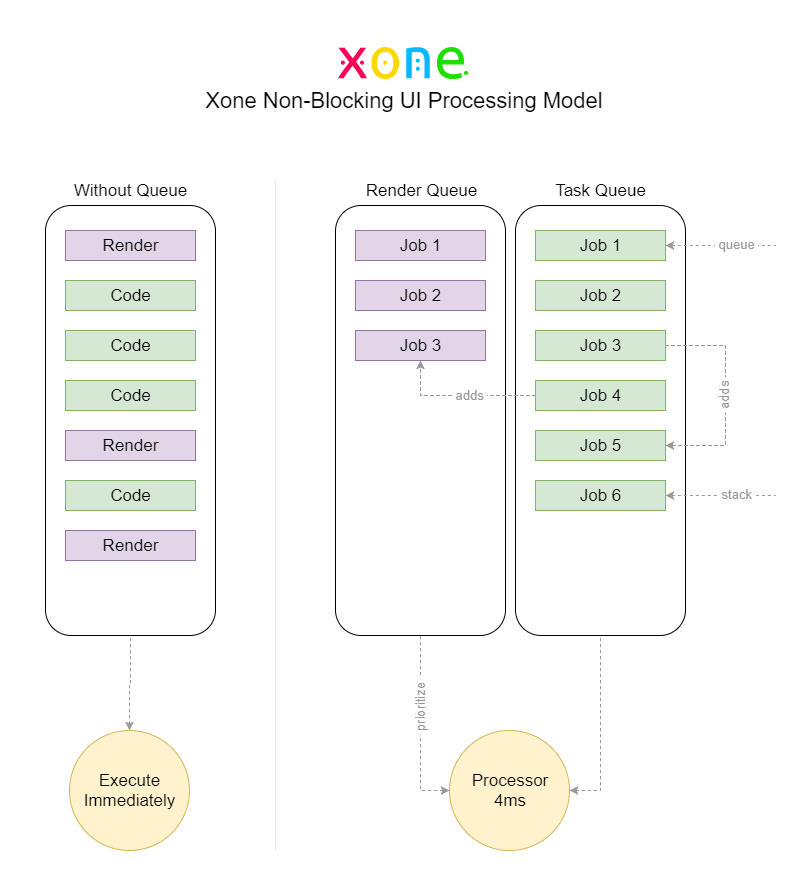
asyncpaintpromisequeuestackasaprun (Pseudo Thread Runner Instance)APP.CONTROLLER[name] → new Controller(name) or Controller.new(name)APP.VIEW[name] → new View(name) or View.new(name)APP.EVENT[query] → new Event(query) or Event.new(query)APP.ROUTE[route] → new Route(route) or Route.new(route)APP.MAPPER[name] → Is now a part of View, Model and/or Route (see: View Mappings, Model Mappings, Payload Mappings)APP.MODEL[name] → new Model(name) or Model.new(name)APP.WORKER[name] → new Worker(name) or Worker.new(name)APP.HANDLER → you are free to use any style (like before)APP.HELPER → you are free to use any style (like before)APP.SETTING.get(key) → Setting.get(key)APP.PLUGIN.Filesystem → FilesystemCORE.* → Util.{Package}.* (e.g. Util.Array.merge)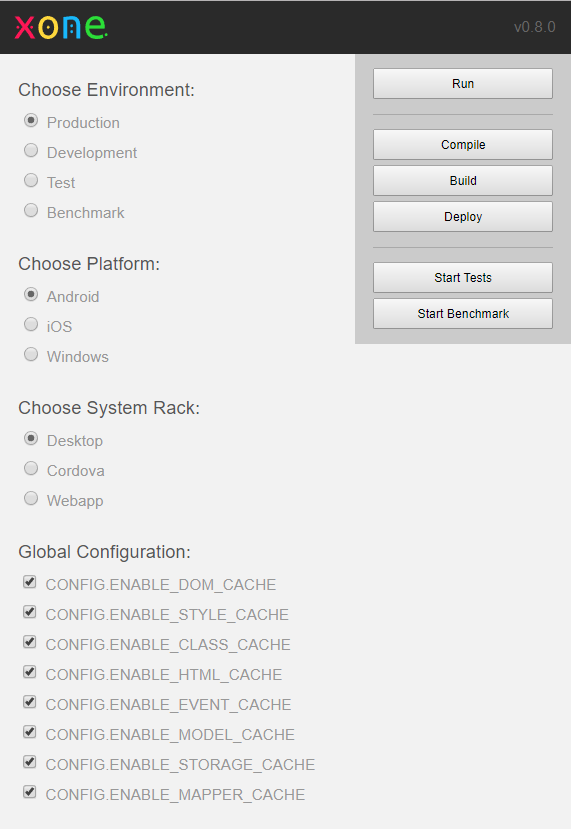
Those features will become deprecated for now (unsupported):
Basically Xone has an easy to learn high-level interface without forcing you to implement any low-level "framework-cryptofied" code as you would do with Angular or React. That also preserves huge flexibility to your codebase for upcoming technologies, ports or any other major changes.
Xone basically is available in 3 different versions:
xone create| Features by default | Xone Project (Environment) | Xone Bundle (Standalone) | Xone Library (Standalone) |
|---|---|---|---|
| Final project filesize | smallest | small | normal |
| Core Library | |||
| MVC Framework | |||
| Render Engine | |||
| Unit Tests | - | - | |
| Debugging Tools | - | ||
| Environments | - | - | |
| Global App Configuration | - | ||
| Build/Compile Project | - | ||
| Manage Platforms | - | - | |
| Dynamic Templates (HTML > JSON) | - | - | |
| Dependency Management | - | - | |
| Initial Codebase | - | - | |
| CLI Tools | - | - | |
| Support Closure Compiler Advanced Mode | - | ||
| Dead Code Removal | - | ||
| Is not strictly bound by Conventions | - | ||
| Does not require Node.js | - | ||
| Use as a Standalone Library (like jQuery/Underscore) | - | ||
| Use as a Framework (like Bootstrap/Angular) | - | ||
| Use as a Dev Environment (like Sencha/Meteor) | - | - |
> npm install -g xoneNote: To make the Xone CLI globally available, you have to install Xone as a global npm module (also in addition to any local installation if you want to keep simple as most as possible). You can also use a local custom versions of Xone as well as using the CLI without any global installations (read further).
Note: Xone Project binaries typically has to be installed via "xone create" or "xone install" and comes with its own pre-defined folder structure (followed by some conventions). You can pick one of the two stand-alone versions optionally to skip as many conventions as possible (e.g. Xone acts like an extern Javascript Plugin).
Alternatively in the root of your project you can use the local CLI shortcut app instead for xone, e.g.:
my_project> app buildNote: The options create and install both are not available over the shortcut app.
On a linux machine you may use:
sudo npm install -g xoneIf the global "xone" identifier is not registered properly try one of these lines:
hash xone
hash -r
Alternatively you can use the local CLI fallback like:
bash xone buildCreate a new project inside the directory workspace/my_project:
workspace> xone create my_projectWorks, but it is generally not recommended to use whitespaces in a project folder name:
workspace> xone create "my project"Read further
To update Xone of an already existing project you basically need 2 steps:
> npm install -g xoneworkspace/my_project> xone installNote: This will not overwrite any of your project files! Only projects xone library files located in app/lib/xone/ are updated.
Read further
Un-compiled sources located in: workspace/my_project/app/*
my_project> xone buildProduction build located in: workspace/my_project/public/www/*
Note: We recommended to use production builds for any external/public release and use the sources only for developing, testing and may some other internal purposes. To skip the build integration of Xone, you have to use the standalone version instead.
my_project> xone serverOpen your preferred webrowser and goto 'http://localhost/app/' or 'http://localhost/public/www/'
Optionally you can pass custom host and port:
my_project> xone server localhost 8080Open your preferred webrowser and goto 'http://localhost:8080'
Open app/index.html from sources or public/www/index.html from production build in your preferred browser.
Use production builds located in workspace/my_project/public/* to move forward into your Cordova-based projects or upload to a webserver.
Xone provides custom platform injections to perform platform specific production builds. Therefore all those builds only includes necessary code and dependencies for their related platform.
Show currently defined platforms:
my_project> xone platformPerform platform specific compilation:
my_project> xone compile androidCompiled files remains in: workspace/my_project/app/*
Perform platform specific builds:
my_project> xone build androidBuild destination: workspace/my_project/public/android/*
You can add unlimited custom platforms, e.g. create a platform 'webapp':
my_project> xone platform add webapp
my_project> xone build webapp
Build destination: workspace/my_project/public/webapp/*
my_project> xone build bundleBuild destination: workspace/my_project/app/lib/xone/dist/xone.bundle.js
my_project> xone build libBuild destination: workspace/my_project/app/lib/xone/dist/xone.lib.js
my_project> xone build lib min ./app/js/Build destination: workspace/my_project/app/js/xone.lib.min.js
Note: The order of passed parameters cannot be changed actually.
<!DOCTYPE html>
<html>
<head>
    <meta charset="UTF-8">
</head>
<body>
    <!-- END_OF_BODY -->
    <!-- LOAD XONE: -->
    <script src="js/xone.lib.min.js"></script>
    <!-- YOUR APP CODE: -->
    <script src="js/app.js"></script>
</body>
</html>Xone build uses the Google Closure Compiler. All Xone libraries also supports compilation in "Advanced Mode". The build properties can be configured in xone.json. The Closure Compiler also provides a simple dependency management system (provide/require) you should make use of to improve dead code removal.
Note: Actually Xone supports 2 different versions of closure compiler: 1. requires Java, 2. requires Javascript (Node). It is recommended to have a Java (JRE) properly installed on your machine to unlock some benefits of the Closure Compiler Java version. To change the type of the compiler you need to change the value of the field
closure_compiler_lib_typefrom"js"into"jar"inxone.jsonaccordingly.
Note: If you have less experience with the Closure Compiler you can optionally set the compilation level to "simple" on the field
closure_compiler_levelwithin the xone config file.
| Features by default | Closure Compiler (Java) | Closure Compiler (Javascript) |
|---|---|---|
| Dependency Management | ||
| Auto Sort Dependencies | - | |
| "Strict" Dependencies (Entry Point) | - | |
| "Pretty Print" Compilation | - | |
| Build Performance | Normal | Slow |
| Compression Ratio | Best | Good |
| Memory Consumption | Normal | Extreme |
my_project> xone docsDocs will be generated in 'docs/api/'.
Default environments are:
Change environment in app/manifest.js:
"env": "development",
"platform": "www"
Or just adding parameters to the URL:
http://localhost:9000/?env=test&platform=android&debug=trueNote: You are also able to override any
CONFIGattribute by passing URL parameters respectively.
Show currently defined environments:
my_project> xone envAdd custom environments:
my_project> xone env add offlineBuild destination: workspace/my_project/app/config/offline.js





