BthPS3
vers v2.14.0

 BthPS3
Windows kernel-mode Bluetooth Profile & Filter Drivers for PS3 peripherals.
/biː θriː/
TL;DR: these drivers allow popular PlayStation(R) 3 gaming peripherals (SIXAXIS/DualShock 3, PS Move Navigation & Motion Controllers) to connect to Windows via Bluetooth without losing any standard functionality. ?
This set of Windows kernel-mode drivers enhances the standard (a.k.a. vanilla) Bluetooth stack (Microsoft/Broadcom/Toshiba/Intel/...) with an additional L2CAP server service (profile driver) and a USB lower filter driver gracefully working around the reserved PSMs issue causing the PS3 peripherals connections to get denied on the default Windows stack. The profile driver attempts to distinguish the incoming device types based on their reported remote names and exposes their HID Control and HID Interrupt channels via simple bus child devices (a.k.a PDOs). The profile/bus driver supports both "regular" operation modes (requiring a proper function driver like a HID-minidriver) and "raw" mode (powering the PDO up without a function driver and exposing it to user-land) for maximum flexibility and future-proofing. The PSM filter only attaches to Bluetooth class devices and unloads itself if the underlying enumerator isn't USB.
The solution consists of the following individual projects:
BthPS3 - Multi-purpose kernel-mode driver. Function driver for service PDO exposed by BTHENUM (Microsoft), Bluetooth profile (L2CAP server service) and bus driver for PS3 wireless peripherals.BthPS3PSM - Lower filter driver for BTHUSB, patching L2CAP packets. Reroutes L2CAP traffic to profile driver.BthPS3CfgUI - User-land GUI utility to safely edit driver settings.BthPS3Installer - WiXSharp-based setup for driver installation and removal.This solution contains BSD-3-Clause and MIT licensed components:
For details, please consult the individual LICENSE files.
This is a community project and not affiliated with Sony Interactive Entertainment Inc. in any way. "PlayStation", "PSP", "PS2", "PS one", "DUALSHOCK" and "SIXAXIS" are registered trademarks of Sony Interactive Entertainment Inc.
BthPS3 components can run on Windows 10 version 1507 or newer (x64, ARM64).
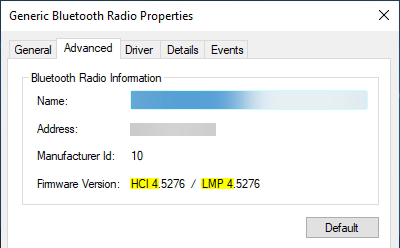
The BthPS3 profile driver and supported devices have been tested successfully with host devices following Link Manager Protocol (LMP) core specification version 3 (which equals Bluetooth 2.0 + EDR) and higher. Anything lower than that is not advised and not supported. Check your particular chip firmware version in Device Manager prior to installing the drivers:
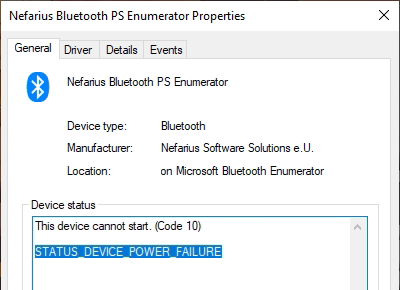
When loaded onto an unsupported host radio, device boot will fail with STATUS_DEVICE_POWER_FAILURE:
For a list of tested devices consult the extended documentation.
| LMP | Bluetooth Version |
|---|---|
| 0 | Bluetooth 1.0b |
| 1 | Bluetooth 1.1 |
| 2 | Bluetooth 1.2 |
| 3 | Bluetooth 2.0 + EDR |
| 4 | Bluetooth 2.1 + EDR |
| 5 | Bluetooth 3.0 + HS |
| 6 | Bluetooth 4.0 |
| 7 | Bluetooth 4.1 |
| 8 | Bluetooth 4.2 |
| 9 | Bluetooth 5 |
| 10 | Bluetooth 5.1 |
| 11 | Bluetooth 5.2 |
Pre-built binaries and instructions are provided by Nefarius Software Solutions e.U. and available via setup. Official support covers Windows 10/11 x64/ARM64 only, filing issues about any other version or architecture will be discarded.
Check out the companion solution DsHidMini for using the controller in games!
Knowledge on how to build and (test-)sign Windows drivers is required for creating usable builds. This is outside of the scope of the project documentation.
Workloads tab under Desktop & Mobile select at least .NET desktop development and Desktop development with C++.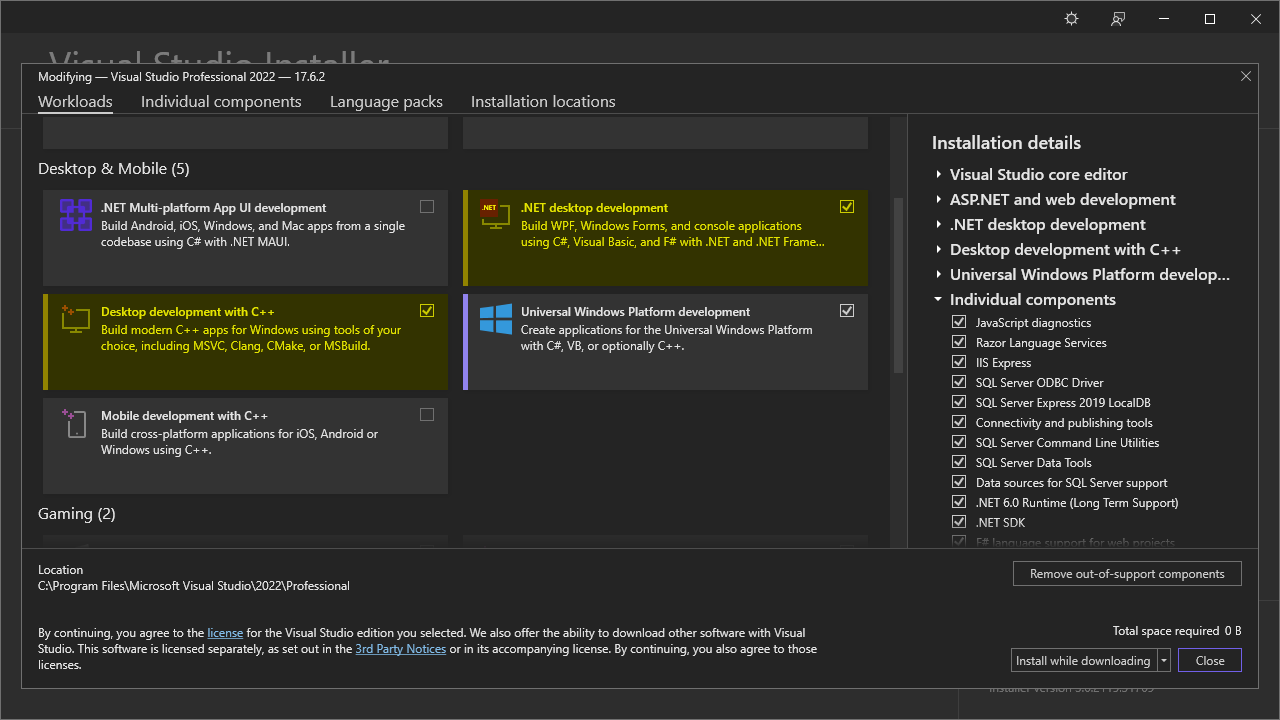
Individual components tab search for and select the Spectre-mitigate libs (Latest) for all architectures you wish to build for.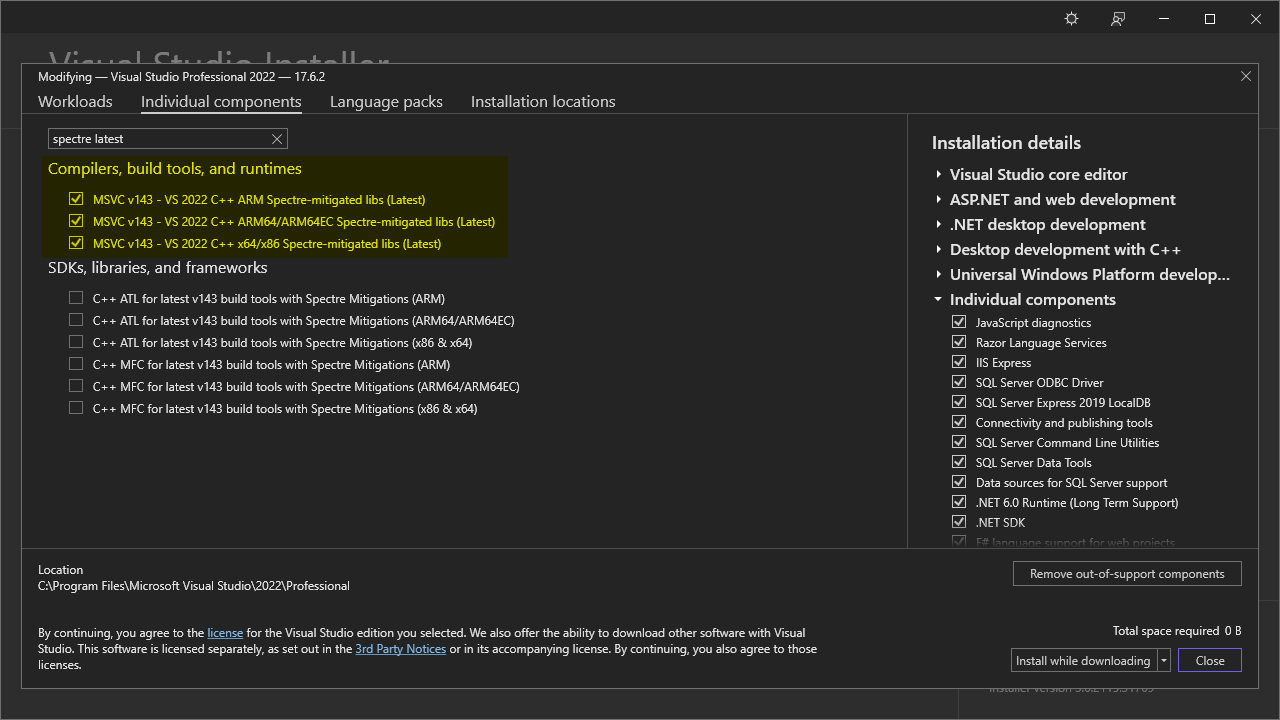
You can build individual projects of the solution within Visual Studio.
The project uses the following branch strategies:
master - stable code base, in sync with tagged public releasesdevel - work-in-progress changes, mostly bigger changes spanning a couple PRsTagged CI builds get mirrored to the buildbot web server, use at your own risk, no support provided whatsoever!
Everything you need to know is documented on the project page, read carefully before considering filing an issue.
Below representation attempts to visualize the relationships between the drivers and devices involved (near host hardware on the bottom, towards exposed child devices on top):
     +----------------------+                                +----------------------+
     |    Navigation PDO    +<----------+         +--------->+      Motion PDO      |
     +----------------------+           |         |          +----------------------+
                                        |         |
                                        |         |
                                        |         |
                                        |         |
                                        |         |
+----------------------+          +-----+---------+------+         +----------------------+
|      SIXAXIS PDO     +<---------+ Profile & Bus Driver +-------->+     Wireless PDO     |
+----------------------+          |     (BthPS3.sys)     |         +----------------------+
                                  +----------+-----------+
                                             ^
                                             |
                                             v
                                  +----------+-----------+
                                  | Bluetooth Enumerator |
                                  |    (bthenum.sys)     |
                                  +----------+-----------+
                                             ^
                                             |
                                             v
                                  +----------+-----------+
                                  |     bthport.sys      |
                                  +----------+-----------+
                                             ^
                                             |
                                             v
                                  +----------+-----------+
                                  |      bthusb.sys      |
                                  +----------+-----------+
                                             ^
                                             |
                                             v
                                  +----------+-----------+
                                  | BthPS3PSM.sys filter |
                                  +----------+-----------+
                                             ^
                                             |
                                             v
                                  +----------+-----------+
                                  |       USB Stack      |
                                  +----------+-----------+
                                             ^
                                             |
                                             v
                                  +----------+-----------+
                                  | USB Bluetooth dongle |
                                  +----------------------+
This application benefits from these awesome projects ❤ (appearance in no special order):





