termcolor
1.0.0

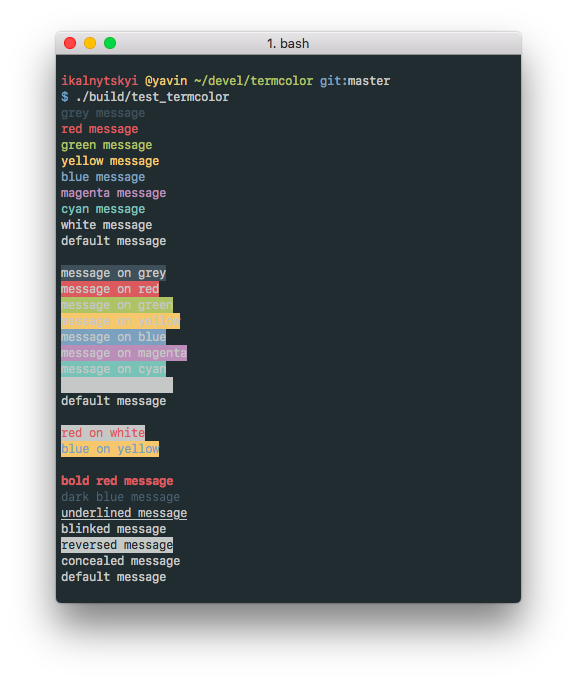
Termcolor is a header-only C++ library for printing colored messages to the terminal. Written just for fun with a help of the Force. Termcolor uses ANSI color formatting, so you can use it on every system that is used such terminals (most *nix systems, including Linux and Mac OS).
Note
On Windows, Windows API is used instead of escape codes but some
limitations are applied (not everything is supported). That's why it's
recommended to enter virtual terminal processing mode and set
TERMCOLOR_USE_ANSI_ESCAPE_SEQUENCES macro to trick termcolor to use
ANSI color codes.
It's licensed under the BSD (3-clause) License. That basically means: do whatever you want as long as copyright sticks around.
Add termcolor.hpp (grab it from include/termcolor/termcolor.hpp) to
the project and use stream manipulators from the termcolor namespace.
You can also use vcpkg to install the library:
$ vcpkg install termcolorOr if you are on macOS, you can use Homebrew for that purpose:
$ brew install termcolorFor up-to-date information about existing packages, refer to the the following picture:
It's very easy to use. The idea is built upon C++ stream manipulators. Typical «Hello World» application looks like this:
#include <iostream>
#include <termcolor/termcolor.hpp>

int main(int /*argc*/, char** /*argv*/)
{
    std::cout << termcolor::red << "Hello, ";                   // 16 colors
    std::cout << termcolor::color<100> << "Colorful ";          // 256 colors
    std::cout << termcolor::color<211, 54, 130> << "World!";    // true colors
    std::cout << std::endl;
    return 0;
}
The application above prints a string using different colors. There is one caveat though. You must not forget to reset colors, otherwise they will be applied to other prints as well.
std::cout << termcolor::red << "Hello, Colorful World!" << std::endl;
std::cout << "I'm RED too!" << std::endl;
Correct version of the code above should look like this:
std::cout << termcolor::red << "Hello, Colorful World!" << termcolor::reset << std::endl;
std::cout << termcolor::reset << "Here I'm!" << std::endl;
By default, Termcolor ignores any colors for non-tty streams (e.g.
std::stringstream), so the following snippet
std::stringstream ss;
ss << termcolor::red << "unicorn";
std::cout << ss.str();
will print «unicorn» using default color, not red. In order to change this
behaviour one can use termcolor::colorize manipulator that enforce colors
no matter what.
The manipulators are divided into four groups:
Also, there are color manipulators for 16 colors, 256 colors and true colors palettes.
Note
While termcolor supports true color, it's required for the terminal
emulator you use to run your software to support true color too. So please
ensure it's supported before filing an issue.
termcolor::greytermcolor::redtermcolor::greentermcolor::yellowtermcolor::bluetermcolor::magentatermcolor::cyantermcolor::whitetermcolor::bright_greytermcolor::bright_redtermcolor::bright_greentermcolor::bright_yellowtermcolor::bright_bluetermcolor::bright_magentatermcolor::bright_cyantermcolor::bright_whitetermcolor::color<256_COLOR_CODE>termcolor::color<RED, GREEN, BLUE>termcolor::on_greytermcolor::on_redtermcolor::on_greentermcolor::on_yellowtermcolor::on_bluetermcolor::on_magentatermcolor::on_cyantermcolor::on_whitetermcolor::on_bright_greytermcolor::on_bright_redtermcolor::on_bright_greentermcolor::on_bright_yellowtermcolor::on_bright_bluetermcolor::on_bright_magentatermcolor::on_bright_cyantermcolor::on_bright_whitetermcolor::on_color<256_COLOR_CODE>termcolor::on_color<RED, GREEN, BLUE>(Windows API does not support these manipulators except for underline)
termcolor::boldtermcolor::darktermcolor::italictermcolor::underlinetermcolor::blinktermcolor::reversetermcolor::concealedtermcolor::crossed(Windows API does not support these manipulators)
termcolor::colorizetermcolor::nocolorize<windows.h>, global namespace could
be polluted with min/max macros. If such effect is desireable, please
consider using #define NOMINMAX before #include <termcolor.hpp>.




