smart os
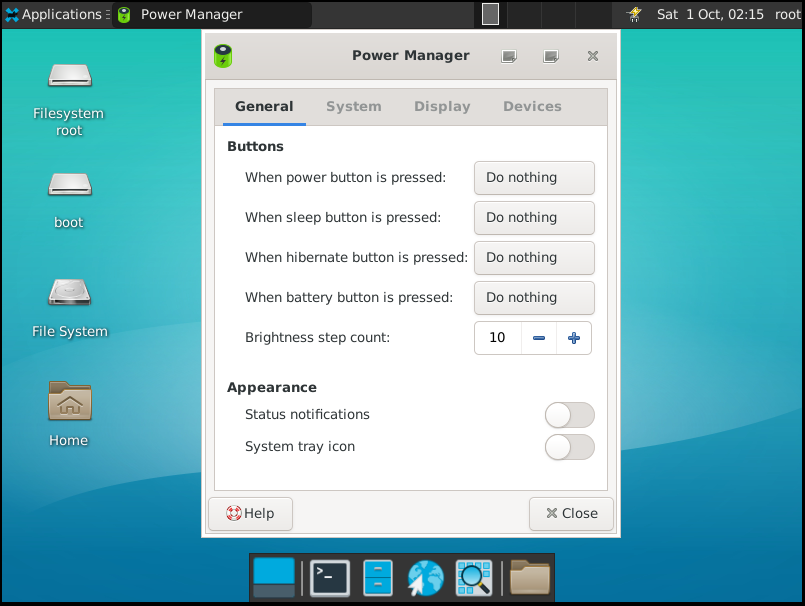
It's can run xfce4 in smartos

This project demonstrates how to quickly create a compact and fully functional Linux operating system. The project address is https://github.com/superconvert/smart-os
Why do we choose the server version for production?
The server version does not contain most of the packages that the window system depends on; if the system comes with these packages, there will be problems with multiple versions of the package, compilation problems, dependency problems, link problems, and runtime problems, which will cause a lot of interference to our work. Moreover, solving these problems is meaningless, we need pure versions of dependency packages
Why does the window system work so large?
All the packages (except tools) that we install using apt, theoretically we need to compile the source code, including the dependencies and adhesions of the package, which need to be solved. This is an extremely huge workload. There is no way, there is nothing on the new system, and the required environment needs to be provided by us. Project A depends on package b, package b depends on package c, package c and package c depends on package d. All we have to do is compile all packages!
This script was made on Ubuntu 18.04. Other systems should not be much changed. Friends who need it can modify it themselves.
Prepare the system environment. Since the kernel needs to be compiled, you need to install the environment required for kernel compilation. Since busybox needs to be compiled, you can install the required environment yourself as needed.
./00_build_env.shCompile source code ( kernel, glibc, busybox, gcc, binutils)
./01_build_src.shCreate a system disk (Important, this step installs the system into a system file)
./02_build_img.shRun the smart-os system
./03_run_qemu.sh 或 ./04_run_docker.shIs it easy to make an operating system? The disk space can be expanded arbitrarily, can be accessed online, and can be expanded as needed. I have successfully tried it and run the streaming server smart_rtmpd in smart-os
+----------------------------------------------------------------+-----------------------------------------+-----------------------------------------+
|                          Host                                  |              Container 1                |              Container 2                |
|                                                                |                                         |                                         |
|       +------------------------------------------------+       |       +-------------------------+       |       +-------------------------+       |
|       |             Newwork Protocol Stack             |       |       |  Newwork Protocol Stack |       |       |  Newwork Protocol Stack |       |
|       +------------------------------------------------+       |       +-------------------------+       |       +-------------------------+       |
|               +                    +                           |                   +                     |                    +                    |
| ............... | .................... | ........................... | ................... | ..................... | .................... | .................... |
|               +                    +                           |                   +                     |                    +                    |
|        +-------------+    +---------------+                    |           +---------------+             |            +---------------+            |
|        | 192.168.0.3 |    | 192.168.100.1 |                    |           | 192.168.100.6 |             |            | 192.168.100.8 |            |
|        +-------------+    +---------------+     +-------+      |           +---------------+             |            +---------------+            |
|        |     eth0    |    |      br0      | < --- > |  tap0 |      |           |      eth0     |             |            |      eth0     |            |
|        +-------------+    +---------------+     +-------+      |           +---------------+             |            +---------------+            |
|               +                   +                 +          |                   +                     |                    +                    |
|               |                   |                 |          |                   |                     |                    |                    |
|               |                   +                 +------------------------------+                     |                    |                    |
|               |               +-------+                        |                                         |                    |                    |
|               |               |  tap1 |                        |                                         |                    |                    |
|               |               +-------+                        |                                         |                    |                    |
|               |                   +                            |                                         |                    |                    |
|               |                   |                            |                                         |                    |                    |
|               |                   +-------------------------------------------------------------------------------------------+                    |
|               |                                                |                                         |                                         |
|               |                                                |                                         |                                         |
+--------------- | ------------------------------------------------+-----------------------------------------+-----------------------------------------+
                +
Physical Network (192.168.0.0/24)Since smart-os installs the glibc dynamic library, this relies heavily on the dynamic library loader/linker ld-linux-x86-64.so.2. Since applications are linked through dynamic compilation, when an application that requires dynamic linking is loaded by the operating system, the system must locate and load all the dynamic library files it needs. This work is done by ld-linux.so.2. When the program is loaded, the operating system will hand over control to ld-linux.so instead of the program's normal entry address. ld-linux.so.2 will look for and load all required library files, and then hand over control to the application's starting portal. ld-linux-x86-64.so.2 is actually the soft chain of ld-linux.so.2. It must exist under /lib64/ld-linux-x86-64.so.2. Otherwise, our dynamically compiled busybox depends on the glibc library. The loading of the glibc library requires ld-linux-x86-64.so. If it does not exist in the /lib64 directory, it will cause the system to be directly paniced. This issue needs special attention! ! !
qemu generally has a small window after startup. Once an error occurs, there is basically no way to read the error log. Then you need to add console=ttyS0 to the startup item of grub. At the same time, qemu-system-x86_64 adds serial port output to the file -serial file:./qemu.log, so debugging is much more convenient. After debugging, you need to remove console=ttyS0. Otherwise, the content in /etc/init.d/rcS may not be displayed.
The version of glibc we compiled is usually higher than the version that comes with the system. We can write a test program main.c to test whether glibc is compiled successfully. for example:
# include < stdio.h >
int main () {
    printf ( " Hello glibc n " );
    return 0 ;
}
We compile
gcc -o test main.c -Wl,-rpath=/root/smart-os/work/glibc_install/usr/lib64 We execute the ./test program successfully, and we usually report an error similar to this /lib64/libc.so.6: version `GLIBC_2.28' not found or the program segments directly. In fact, this is the reason why there is no specified dynamic library loader/linker and system environment. Usually when we compile the glibc library, the compilation directory will automatically generate a testrun.sh script file, and we execute the program in the compilation directory.
./testrun.sh ./test This is usually done successfully. We can also save the following sentence into a script, and it is also OK to execute the test.
exec env /root/smart-os/work/glibc_install/lib64/ld-linux-x86-64.so.2 --library-path /root/smart-os/work/glibc_install/lib64 ./testHow do we track which libraries loaded by an executable program? Just use LD_DEBUG=libs ./test. We preload the library and force preload the library to use LD_PRELOAD to force preload the library
When we compile cairo, we usually encounter many problems. What should we do if there is a problem with cairo compilation? Some error messages are difficult to search on the Internet to see the config.log file generated during compilation. The error messages are very detailed! You can solve the problem according to the prompt information
About busybox's init system variables, even if grub's kernel parameters are used, it is not possible to pass environment variables. busybox's init will automatically generate the default environment variable PATH, so the source code needs to be changed to support customized paths. Of course, the login mode of the shell will read /etc/profile. For non-login mode, this mode is invalid, so there are limitations to pass /etc/profile.
This knowledge involves relatively large knowledge. There are relatively few articles that specifically introduce the compilation and use of xfce4 in China, including abroad. I also crossed the river by feeling the stones and tried to demonstrate this knowledge clearly. I will open a special chapter to explain this. For xfce4 transplantation into smart-os, it will reveal the secrets of the graphics system to the Chinese. For details, please refer to xfce4.md.
The integration workload of the entire graphics system is particularly huge, involving all aspects of the system. There is relatively little systematic information on this aspect abroad, and almost even less in China. The goal is to DIY all environments and personal open source projects to make the entire graphics system run intact. Smart-os is not the first one, but it is basically the top three. I don't know yet. The entire integration process is very long, and I encountered many problems. I won’t talk about these repetitive tasks through continuous debugging and compilation. The workload is particularly huge. I can almost describe my work hard. It is absolutely not an exaggeration to describe my work. Secondly, I encountered a lot of knowledge points, many of which were learned and sold immediately. I needed to quickly understand the working mechanism, cause the problem, and then solve the problem. Let’s talk about the overall idea roughly, which will facilitate new scholars to quickly understand the ideas, provide guidance on system maintenance, and provide a model for solving system problems.
The usr directory details the abbreviation of usr = unix system resource. The /lib library is a kernel-level library, /usr/lib is a system-level library, and /usr/local/lib is an application-level library; /lib contains many libraries used by executable programs in /bin && /sbin. /usr/lib Almost all libraries referenced by system executable programs are installed here, and /usr/local/bin Many libraries referenced by application-level executable programs are placed here
ramfs:
ramfs is a very simple file system. It directly utilizes the existing cache mechanism of the Linux kernel (so its implementation code is very small. For this reason, ramfs feature cannot be blocked through kernel configuration parameters. It is a natural property of the kernel). It uses the system's physical memory to make a memory-based file system with dynamic size. The system will not recycle it, and only root users use it.
tmpfs:
tmpfs is a derivative of ramfs, which adds capacity limits and allows data to be written to swaps based on ramfs. Due to the addition of these two features, ordinary users can also use tmpfs. tmpfs occupies virtual memory, not all RAM, and its performance may not be as high as ramfs
ramdisk:
ramdisk is a technology that uses a piece of area in memory as a physical disk. It can also be said that ramdisk is a block device created in a piece of memory for storing file systems. For users, ramdisk can be treated equally with the usual hard disk partition. The system will also store a corresponding cache in memory, polluting the CPU cache, poor performance, and require corresponding driver support.
rootfs:
rootfs is an instance of specific ramfs (or tmpfs, if tmpfs is enabled), it always exists in linux2.6 systems. rootfs cannot be uninstalled (rather than adding special code to maintain empty linked lists, it is better to always add rootfs nodes, so it is convenient for kernel maintenance. rootfs is an empty instance of ramfs and takes up very little space). Most other file systems are installed on rootfs and then ignore it. It is the kernel startup initialization of the root file system.
rootfs are divided into virtual rootfs and real rootfs.
The virtual rootfs are created and loaded by the kernel itself and only exist in memory (the subsequent InitRamfs is also implemented on this basis), and its file system is of tmpfs type or ramfs type.
Real rootfs means that the root file system exists on the storage device. During the startup process, the kernel will mount this storage device on the virtual rootfs, and then switch the / directory node to this storage device. In this way, the file system on the storage device will be used as the root file system (the subsequent InitRamdisk is implemented on this basis), and its file system types are richer, which can be ext2, yaffs, yaffs2, etc., which are determined by the type of the specific storage device.
Our startup file system is actually to prepare files for rootfs, so that the kernel can execute as we wish. In early Linux systems, only hard disks or floppy disks were generally used as storage devices for the Linux root file system, so it is easy to integrate the drivers of these devices into the kernel. However, in today's embedded systems, the root file system may be saved to various storage devices, including scsi, sata, u-disk, etc. Therefore, it is obviously not very convenient to compile all the driver code of these devices into the kernel. In the kernel module automatic loading mechanism udev, we see that udevd can realize the automatic loading of the kernel module, so we hope that if the driver of the storage device storing the root file system can also realize the automatic loading, that would be great. However, there is a contradiction here. udevd is an executable file. It is impossible to execute udevd before the root file system is mounted. However, if udevd is not started, the driver that stores the root file system device cannot be automatically loaded, and the corresponding device node cannot be established in the /dev directory. In order to resolve this contradiction, a ramdisk-based initrd (bootloader initialized RAM disk) emerged. Initrd is a compacted small root directory. This directory contains the necessary driver modules, executable files and startup scripts in the startup stage, and also includes the udevd (demon that implements the udev mechanism). When the system starts, the bootloader will read the initrd file into memory, and then pass the start address and size of the initrd file in memory to the kernel. During the initialization process, the kernel will decompress the initrd file, then mount the unzipped initrd as the root directory, and then execute the /init script in the root directory (init in cpio format is /init, while initrd in image format <also known as initrd of old block devices or initrd in traditional file mirror format> is /initrc). You can run udevd in the initrd file system in this script, let it automatically load realfs (real file system) drivers for storing the device and establish necessary device nodes in the /dev directory. After udevd automatically loads the disk driver, you can mount the real root directory and switch to this root directory.





