Dissecting Xv6
1.0.0

You will get the latest modified verson of Xv6 according to this repository here
Clone the official Xv6 repository from here. We need an emulator to boot Xv6.We will use qemu for this purpose. To install qemu, run from your terminal
sudo apt install qemu
Then from where Xv6 was cloned , run make to compile Xv6. Then to launch the emulator , run make qemu and you will see qemu in a different window. If qemu doesn't launch , then run
sudo apt install qemu-system-x86
make qemu
This time , it should work. Still, you might face problems like this then here is a way around.
To run qemu in the same terminal you're using , run make qemu-nox instead of make qemu.
After qemu is being launched , you will see following system calls by running ls
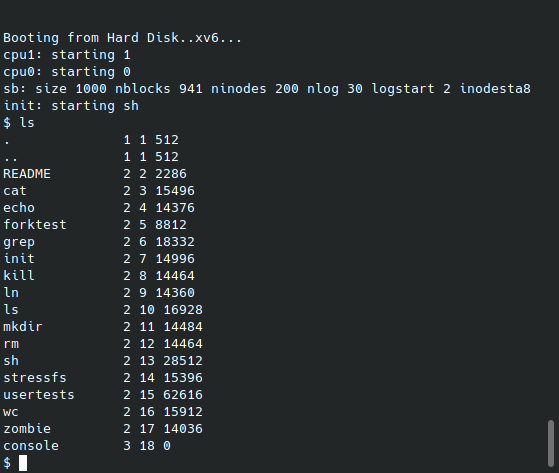
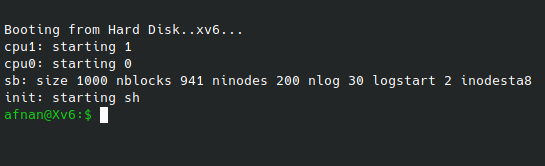
We can modify the source code and see the effects instantly.Lets say we want to replace the $ sign with something else.To do this , go to sh.c file and change inside getcmd method.
printf(2, ANSI_COLOR_GREEN "afnan@Xv6:$ " ANSI_COLOR_RESET);Add two lines at the top of this file
#define ANSI_COLOR_GREEN   "x1b[32m"
#define ANSI_COLOR_RESET   "x1b[0m"
Now quit from the qemu terminal pressing cntrl+A , release and then type x immediately(as you can see it's a tedious task and we will create a system call to exit from the terminal).Then run make qemu-nox again and see the result now
The two CPU usage always seem to be 100%.To resolve this,do following modification.
In proc.c , modify schduler function
void
scheduler(void)
{
  struct proc *p;
  int ran;
  struct cpu *c = mycpu();
  c->proc = 0;

  for(;;){
    // Enable interrupts on this processor.
    sti();

    // Loop over process table looking for process to run.
    acquire(&ptable.lock);
    for(ran = 0, p = ptable.proc; p < &ptable.proc[NPROC]; p++){
      if(p->state != RUNNABLE)
        continue;

      // Switch to chosen process.  It is the process's job
      // to release ptable.lock and then reacquire it
      // before jumping back to us.
      ran = 1;
      c->proc = p;
      switchuvm(p);
      p->state = RUNNING;

      swtch(&(c->scheduler), p->context);
      switchkvm();

      // Process is done running for now.
      // It should have changed its p->state before coming back.
      c->proc = 0;


    }
    release(&ptable.lock);

    if (ran == 0) {
      halt();
    }
  }
}
and in x86.h , add a halt function
static inline void
halt()
{
  asm volatile("hlt" : : );
}Let's create a system call to exit from the qemu terminal.We name it as shutdown.So we want to do something that would enable us to exit from the terminal by just writing the command shutdown.
First create a file named shutdown.c.
#include "types.h"
#include "stat.h"
#include "user.h"

int main(int argc, char * argv[])
{
    printf(1, "Exitingn");
    shutdown();
    exit();//eq to return zero
}
Notice that to print anything in console , we need to add a file descriptor as the first parameter of printf unlike C language.
Then in Makefile , add it in the UPROGS
UPROGS=
	_cat
	_echo
	_forktest
	_grep
	_init
	_kill
	_ln
	_ls
	_mkdir
	_rm
	_sh
	_stressfs
	_usertests
	_wc
	_zombie
 	_shutdown
Add it also in EXTRA
EXTRA=
	mkfs.c ulib.c user.h cat.c echo.c forktest.c grep.c kill.c
	ln.c ls.c mkdir.c rm.c stressfs.c usertests.c wc.c zombie.c shutdown.c
Now you can exit from the qemu terminal and run make qemu-nox again and see that ls will list shutdown as a system call.But running this command won't do anything for now.We've to add this system call to 4 following files
extern int sys_shutdown(void);
Then in the next block , add
[SYS_shutdown] sys_shutdown,#define SYS_shutdown 23SYSCALL(shutdown)void shutdown(void);Now,there are two files which contain the methods for system calls.sysfile.c contains methods related to files and sysproc.c contains methods related to processes.We have to write a new method named sys_shutdown in sysproc.c.
void sys_shutdown(void){
  outw(0xB004, 0x0|0x2000);
  outw(0x604, 0x0|0x2000);
}
If everything's fine so far,then you can exit from qemu , run make qemu-nox and see the available sytem calls by running ls.Run the command shutdown and you will see the terminal exiting.
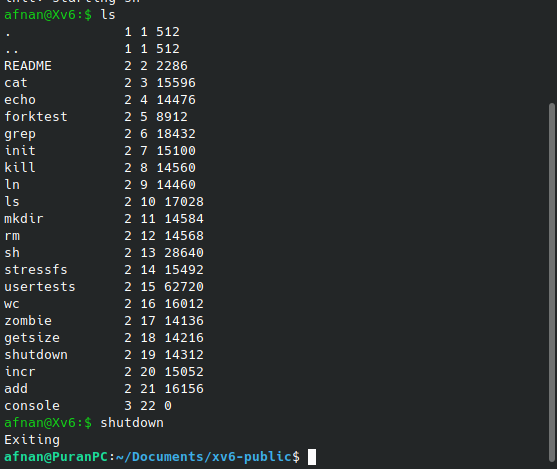
NB:I have already implemented few more sytem calls.You won't see add,incr,getsize etc for now if those aren't implemented.
First of all , modify the atoi function in ulib.c file so that it handles negative numbers too.
int
atoi(const char *s)
{
    int i;
    int sign;
    int val;


    i = 0;
    sign = 1;
    val = 0;

    if (s[i] == '-')
    {
        sign = -1;
        i++;
    }

    while(s[i] >= '0' && s[i] <= '9' && s[i] != '')
    {
        val = val * 10 + (s[i]-'0');
        i++;
    }
    return (val * sign);
}
Then create a incr.c file
#include "types.h"
#include "user.h"
#include "fcntl.h"

//give command : incr 7
//it will output 8
int main(int argc , char * argv[]){
    printf(1 , "%dn" , incr(atoi(argv[1])));
    exit();
}
modify the files which are needed to be.
extern int sys_incr(void);
Then in the next block , add
[SYS_incr] sys_incr,#define SYS_incr 23SYSCALL(incr)int incr(int);_incr in UPROGS
Add incr.c in EXTRAThen add a method in sysproc.c
int sys_incr(void){
  int num;
  argint(0,&num); //retrieving first integer argument

  //cprintf("%d - Inside system call!",num);

  return num + 1;
}
Now exiting and running make-qemu-nox again will enable you to use incr command.
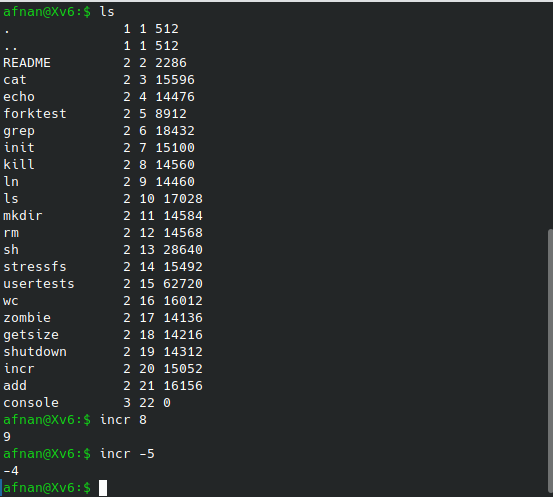
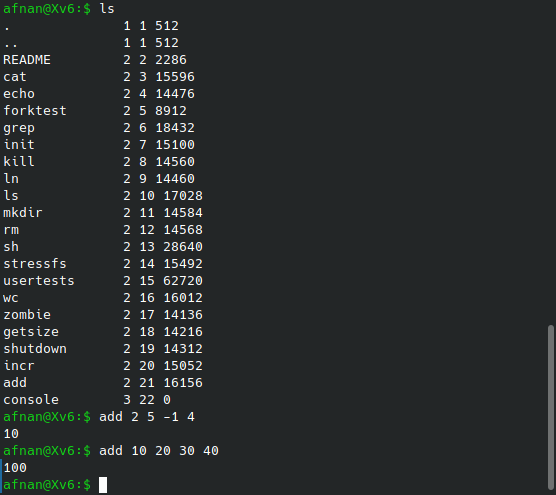
Suppose we want a system call so that add 2 5 -1 4 will return us 10.There can be as many numbers as arguments.Now here is an issue.How to pass multiple arguments from user space to kernel space?In case of incr we used argint method to retrieve the argument but what to do when there are multiple values?
We need to use a structure.Xv6 has a file stat.h dealing with structures.Define a new structure in that file.
struct mystat {
  int *nums;
  int sz;
};
In sysproc.c add the following method and make sure you add the header file stat.h.
int sys_add(void){
  struct mystat *ct;
  argptr (0 , (void*)&ct ,sizeof(*ct));
  int s = 0;
  int i;
  for(i=0;i<ct->sz;i++){
    s+=ct->nums[i];
    //cprintf("%d " , ct->nums[i]);
  }
  return s;
}
Create a new file add.c
#include "types.h"
#include "user.h"
#include "fcntl.h"
#include "stat.h"

int main(int argc , char * argv[]){
    struct mystat *ct = malloc (sizeof(struct mystat));
    ct->sz = argc - 1;
    int i;
    for(i = 1;i<argc;i++){
        //printf(1,"%d->" , atoi(argv[i]));
        ct->nums[i-1] = atoi(argv[i]);
    }
    printf(1 , "%dn" , add(ct));
    exit();
}
Now modify following files accordingly
extern int sys_add(void);
Then in the next block , add
[SYS_add] sys_add,#define SYS_add 24SYSCALL(add)int add(struct mystat*); and add struct mystat; at the top.Now exiting and running make-qemu-nox again will enable you to use add command.
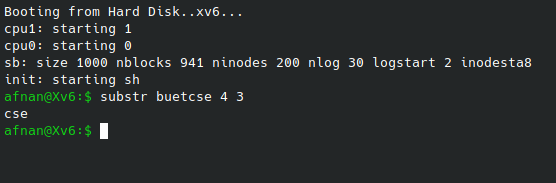
Suppose we want to generate substring from a string by specifying start index and substring length.substr alupotol 3 5 will output potol.Let's add a new function in sysproc.c
char* sys_substr(void){
  static char *str;
  int start_idx , len;

  argint(1 , &start_idx);
  argint(2 , &len);
  argstr(0 , &str);
  char* s = &str[0];
  int i;
  int k = 0;
  for(i = start_idx ; i < start_idx+len ; i++){
    s[k++] = str[i];
  }
  s[k]='';
  return s;
}
And corresponding substr.c file
#include "types.h"
#include "user.h"
#include "stat.h"

int main(int argc , char * argv[]){
    char *s = argv[1];
    int start_idx = atoi(argv[2]);
    int len = atoi(argv[3]);
    printf(1 , "%s" , substr(s , start_idx , len));
    exit();
}
Adding this system call's signature to other files as shown before will enable us to use the system call
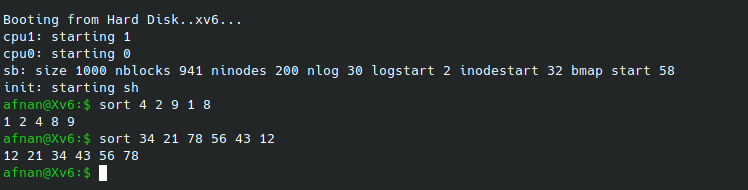
We want to give a command sort 3 5 2 7 4 and expect the output 2 3 4 5 7.To add a syscall like this , create a sort.c file
#include "types.h"
#include "user.h"
#include "fcntl.h"
#include "stat.h"

int main(int argc , char * argv[]){
    struct mystat *ct = malloc (sizeof(struct mystat));
    ct->sz = argc - 1;
    int i;
    for(i = 1;i<argc;i++){
        ct->nums[i-1] = atoi(argv[i]);
    }

    int *sorted_nums = sort(ct);

    for(int i=0;i<ct->sz;i++){
        printf(1 , "%d " , *(sorted_nums+i));
    }
    printf(1 , "n");
    exit();
}
And corresponding sys_sort function in sysproc.c file
int* sys_sort(void){
  struct mystat *ct;
  argptr (0 , (void*)&ct ,sizeof(*ct));
  int n = ct->sz;

  int temp, j, k;

  for (j = 0; j < n; ++j)
  {
    for (k = j + 1; k < n; ++k)
    {
        if (ct->nums[j] > ct->nums[k])
        {
          temp = ct->nums[j];
          ct->nums[j] = ct->nums[k];
          ct->nums[k] = temp;
        }
    }
  }
  return ct->nums;
}
After modifying other files accordingly,you can use the command