vmify
1.0.0

From Docker Image to the Cloud in Seconds
Infrastructure has gotten needlessly complicated. Traditional container deployment solutions like Kubernetes and ECS essentially leave you with containers requiring their own provisioning, scaling and networking while running on a pool of VMs also having their own separate provisioning, scaling and networking. This legacy layer of indirection has grown out of the fact that VMs have historically been much harder to provision than containers.
No more. With VMify VM images are created in seconds with a single command, allowing you to do away with this legacy indirection, while at the same time making your infrastructure simpler, more reliable and more secure.
VMify takes your Docker images and compiles them into minimal, secure and fully baked AWS AMIs in seconds.
All it takes is one simple command:
$ vmify hello-world
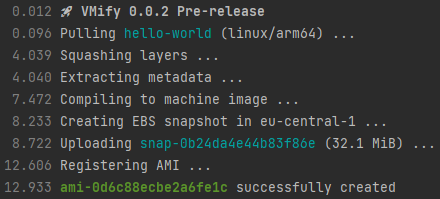
You can then integrate this AMI in your existing infrastructure as code deployment processes using CloudFormation and Terraform. Or you can simply launch instances based on it using AWS AutoScaling Groups, the EC2 RunInstances API or the AWS Console.
VMify compiles your Docker image into a machine image by combining it with VMify NanoOS, an ultra-minimal in-memory Linux OS. This enables your Docker image to boot directly on EC2 virtual hardware.
VMify NanoOS consists of just a Linux kernel and an ultra-minimal in-memory init system weighing only 1 MB. All it does is load the required drivers for the current machine, set up an ACPI daemon to react to reboot and poweroff events and enable NTP-based clock synchronization to prevent clock drift. After that, it passes control to your container image by loading it from a read-only disk partition and launching its entrypoint and cmd in a confined chroot environment.
There is no runtime provisioning and no Docker daemon on board as the image is already fully backed. Instances boot instantly and are guaranteed to be 100% identical every single time.
The whole system has much fewer moving parts. All disk access is read-only, ensuring the volume is never modified. Writes are handled by a tmpfs overlay with a configurable amount of swap space, living in a separate ephemeral volume wiped at every boot.
To get started, all new you need is an IAM user with the following policy:
{
    "Version": "2012-10-17",
    "Statement": [
        {
            "Sid": "vmify",
            "Effect": "Allow",
            "Action": [
                "ebs:StartSnapshot",
                "ebs:PutSnapshotBlock",
                "ebs:CompleteSnapshot",
                "ec2:DescribeSnapshots",
                "ec2:RegisterImage"
            ],
            "Resource": "*"
        }
    ]
}Add the users' credentials to a new [vmify] section in ~/.aws/credentials (the same file used by the AWS CLI):
[vmify]
aws_access_key_id = AKIAXXXXXXXXXXXXXXXX
aws_secret_access_key = xxxxxxxxxxxxxxxxxxxxxxxxxxxxxxxxxxxxxxxx
Finally, make sure you have
 VMify 0.0.2 Pre-release
From Docker Image to Cloud in Seconds

Usage:
  vmify [args] image

AWS credentials are retrieved from the [vmify] profile in ~/.aws/credentials

Examples:
  vmify nginx
  vmify -d -r=us-east-1 -s:dev.hpet.max-user-freq=64 -s:vm.panic_on_oom=0 nginx:latest

Params:
  image       The Docker image to compile into an AMI

Args:
  -q          Quiet mode: only print AWS AMI id upon completion
  -t          Timings displayed in output
  -d          Debug output turned on during boot
  -b          reBoot instead of terminating upon entrypoint exit
  -a=arch     Arch for the image (x64 or arm64, default: current cpu arch)
  -r=region   Region in AWS to use (default: us-east-1)
  -w=number   sWap size (in GiB) to use, 0 to disable swap (default: 1)
  -k=args     Kernel arguments
  -s:key=val  Sysctl to set with this value
  -h or -?    Show this help message
VMify works with the following AWS regions:
af-south-1, ap-east-1, ap-northeast-1, ap-northeast-2, ap-northeast-3, ap-south-1,
ap-southeast-1, ap-southeast-2, ap-southeast-3, ca-central-1, eu-central-1,
eu-north-1, eu-south-1, eu-west-1, eu-west-2, eu-west-3, me-south-1, sa-east-1,
us-east-1, us-east-2, us-west-1, us-west-2
AMIs created by VMify are compatible with the following instances types:
t3, t3a, m6i, m5, m5a, m5n, m5zn, c6i, c6a, c5, c5a, c5n, r5, r5b, r5a, r5n
t4g, m6g, c6g, c6gn, r6g





