FastBootWeixin
发布0.6.2

Before using this framework, it is recommended to have some understanding of the development documents of WeChat public account, but using this framework without understanding the documents of the public account can also complete a simple WeChat public account.
Currently compatible with Spring Boot 1.4+ and Spring Boot 2.x. Everyone is welcome to mention issue and contribution, and also welcome to join the group to discuss 627254793. Open source projects need to be shared by everyone. Thank you~
WeChat test official account application link
 <!-- 支持1.4.0.RELEASE及以上,包括2.x -->
<parent>
    <groupId>org.springframework.boot</groupId>
    <artifactId>spring-boot-starter-parent</artifactId>
    <version>1.5.6.RELEASE</version>
</parent>

<dependencies>
    <!-- fastbootWeixin的核心依赖 -->
    <dependency>
        <groupId>com.mxixm</groupId>
        <artifactId>fastboot-weixin</artifactId>
        <version>0.6.2</version>
    </dependency>

    <!-- SpringBoot的web项目,必须 -->
    <dependency>
        <groupId>org.springframework.boot</groupId>
        <artifactId>spring-boot-starter-web</artifactId>
    </dependency>

    <!-- 暂时只能使用apache的http,后续可加入其它http支持 -->
    <dependency>
        <groupId>org.apache.httpcomponents</groupId>
        <artifactId>httpcore</artifactId>
    </dependency>
    <dependency>
        <groupId>org.apache.httpcomponents</groupId>
        <artifactId>httpclient</artifactId>
    </dependency>
</dependencies>
Create a new configuration file application.properties or other configuration file types supported by spring boot in the resource directory, and add configuration:
Test code:
 package com.mxixm.fastboot.weixin;

import com.mxixm.fastboot.weixin.annotation.WxApplication;
import com.mxixm.fastboot.weixin.annotation.WxAsyncMessage;
import com.mxixm.fastboot.weixin.annotation.WxButton;
import com.mxixm.fastboot.weixin.module.web.WxRequest;
import com.mxixm.fastboot.weixin.module.event.WxEvent;
import com.mxixm.fastboot.weixin.module.message.WxMessage;
import com.mxixm.fastboot.weixin.module.message.WxMessageBody;
import com.mxixm.fastboot.weixin.module.user.WxUser;
import com.mxixm.fastboot.weixin.mvc.annotation.WxController;
import com.mxixm.fastboot.weixin.mvc.annotation.WxEventMapping;
import com.mxixm.fastboot.weixin.mvc.annotation.WxMessageMapping;
import org.springframework.boot.SpringApplication;

@WxApplication
@WxController
public class WxApp {

    public static void main(String[] args) throws Exception {
        SpringApplication.run(WxApp.class, args);
    }

    /**
     * 定义微信菜单
     */
    @WxButton(group = WxButton.Group.LEFT, main = true, name = "左")
    public void left() {
    }

    /**
     * 定义微信菜单
     */
    @WxButton(group = WxButton.Group.RIGHT, main = true, name = "右")
    public void right() {
    }

    /**
     * 定义微信菜单,并接受事件
     */
    @WxButton(type = WxButton.Type.CLICK,
            group = WxButton.Group.LEFT,
            order = WxButton.Order.FIRST,
            name = "文本消息")
    public String leftFirst(WxRequest wxRequest, WxUser wxUser) {
        return "测试文本消息";
    }

    /**
     * 定义微信菜单,并接受事件
     */
    @WxButton(type = WxButton.Type.VIEW,
            group = WxButton.Group.LEFT,
            order = WxButton.Order.SECOND,
            url = "http://baidu.com",
            name = "点击链接")
    @WxAsyncMessage
    public WxMessage link() {
        return WxMessage.newsBuilder().addItem("测试图文消息", "测试", "https://ss0.bdstatic.com/5aV1bjqh_Q23odCf/static/superman/img/logo/logo_white.png", "http://baidu.com").build();
    }

    /**
     * 接受微信事件
     * @param wxRequest
     * @param wxUser
     */
    @WxEventMapping(type = WxEvent.Type.UNSUBSCRIBE)
    public void unsubscribe(WxRequest wxRequest, WxUser wxUser) {
        System.out.println(wxUser.getNickName() + "退订了公众号");
    }

    /**
     * 接受用户文本消息,异步返回文本消息
     * @param content
     * @return the result
     */
    @WxMessageMapping(type = WxMessage.Type.TEXT)
    @WxAsyncMessage
    public String text(WxRequest wxRequest, String content) {
        WxSession wxSession = wxRequest.getWxSession();
        if (wxSession != null && wxSession.getAttribute("last") != null) {
            return "上次收到消息内容为" + wxSession.getAttribute("last");
        }
        return "收到消息内容为" + content;
    }

    /**
     * 接受用户文本消息,同步返回图文消息
     * @param content
     * @return the result
     */
    @WxMessageMapping(type = WxMessage.Type.TEXT, wildcard = "1*")
    public WxMessage message(WxSession wxSession, String content) {
        wxSession.setAttribute("last", content);
        return WxMessage.newsBuilder()
                .addItem(WxMessageBody.News.Item.builder().title(content).description("随便一点")
                        .picUrl("http://k2.jsqq.net/uploads/allimg/1702/7_170225142233_1.png")
                        .url("http://baidu.com").build())
                .addItem(WxMessageBody.News.Item.builder().title("第二条").description("随便二点")
                        .picUrl("http://k2.jsqq.net/uploads/allimg/1702/7_170225142233_1.png")
                        .url("http://baidu.com").build())
                .build();
    }

    /**
     * 接受用户文本消息,异步返回文本消息
     * @param content
     * @return the result
     */
    @WxMessageMapping(type = WxMessage.Type.TEXT, wildcard = "2*")
    @WxAsyncMessage
    public String text2(WxRequestBody.Text text, String content) {
        boolean match = text.getContent().equals(content);
        return "收到消息内容为" + content + "!结果匹配!" + match;
    }
}
Because WeChat public accounts need to configure their own server interface, you can directly use local testing during testing. Using intranet penetration can allow WeChat public platforms to access your own local server.
The software can use ngrok or natapp. Please refer to the official documents of both.
The domain name url address generated after startup can be configured in wx.callback-url for oauth2 authentication. The domain name in the url generated above must also be configured in the domain name of the authorization callback page.
Fill in the domain name generated in step 4 in the interface configuration information of the test official account. The token uses the token in the configuration file. After saving, if nothing unexpected happens, it should be verified successfully. If you have any questions, please provide feedback in time.
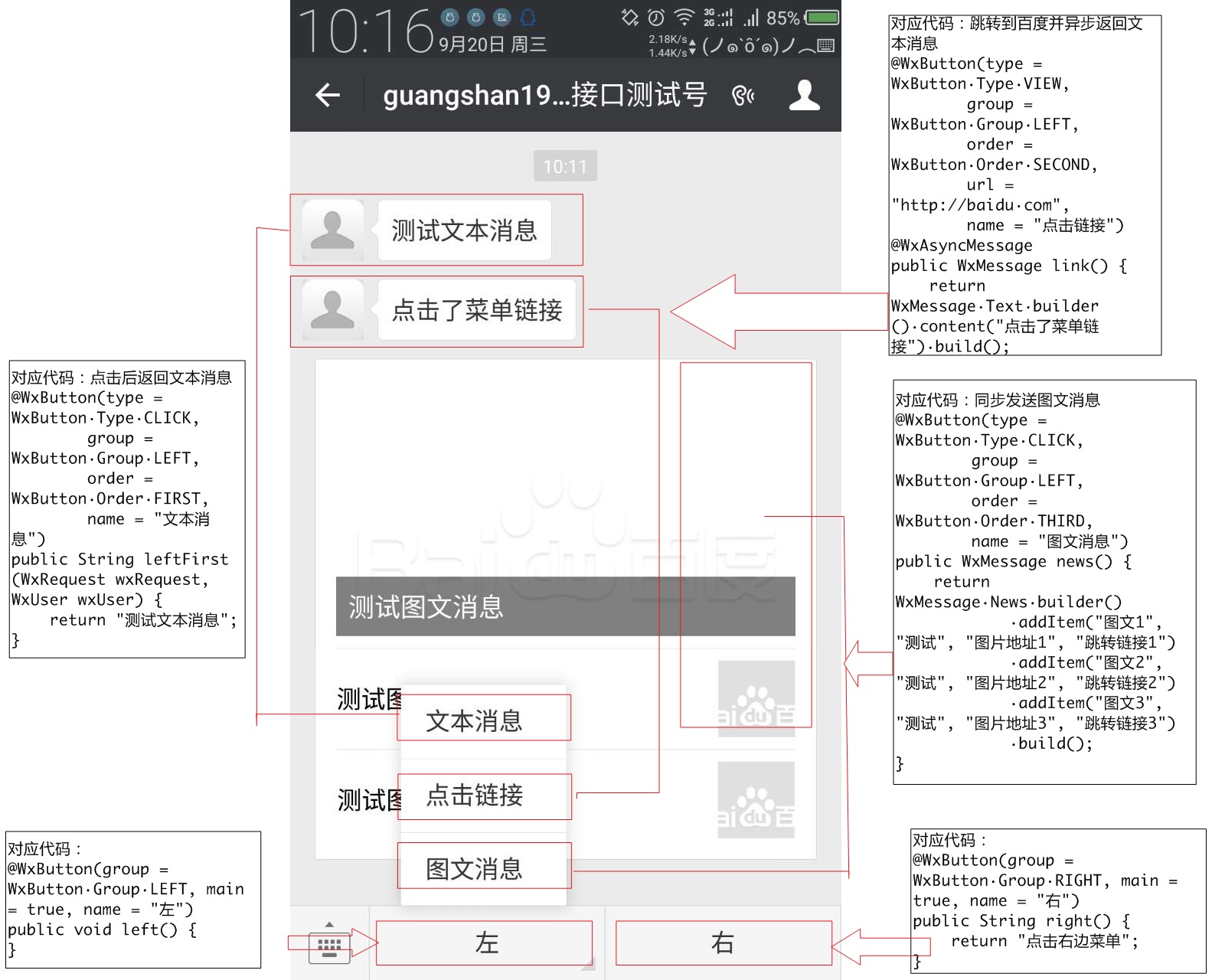
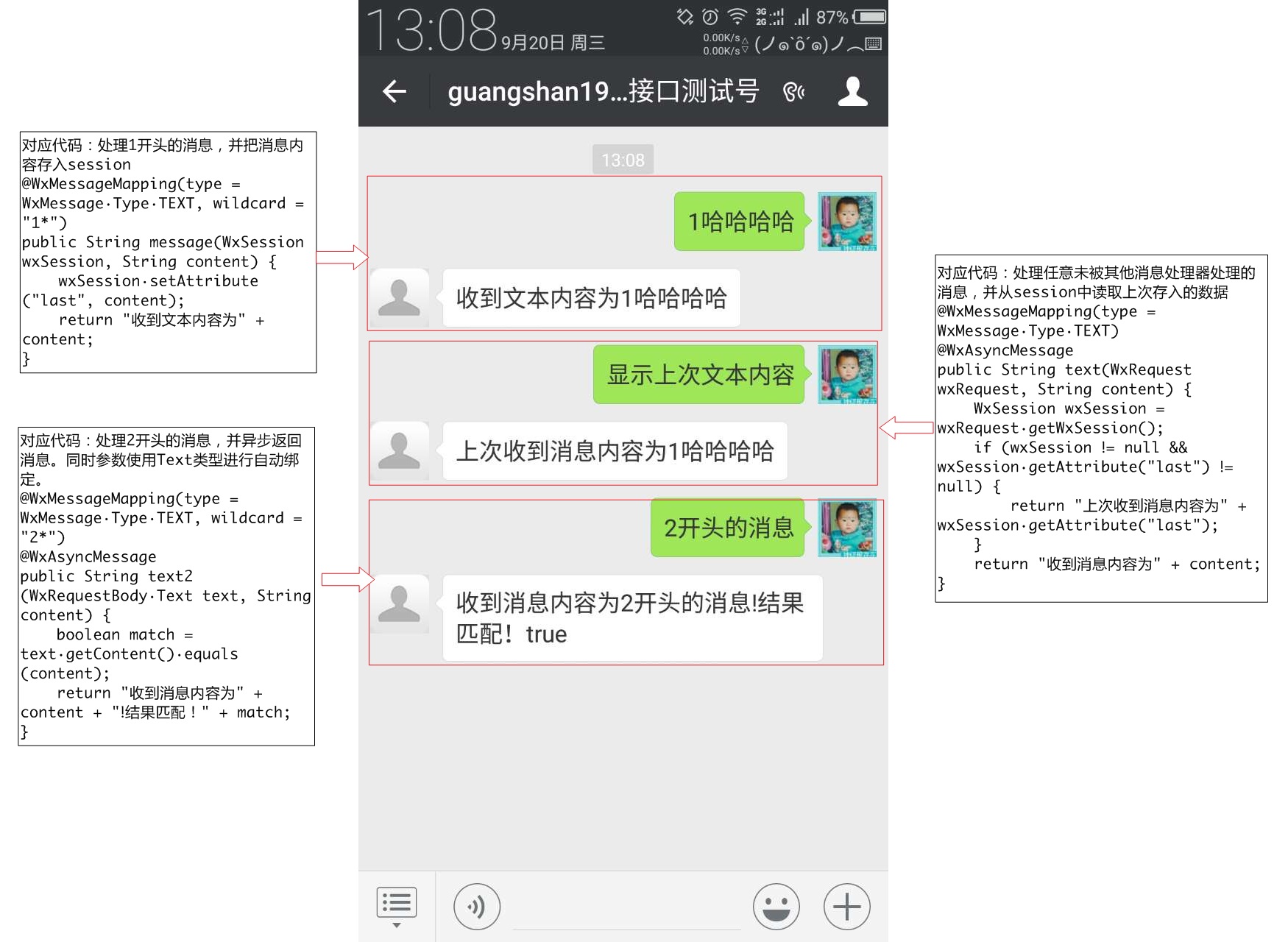
After the above example is started, please pay attention to your official account. At this time, the menu of the official account should have two main menus: left and right, and there are two submenu on the left: text message and click link.
When you click on the Text Message menu, you will receive a text message, which is: Test text message.
When you click the second click link, you will jump to Baidu and receive a graphic message with the title of Test graphic message.
When sending a text message to the official account, if the message content does not start with 1, you will receive a reply to the official account: "The message content is received" + the content sent.
Send a text message to the official account. When the message content starts with 1, you will receive a reply to the graphic and text message.
When a user unsubscribes to the official account, the user's nickname will be printed in System.out + "Unsubscribed to the official account"
Annotation @WxApplication is used to declare the application as a WeChat application and start using SpringApplication. If you already have a SpringBoot environment, please add the annotation @EnableWxMvc to your @SpringApplication class, the effect is the same. You can see the source code.
The annotation @WxController is used to declare that the class is a WeChat Controller. Only when this annotation is declared will it be bound to the request map of the WeChat server, otherwise the class will be ignored.
Annotation @WxButton(group = WxButton.Group.LEFT, main = true, name = "left") is used to declare a button box. Group represents a group, with three groups on the left, center and right, corresponding to the three first-level menus of WeChat. main is a boolean value, which means whether the menu item is a first-level menu. name is the menu name.
Annotation @WxButton(type = WxButton.Type.CLICK, group = WxButton.Group.LEFT, order = WxButton.Order.FIRST, name = "text message") is used to declare the submenu of the left grouping. The order represents the order, here is the first one.
public String leftFirst(WxRequest wxRequest, WxUser wxUser) { return "Test text message"; } There are three points here:
@WxButton(type = WxButton.Type.VIEW, group = WxButton.Group.LEFT, order = WxButton.Order.SECOND, url = "http://baidu.com", name = "Click on the link") This annotation is the same as above, and the type becomes View. For specific content, you can refer to the enumeration annotation or the official account document. Note that each menu type has its own limitations. Please refer to the documentation. If the conditions are not met, an exception will occur when the startup is started.
The annotation @WxAsyncMessage indicates that the message is replyed asynchronously, refer to the customer service message, and no support is provided for multiple customer service at the moment.
WxMessage.News.builder(). In the WxMessage class, there are different static internal classes and their builders. Through the builder, different types of WeChat messages can be easily constructed. Please refer to passive reply messages and customer service messages.
Annotation @WxEventMapping(type = WxEvent.Type.UNSUBSCRIBE) binds the unsubscribe event. When a user unfollows, the logic below this annotation will be entered. Another point to be noted is that all reply contents of WxEventMapping will be sent to the user asynchronously.
Annotation @WxMessageMapping(type = WxMessage.Type.TEXT) means binding the text message sent by the user to the following method logic, public String text(String content) { return "The message received is" + content; }. The content will be automatically assigned to the text content sent by the user.
The annotation @WxMessageMapping(type = WxMessage.Type.TEXT, wildcard = "1*") is the same as above. The difference is the wildcard wildcard character. This wildcard character supports wildcard content. Overriding the wildcard logic will enter the execution logic below.
Perfectly integrated with Spring Boot. If you don't have a SpringBoot project and want to use this framework to build a public account, you can directly use @WxApplication to mark the startup class. This annotation supports parameter: menuAutoCreate, default is true. It means that the WeChat menu is automatically created, and it can be set to false to turn off the behavior of automatically creating the menu. If you already have a Spring Boot project and want to introduce this framework, just mark the annotation @EnableWxMvc on any configuration class, and the parameters are the same as above.
There are three types of mappings supported:
Note: The class you bind must be declared as @WxController
The following types of parameters are supported:
Parameter binding currently supports these types. If there is a better solution that needs to be supported, you can also directly put forward opinions and suggestions, and I will deal with them in a timely manner.
The return value supports the following types:
The above asynchronous messages are sent using WxMessageTemplate, which is explained below.
This framework provides WxMessageTemplate to send messages, and at the same time provides WxMessageProcessor support in template, which is to process messages before sending them.
For example, when returning messages synchronously, you need to write the fromUserName field, which is the toUserName field when the message is sent. There is no need to let the framework users process this field. This field is processed in the WxCommonMessageProcessor processor. If you are interested, you can refer to the source code.
It also supports the following conversion: For media-type messages, you can directly use mediaUrl or mediaPath to write the material path, and the message converter automatically manages the material through WxMediaManager to obtain the necessary material id. (Write below about WxMediaManager)
Note: When processing text messages, it is recommended to use the builder of the corresponding message content in WxMessage to generate them!
This framework provides WxMediaManager to manage materials, and also uses embedded database to save the correspondence between materials and local files. Although I have completed this part of the function at present, I always feel that there is a big problem. I hope someone can help me see it and give me some suggestions.
The media in the above message sending is actually implemented through the material manager.
The 0.2.0.alpha version optimizes storage, using the interface WxMediaStore to manage media storage, developers can implement this interface by themselves and register as Spring's bean to replace the default MapDbWxMediaStore. For specific use of each interface, please refer to MapDbWxMediaStore. A memory-based implementation can also be provided here to replace MapDb.
This framework provides the WxTokenStore interface to store tokens and provides a default memory-based implementation of MemoryWxTokenStore. If you need to be distributed, you can implement this interface by yourself and inject the implementation class into Spring as a bean.
Use the WxApiInvokeSpi interface and the WxInvokerProxyFactory factory class to automatically generate the WeChat interface call proxy. You only need to declare methods and annotations. By default, the HttpComponent call interface is used. Interested friends can check the source code. I don’t write it well, so if you have any better suggestions, please feel free to put forward them.
At the same time, a preliminary analysis of the return value is performed. If the errorCode of the returned content of the interface is not 0, it will be thrown as an exception. The exception system is WxException and its subclasses.
PS: You can also use this method to generate your own proxy calling interface at will. I will add the documentation in the future, so I am lazy for the time being. . .
You can turn on and off the switch, generate the menu structure through @WxButton annotation, and automatically call the interface to determine whether the menu changes, and automatically generate and update the menu.
It can correctly respond to the token verification sent by WeChat, which is convenient and fast.
Using this framework will not have any impact on SpringMvc's own native Mapping, nor will it occupy any unique Mapping relationship (except authentication request). In the case of this framework, you can use any SpringMvc native functions, including root directory requests, and will not be occupied by the WeChat server alone.
If you want to use a separate address as the WeChat API call address, please configure wx.path as the path information, which needs to be consistent with the URL path in the interface configuration information in the WeChat official account backend management.
Provide WeChat OAUTH2 authentication intercept, fill in the OAUTH2 authorization callback page domain name by configuring wx.callback-domain, configure wx.mvc.interceptor.includePatterns and wx.mvc.interceptor.excludePatterns to configure the target address of the intercept. You can provide a WxOAuth2Callback interface implementation class as a bean, and this bean will be automatically injected in WxOAuth2Interceptor, and call after (WxOAuth2Context after WeChat Web authentication is passed. The context) method passes the related context to the method of the bean. You can obtain the context WxWebUser in this method and convert the WxWebUser to WxUser through the WxUserManager. For detailed relationship information, please refer to: WeChat web authorization.
Since version 0.3.6, the alternative property wx.callback-url of wx.callback-domain is provided, which is used to set the url of the callback, including the callback domain name and protocol type. There are more protocol types than wx.callback-domain, please use this configuration to replace the callback-domain configuration.
Additional function 1: View type WxButton, which automatically determines whether the url belongs to the address under the authorized callback domain name, and automatically handles it as a url containing OAuth2 as needed. The default interceptor can be used to realize the function of obtaining click user information on the menu url. At the same time, combined with the wx.callback-url function, it supports configuring relative paths in the menu without carrying a domain name.
Additional function 2: Automatically determine whether the url in the message needs to add OAuth redirect, please refer to WxRedirectUtils.
In the code, you can use WxJsTicketManager to obtain WxJsTicket
 @Autowired
WxJsTicketManager wxJsTicketManager;
Refer to the method for detailed use
Configure wx.encrypt=true, wx.encodingAesKey=aesKey set in the background of the official account, that is, enable message encryption and decryption mode
Note that when turning on message encryption and decryption, you need to turn on JCE unlimited permissions.
JDK7 download address: http://www.oracle.com/technetwork/java/javase/downloads/jce-7-download-432124.html
JDK8 download address: http://www.oracle.com/technetwork/java/javase/downloads/jce8-download-2133166.html
After downloading, you can see local_policy.jar, US_export_policy.jar and readme.txt. If JRE is installed, place the two jar files in the %JRE_HOME%libsecurity directory to overwrite the original file. If JDK is installed, you must also place the two jar files in the %JDK_HOME%jrelibsecurity directory to overwrite the original file.
You can add support later and use annotations to define message customer service, similar to @RabbitListener
A little troublesome, user classification
Is there a good implementation of user grouping or something? No demand yet
Such as payment, etc.
Initial version
Optimize message parameter binding, add specified message body binding, refer to WxRequestBody
Upload maven central repository, generate javadoc, and a series of normalizations
Join apache copyright, all delombok
The last time I joined copyright, I accidentally deleted the header comments of all files. I have now filled some of them. After all, I will add the WeChat card coupon function and release the release version







