STM32 DualSlot Bootloader
1.0.0

Under Development Please note: This firmware is currently in the development stage. Features may change, and the code may contain bugs. Use with caution and report any issues you encounter.
This bootloader for the STM32 microcontroller provides a robust and feature-rich solution for firmware updates. The bootloader is designed to facilitate firmware updates via the internal USB or UART interfaces, utilizing an external SPI Flash to store firmware temporarily.
Dual Slot Firmware Storage: The bootloader manages two separate slots in external SPI Flash to store different versions of firmware. This allows for safe firmware updates with rollback capability.
Firmware Rollback: In case of an update failure, the bootloader can revert to the previous working firmware, ensuring the device remains operational.
CRC32 Validation: Each firmware stored in the SPI Flash is validated using CRC32 checks to ensure data integrity and prevent corrupted firmware from being executed.
Encrypted Storage: The bootloader keeps all firmware data stored in SPI Flash in an encrypted form, enhancing security against unauthorized access.
Version Management: The bootloader can report the current firmware version, helping in maintaining and tracking the firmware versions deployed on the device.
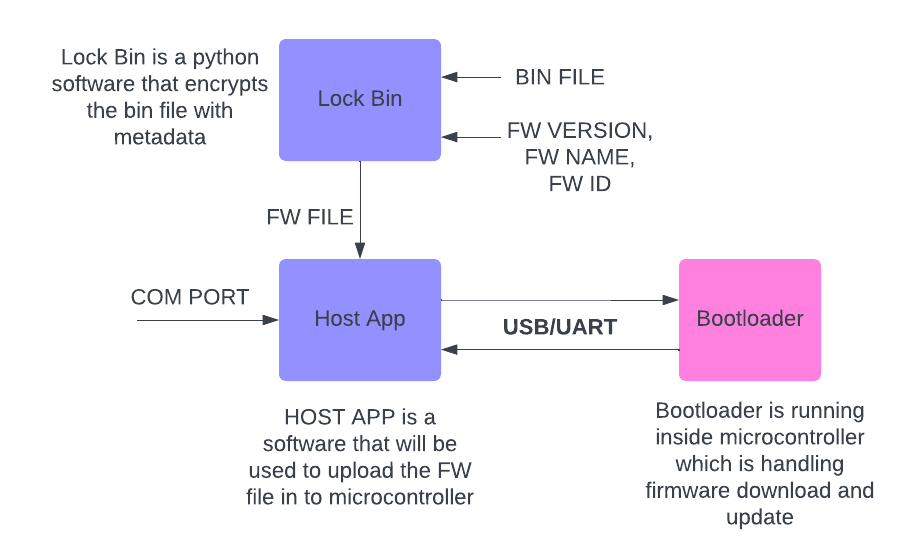
External Python Script: A Python script is provided to assist with loading new firmware onto the device. This script also facilitates version reporting and other bootloader-related operations.
FW FILE) and attaches crucial metadata like firmware version, firmware name, firmware ID, build time, and date to the output file (BIN FILE).Lock Bin tool combines these inputs with the firmware file and encrypts the package to ensure its security during transmission.BIN FILE) that securely contains the encrypted firmware along with the embedded metadata..fw file that contains all the metadata, including build time and date.Host App is responsible for transmitting the encrypted firmware file to the microcontroller..fw file, extracts the necessary metadata for logging or validation purposes, and establishes a connection with the microcontroller via a COM port (e.g., USB/UART).Host App via USB/UART.This pipeline securely handles firmware updates, ensuring the integrity of the process from encryption to installation. The addition of build time and date in the .fw file offers further traceability for each firmware version.
Clone this repository:
git clone https://github.com/mayankpatel97/STM32-SPIFLASH-UART-BOOTLOADER.git
cd STM32-SPIFLASH-UART-BOOTLOADER
Configure the bootloader using your preferred IDE (e.g., STM32CubeIDE) or via command line.
Build the bootloader project and flash it onto your STM32 microcontroller.
Connect your STM32 device to your computer via USB or UART.
Run the provided Python script to load new firmware:
python firmware_loader.py --port /dev/ttyUSB0 --file firmware.binThe script will automatically handle the transfer, validation, and version management.
After the firmware is successfully loaded, the bootloader will perform a CRC16 check and either boot into the new firmware or revert to the previous version if an error is detected.
In case of an issue with the newly loaded firmware, the bootloader automatically reverts to the previous firmware stored in the other slot, ensuring the device remains operational.
To check the currently running firmware version, use the following command:
python firmware_loader.py --port /dev/ttyUSB0 --versionThis project is licensed under the MIT License - see the LICENSE file for details.
Feel free to contribute to this project by submitting pull requests or opening issues for any bugs or feature requests.
Special thanks to the open-source community for providing tools and libraries that helped in the development of this bootloader.







