FlashStorage_STM32
v1.2.0 to fix `multiple-definitions` linker error

Multiple Definitions Linker ErrorPlease have a look at HOWTO Fix Multiple Definitions Linker Error
The FlashStorage_STM32 library, inspired by Cristian Maglie's FlashStorage, provides a convenient way to store and retrieve user's data using emulated-EEPROM, from the non-volatile flash memory of STM32F/L/H/G/WB/MP1.
The flash memory, generally used to store the firmware code, can also be used to store / retrieve more user's data and faster than from EEPROM. Thanks to the buffered data writing and reading, the flash access time is greatly reduced to increase the life of the flash.
Currently, the library supports both new STM32 core v2.0.0+ and previous STM32 core v1.9.0-
Arduino IDE 1.8.19+ for Arduino. Arduino Core for STM32 v2.3.0+ for STM32 boards. The best and easiest way is to use Arduino Library Manager. Search for FlashStorage_STM32, then select / install the latest version.
You can also use this link for more detailed instructions.
Another way to install is to:
FlashStorage_STM32-main.zip.FlashStorage_STM32-main directoryFlashStorage_STM32-main folder to Arduino libraries' directory such as ~/Arduino/libraries/.For Generic STM32F4 series boards, such as STM32F407VE, using LAN8720, please use STM32 core v2.2.0 as breaking core v2.3.0 creates the compile error.
To use LAN8720 on some STM32 boards
you have to copy the files stm32f4xx_hal_conf_default.h and stm32f7xx_hal_conf_default.h into STM32 stm32 directory (~/.arduino15/packages/STM32/hardware/stm32/2.2.0/system) to overwrite the old files.
Supposing the STM32 stm32 core version is 2.2.0. These files must be copied into the directory:
~/.arduino15/packages/STM32/hardware/stm32/2.2.0/system/STM32F4xx/stm32f4xx_hal_conf_default.h for STM32F4.~/.arduino15/packages/STM32/hardware/stm32/2.2.0/system/STM32F7xx/stm32f7xx_hal_conf_default.h for Nucleo-144 STM32F7.Whenever a new version is installed, remember to copy this file into the new version directory. For example, new version is x.yy.zz, these files must be copied into the corresponding directory:
~/.arduino15/packages/STM32/hardware/stm32/x.yy.zz/system/STM32F4xx/stm32f4xx_hal_conf_default.hTo use Serial1 on some STM32 boards without Serial1 definition (Nucleo-144 NUCLEO_F767ZI, Nucleo-64 NUCLEO_L053R8, etc.) boards, you have to copy the files STM32 variant.h into STM32 stm32 directory (~/.arduino15/packages/STM32/hardware/stm32/2.3.0). You have to modify the files corresponding to your boards, this is just an illustration how to do.
Supposing the STM32 stm32 core version is 2.3.0. These files must be copied into the directory:
~/.arduino15/packages/STM32/hardware/stm32/2.3.0/variants/NUCLEO_F767ZI/variant.h for Nucleo-144 NUCLEO_F767ZI.~/.arduino15/packages/STM32/hardware/stm32/2.3.0/variants/NUCLEO_L053R8/variant.h for Nucleo-64 NUCLEO_L053R8.Whenever a new version is installed, remember to copy this file into the new version directory. For example, new version is x.yy.zz, these files must be copied into the corresponding directory:
~/.arduino15/packages/STM32/hardware/stm32/x.yy.zz/variants/NUCLEO_F767ZI/variant.h~/.arduino15/packages/STM32/hardware/stm32/x.yy.zz/variants/NUCLEO_L053R8/variant.hMultiple Definitions Linker ErrorThe current library implementation, using xyz-Impl.h instead of standard xyz.cpp, possibly creates certain Multiple Definitions Linker error in certain use cases.
You can include this .hpp file
// Can be included as many times as necessary, without `Multiple Definitions` Linker Error
#include "FlashStorage_STM32.hpp"     //https://github.com/khoih-prog/FlashStorage_STM32
in many files. But be sure to use the following .h file in just 1 .h, .cpp or .ino file, which must not be included in any other file, to avoid Multiple Definitions Linker Error
// To be included only in main(), .ino with setup() to avoid `Multiple Definitions` Linker Error
#include "FlashStorage_STM32.h"           //https://github.com/khoih-prog/FlashStorage_STM32
Check the new multiFileProject example for a HOWTO demo.
Have a look at the discussion in Different behaviour using the src_cpp or src_h lib #80
The flash memory has a limited amount of write cycles. Typical flash memories can perform about 10000 writes cycles to the same flash block before starting to "wear out" and begin to lose the ability to retain data.
So BEWARE: IMPROPER USE OF THIS LIBRARY CAN QUICKLY AND PERMANENTLY DESTROY THE FLASH MEMORY OF YOUR MICRO, in particular you should avoid to call the put() orcommit() functions too often and make sure that in the entire life of the micro the number of calls to put() orcommit() stay well below the above limit of 10000 (it's a good rule-of-thumb to keep that number in mind even if the manufacturer of the micro guarantees a bigger number of cycles).
Include FlashStorage_STM32.h to get an EEPROM emulation with the internal flash memory.
See EmulateEEPROM sketch for an example.
The API is very similar to the well known Arduino EEPROM.h API but with 4 additional functions:
bool isValid() returns true if data in the emulated-EEPROM is valid (the data written to flash at least once by EEPROM.commit() or EEPROM.put()). Otherwise emulated-EEPROM data is "undefined" and the function returns false.void commit() store the EEPROM data in flash. Use this with care: Every call writes the complete emulated-EEPROM data to flash. This will reduce the remaining flash-write-cycles. Don't call this method in a loop or you will kill your flash soon.void setCommitASAP(bool value = true) to set or clear the _commitASAP private variable (default is true to be safe). If _commitASAP is false, the call to EEPROM.put() won't force the EEPROM.commit() to extend the flash life. You'll have to remember to call EEPROM.commit() manually to save the emulated-EEPROM data into flash or data will be lost.bool getCommitASAP() to return the current value of _commitASAP.BI_Ethernet_Blynk
BI_Ethernet_Blynk_Email
BI_Ethernet_WM_Config
LAN8720_Ethernet_Blynk
LAN8720_Ethernet_Blynk_Email
LAN8720_Ethernet_WM_Config
......
and many more to libraries come.
FlashStorage_STM32/examples/StoreNameAndSurname/StoreNameAndSurname.ino
Lines 15 to 106 in bb0dd71
The following is the sample terminal output when running example Ethernet_STM32_LAN8720 on STM32F4 BLACK_F407VE with LAN8720 Ethernet using STM32Ethernet Library.
Start Ethernet_STM32_LAN8720 on BLACK_F407VE
Ethernet Shield type : LAN8720 Ethernet & STM32Ethernet Library
Ethernet_Manager_STM32 v1.3.2
DoubleResetDetector_Generic v1.8.1

EEPROM size = 16384, start = 0
Flag read = 0xd0d04321
No doubleResetDetected
SetFlag write = 0xd0d01234
[ETM] EEPROMsz:4096
[ETM] EEPROM Length():16384
[ETM] CCSum=0xaed,RCSum=0x4d385471
[ETM] ChkCrR:CrCCsum=0x21dd,CrRCsum=0x3338
[ETM] InitCfgFile,sz=60
[ETM] SaveEEPROM,Sz=16384,DataSz=0,WCSum=0x569
[ETM] CrCCSum=0xc30
[ETM] Start connectEthernet using DHCP
[ETM] MAC:FE-98-FC-DD-D9-BA
[ETM] Dynamic IP OK, connected
[ETM] IP:192.168.2.169
[ETM] bg: isForcedConfigPortal = false
[ETM] bg:Stay forever in CP:No ConfigDat
Connected! IP address: 192.168.2.169

Your stored Credentials :
MQTT Server = blank
Port = blank
MQTT UserName = blank
MQTT PWD = blank
Subs Topics = blank
Pubs Topics = blank
HStop doubleResetDetecting
ClearFlag write = 0xd0d04321
HHHHH[ETM] h:Updating EEPROM. Please wait for reset
[ETM] SaveEEPROM,Sz=16384,DataSz=0,WCSum=0x729
[ETM] CrCCSum=0x1087
[ETM] h:Rst
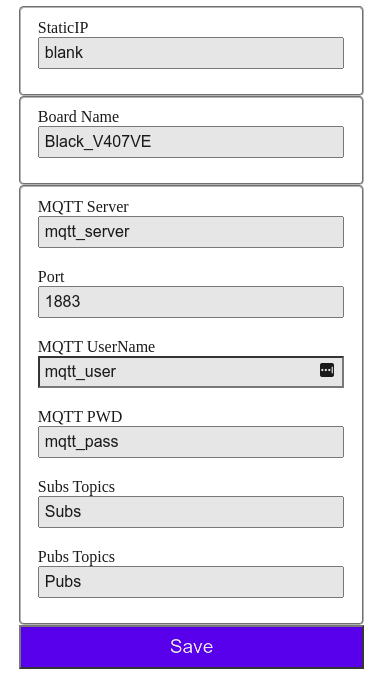
Start Ethernet_STM32_LAN8720 on BLACK_F407VE
Ethernet Shield type : LAN8720 Ethernet & STM32Ethernet Library
Ethernet_Manager_STM32 v1.3.2
DoubleResetDetector_Generic v1.8.1

EEPROM size = 16384, start = 0
Flag read = 0xd0d04321
No doubleResetDetected
SetFlag write = 0xd0d01234
[ETM] EEPROMsz:4096
[ETM] EEPROM Length():16384
[ETM] CCSum=0x729,RCSum=0x729
[ETM] ChkCrR:CrCCsum=0x1087,CrRCsum=0x1087
[ETM] CrCCSum=1087,CrRCSum=1087
[ETM] Valid Stored Dynamic Data
[ETM] ======= Start Stored Config Data =======
[ETM] Header=STM32, BoardName=Black_V407VE
[ETM] StaticIP=blank
[ETM] Start connectEthernet using DHCP
[ETM] MAC:FE-98-FD-D6-DA-BA
[ETM] Dynamic IP OK, connected
[ETM] IP:192.168.2.170
[ETM] begin:Ethernet Connected.
Connected! IP address: 192.168.2.170

Your stored Credentials :
MQTT Server = mqtt_server
Port = 1883
MQTT UserName = mqtt_user
MQTT PWD = mqtt_pass
Subs Topics = Subs
Pubs Topics = Pubs
HStop doubleResetDetecting
ClearFlag write = 0xd0d04321
HSetFlag write = 0xd0d01234
[ETM] EEPROMsz:4096
[ETM] EEPROM Length():16384
[ETM] CCSum=0x729,RCSum=0x729
[ETM] ChkCrR:CrCCsum=0x1087,CrRCsum=0x1087
[ETM] CrCCSum=1087,CrRCSum=1087
[ETM] Valid Stored Dynamic Data
[ETM] ======= Start Stored Config Data =======
[ETM] Header=STM32, BoardName=Black_V407VE
[ETM] StaticIP=blank
[ETM] Start connectEthernet using DHCP
[ETM] MAC:FE-98-FD-D6-DB-BA
[ETM] Dynamic IP OK, connected
[ETM] IP:192.168.2.149
[ETM] begin:Ethernet Connected.
Connected! IP address: 192.168.2.149

Your stored Credentials :
MQTT Server = mqtt_server
Port = 1883
MQTT UserName = mqtt_user
MQTT PWD = mqtt_pass
Subs Topics = Subs
Pubs Topics = Pubs
HStop doubleResetDetecting
ClearFlag write = 0xd0d04321
HHHHHHHHH HHHHHHHHHH HHHHHHHHHH HHHHHHHHHH HHHHHHHHHH HHHHHHHHHH HHHHHHHHHH HHHHHHHHHH
HHHHHHHHHH HHHHHHHHHH HHHHHHHHHH HHHHHHHHHH HHHHHHHHHH HHHHHHHHHH HHHHHHHHHH HHHHHHHHHH
HHHHHHHHHH HHHHHHHHHH HHHHHHHHHH HHHHHHHHHH HHHHHHHHHH HHHHHHHHHH HHHHHHHHHH HHHHHHHHHH
HHHHHHHHHH HHHHHHHHHH HHHHHHHHHH HThe following is the sample terminal output when running example StoreNameAndSurname on STM32H7 Nucleo-144 NUCLEO_H743ZI2
Start StoreNameAndSurname on NUCLEO_H743ZI2
FlashStorage_STM32 v1.2.0
EEPROM length: 16384
EEPROM is empty, writing WRITTEN_SIGNATURE and some example data:
Insert your name : My_Name

Insert your surname : My_Surname

<< Your name: My_Name
. Your surname: My_Surname
>> have been saved. Thank you!Start StoreNameAndSurname on NUCLEO_H743ZI2
FlashStorage_STM32 v1.2.0
EEPROM length: 16384
Hi My_Name
My_Surname
, nice to see you again :-)
Clearing WRITTEN_SIGNATURE for next try
Done clearing signature in emulated EEPROM. You can reset nowThe following is the sample terminal output when running example StoreNameAndSurname on STM32L5 Nucleo-144 NUCLEO_L552ZE_Q
Start StoreNameAndSurname on NUCLEO_L552ZE_Q
FlashStorage_STM32 v1.2.0
EEPROM length: 2048
EEPROM is empty, writing WRITTEN_SIGNATURE and some example data:
Insert your name : My_Name

Insert your surname : My_Surname

<< Your name: My_Name
. Your surname: My_Surname
>> have been saved. Thank you!Start StoreNameAndSurname on NUCLEO_L552ZE_Q
FlashStorage_STM32 v1.2.0
EEPROM length: 2048
Hi My_Name
My_Surname
, nice to see you again :-)
Clearing WRITTEN_SIGNATURE for next try
Done clearing signature in emulated EEPROM. You can reset nowThe following is the sample terminal output when running example StoreNameAndSurname on STM32F7 Nucleo-144 NUCLEO_F767ZI
Start StoreNameAndSurname on NUCLEO_F767ZI
FlashStorage_STM32 v1.2.0
EEPROM length: 16384
EEPROM is empty, writing WRITTEN_SIGNATURE and some example data:
Insert your name : My_Name

Insert your surname : My_Surname

<< Your name: My_Name
. Your surname: My_Surname
>> have been saved. Thank you!Start StoreNameAndSurname on NUCLEO_F767ZI
FlashStorage_STM32 v1.2.0
EEPROM length: 16384
Hi My_Name
My_Surname
, nice to see you again :-)
Clearing WRITTEN_SIGNATURE for next try
Done clearing signature in emulated EEPROM. You can reset nowYes, you can declare a struct with more fields and call a EEPROM.put() to store the entire structure. See the StoreNameAndSurname for how to do it.
Not with STM32.
No. If your board provides an integrated-EEPROM, it's advisable to use that because EEPROM has longer lifetime, number of write cycles, etc.).
In the absence of an integrated-EEPROM or its size is too small for your use-case, you can use this library to use a small portion flash memory as emulated-EEPROM, provided that you keep in mind the limits as in Limited number of writes
If you get compilation errors, more often than not, you may need to install a newer version of the core for Arduino boards.
Sometimes, the library will only work if you update the board core to the latest version because I am using newly added functions.
Submit issues to: FlashStorage_STM32 issues
multiple-definitions linker error.allman style. Restyle the libraryMany thanks for everyone for bug reporting, new feature suggesting, testing and contributing to the development of this library.
 Cristian Maglie |
If you want to contribute to this project:
Copyright (c) 2021- Khoi Hoang







