YangMVC
1.0.0

[toc]
https://git.oschina.net/yangtf/YangMVC/attach_files
Please download the version with the highest version number on this page
    < dependency >
      < groupId >org.docshare</ groupId >
      < artifactId >yangmvc-boot</ artifactId >
      < version >2023.01.21</ version >
</ dependency >https://gitee.com/yangtf/YangMVC/blob/master/YangMVC/update.md
YangMVC is an efficient, lightweight MVC and ORM framework. You just need to throw a jar package into your project to complete the development of most web websites.
YangMVC's URL and controller class adopt the default naming convention method, reducing configuration. For example, IndexController corresponds to the root directory of the website, BookController corresponds to /book directory.
The ORM provided by YangMVC is easy to use.
LasyList list = Model.tool("book").all().gt("id",12).lt("id,33);
This sentence is equivalent to the sql statement select * from book where id>12 and id<33
It gets a linear table (array) that can be enumerated directly in JSTL and FreeMarker. .
If there is some complex SQL, you can write SQL directly, and it will also return LasyList instead of ResultSet.
The ORM framework does not need to pre-generate any POJO class, and all tables are mapped to the built-in Model class, that is, a Model object corresponds to a row in the database table. . . Model can adapt to any table and view.
If you really need to convert the data in the database into a specific java object (POJO class), then Model provides methods that can be directly converted into the class you need. It is also very convenient to use.
Using this framework, you can advance your project at an efficient speed, without changing the java file and two xml files in order to write a function (students who use SSH can have a bubble, isn't that true)
The design of the database is often incomplete in the early stage. If a framework like Hibernate is used, then the Java class needs to be regenerated after modifying the database. The corresponding DAO class also needs to be modified accordingly, which is simply a nightmare. . .
iBatis is what you like, but it requires sql statements. YangMVC is not used. . .
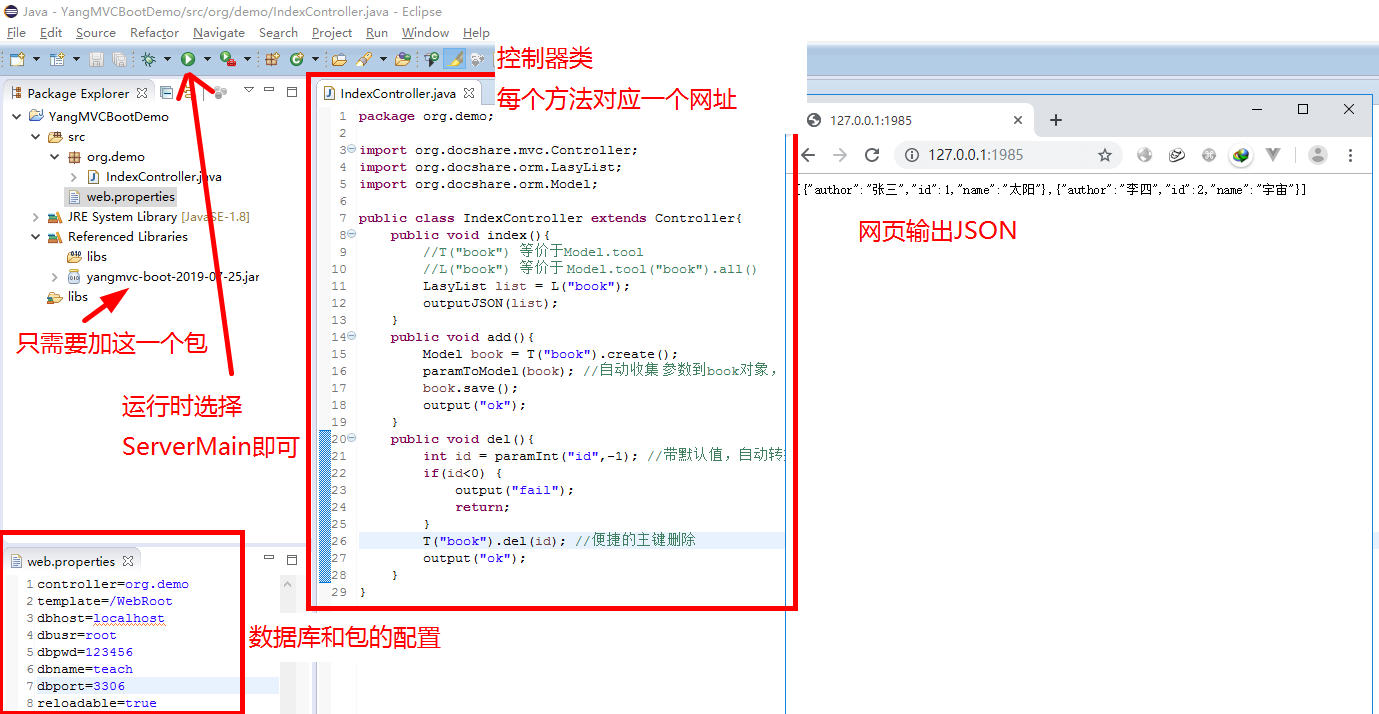 Under this architecture, you usually only need to output JSON. You can create a java project, drag in a yangmvc-xxx-boot.jar, and create a new controller. Run directly!
 public class IndexController extends Controller {
	public void index (){
		//T("book") 等价于Model.tool
		//L("book") 等价于 Model.tool("book").all()
		LasyList list = L ( "book" );
		outputJSON ( list );
	}
	public void add (){
		Model book = T ( "book" ). create ();
		paramToModel ( book ); //自动收集 参数到book对象, 如参数height会保存到book的height属性中。
		book . save ();
		output ( "ok" );
	}
	public void del (){
		int id = paramInt ( "id" ,- 1 ); //带默认值,自动转换类型
		if ( id < 0 ) {
			output ( "fail" );
			return ;
		}
		T ( "book" ). del ( id ); //便捷的主键删除
		output ( "ok" );
	}
}
Visit http://127.0.0.1:1985/ to obtain the json data corresponding to the book table.
http://127.0.0.1:1985/add Add the interface address corresponding to the data
http://127.0.0.1:1985/del?id=12 Delete the interface address corresponding to the data
For the entire web project, you only need to manually introduce a jar package, which is yangmvc-version number.jar configuration, and you only need to add necessary configuration information such as database address in web.xml.
You can add the communication group QQ 753780493
First you need to configure the development environment. You need a JDK1.7 or above. And you need an Eclipse or MyEclipse.
If you only have Eclipse, please see this tutorial.
If using MyEclipse, please see the configuration of A01
In the future version number is named after the generation time: yangmvc-2018-6-5.jar The boot version is yangmvc-boot-2018-6-5.jar
Added the function of generating POJO classes, the usage method is as follows
Please enter the database information. If it is the same as in the brackets, you can directly call Enter. Please enter the server domain name or IP default is: [localhost]:
Execute the command
java -jar yangmvc-2018-6-5.jar
Please enter the database name by default: [mvc_demo]:
Please enter the port number by default: [3306]:
Please enter the password by default: [123456]:
Please enter the username by default: [root]:
....
Please enter the package name of the class you want to generate: org.yang
The code will then be generated in the corresponding directory of the registration you entered.
If you enter org.yang, the code is generated in src/org/yang.
A bug was found in children's shoes, that is, tomcat6.0 cannot upload files using YangMVC. After testing, it was found that the reason was that YangMVC used a higher version of Servlet-api when uploading, but Tomcat6 does not support it, so. . . Removed the use of higher-version APIs. Make it run on standalone tomcat 6.0 without any problems. . .
https://gitee.com/yangtf/YangMVC/wikis/pages
http://yangtf.gitee.io/yangmvc/YangMVC/doc/index.html
Basically, as long as you master these three core classes, you can use this framework freely.
Controller class
http://yangtf.gitee.io/yangmvc/YangMVC/doc/org/docshare/mvc/Controller.html
DBTool class http://yangtf.gitee.io/yangmvc/YangMVC/doc/org/docshare/orm/DBTool.html
LasyList class http://yangtf.gitee.io/yangmvc/YangMVC/doc/index.html







