WebCompiler_SE.LAB
1.0.0

SE.LAB student production of web compilers for coding practice!
Development environment
Compiler & Interprinter installation
Distributed the web in the server [Linux] and uses a Linux compiler when entering text from outside.
! It should be Korean in Linux environment -C-
Which of the GCC and G ++ do you choose?
If you send a command to Linux in Java, the inequality will not recognize it?
GCC -o test test.c 2> Error.txt cannot be executed itself
The above authority is a problem, but it is not a matter to be considered in the current stage of development.
Conclusion) First, create a C file and interpret the phrase that Java cannot be interpreted. Reinterpretation by making the phrase that was previously commanded in Java into an executable file.
-Java-
Java Compiler implementation based on the implementation of C Compiler with GCC
Different from GCC
In conclusion, as if you were producing the C Compiler, the interpretation of Java instead
 docker exec se03 sh -c "cd compile; javac -encoding utf-8 javaTest.java 2> javaError.txt"
docker exec se03 sh -c "cd compile; java -Dfile.encoding=utf-8 SELAB > javaResult.txt"
 -PYTHON-
- python은 인터프린터 언어로 컴파일 과정을 거치지 않느다. 그점에서 위의 JAVA와 C Compiler와 상호 다른 부분이 존재했다.
    1) 실행 결과 python python.py를 실행하면 즉각적으로 결과가 출력됨
        - 오류출력은? 어떻게?
            1) 표준 에러 출력을 pythonError.txt파일에 입력시킨다.
            2) pythonError.txt 파일에 데이터가 입력된 상태이면 실행이 성공한 것으로 생각하고 결과값을 유도받는다.
        - 오류출력에 문제점이 발생할 경우 또는 .py 파일의 데이터가 쌓이는 겨우
            1) 제일 먼저 실행될 리눅스 명령문을 .py 파일과 pythonError.txt파일을 지우도록 했다.
            2) 기존 데이터를 지움으로써 이후에 입력될 내용들의 오류를 잡는다.
    2) python 한글 패치
        - `# -*- coding: utf-8 -*-`

 -JS-
 - JS는 python과 같은 인터프린터 언어이다. 자바와 c언어처럼 별도의 컴파일 과정을 거치지 않는다. 그러므로 이를 해결하기 위해서 python과 같은 구조로 해석문 구조를 구현했다.
    1) 실행 결과 js hello.js를 실행하면 즉각적으로 결과가 출력됨
        - 오류출력은? 어떻게?
            1) 표준 에러 출력을 jsError.txt파일에 입력시킨다.
            2) jsError.txt 파일에 데이터가 입력된 상태이면 실행이 성공한 것으로 생각하고 결과값을 유도 받는다.
        - 오류출력에 문제점이 발생할 경우 또는 .js 파일의 데이터가 쌓이는 경우
            1) 제일 먼저 실행될 리눅스 명령문을 .js 파일과 js.txt파일을 지우도록 함
            2) 기존 데이터를 지움으로써 이후에 입력될 내용들의 오류를 잡음
image 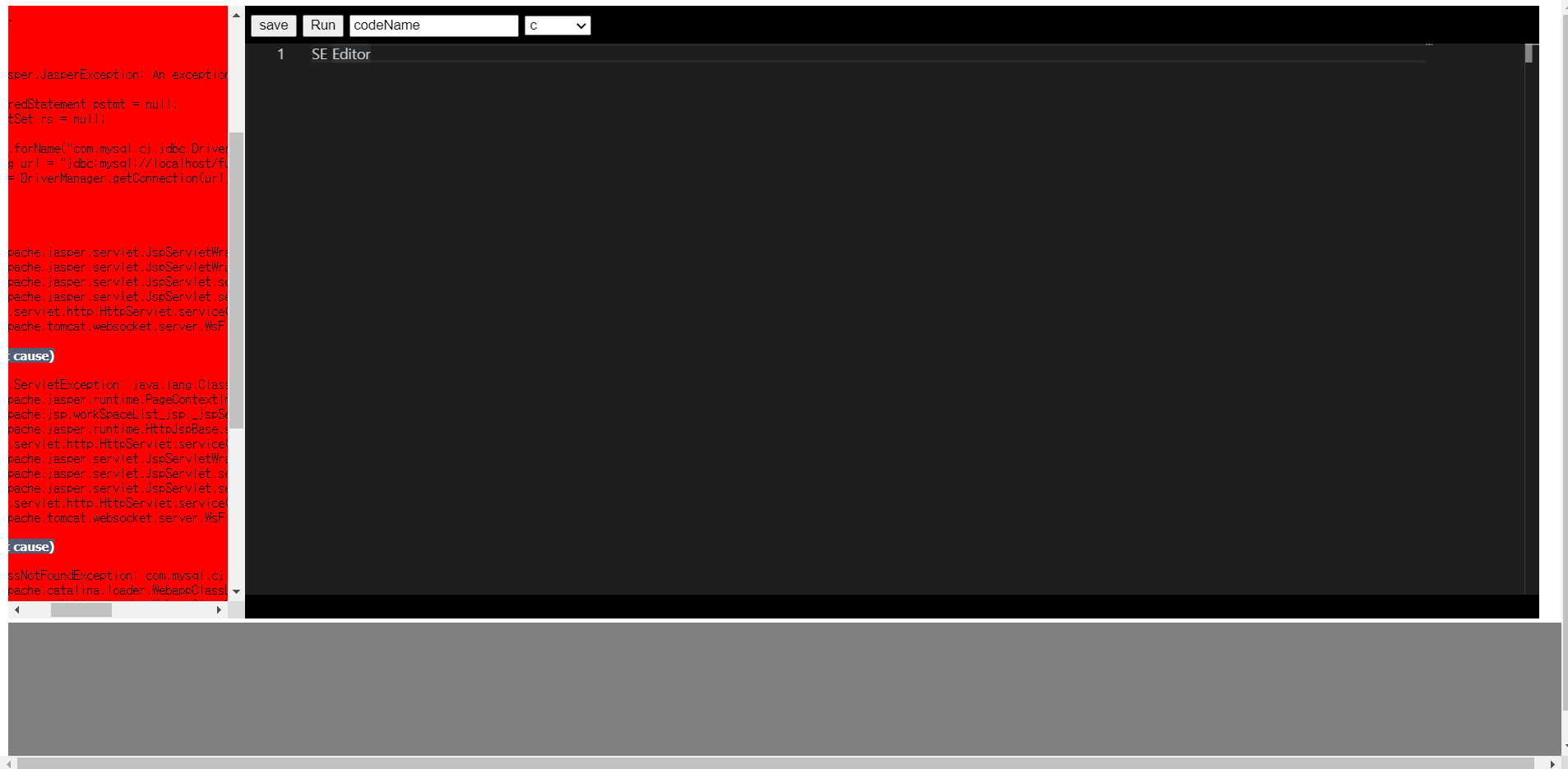

SQL
SQL Creation Patch Exhibition
Error occurs during MySQL interlocking?
Conclusion) Move to MySQL-Connector-Java-5.1.45.jar-> Tomcat-> LIB
Database ID: SELAB
Database PW: 1234
Code is not saved?
Results) Membership can be registered only with membership IDs who have joined on the web !!
Docker installation file
Docker Inner APT installation method
apt update inside Dockertar zxvf jdk-14.0.2.tar.gzsudo mkdir /usr/lib/jvm is executed inside Dockersudo mv jdk-14.0.2 /usr/lib/jvmupdate-alternatives --install /usr/bin/java java /usr/lib/jvm/jdk-14.0.2/bin/java 1update-alternatives --install /usr/bin/javac javac /usr/lib/jvm/jdk-14.0.2/bin/javac 1update-alternatives --config java Run inside Dockerupdate-alternatives --config javac Run inside Dockerapt install python3 Run inside Dockerapt install nodejs inside Dockerapt install gcc execution inside DockerCompile the source sent by the client in Docker's container
    docker run -it --name se01 -v /root/data:/data ubuntu
    docker run -it --name se02 -v /root/data:/data ubuntu
    docker run -it --name se03 -v /root/data:/data ubuntu
"/usr/local/apache/share/cResult.txt"
 #!bin/bash

docker restart se01
docker exec se01 sh -c "cd data; cp cTest.txt cTest.c; gcc -o cTest cTest.c 2> cError.txt;"


docker restart se01
docker exec se01 sh -c "cd data; ./cTest > cResult.txt;"
 #!bin/bash

docker restart se01

docker exec se01 sh -c "cd compile; rm -r cTest;"
docker exec se01 sh -c "cd compile; rm -r cError.txt;"
docker exec se01 sh -c "cd compile; rm -r cResult.txt;"

docker exec se01 sh -c "cd data; mv cTest.txt ../compile"
docker exec se01 sh -c "cd compile; cp cTest.txt cTest.c"
docker exec se01 sh -c "cd compile; gcc -o cTest cTest.c 2> cError.txt"
docker exec se01 sh -c "cd compile; ./cTest > cResult.txt"
docker exec se01 sh -c "cd compile; mv cResult.txt ../data"
docker exec se01 sh -c "cd compile; mv cError.txt ../data "
 #!bin/bash

docker restart se01

docker exec se01 sh -c "cd compile; rm -r pythonTest.py;"
docker exec se01 sh -c "cd compile; rm -r pythonError.txt;"
docker exec se01 sh -c "cd compile; rm -r pythonResult.txt;"

docker exec se01 sh -c "cd data; mv pythonTest.txt ../compile"
docker exec se01 sh -c "cd compile; cp pythonTest.txt pythonTest.py"
docker exec se01 sh -c "cd compile; python pythonTest.py > pythonResult.txt 2> pythonError.txt"
docker exec se01 sh -c "cd compile; mv pythonResult.txt ../data"
docker exec se01 sh -c "cd compile; mv pythonError.txt ../data "
 #!bin/bash

docker restart se01

docker exec se01 sh -c "cd compile; rm -r javascriptTest.js;"
docker exec se01 sh -c "cd compile; rm -r javascriptError.txt;"
docker exec se01 sh -c "cd compile; rm -r javascriptResult.txt;"

docker exec se01 sh -c "cd data; mv javascriptTest.txt ../compile"
docker exec se01 sh -c "cd compile; cp javascriptTest.txt javascriptTest.js"
docker exec se01 sh -c "cd compile; node javascriptTest.js > javascriptResult.txt 2> javascriptError.txt"
docker exec se01 sh -c "cd compile; mv javascriptResult.txt ../data"
docker exec se01 sh -c "cd compile; mv javascriptError.txt ../data "
JavaScript is similar to the existing Python Interprinter, so it can be implemented simply.
Program installed inside Docker
 #!bin/bash

docker restart se01

docker exec se01 sh -c "cd compile; rm -r SELAB.class;"
docker exec se01 sh -c "cd compile; rm -r javaError.txt;"
docker exec se01 sh -c "cd compile; rm -r javaResult.txt;"

docker exec se01 sh -c "cd data; mv javaTest.txt ../compile"
docker exec se01 sh -c "cd compile; cp javaTest.txt javaTest.java"
docker exec se01 sh -c "cd compile; javac javaTest.java 2> javaError.txt"
docker exec se01 sh -c "cd compile; java SELAB > javaResult.txt"
docker exec se01 sh -c "cd compile; mv javaResult.txt ../data"
docker exec se01 sh -c "cd compile; mv javaError.txt ../data "
Class name is fixed with SELAB!
How to distribute multiple clients to Docker's container
cMid.sh JavaMid.sh JavascriptMid.sh python.sh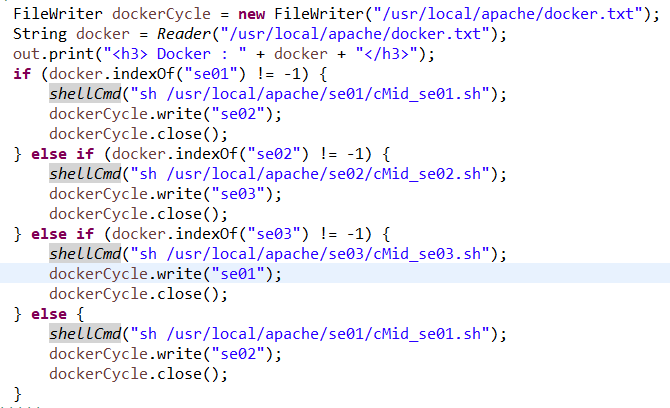
    docker = docker.replace("<br>", "");
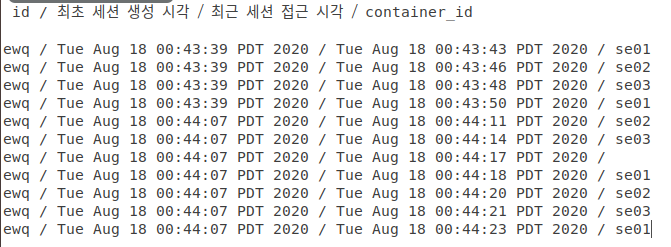
	FileWriter pw = new FileWriter("/usr/local/apache/log.txt", true);
	HttpSession session = req.getSession();
	String a = (String) session.getAttribute("id"); // 회원 아이디
	Date b = new Date(session.getCreationTime()); // 최초 세션 생성 시각
	Date c = new Date(session.getLastAccessedTime()); // 최근 세션 접근 시각
	pw.write(a + " / " + b + " / " + c + " / " + docker + "n");
	pw.close();
 public static String getClientIp(HttpServletRequest req) {

    String[] header_IPs = { "HTTP_CLIENT_IP", "HTTP_X_FORWARDED_FOR", "HTTP_X_FORWARDED",
		"HTTP_X_CLUSTER_CLIENT_IP", "HTTP_FORWARDED_FOR", "HTTP_FORWARDED", "X-Forwarded-For",
		"Proxy-Client-IP", "WL-Proxy-Client-IP" };

    for (String header : header_IPs) {
	    String ip = req.getHeader(header);

	    if (ip != null && !"unknown".equalsIgnoreCase(ip) && ip.length() != 0) {
		return ip;
	    }
    }

    return req.getRemoteAddr();

}
 ArrayList<String> DN = new ArrayList<String>();

		shellCmd("sh /usr/local/apache/docker/check.sh");
		File check01 = new File("/usr/local/apache/docker/check01.txt");
		File check02 = new File("/usr/local/apache/docker/check02.txt");
		File check03 = new File("/usr/local/apache/docker/check03.txt");

		if (check01.length() == 0) {
			DN.add("se01");
		}
		if (check02.length() == 0) {
			DN.add("se02");
		}
		if (check03.length() == 0) {
			DN.add("se03");
		}
		int length = DN.size();

		int cnp = 0;
		if (length != 0 && length != 3) {
			for (int i = 0; i < length; i++) {
				if (docker.indexOf(DN.get(i)) != -1) {
					shellCmd("sh /usr/local/apache/docker/se01/cMid_" + DN.get(i) + ".sh");

					if (i + 1 < length) {
						dockerCycle.write(DN.get(i + 1));
					} else if (i - 1 >= 0) {
						dockerCycle.write(DN.get(i - 1));
					} else {
						dockerCycle.write(DN.get(i));
					}

					dockerCycle.close();

					break;
				}
				cnp++;
			}
			if (cnp == length) {
				docker = DN.get(0);
				shellCmd("sh /usr/local/apache/docker/se01/cMid_" + DN.get(0) + ".sh");

				if (1 < length) {
					dockerCycle.write(DN.get(1));
				} else {
					dockerCycle.write(DN.get(0));
				}
				dockerCycle.close();
			}
		} else if (length == 3) {

			if (docker.indexOf("se01") != -1) {
				shellCmd("sh /usr/local/apache/docker/se01/cMid_se01.sh");
				dockerCycle.write("se02");
				dockerCycle.close();
			} else if (docker.indexOf("se02") != -1) {
				shellCmd("sh /usr/local/apache/docker/se02/cMid_se02.sh");
				dockerCycle.write("se03");
				dockerCycle.close();
			} else if (docker.indexOf("se03") != -1) {
				shellCmd("sh /usr/local/apache/docker/se03/cMid_se03.sh");
				dockerCycle.write("se01");
				dockerCycle.close();
			} else {
				docker = "se01";
				shellCmd("sh /usr/local/apache/docker/se01/cMid_se01.sh");
				dockerCycle.write("se02");
				dockerCycle.close();
			}
		}
Compilation of interworking and sources
Using OCR in ubuntu
 sudo apt-get install tesseract-ocr
sudo apt-get install libtesseract-dev
sudo apt-cache seach tesseract
sudo apt-get install
sudo apt-get install tesseract-ocr-eng
sudo apt-get install tesseract-ocr-kor
+ 실행
 tesseract input.png output[.txt]
tesseract -l kor input.png output[.txt]
Install the above OCR API on Docker
Solving algorithm problem
./hello < test.txtAlgorithm Java error resolution
Export LC_ALL = C.UTF-8 Locale
```
Completion of algorithm problem solving implementation
NAVER Cloud Platform
sudo scp -P 7498 -i "SELAB.pem" ROOT.war [email protected]:~/sudo ssh -p 7498 -i "SELAB.pem" [email protected]Time to find algorithm
 // 실행시간 확인 --> 나중에 ㄱㄱ
	public static void timeCheck(String tmp) {

		try {
			FileWriter timeCheck = new FileWriter("/usr/local/apache/share/timeCheck.sh");
			timeCheck.write("beginTime=$(date +%s%N)" + "n");
			timeCheck.write(tmp + " < testinput" + "n");
			timeCheck.write("endTime=$(date +%s%N)" + "n");
			timeCheck.write("elapsed=`echo "($endTime - $beginTime) / 1000000" | bc`" + "n");
			timeCheck.write("elapsedSec=`echo "scale=6;$elapsed / 1000" | bc | awk '{printf "%.6f", $1}'`" + "n");
			timeCheck.write("echo TOTAL: $elapsedSec sec > timeCheck.txt");
			timeCheck.close();
		} catch (IOException e) {
			// TODO Auto-generated catch block
			e.printStackTrace();
		}

	}







