Artwork display and management system
Content and requirements
- 1. Functional requirements. Complete at least the following basic functions:
- (1) Student basic information management. Information includes: student number, name, gender, date of birth, grade, major, photos, etc.
- (2) Student work management. Information includes: student ID, name of the work, category of work (such as watercolor painting, ink painting, gouache painting, oil painting, printmaking, fine brushwork painting, woodcut, sketch, calligraphy, seal carving, sculpture, etc.), work size (including length, width, height, unit: cm), creation date, highest award title, highest award level, award date, award certificate photos, work photos, etc.
- (3) Display of students' works. Query student works according to various conditions, and display the work's photos, names, categories, sizes, creation dates, award titles, award grades, award dates and other information. If there are multiple works that meet the conditions, set the front and back page turn buttons and use the mouse to select front and back. It would be better if the photos of the work can be enlarged and reduced.
- (4) Statistics and summary:
- ① The total number of works and winning works of each student are counted by major and grade.
- ② According to major, grade and work category, count the total number of works and the number of awarded works of each student.
- (5) System role:
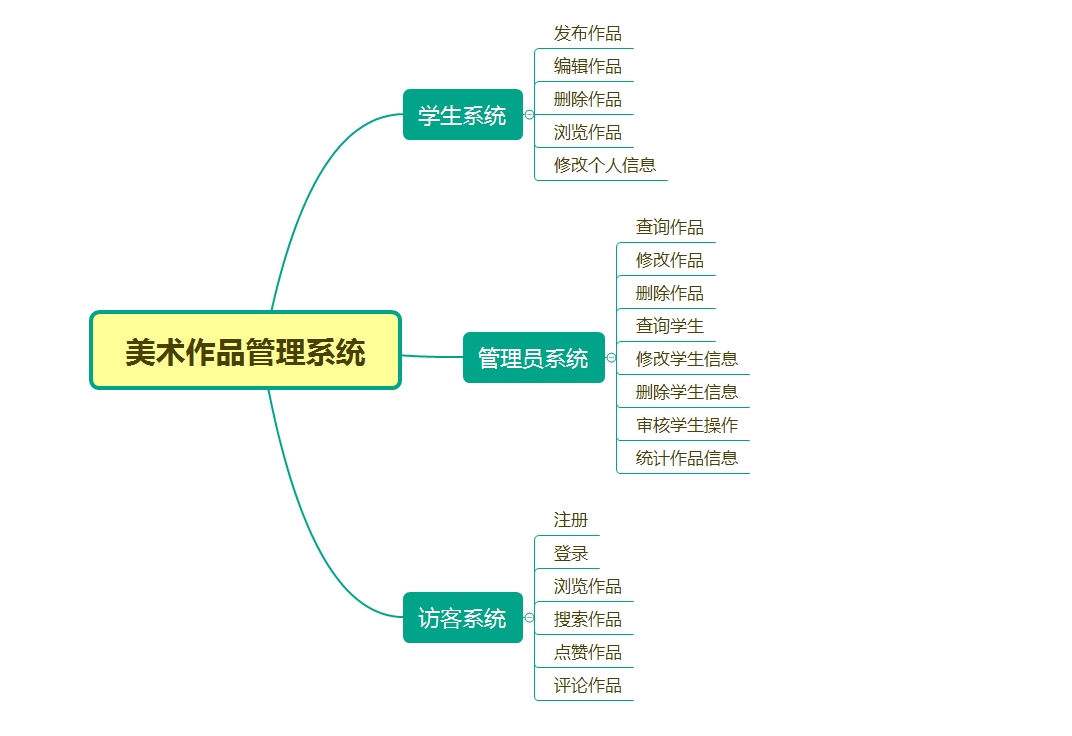
- ① Administrator. Registration is required. Able to manage students' basic information; review and confirm the information of newly added and modified works by students; and carry out various statistical summary work.
- ② Student. Registration is required. Can add, delete, check and modify information about your own works.
- ③ Visitors. No registration required. Able to query and appreciate student works according to various conditions.
- 2. Special requirements: In addition to the functions of registration, login, etc. on the main page, it also provides the function of visitors to query and browse student works.
- 3. Design requirements:
- (1) Create code files for standard information (such as majors, work categories, highest award-winning level, etc.).
- (2) The input of standard information is selected using the drop-down menu.
- (3) There must be a strict mechanism for checking the rationality of input data.
- (4) We must fully consider the data connection between multiple data files to realize the correlation operation between multiple data files.
Structural diagram
Install
- Install tomcat
- Install MySQL
- Import the source code into eclipse to run
- Visit:
http://localhost/DrawingManager/install/install.jsp








