qacover
v2.0.0

QACover is a component to evaluate the test data coverage in relation to the SQL queries that are executed in a Java or .NET application. The coverage is measured according to the SQL Full Predicate Coverage (SQLFpc) criterion, a variant of MCDC tailored to SQL queries. The criterion determines the situations of interest (test coverage items) to test a SQL query against the test database. These situations are represented as a set of Coverage Rules. There is also an option to measure the coverage of Mutants for SQL queries (SQLMutation criterion).
Each time that the application executes a query, QACover intercepts the query execution, generates and evaluates the coverage rules, and stores the results in the local development environment.
At the end of the tests you can get the summary and detail reports of test data coverage. This is an example of the summary report of a test session:
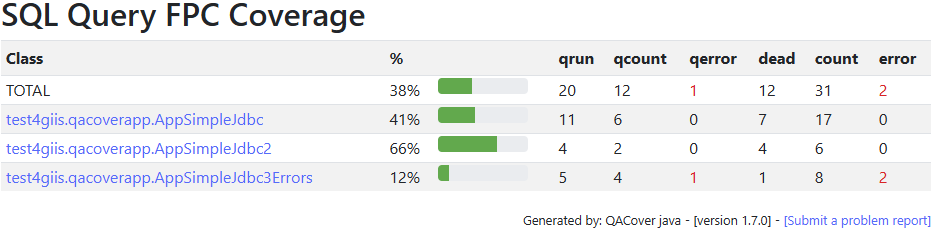
Example for Java:
qacover-core to your pom.xmlqacover.properties and
spy.properties from the qacover-core folder to the root of your project.:p6spy afer jdbc
(eg. if your connection string is jdbc:sqlite:./target/TestDB.db it must become jdbc:p6spy:sqlite:./target/TestDB.db).This creates the folder target/qacover/rules that contains the internal data about the coverage evaluation.
To generate an html report:
qacover-model-<VERSION>-report.jar
from Maven Central (go to Versions and then Browse the selected version to download).java -jar qacover-model-<VERSION>-report.jar target/qacover/rules target/qacover/reportsindex.html that you will found in the target/qacover/reports folder.If you find that the class names are not the ones at the interaction point that executes the query,
you will need to tweak the configuration to include some exclusions for their packages
(see later), remove the target/qacover folder and repeat again.
Folder with the test package qacoversample contains an example of how to use the coverage information to improve the test data and test cases to reveal hidden bugs. It contains three sequential scenarios:
Releases of the java artifacts (java 8 or higher) are published in Maven Central under the group id io.github.giis-uniovi.
There are two different artifacts:
qacover-core:
The main artifact to use as a a dependency in your application (as shown in the Quick Start).qacover-model:
It only includes the model and classes to do reporting and to inspect the coverage rules.
Use it if you only need access to previously generated coverage rules (e.g. to generate reports from a program).Each of them has another downloadable jar that includes additional qualifier:
qacover-core uber jar.
It includes all needed dependencies (excluding slf4j) and they are shaded
(i.e. renamed in a different namespace to avoid dependency conflicts):
-uber qualifier if for any reason you cannot use it as a dependency in your application
(e.g. to deploy in an application server).
You simply need to put the jar in your server library and set the configuration to use QACover.<qualifier>uber</qualifier> to the dependency declaration.qacover-model standalone reporter:
Download the artifact with the -report qualifier to generate the reports from the command line as shown in the quick start.Releases for .NET platform are published in NuGet. The same as for Java, there are two different packages:
QACover:
The main package (netstandard2.9) to include as a package reference in your project configuration (e.g. the .csproj file if you are using C#).QACoverReport:
A dotnet tool (netcore2.0) to generate the reports from the command line:
Install the tool with dotnet tool install QACoverReport
and execute it as a command QACoverReport <rules folder> <reports folder>.On Java, you need to have two configuration files to evaluate the coverage:
qacover.properties and
spy.properties and to customize the JDBC Driver.
On .NET you only need the first one along with some additional code to intercept the queries.
QACover looks for the qacover.properties in this order:
The qacover.properties available in the qacover-core module of this
repo contains a general configuration suitable for common scenarios, but sometimes it must be customized.
See the file for details on each configuration parameter. Next, we highlight the most important ones that are the
inclusion and exclusion criteria.
When a line of a method in your application executes a SQL query (interaction point), a chain of calls to methods of your framework is executed until reaching the driver method that actually executes the query. Here is the point in which the actual execution of the query is detected, but what we want is to determine the interaction point in the application. To achieve this, QACover checks the call stack at the point of the actual execution and successively excludes every call made in any framework package until it locates the point of the database interaction in your method.
QACover excludes the system packages like the java, System, P6Spy or the QACover packages, but depending on the framework
you must configure additional exclusions by setting the qacover.stack.exclusions property in the file qacover.properties.
Example: Folder it/spring-petclinic-main contains a typical sample from Spring Boot.
The exclusion is declared as:
qacover.stack.exclusions=org.springframework.,org.hibernate.,com.zaxxer.hikari.,com.sun.,sun.reflect.
that removes the framework classes that we want to skip to locate the interaction point that is at the
org.springframework.samples.petclinic.PetclinicIntegrationTests class.
However, in this particular case, the interaction point is under org.springframework.
We must add the inclusions parameter to ensure that org.springframework.samples. is not excluded:
qacover.stack.inclusions=org.springframework.samples.
There are other parameters to configure inclusion criteria for packages,
and exclusion criteria for class names or table names.
See qacover.properties for more details.
The spy.properties available in the qacover-core folder of this
repo contains the minimal configuration required by P6Spy:
modulelist=giis.qacover.driver.InterceptorFactory must always be present to indicate the point in which
P6Spy passes the control to QACoverSee the spy.properties file
or the P6Spy documentation for more details.
Configuration for .NET project use the same
qacover.properties than Java,
but does not use spy.properties. Instead, it requires some coding:
DbContext, see e.g.
Ef2InterceptorContext.csLogging can be configured for packages starting with giis.qacover.:
In addition to standard logs, other folders log-* are created in the rules folder
to display additional debug information about the queries that are evaluated, the database schema,
and the coverage rules.
The report generation creates a set of static html files in the designated folder, to easily inspect summary and details of the coverage data.
To generate reports you have three options:
qacover-model standalone reporter
as shown in the quick start and execute: java -jar qacover-model-<VERSION>-report.jar target/qacover/rules target/qacover/reportsqacover-model in the classpath: new giis.qacover.report.ReportManager().run("target/qacover/rules", "target/qacover/rules");qacover-model is declared as a dependency,
execute the ReportMain method using the exec-maven-plugin: <plugin>
<groupId>org.codehaus.mojo</groupId>
<artifactId>exec-maven-plugin</artifactId>
<version>1.6.0</version>
<executions>
<execution>
<id>qacover-report</id>
<phase>post-integration-test</phase>
<goals>
<goal>java</goal>
</goals>
<configuration>
<classpathScope>test</classpathScope>
<classpath/>
<mainClass>giis.qacover.report.ReportMain</mainClass>
<arguments>
<argument>target/qacover/rules</argument>
<argument>target/qacover/reports</argument>
</arguments>
</configuration>
</execution>
</executions>
</plugin>The index.html file contains the summary of test data coverage for each class:
where:
Each class name is clickable to display a report that contains the details for queries that have been evaluated. The report for a class looks like:
 ...
...
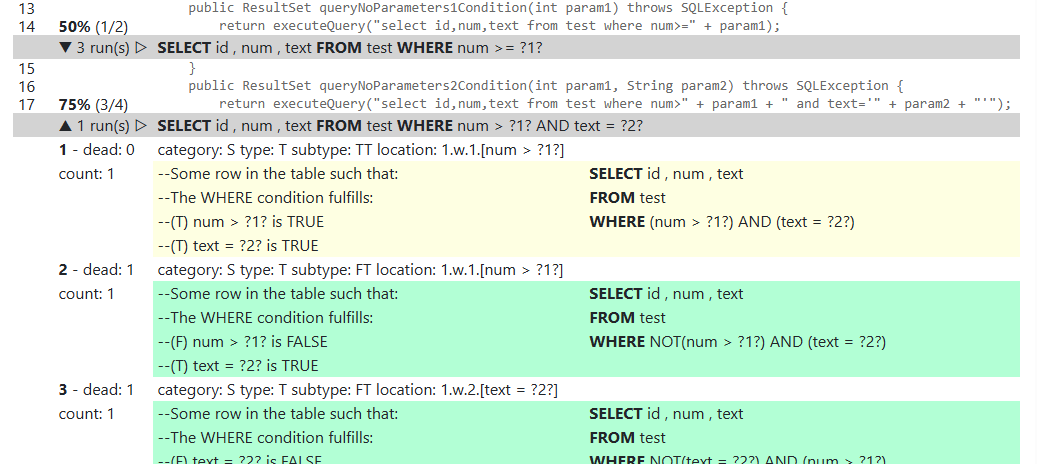
Clicking the down arrow near the percent coverage at the query evaluated expands the details of each coverage rule (covered in green, uncovered in yellow):
The general syntax of the report generator has four parameters (only the two first ones are required if you do not include the source code of the classes under test):
<rules-folder> <reports-folder> [<source-folders> [<project-folder>]]
On Java, if you want to include the source code in the reports, you have to set a value for the third parameter
<source-folders> to include a comma-separated list of the path(s) to locate the sources. For example:
src/main/java.module1/src/main/java,module2/src/main/java.On .NET, you have to set a value for both the third and fourth parameters:
<source-folders> and <project-folder>.
The reason is that the location of .NET source files does not exactly match the namespaces, so that,
the FPC coverage rules store the absolute path of the class source files that has to be
resolved to a relative path before report generation. For example:
.
../../../.. (because the default directory where the tests run
is four levels down the solution folder)/app folder,
set the parameters as . /app (The /app value allows to resolve the relative path of each source file
from the project folder).See the general contribution policies and guidelines for giis-uniovi at CONTRIBUTING.md.
Now we include some additional background technical information:
QACover makes use of p6spy to intercept the jdbc calls, TdRules to get the database schema and invoke the SQLRules Service to generate the coverage rules. The execution of everything is made in local against the database configured in the connection string.
The internal structure of the main QACover packages (prefix giis.qacover.) is shown below (the prefixes are omitted for simplicity):
core module: Contains the driver, core and core.sevices packages.model module: Contains the model, storage, reader and report packages.These are the dependencies between packages:
flowchart TD
  driver --> core
  core --> services(core.services)
  services --> storage
  storage --> model
  core --> model
  services --> model
  report --> reader
  report --> model
  reader --> model
  reader --> storage






