This project originates from search engine jump scripts maintained by iqxin, and is independently developed from Fork to this warehouse after version 5.27.0. Originally, Fork came here to ask the author for PR, but the author did not use GitHub very often. The PR contributed by some people before was not merged into the main branch. In addition, large-scale reconstruction was carried out after 2022-12-03, so it was impossible to directly synchronize the changes in the original repository. So Detach Fork temporarily, it will continue to update in this repository in the future and push it to GreasyFork and OpenUserJS from time to time.
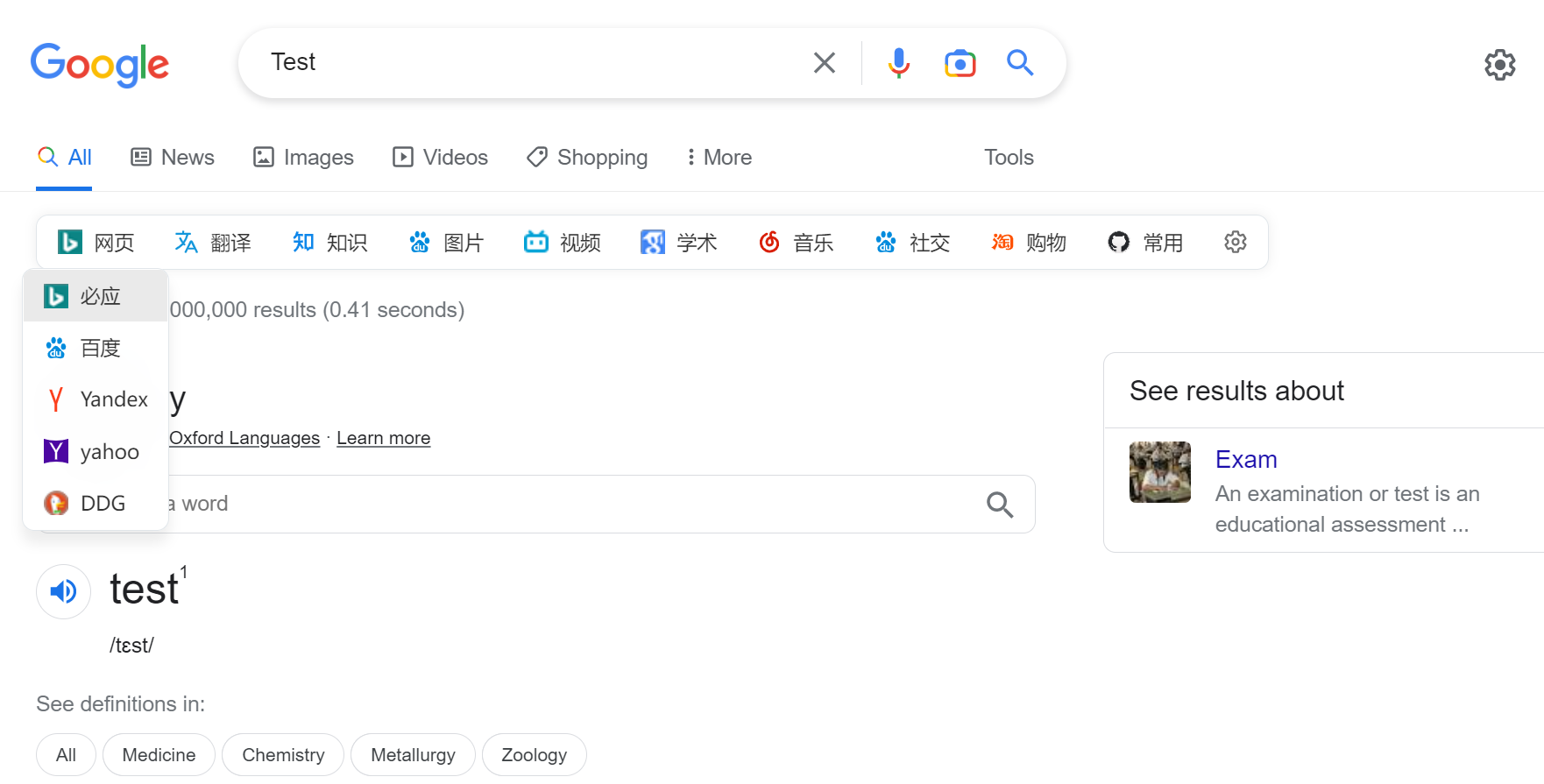
After enabling scripts in the script manager, when accessing supported search pages, a small horizontal bar of the script will be displayed on the page. You can click the buttons in it to jump to the corresponding search engine and automatically search quickly with one-click according to the content in the current search box.
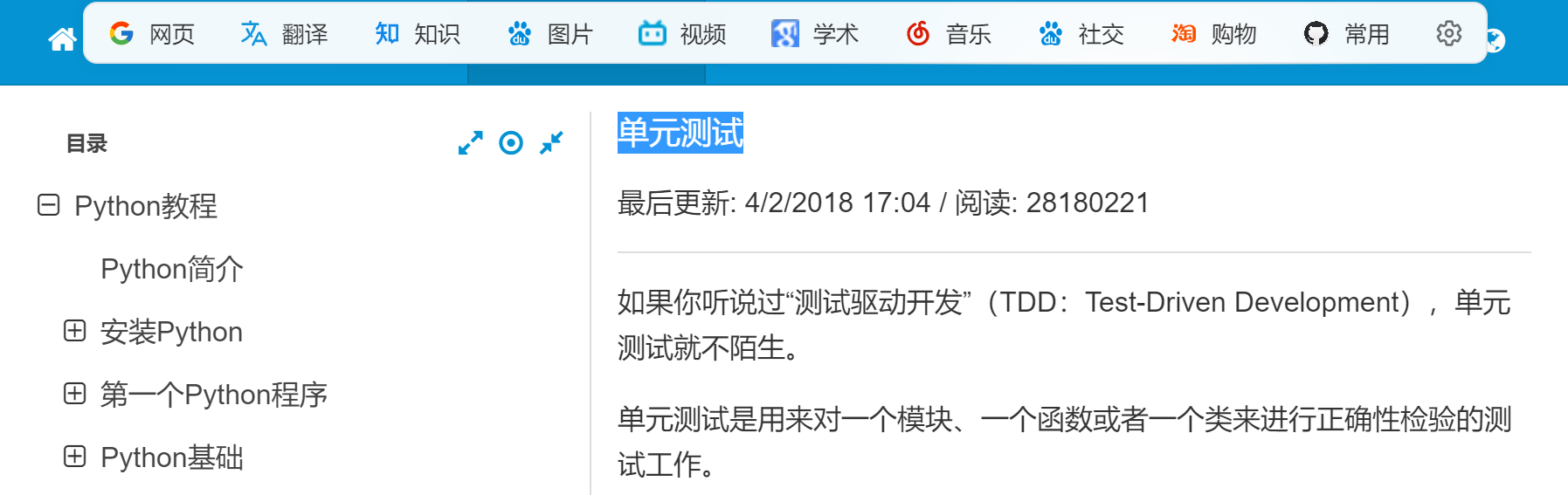
When accessing other pages that do not support the search box, the script enables the word search function by default. Use the mouse to grab words in the page, and a small horizontal bar will pop up above the page. At this time, you can click the button in it to jump to the corresponding search engine, and automatically search with one-click speed according to the current word content.
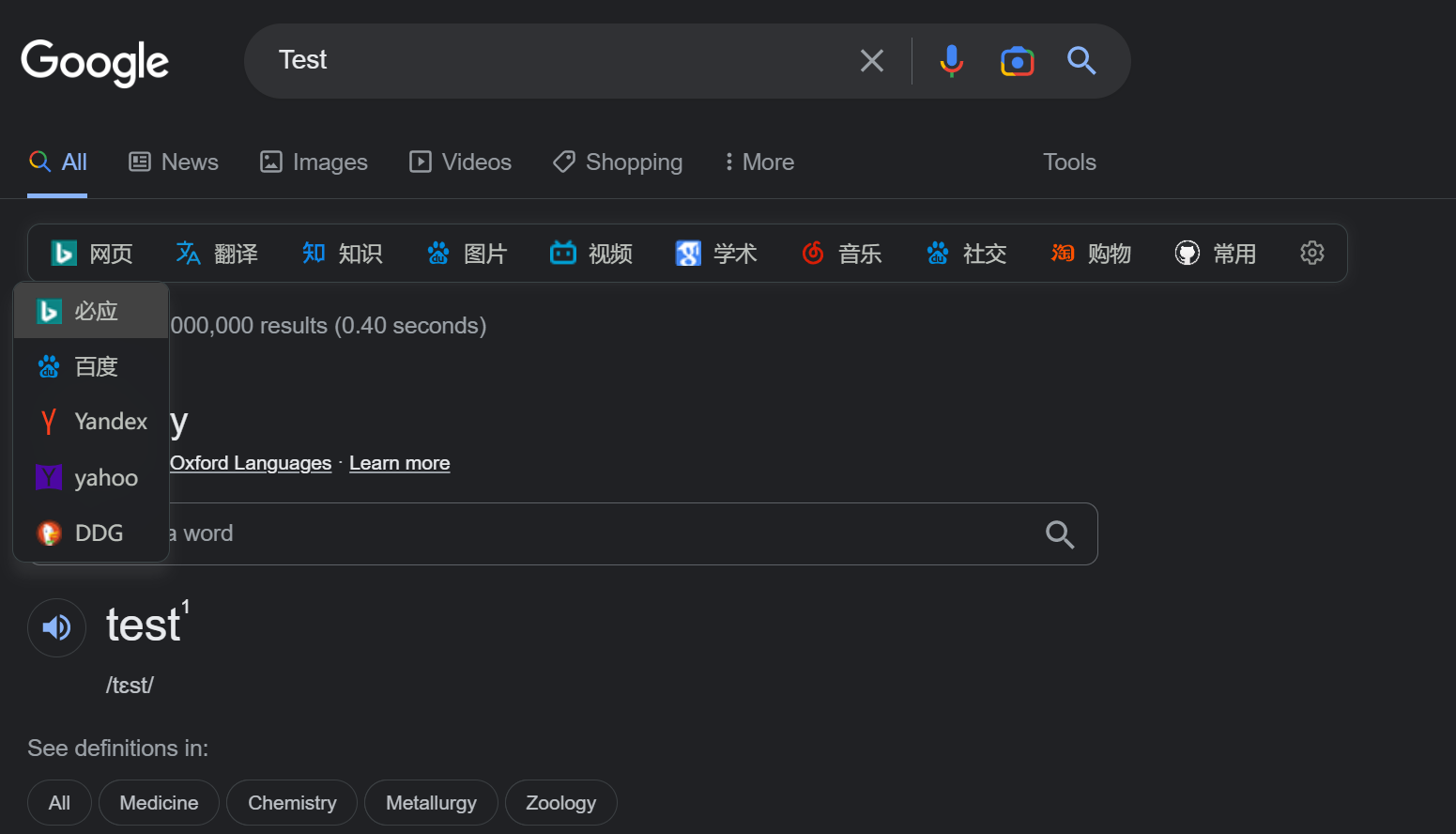
The script supports dark mode, but different pages adapt differently to dark mode, resulting in some websites that do not support dark mode conflict with the default settings of the operating system or browser. Therefore, it is recommended to use it with Dark Reader expansion to automatically render dark pages according to the operating system settings.
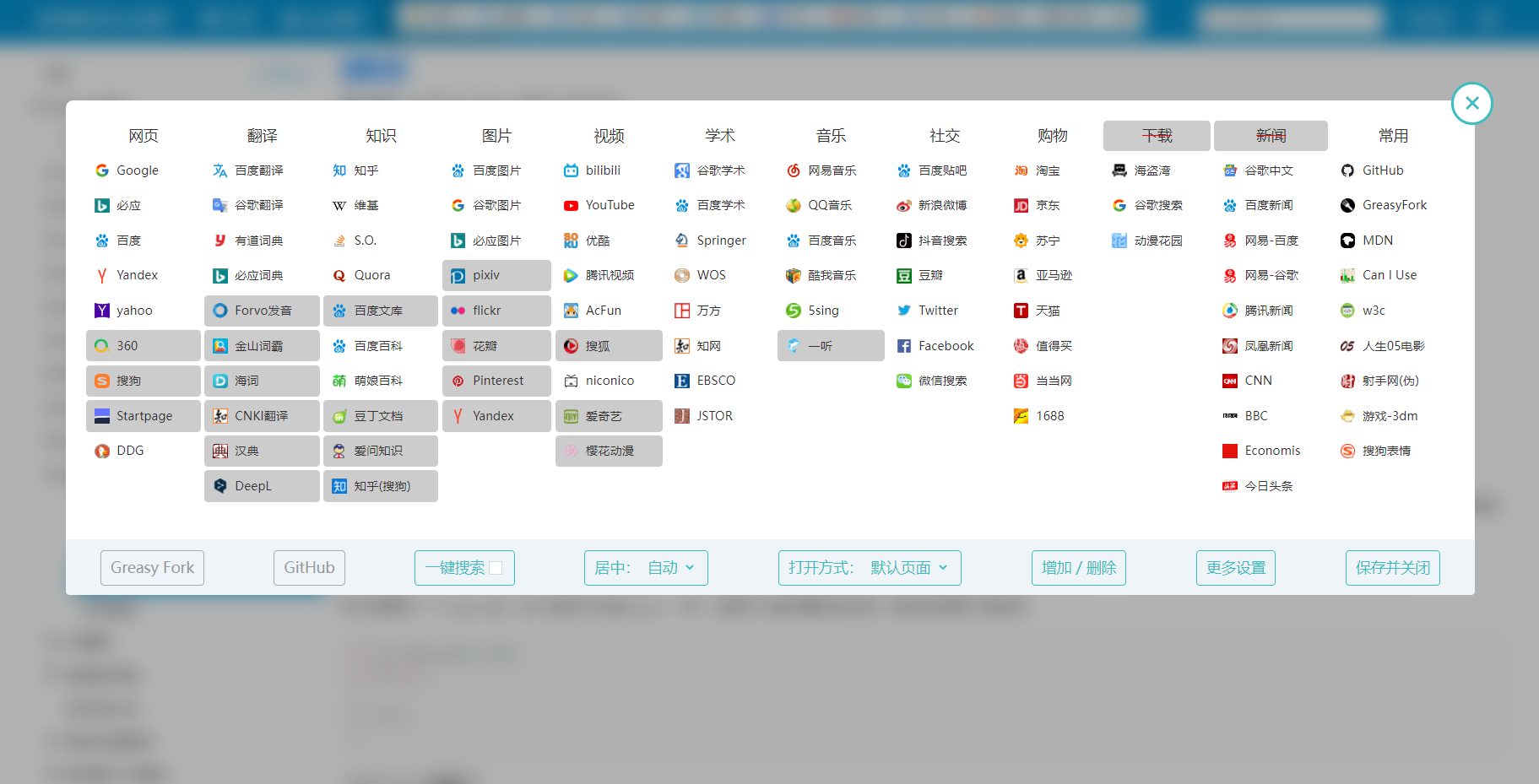
There is a setting button at the end of the jump bar. Click to enter the settings menu, or you can also enter the settings menu from the options of the script manager. In the settings menu, you can configure the script's search engine, such as dragging and dropping to adjust the position, clicking toggle the enable status, adding or deleting search engines, etc.
version 5.31.15 2023-06-13
- Fixed: The problem of Taobao front-end update causing the jump bar to disappear
version 5.31.14 2023-06-12
- Tweak: Suppress scripts to run in iframes through @noframe to optimize performance
version 5.31.13 2023-06-02
- Adjustment: TikTok search style
- Added: The function of opening a new tab with the middle mouse button
version 5.31.12 2023-04-26
- Fixed: The problem of jump bars not appearing on Baidu search
version 5.31.11 2023-04-18
- Added: Xiaohongshu adaptation
version 5.31.10 2023-03-26
- Fixed: The issue where Google does not display jump bar after update
version 5.31.9 2023-03-24
- Adjustment: Baidu widescreen adaptation
version 5.31.8 2023-01-11
- Adjustment: Synchronize the modifications to Baidu by the original script
- Adjustment: Update bing link
- Fixed: CSS conflict issues on certain pages
version 5.31.7 2023-01-11
- Fixed: Settings panel red strikethrough disappears
version 5.31.6 2023-01-10
- Adjustment: Optimize dark mode experience
version 5.31.5 2023-01-09
- Added: Document Instructions and Pictures
- Adjustment: Baidu style
- Fixed: Some web button styles are overwritten
- Fixed: The problem of fixed top of certain websites caused by the sticky style of position
- Fixed: The problem of styling in Wikipedia page
version 5.31.4 2023-01-06
- Fixed: The drop-down menu button prohibits selection
- Fixed: Insertion failure caused by GitHub search revision
version 5.31.3 2022-12-23
- Adjustment: Optimize dark mode logic, adapt to Firefox
version 5.31.2 2022-12-19
- Adjustment: Stroke search top Wrapper
- Adjustment: Scribing the word search display level
version 5.31.1 2022-12-18
- Adjustment: Edge styles move closer to Fluent UI
- Adjustment: Adapt to Quora
- Adjustment: Optimize the top adsorption experience
- Fixed: Tieba full-screen style, Yahoo style, Youdao dictionary style
- Fixed: Some pages jump to target issues
version 5.31.0 2022-12-11
- Adjustment: Most of the code frameworks have been refactored, and details need to be optimized.
- Adjustment: Animation style
- Adjustment: Set page pop-up notification optimization
- Adjustment: Set button style
- Adjustment: Pull-down style
- Fixed: Error update logic
- Fixed: Setting the panel label color issue
version 5.30.4 2022-12-10
- Adjustment: Code Refactoring
- Adjustment: StartPage Jump Link
- Adjustment: Update logic
- Fixed: Updated version number shallow copy issue
- Fixed: Single-page application routing change problem
- Fixed: Setting list loading problem caused by routing changes
- Fixed: Multiple loading issues caused by routing changes
- Fixed: Post request jump conflicts with the default behavior of tags
version 5.30.3 2022-12-10
- Adjustment: Optimize the word marking experience
version 5.30.2 2022-12-05
- Add: Baidu Wenku, Baidu Tieba full bar search and re-adapt
- Adjustment: Refactor most of the code, reduce redundancy, and improve readability
- Adjustment: Weibo jump engine problem
- Adjustment: console info style
- Adjustment: Remove custom rules support
- Adjustment: Shadow Style
- Adjustments: Baidu Tieba, Youdao Translation, Mengniang Encyclopedia, Google Pictures, Bing Pictures, Baidu Pictures, Bilibili, NetEase Cloud Music, Google Scholar Style
- Adjustment: Top adsorption logic
- Adjustment: Delete LeTV Video
version 5.30.1 2022-12-05
- Adjustment: Refactor some code, logical splitting, reduce redundant code, and improve readability
- Fixed: Some website settings prompts for wrong style
- Fixed: Issues that cannot be added correctly when adding a website without specifying a protocol
version 5.30.0 2022-12-04
- Adjustment: CSS file splitting, simplifying code
version 5.29.10 2022-12-04
- Fixed: Some website icons are inconsistent
- Adjustment: Display fonts
- Adjustment: Classification Name
version 5.29.9 2022-12-04
- Added: Version number support
- Adjustment: Set menu button style
version 5.29.8 2022-12-04
- Adjustment: Night mode setting button style
version 5.29.7 2022-12-04
- Adjustment: Set page style
version 5.29.6 2022-12-03
- Synchronously update the code of source repository code 5.26.1-5.26.3
- Adjustment: Supports word search for all sites, sometimes it may be incompatible with some sites and needs to be closed manually
- Adjustment: Bilibili style and multiple search subpages
- Fixed: Exclude cubic-bezier.com that is incompatible with word search
version 5.29.5 2022-11-25
- Adjustment: Dark Mode Buttons and Shadow Styles
version 5.29.4 2022-11-10
- Fixed: Forced centering failure problem
version 5.29.3 2022-11-09
- Added: Mengniang Encyclopedia, StackOverflow adaptation
- Adjustment: CNKI, Baidu Encyclopedia Style
version 5.29.2 2022-11-09
- Adjustment: YouTube Style
- Adjustment: Sliding word pattern style, normal search center style
- Adjustment: Full https
- Fixed: The issue of occluding useful information on Baidu Post Bar on Edge
- Fixed: Haici, Bing Pictures, pixiv, petals, Pinterest, Yandex Pictures, QQ Music Jump Issues
- Fixed: Jump to the jump bar disappears when you listen to music
- Fixed: Douban jump bar and line wrapping problem
- Fixed: What is worth buying, 1688 style confusion problem
- Fixed: Bing Image pull-down block jump bar problem
version 5.29.1 2022-11-05
- Adjustment: Sliding Word Pattern Style
version 5.29.0 2022-11-05
- Added: Baidu Academic, Google Academic, CNKI, Wanfang, Baidu Tieba, Taobao, Weibo, Douban, QQ Music, Yisong, Tencent Video Re-adapted
version 5.28.1 2022-11-05
version 5.28.0 2022-11-05
- Adjustment: Rewrite styles using Flexbox
- Adjustment: Adjust some website adaptation
- Fixed: Fixed the 1-pixel white gap problem when the mouse was hovering on the button
- Fix: Delete and modify some websites that do not need to be redirected
version 5.27.0 2022-11-04
- Forked by MUTED
- Adjustment: Change the style of the jump bar to rounded corners, fix some margins and web embedding issues, and use sticky on some websites to optimize the top fixed experience
version 5.26.0 2022-11-03
- Added: The word search function can be turned off in the settings menu
- Adjustment: Change the style, remove the triangle arrow, and change the drop-down search menu to center display
version 5.25.1 2022-10-27
- Fixed: TikTok search interface color issue
version 5.25.0 2022-10-27
- Added: Support for Google's Night Mode
- Adjustment: Some icons have been updated, but the user needs to reset the settings themselves to use the new icon
version 5.24.19 2022-09-28
- Added: Support to buy websites slowly
version 5.24.18 2022-09-11
- Fixed: The previous version would cause the "Hide Links to Same Sites" to be closed. If the search link is a specific website, many site problems will appear in the search term.
version 5.24.17 2022-09-10
- Fixed: If the JD search page, the search bar is too long, the JD page will be misaligned. Thanks to abossk for feedback
- Change: If there is a site in the search content: , the jump will no longer delete the site and its subsequent content.
version 5.24.16 2022-09-04
- Fixed: The problem of occluding toolbar when searching Google, menu two lines
version 5.24.15 2022-08-24
- Fixed: The problem with the YouTube website without toolbar
- Record: The hashList was removed and the title monitor was completely replaced. As long as the Baidu page is fine, there is no big problem.
version 5.24.14 2022-08-24
- Added: You can hide text and keep only icons. Settings - More settings - The value of the configuration file "icon" is changed to 0, 1 is the default icon, and 2 is the abstract icon.
- Fixed: Style adjustments for multiple websites
- Fixed: "Hide links to the same site" now works normally
version 5.24.13 2022-08-23
- Added: Added settings "Hide links to the same site". Settings - More settings - Hide links to the same site: It is enabled by default, Baidu page will hide Baidu search. If you want to search on the same website but want to search through different languages, you can choose false to achieve it. There is currently a problem2022-08-23 todo: Hide links on the same site will be invalid intermittently.
- Added: Support websites brave.com, neeva.com (latency loading)
- Record: Google removed the magnet and added class: "s6JM6d" to align. This version can add an extra class to #sej-container
- I logged on to github and found a lot of feedback on the problem. . .
version 5.24.12 2022-08-06
- Fixed: Changes in search URLs for ecosia.org
- Fixed: There are two search bars on Zhihu page
version 5.24.11 2022-07-31
- Fixed: The issue of changing the search terms on Baidu page or clicking on the next page causes style loss. It is highly likely that the problem caused by the v5.24.6 update at the beginning of this month. At that time, in order to be compatible with "ac Baidu", some codes about Baidu search were deleted. It is not sure whether to solve the problem. If you have any specific problems, please give feedback.
- Fixed: f search URL change thanks to ZZH-qwq feedback
- Added: Supports jump to Google Mirroring websites, Google.ml xn--flw351e.ml Thanks to nvfddbgfh for your comments
version 5.24.10 2022-07-25
- Fixed: One-click search cannot open an issue containing site search [Thanks HelloWeirdTourist for feedback
version 5.24.9 2022-07-23
- Fixed: The list has more than 10 issues that cannot be added. Thanks to HelloWeirdTourist for feedback
- Fixed: Adjust the CNKI search website. Thanks to Holiday2019 for help
- Fixed: Taobao page style issue
version 5.24.8 2022-07-04
- Fixed: The problem of occlusion after enabling Baidu lite of "AC-baidu-redirect optimization Baidu Sogou Google Bing search for favicon double columns" script
version 5.24.7 2022-07-03
- Fixed: After opening the "AC-baidu-redirect optimization Baidu Sogou Google Bing Search Favicon Dual Column" script, the drop-down menu will be blocked by other content on the page.
- Known issues: When two scripts coexist, the Baidu drop-down page cannot fix the search bar, and will be fixed in the future.
version 5.24.6 2022-07-03
- Fixed: After opening the "AC-baidu-redirect optimization Baidu Sogou Google Bing Search Favicon Dual Column" script, the Baidu page drop-down menu offset is required, but it needs to be opened manually. Opening method: Menu - Center - Force. Because the script will delay loading, the automatic acquisition I used previously failed. If both scripts are enabled at the same time, be sure to change "Center" to "Forcing" in the "Menu".
- Thank you to everyone in the comment section, I have been constantly feedbacking this issue during the period when I disappeared.
version 5.24.5 2022-03-19
- Fixed: In version 5.24.3, delete the duckduckgo.com website in error, restore the music www.1ting.com. Thanks JY3 for reminding
version 5.24.4 2022-03-18
- Fixed: Compatible with both new and old layouts of the bilibili search interface. The problem brought about is that it is almost impossible to use when the b station is fixed to the top, which is the minority of the two harms. Thanks to iamking22 for feedback
version 5.24.3 2022-03-15
- Unsolved issues: Headline search cannot jump to Taobao;
- Add new searches below, and the order of search websites will not affect old users
- Added: Added support for f search. Thanks to ZZH-qwq's code provided, since the search is in the internal beta stage, the accuracy of the code has not been verified.
- Added: Support for today's Toutiao search, fixing the problem of today's Toutiao search link errors
- Added: TikTok search, in social list; support for TikTok search (there are problems with color display)
- Fixed: Yahoo Japan Search Issue
- Fixed: The problem of the revision of Bilibili search caused the failure, I can't see my feedback
- Interface: Delete Yiting Music www.1ting.com, Yinyuetai Yinyuetai.com, Picture Easyicon.net, Renren Film and Television Zimuzu.tv, Guoke guokr.com, Secret Search mijisou.com, DOG duckduckgo.com and other websites
version 5.24.2 2021-06-30
- Fixed: Issues missing when searching again on Youdao Search page. Thanks to spn
- Added: Kingsoft PowerWord support. Thanks to the code provided by spn
- Fixed: The problem of setting interface icons in some websites, such as Kingsoft PowerWord website, is abnormal.
version 5.24.1 2021-06-23
- Fixed: The issue of inaccurate search links for Qichacha. Thanks kidzgy
- Added: 1688 Website Add search bar
version 5.24.0 2021-06-21
- Added: Added option to turn off animation effects in settings
- Added: Tianyancha, Qichacha thanks to kidzgy for providing the code
version 5.23.10 2021-06-14
- Added: Support for www.ecosia.org website thanks lisariel
version 5.23.9 2021-05-22
- Fixed: Issues where Google search page overlaps with the included tools
- Optimization: When there are too many search lists in the setting interface, the gap with the edge is added
version 5.23.8 2021-05-22
- Fixed: Version 5.23.7 caused some users to be unable to use (the reason was that the list that had been deleted by the user was called, resulting in an error)
- Fixed: Baidu page search for translation content, missing background color, adjusted the index of the parent element to 101
version 5.23.7 2021-03-19
- Fixed: Moving the mouse from the category list to the menu will cause the list to continue to move down, thanks to kidzgy
- Interface: b station icon thanks kidzgy
version 5.23.6 2021-03-16
- Fixed: What's worth buying too high
- Fixed: List exit animation is missing
- Fixed: Baidu interface sublist offset
- Fixed: Google Images drop-down does not display
- Optimization: Domain name matching rules
// @include *://*.yahoo.tld/* dnknn - Interface: Add some frosted glass effect, part entry and exit animation modification
version 5.23.5 2021-03-07
- Fixed: AcFun website
- Optimization: duckduckgo Yandex
- Delete: Xiami Music No. 1 Store Xianyu
version 5.23.4 2020-12-27
- Optimization: Delete some websites that do not need to match
version 5.23.3 2020-12-26
- Optimization: Delete some websites that do not need to match
version 5.23.2 2020-12-23
- Fixed: The problem of the search bar on Bing page is not aligned. Thank you for riding on the bamboo horse when I was a child.
version 5.23.1 2020-12-22
- Fixed: Match all Google URLs (it will only match the main site com before) Thanks to zy G
version 5.23.0 2020-12-19
- Fixed: An issue that seriously affects the operation of the script. After reimporting the configuration, the script has a high chance of loading errors.
- Fixed: Baidu Library
- Added: Shopping website Amazon
- Optimization: Youdao Search startpage
- Optimization: No more matching all websites, only related websites
- Interface: Baidu icon, B station icon
version 5.22.5 2020-10-15
- Delete Tencent Weibo, google+ Thanks to wsxy162
- Dogedoge is compatible with "ac Baidu" Thanks to benzBrake
- Video added Sakura Anime Special thanks to storyInAugest for its contribution
- Added prompts to "enable" and "disable"
version 5.22.4 2020-09-05
- The problem of Baidu Encyclopedia's excessive level
- startpage.com website fix
- github.com website fix
version 5.22.3 2020-08-02
- Dogedoge stacking order is too high
- Add DeepL to the translation list
- Compatibility issues with script "AC-baidu"
- (The previous version had fewer errors in v_5.22.1)
version 5.22.2 2020-08-02
- Icon fine-tuning
- Added support for "Yahoo Japan Search"
version 5.22.0 2020-08-01
- 1688 There is a garbled problem
- Baidu has occlusion problem
version 5.21.2 2020-05-04
- Fix Google Images
- Fix A site link
- Compatible script "Zhihu Typesetting Optimization"
version 5.21.1 2020-02-20
version 5.21.0 2020-02-04
- Compatible script AC-baidu: Redirect optimization Baidu Sogou Google Search Advertising_favicon Dual Column, add relevant options in the settings menu
version 5.20.0 2020-01-27
- Add one-click search. After clicking the icon of the search category, all search websites of the category will be opened in the background for searching.
- Setting page slightly changed
version 5.19.0 2020-01-26
- For encoding issues, all searches are transcoded by default (you can search for c# without becoming c). Among them, 1688 are gbk encoding, and the gbk option is added to the rule.
- Add website styles google.infinitynewtab.com | <www.dogedoge.com>
- Add search engine Yandex
- Fix Zhihu website NetEase Cloud (still has problems: cannot be fixed to the top)
- Time never abandons time peaceful New Year peace
version 5.18.2 2019-04-19
- Add a secret search, thanks to swearwr for help and lukemin for suggestions
- When YouTube is searching to play videos, a search bar will appear above the video. You can refresh the web page and temporarily remove it, waiting for a better solution to follow up.
version 5.18.1 2019-02-28
- Add startpage Web Search
- Add Dangdang Online Shopping Search
- Add Cool Music 5sing Song Search
version 5.18.0 2019-02-28
- When fixed to the top, add the option that only appears if pull-up is added: Settings - More settings - Configuration file fixedTopUpward Change false to true Thanks to Huang Zhidong for the suggestion
version 5.17.3 2019-02-21
- Sogou search page revision thanks for Fordo for feedback
- Add Sogou emoticon search in your own use
- Long time no see, I hope everyone will be treated gentlely
version 5.17.2 2018-12-21
- Add Search Shopping - What's Worth Buying Thanks iqeq Suggestions
version 5.17.1 2018-12-09
- After "Fixed to Top" is turned on, Google searches, the search bar is blocked (there are defects)
- Set the YouTube search bar, known issue: Cannot pin to top
- <www.startpage.com> Add search bar to the website
- Individual name changes
version 5.17.0 2018-08-03
- Add icon options. When users add custom searches, they can choose to use Google to get icons, or domain name to get, or dnspot to get. Settings - More Settings - Configuration Menu - getIcon . For details, you can view the message in it for related settings.
- Add a network disk search in the import and sort it out by running cheese.
version 5.16.2 2018-07-02
version 5.16.1 2018-06-30
- Add a new search category ebook, add it from import. Settings - More Settings - Import; Organized by running cheese.
version 5.16.0 2018-06-29
- Added import function, currently only can I import the settings I have set, Settings - More Settings - Import; Only one search category has been added, and will be gradually added in the future. First add a selection of search engines compiled by running cheese
- Delete search links for adult websites
version 5.15.15 2018-06-29
version 5.15.14 2018-06-25
- Add new search categories - News Search Thanks to Github Comments Hipd for suggestions, as well as the URL provided by chinchihyu, a search engine organized by Running Cheese
- Add quora and stackoverflow to the knowledge search list
version 5.15.13 2018-06-25
version 5.15.12 2018-06-17
- Add a search style for the yandex search page. If there are defects, it will cover the content of the source web page
version 5.15.11 2018-06-11
- Zhihu web page adjustment
version 5.15.10 2018-05-10
- The classification background in the dge browser is transparent Thanks to Github Comments WLYYL Feedback
version 5.15.9 2018-04-08
- If you use style adjustment style for Baidu page, you can modify the baiduOffset in the configuration file to fix the offset of the secondary menu.
version 5.15.8 2018-04-04
- b. Issue of missing search bar in site
- In the settings, if you are editing the title without clicking confirmation, clicking another title to edit will cause the title name to be wrong.
version 5.15.7 2018-03-25
- Bing Image Search Misplaced
version 5.15.6 2018-03-08
- Fix Google Books that will be hidden by errors Thanks for the comment section tensun tsai feedback
- Baidu Academic Interface No Search Box
- This version begins to collapse the current search category by default
version 5.15.5 2018-03-05
- Modify the search connection of a site and fix the style of a site
version 5.15.4 2018-02-15
version 5.15.3 2018-01-19
- Google search interface, wrongly hides Google search under download category thanks to comment section wsxy162 feedback
version 5.15.2 2018-01-07
- "Opening" will always automatically jump back to "Default Page" instead of "New Tab Open" Thanks to comment area cll12 for feedback
version 5.15.1 2017-12-15
- Fixed the problem of Baidu Encyclopedia, Sogou Search, 360 Haosou, Facebook, thanks to Ring for feedback in the comment area
version 5.15.0 2017-12-13
- The settings interface can be dragged
version 5.14.0 2017-12-12
- You can hide the close button configuration file closeBtn in the upper right corner of the settings interface
- The issue of re-opening the page after hiding the settings button
- Unification of other small details
version 5.13.1 2017-12-11
- Youku search connection changes thanks for feedback
version 5.13.0 2017-12-11
- Change the implementation method of drag and drop sorting to make it more intuitive and easy to use
version 5.12.12 2017-12-10
- Zhihu interface changes
- Search list changes: html Search list merge into mine
version 5.12.11 2017-11-27
- Translation list added Haici search thanks for suggestions, old users disable by default
- The problem that the toolbar will be blocked after the mouse on Taobao page passes the product
version 5.12.10 2017-11-19
- Added download search list, thanks and suggestions are hidden by default
- Added several settings that may be used in the future
version 5.12.9 2017-11-04
- Tmall supermarket caused misalignment of the sidebar of the source web page thanks for feedback
- Fixed the issue where Zhihu was pinned to the top bar in the previous version
version 5.12.8 2017-10-27
- If Taobao and other websites are fixed to the top column, there will be misalignment problems and still have flaws.
- Starting with this version, Firefox users cannot directly click on the Disable Menu button from the menu
- When Baidu page scrolls up, hide the Lenovo prompts below the search box
version 5.12.7 2017-10-18
- Fixed the issue that "Pin to Top" was saved after modification and failed to take effect in time
- The problem of wrong position of message prompt box
- Button color matching, animation slight adjustments
version 5.12.6 2017-10-10
version 5.12.5 2017-10-04
- No need to reload the page after changing settings
- Setting interface adjustment: Color position font
version 5.12.4 2017-09-23
- Removed the "More Settings - List Sort" feature and you can now drag the list title sort
- Add search: Shopping - Xianyu, mine-GreasyFork
- Setting the problem of the interface icon not aligning with the name
version 5.12.3 2017-09-10
- Settings menus are integrated into the Tampermonkey menu
- Click the number after "Set button transparency" to hide the settings menu. Reopen it and open it from the Tampermonkey menu. Firefox users please ignore this update.
- The flowers in the forest fade, spring is too hurried - Li Yu meets each other happily
version 5.12.2 2017-09-01
- In the settings menu, the problem of missing strikethroughs disabled searches
- youtube revision
- Thanks for feedback on the garbled question when jumping from Baidu Library
- Adjusted the minimum width, better performance on the general screen Thanks for feedback
version 5.12.1 2017-08-27
- In the case of fixed search bar, the problem of misalignment of the secondary search menu on Baidu page
- Google page style fine tune
version 5.12.0 2017-08-21
- Add post submitter method to search for connection followed by '$post$xx' where xx refers to the name of post submitted related feedback
- Fixed the issue where "Search Item" can be dragged with "Category Name" Thanks for feedback
- Add styles to the searx and Sogou pages
version 5.11.2 2017-08-20
- When the visual area of the settings menu is too low, the setting button cannot be automatically set to the bottom. Thank you for your feedback.
- Add Yahoo Search
version 5.11.1 2017-08-19
- Under Google search page, the gap between "list sorting" is too large
- Soft animation?
version 5.11.0 2017-08-18
- Added function of list sorting: Settings-More Settings-List Sort
Fixed the issue of misalignment of the settings menu of the Running Cheese Custom Edition Firefox v8 in the Settings- Hide html search list by default; javlibrary search connection repair; delete Baidu know; add Mengniang Encyclopedia
- Set interface style fine-tuning
version 5.10.3 2017-08-10
- The input box will automatically select text after obtaining focus. Previously, the mouse clicks the input box to automatically select text.
- The issue of selecting all settings for Firefox browser
- Bing search, "More Settings" menu misalignment problem
version 5.10.2 2017-08-09
- Set interface style adjustments and add multiple setting buttons. Change the opening and closing animation of the settings interface
version 5.10.1 2017-08-09
- Remove the rotation animation of the close button
- Remove inexplicable margin attributes
version 5.10.0 2017-08-08
- Added the pin to the top option, and the toolbar can be kept at the top of the page after scrolling down. "Settings-Advanced-fixedTop" is changed to true, some pages are not very compatible, thanks for the suggestions
version 5.9.2 2017-08-07
- Issues that the viewing area of the Settings menu is too low and cannot scroll to the top
version 5.9.1 2017-08-06
- If the visual area of the settings menu is too low, there is no scroll bar, thanks for feedback
version 5.9.0 2017-08-05
- Add and delete search list function
- Add debug settings - Advanced-debug (picked from similar scripts)
- Many details adjustments
version 5.8.1 2017-07-29
- Still cannot rule out searches for a certain website, thank you for your feedback
version 5.8.0 2017-07-28
- Add rules information in the configuration file. The function is the same as rules in the script, but the priority is higher. The configuration file is updated to 1.6
- The search that jumps to the current search will be removed before, and now the search engine searches for a certain website will be ruled out site:xxx.xx. Such situations in feedback
- After modifying the local configuration file, some information will be overwritten by the default configuration in some cases.
version 5.7.0 2017-07-26
- Add the function of modifying the transparency of the setting button. Set-Advanced-setBtnOpacity The number after the transparency is 0-1, and -1 is the closing setting button. Configuration file updated to 1.5
- Delete details in the configuration file and integrate them into engineDetails
- Individual website style adjustment
version 5.6.3 2017-07-24
- Fixed the opening method cannot be set to open as new tab page Thanks for feedback
- Individual website style adjustment
version 5.6.2 2017-07-23
- Remove useless information from the configuration file
- Fixed the style issue when opening settings on Baidu page
- Improve Tencent video search style
version 5.6.1 2017-07-20
- 360 searches are added by default, iQiyi video and the search bar at the top of the web page thank you for feedback
- Video classification has been added to Tencent Video Search by default, but the top search bar is not implemented, and the reason is being searched
- Fixed the problem of adding "&type=1" by default in NetEase Cloud Music Redirect Thanks for your feedback
version 5.6.0 2017-07-16
- Add the option to collapse the current search category
- Add the option to directly modify the code in configuration files
- Set interface button adjustment
- Hide academic search list by default
version 5.5.1 2017-06-07
- When adding a new search, the icon will be obtained from Google's API first. If the network is not connected, use the domain name plus favicon.ico to get thanks and suggestions.
- Detail optimization, add an inquiry window when resetting settings
version 5.5.0 2017-06-04
- Added the function of changing the name of search categories
- Setting details optimization
version 5.4.0 2017-06-01
- Add options to changes to existing search lists
- Detail optimization: Modify some icons of the settings interface and add some animations
version 5.3.0 2017-05-29
- Added the global "New Tab Open" option, and change the configuration file version to 1.2
version 5.2.2 2017-05-28
- Mine in a category The problem that the classification (or multiple) cannot be displayed
version 5.2.1 2017-05-27
- Only up to 9 searches can be added. Continue to add questions that cannot be displayed. Thanks for your feedback
- Change user experience: text cannot be selected
version 5.2.0 2017-05-20
- Added the function of adding and deleting search: No fault tolerance, it will not determine whether your input is correct. The search URL in the search connection needs to be replaced by %s. After adding, if you need to move, disable it, delete it needs to "save and close" and then set it.
version 5.1.5 2017-05-14
- Must be wrong thanks to the feedback
version 5.1.4 2017-05-12
- qq music website changes thanks for feedback
version 5.1.3 2017-05-11
- The previous version forgot to change the version number and then released it (after the version is changed, greasyfork will not only have version updates)
- Translation (Baidu, Google, must be answered, there are some adjustments to the principles) Thank you for your feedback
version 5.1.2 2017-05-11
- Due to the modification of the previous version, the problem of searching for no jump bar from Baidu homepage
version 5.1.2 2017-05-11
- Refresh the page after searching from Google homepage, jump bar missing questions thanks for feedback
- If the Internet speed is not good, the problem of searching for no style from Google homepage
version 5.1.1 2017-05-10
- Add animation effects
- Change the settings to elastic layout (test)
version 5.1.0 2017-05-10
- Increase the ability to modify the source web page to be compatible with scripts
- Issues of incompatibility with Google Variety styles
- Fine-tuning styles in Google search page
- Problem not automatically updated with the configuration file version
version 5.0.5 2017-05-10
- Add Sogou Zhihu Search Thanks for your suggestions
- Add Sogou WeChat Search (in category mine)
- The local data storage version is upgraded to 1.1
version 5.0.4 2017-05-9
- 5.0.0.2 The problem of incompatibility with the style "Google Variety" is modified and the harm is more than the advantage. Change it back temporarily
version 5.0.3 2017-05-09
- Issue that the opening of a new tab page cannot be saved in settings
- Fixed the issue that Google and Baidu could not display the jump bar from the homepage search due to version 5.0.0
- Add a class named "rwl-exempt" to prepare for solving and scripts [Work page lifting restrictions]
- Version changed from 5.xxx to 5.xx
version 5.0.0.2 2017-05-09
- Change the font settings will cause misalignment. Thank you feedback
- Incompatible with Google Variety styles
version 5.0.0.1 2017-05-08
version 5.0.0.0 2017-05-08
- Add Settings Menu (Test) Custom Switch Search List, sort, cannot be added by yourself. Test version
- Add fruit shell search
- Fix duckduckgo style
version 4.1.1.17 2017-05-1
- Add script icon
- Baidu Music Style Not Centered Thanks for Feedback
- Change the name from "searchEngineJump" to "searchEngineJump Quick Jump"
version 4.1.1.16 2017-04-23
- Fixed the issue of no style when searching for home pages from Baidu and Google
version 4.1.1.15 2017-04-23
- acfun style not centered thanks for feedback
version 4.1.1.14 2017-04-21
- Fixed the problem that the search bar blocked associative words caused by the previous version
version 4.1.1.13 2017-04-20
- Google search tool is blocked for the issue thanks for feedback
version 4.1.1.12 2017-04-09
- Fixed the issue where the list offset caused by changing the animation in the previous version
version 4.1.1.11 2017-04-07
- Change the exit animation to make it look smoother
version: 4.1.1.10 2017-04-05
- Google Translate hk to com
- Baidu search changed to their own ajax request, no longer force refreshing the web page
version: 4.1.1.9 2017-04-03
- Fix b-site style and adjust search connections
- Style minor tune
version: 4.1.1.8 2017-03-31
- Fix flickr style
- Fixed the issue where Wikipedia could not get search terms
- The problem of style loss after searching on Baidu Lenovo. Although the style is no longer lost, there is still no detailed search list after the mouse is swiped over. It can be fixed, but there are too many things to be involved. In the future version, the repair on this version is a face-saving project in a greater sense.
- Icon fine-tuning: youtube NetEase Cloud Music Wikipedia
version:4.1.1.7 2017-03-31
- It can be used on some websites that enable Content Security Policy (CSP) security policy. Zhihu can do it, but github still can't do it.
version:4.1.1.6 2017-03-29
- Add Pinterest, MDN Search
- Some icons are changed to 32x32, 16X16 has too obvious serrations, the icon is fine-tuned: Baidu
version:4.1.1.5 2017-03-21
- Unified icon 16x16 base64 encoding, for this purpose, I wrote a tool img2base64
version:4.1.1.4 2017-03-20
- Fixed the issue of search keyword encoding for individual web pages
- Fixed the issue where the style overwhelmed the Baidu search box
- Change the font color to #333
version:4.1.1.3 2017-03-20
- Fix Yinyuetai Search Connection
version:4.1.1.2 2017-03-10
- Fixed the issue of Baidu's "Related Search" style missing
- Add GitHub Search
version:4.1.1.1 2017-03-06
- Fixed the issue of Baidu search page and lost style after turning pages
- Fixed the problem of occluding the left side of youtube page
- Fixed the issue of missing acfun style
- There are still many questions, take it slowly
version:4.1.1.0 2017-03-05:
- Fixed the problem of page style loss after searching with Baidu, with a rough method
2017-2-28:upload version:4.1.0.0