embedding_studio
v0.0.1

Website • Documentation • Challenges & Solutions • Use Cases
Embedding Studio is an innovative open-source framework designed to seamlessly convert a combined embedding model and vector database into a comprehensive search engine. With built-in functionalities for clickstream collection, continuous improvement of search experiences, and automatic adaptation of the embedding model, it offers an out-of-the-box solution for a full-cycle search engine.
| Community Support |
|
Embedding Studio grows with our team's enthusiasm. Your star on the repository helps us keep developing. Join us in reaching our goal:
|
(*) - features in development
Embedding Studio is highly customizable, so you can bring your own:
More about it here.
Disclaimer: Embedding Studio is not a yet another Vector Database, it's a framework which allows you transform your Vector Database into a Search Engine with all nuances.
More about challenges and solutions here
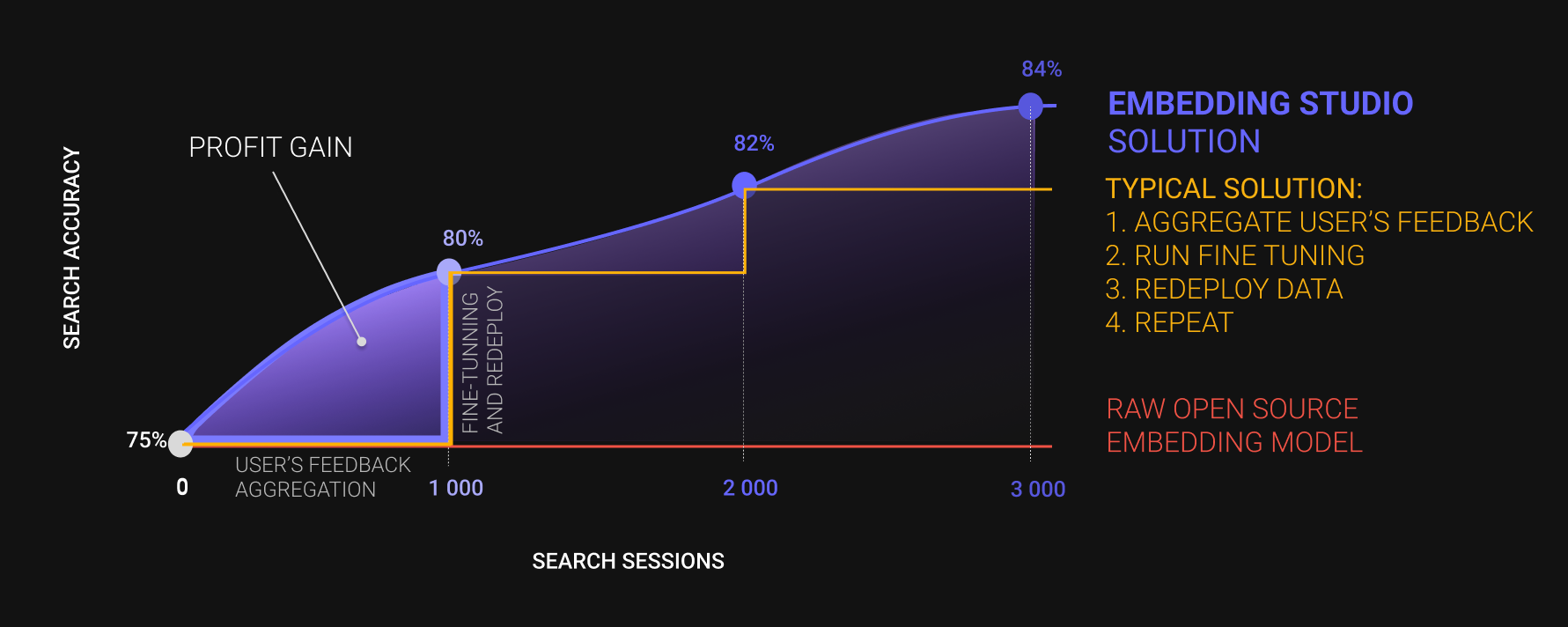
Our framework enables you to continuously fine-tune your model based on user experience, allowing you to form search results for user queries faster and more accurately.
View our official documentation.
To try out Embedding Studio, you can launch the pre-configured demonstration project. We've prepared a dataset stored in a public S3 bucket, an emulator for user clicks, and a basic script for fine-tuning the model. By adapting it to your requirements, you can initiate fine-tuning for your model.
Ensure that you have the docker compose version command working on your system:
Docker Compose version v2.23.3You can also try the docker-compose version command. Moving forward, we will use the newer docker compose version command, but the docker-compose version command may also work successfully on your system.
Firstly, bring up all the Embedding Studio services by executing the following command:
docker compose up -dOnce all services are up, you can start using Embedding Studio. Let's simulate a user search session. We'll run a pre-built script that will invoke the Embedding Studio API and emulate user behavior:
docker compose --profile demo_stage_clickstream up -dAfter the script execution, you can initiate model fine-tuning. Execute the following command:
docker compose --profile demo_stage_finetuning up -dThis will queue a task processed by the fine-tuning worker. To fetch all tasks in the fine-tuning queue, send a GET
request to the endpoint /api/v1/fine-tuning/task:
curl -X GET http://localhost:5000/api/v1/fine-tuning/taskThe answer will be something like:
[
  {
    "fine_tuning_method": "Default Fine Tuning Method",
    "status": "processing",
    "created_at": "2023-12-21T14:30:25.823000",
    "updated_at": "2023-12-21T14:32:16.673000",
    "batch_id": "65844a671089823652b83d43",
    "id": "65844c019fa7cf0957d04758"
  }
]
Once you have the task ID, you can directly monitor the fine-tuning progress by sending a GET request to the
endpoint /api/v1/fine-tuning/task/{task_id}:
curl -X GET http://localhost:5000/api/v1/fine-tuning/task/65844c019fa7cf0957d04758The result will be similar to what you received when querying all tasks. For a more convenient way to track progress, you can use Mlflow at http://localhost:5001.
It's also beneficial to check the logs of the fine_tuning_worker to ensure everything is functioning correctly. To do
this, list all services using the command:
docker logs embedding_studio-fine_tuning_worker-1If everything completes successfully, you'll see logs similar to:
Epoch 2: 100%|██████████| 13/13 [01:17<00:00,  0.17it/s, v_num=8]
[2023-12-21 14:59:05,931] [PID 7] [Thread-6] [pytorch_lightning.utilities.rank_zero] [INFO] `Trainer.fit` stopped: `max_epochs=3` reached.
Epoch 2: 100%|██████████| 13/13 [01:17<00:00,  0.17it/s, v_num=8]
[2023-12-21 14:59:05,975] [PID 7] [Thread-6] [embedding_studio.workers.fine_tuning.finetune_embedding_one_param] [INFO] Save model (best only, current quality: 8.426392069685529e-05)
[2023-12-21 14:59:05,975] [PID 7] [Thread-6] [embedding_studio.workers.fine_tuning.experiments.experiments_tracker] [INFO] Save model for 2 / 9a9509bf1ed7407fb61f8d623035278e
[2023-12-21 14:59:06,009] [PID 7] [Thread-6] [embedding_studio.workers.fine_tuning.experiments.experiments_tracker] [WARNING] No finished experiments found with model uploaded, except initial
[2023-12-21 14:59:16,432] [PID 7] [Thread-6] [embedding_studio.workers.fine_tuning.experiments.experiments_tracker] [INFO] Upload is finished
[2023-12-21 14:59:16,433] [PID 7] [Thread-6] [embedding_studio.workers.fine_tuning.finetune_embedding_one_param] [INFO] Saving is finished
[2023-12-21 14:59:16,433] [PID 7] [Thread-6] [embedding_studio.workers.fine_tuning.experiments.experiments_tracker] [INFO] Finish current run 2 / 9a9509bf1ed7407fb61f8d623035278e
[2023-12-21 14:59:16,445] [PID 7] [Thread-6] [embedding_studio.workers.fine_tuning.experiments.experiments_tracker] [INFO] Current run is finished
[2023-12-21 14:59:16,656] [PID 7] [Thread-6] [embedding_studio.workers.fine_tuning.experiments.experiments_tracker] [INFO] Finish current iteration 2
[2023-12-21 14:59:16,673] [PID 7] [Thread-6] [embedding_studio.workers.fine_tuning.experiments.experiments_tracker] [INFO] Current iteration is finished
[2023-12-21 14:59:16,673] [PID 7] [Thread-6] [embedding_studio.workers.fine_tuning.worker] [INFO] Fine tuning of the embedding model was completed successfully!
Congratulations! You've successfully improved the model!
To download the best model you can use Embedding Studio API:
curl -X GET http://localhost:5000/api/v1/fine-tuning/task/65844c019fa7cf0957d04758If everything is OK, you will see following output:
{
  "fine_tuning_method": "Default Fine Tuning Method",
  "status": "done",
  "best_model_url": "http://localhost:5001/get-artifact?path=model%2Fdata%2Fmodel.pth&run_uuid=571304f0c330448aa8cbce831944cfdd",
  ...
}
And best_model_url field contains HTTP accessible model.pth file.
You can download *.pth file by executing following command:
wget http://localhost:5001/get-artifact?path=model%2Fdata%2Fmodel.pth&run_uuid=571304f0c330448aa8cbce831944cfddWe welcome contributions to Embedding Studio!
Embedding Studio is licensed under the Apache License, Version 2.0. See LICENSE for the full license text.





