About teemo
Project address: https://github.com/bit4woo/teemo
Domain name collection and enumeration tools
Teemo is a scout, and the collection of domain names is like reconnaissance of penetration and loophole mining, so it is named Teemo!

Features: It has the ability to collect relevant domain names, that is, it will collect other domain names of the current domain name organization. The principle is to pass the content of "Subject Alternative Name" in the certificate.
I believe that this part of the functions is as useful as the collection of similar domain names in domain_hunter!
This tool has three main modules:
Utilize search engines:
- http://www.ask.com/ (No request restrictions, proxy required)
- https://www.baidu.com/ (No request restrictions, no proxy required)
- http://cn.bing.com/
- https://api.cognitive.microsoft.com (bing API not completed yet)
- http://www.dogpile.com/ (no proxy required)
- https://duckduckgo.com (not completed yet, page control)
- http://www.exalad.com/search/web/
- http://www.fofa.so/ (Purchase required)
- https://www.so.com/
- https://www.google.com (may be blocked and requires a proxy)
- https://search.yahoo.com/
- https://yandex.com/ (may be blocked)
- http://www.exalad.com/ (may be blocked)
- http://www.googleapis.com/ (Requires API key, google CSE)
- https://www.zoomeye.org/
- https://shodan.io/
Utilize third-party sites:
- Alexa
- Chaxunla
- CrtSearch
- DNSdumpster
- Googlec
- Ilink
- Netcraft
- PassiveDNS
- Pgpsearch
- Sitedossier
- ThreatCrowd
- Threatminer
- Virustotal
- HackerTarget
Whois query and reverse query (interface requires a fee and has not been added to the main function yet):
- https://www.whoxy.com/
- DOMAINTOOLS
- WHOISXMLAPI
- ROBOWHOIS
- ZIPWHOIS
Utilize enums
- subDomainsBrute https://github.com/lijiejie/subDomainsBrute
Guidelines for application of each API (not necessary)
Some interfaces require API Key. If you have a corresponding account, you can configure it in config.py, and it does not affect the use of the program .
Google CSE (custom search engine):
- Create a custom search engine (CSE) https://cse.google.com/cse/all
- Apply for API Key: https://developers.google.com/custom-search/json-api/v1/overview
Bing API:
- https://azure.microsoft.com/zh-cn/try/cognitive-services/my-apis/
- https://api.cognitive.microsoft.com/bing/v5.0/search
- https://docs.microsoft.com/en-us/azure/cognitive-services/bing-web-search/quick-start
Fofa:
- Need to purchase a membership
Shodan:
- After logging in, “show API key” in the upper right corner of the page
Basic use
Running environment: python 2.7.*
python teemo.py -h
- Enumerate the specified domain name (search engine and third-party site modules will be used):
python teemo.py -d example.com
- Use the proxy address (the default settings in config.py will be used):
python teemo.py -d example.com -x "http://127.0.0.1:9999"
python teemo.py -b -d example.com
- Save the result to the specified file (by default, it will be saved to a file named after the domain name according to the settings in config.py):
python teemo.py -d example.com -o result.txt
refer to
Refer to the following excellent tools to modify:
- https://github.com/ring04h/wydomain
- https://github.com/aboul3la/Sublist3r
- https://github.com/laramies/theHarvester
Thanks for their sharing.
Change Log
2017-08-17 : Update "domainsite" part, use logging to output; fix some bug. 2017-09-08 : Remove port scan function,leave it to nmap, add IP and Network analysis. 2018-04-03 : Add HackerTarget API 2018-04-04 : Add Censys API; Add function that to get "Related Domains" which base on Censys,Crt.sh and GoogleCert.
To Do
- Optimize the DNS query part and abstract it into a function
- Fuzzy matching, such as all domain names containing "qq", such as qqimg.com
- File Search
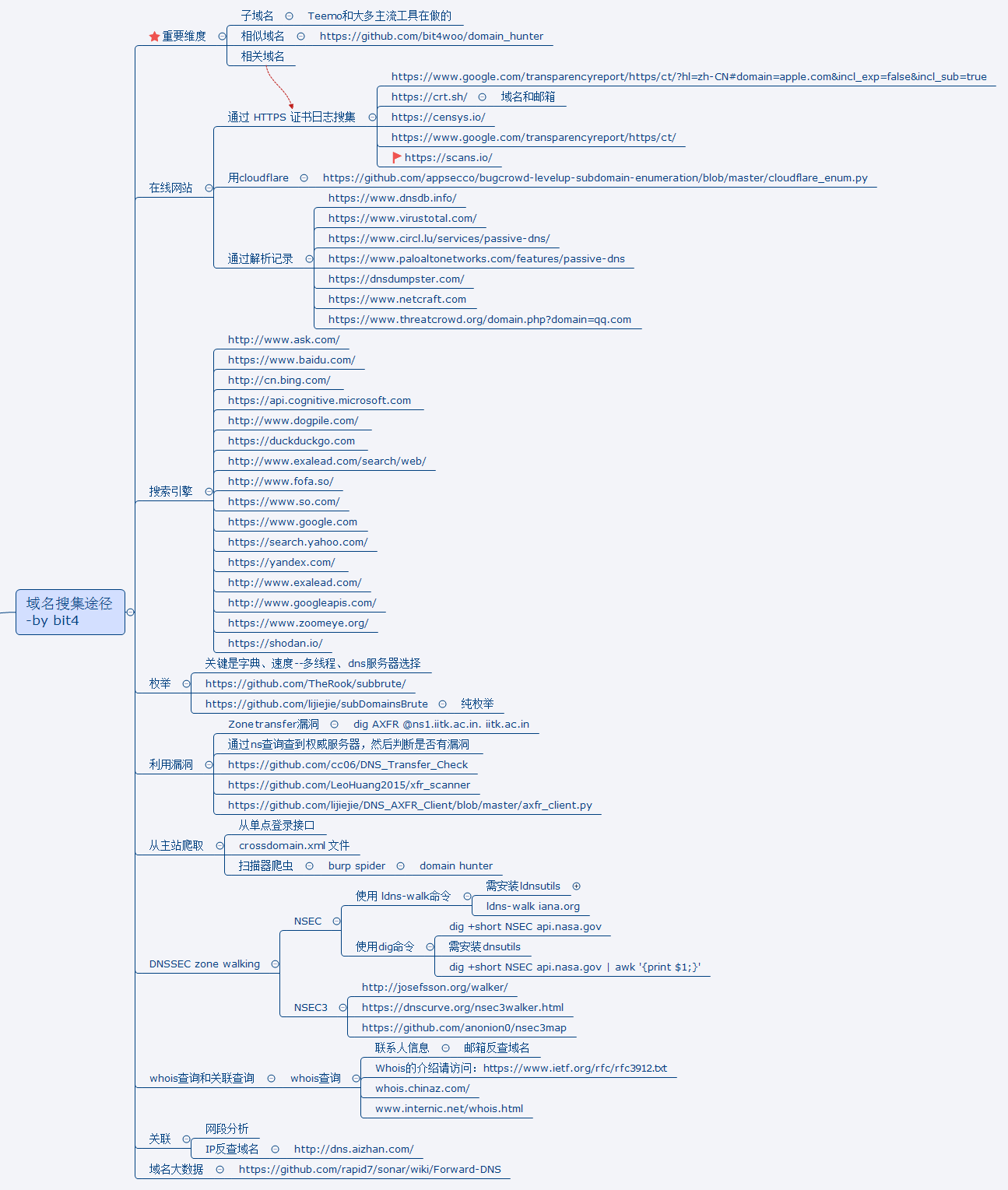
Related mind maps

Disclaimer
The author discloses the code of the tool. For the purpose of technical sharing, please do not use it for illegal purposes. Any problems caused by using this tool and code, or modified tools and code, have nothing to do with this author, and hereby declare! ! !


