bedrock agent appointment manager dynamodb
1.0.0

Agents for Amazon Bedrock enable developers to create conversational agents that understand natural language through foundation models (FMs). In this blog post, I'll create an Amazon Bedrock Agent that allows users to interact with an Amazon DynamoDB table and a Knowledge bases for Amazon Bedrock using natural language.
I'll guide you through setting up the resources, defining the agent's action groups, associating AWS Lambda functions to execute DynamoDB operations, and integrating the knowledge base for enhanced conversational experiences to provide more personalized and context-aware responses to user queries. All this with a 'CDK deploy' command using the AWS Cloud Development Kit (CDK).
By the end, you'll understand how to build an intelligent conversational agent that simplifies database interactions, delivers personalized responses, and provides a user-friendly experience.
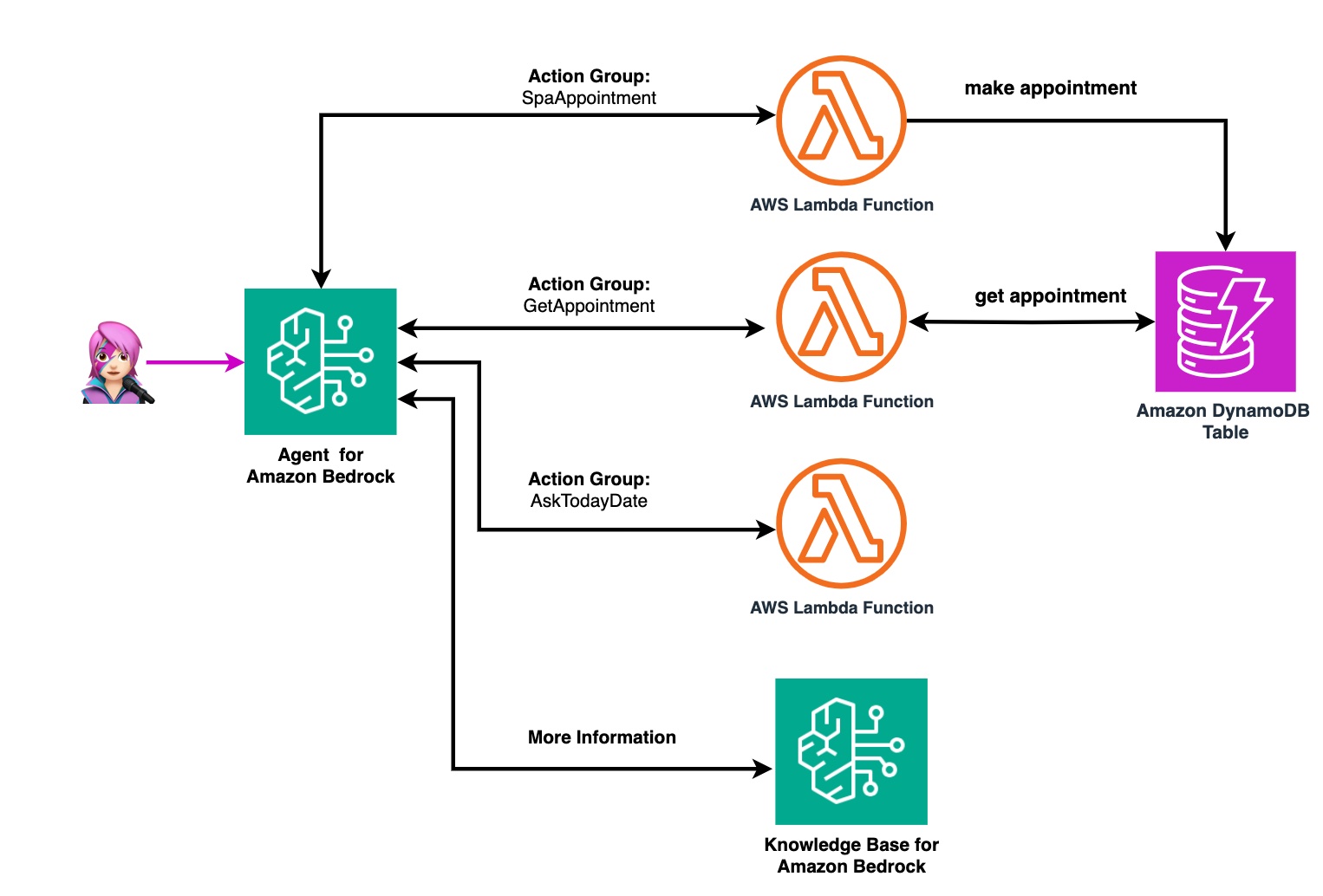
This agent acts as the interface for the user to input information and make requests.
The user's actions trigger AWS Lambda functions based on action group definition, actions that the agent can help the user perform three key actions: SpanAppointment, GetAppointment, and AskTodayDate.
? Action group definition is in ag_data.json and Amazon Bedrock Definition is in agent_data.json
The SpanAppointment and GetAppointment functions interact with an Amazon DynamoDB table. It stores and retrieves the appointment data as needed.
The AskTodayDate function retrieves the current date information, which is then relayed back to the user via the Agent for Amazon Bedrock. This allows the user to receive real-time updates and confirmations regarding their appointment scheduling actions.
Leveraging the information stored in the knowledge base, the agent can then offer personalized massage recommendations tailored to the customer's unique needs. It can suggest the most suitable massage types, durations, and any additional services that may enhance their spa experience and address their specific concerns.
For example, if a customer mentions neck pain and stiffness, the agent can draw from the knowledge base and recommend a deep tissue massage focused on the neck and shoulder area, combined with hot stone therapy for added relaxation and muscle relief.
✅ AWS Level: Intermediate - 200
Prerequisites:
? Cost to complete:
✅ Clone the repo
git clone https://github.com/build-on-aws/bedrock-agent-appointment-manager-dynamodb
✅ Go to:
cd agent-appointment-manage
Create the Amzon Knowledge base by following these steps and using this data, then in kb_data.json edit the "knowledge_base_id" value:
    {
        "description_kb": "Recommend the best massage. Recommend the best massage according to the user's preferences",
        "knowledge_base_id": "XXXXXXXXXX"
    }
✅ Create The Virtual Environment: by following the steps in the README
python3 -m venv .venv
source .venv/bin/activate
for windows:
.venvScriptsactivate.bat
✅ Install The Requirements:
pip install -r requirements.txt
✅ Synthesize The Cloudformation Template With The Following Command:
cdk synth --all
✅ The Deployment:
cdk deploy --all
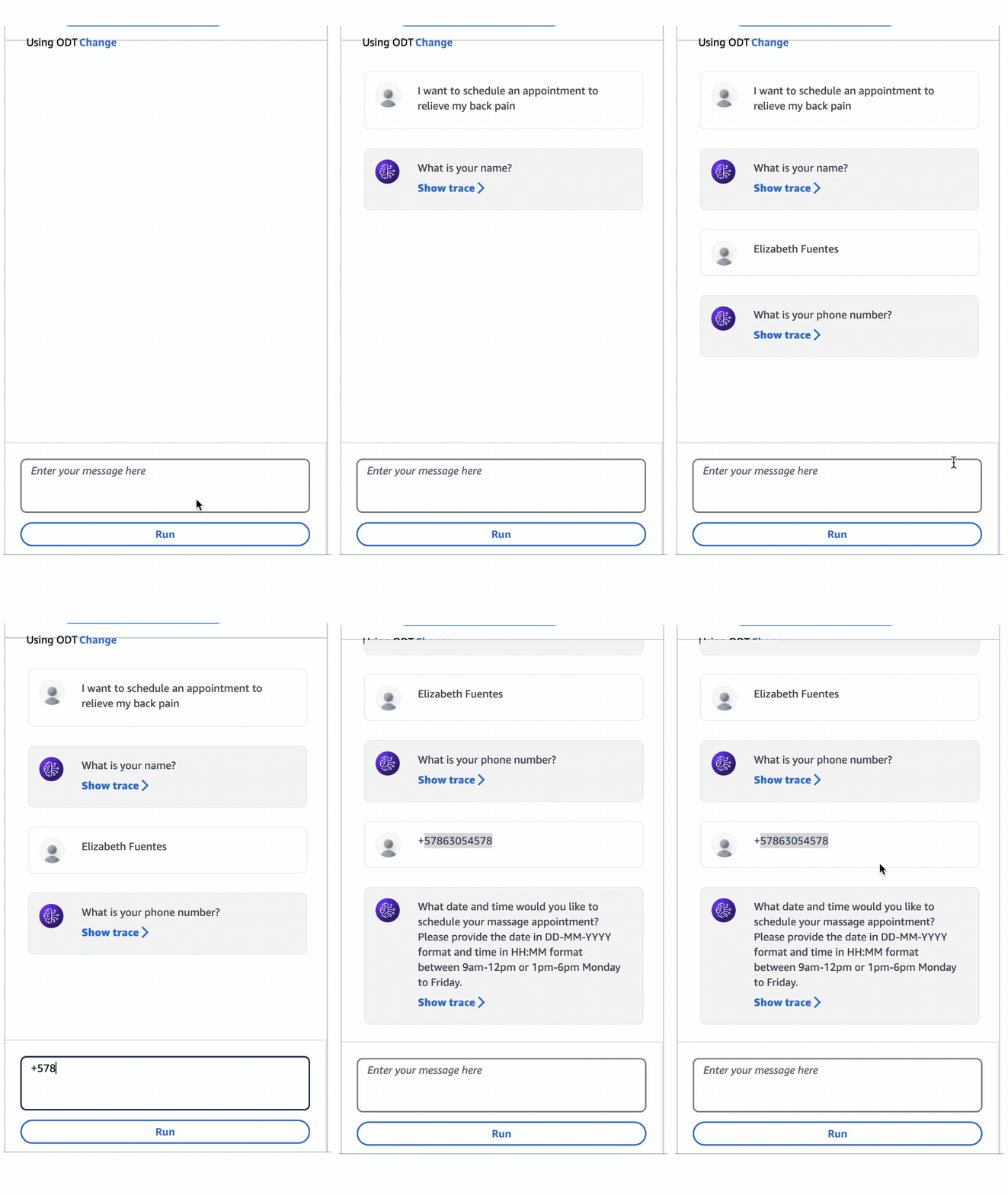
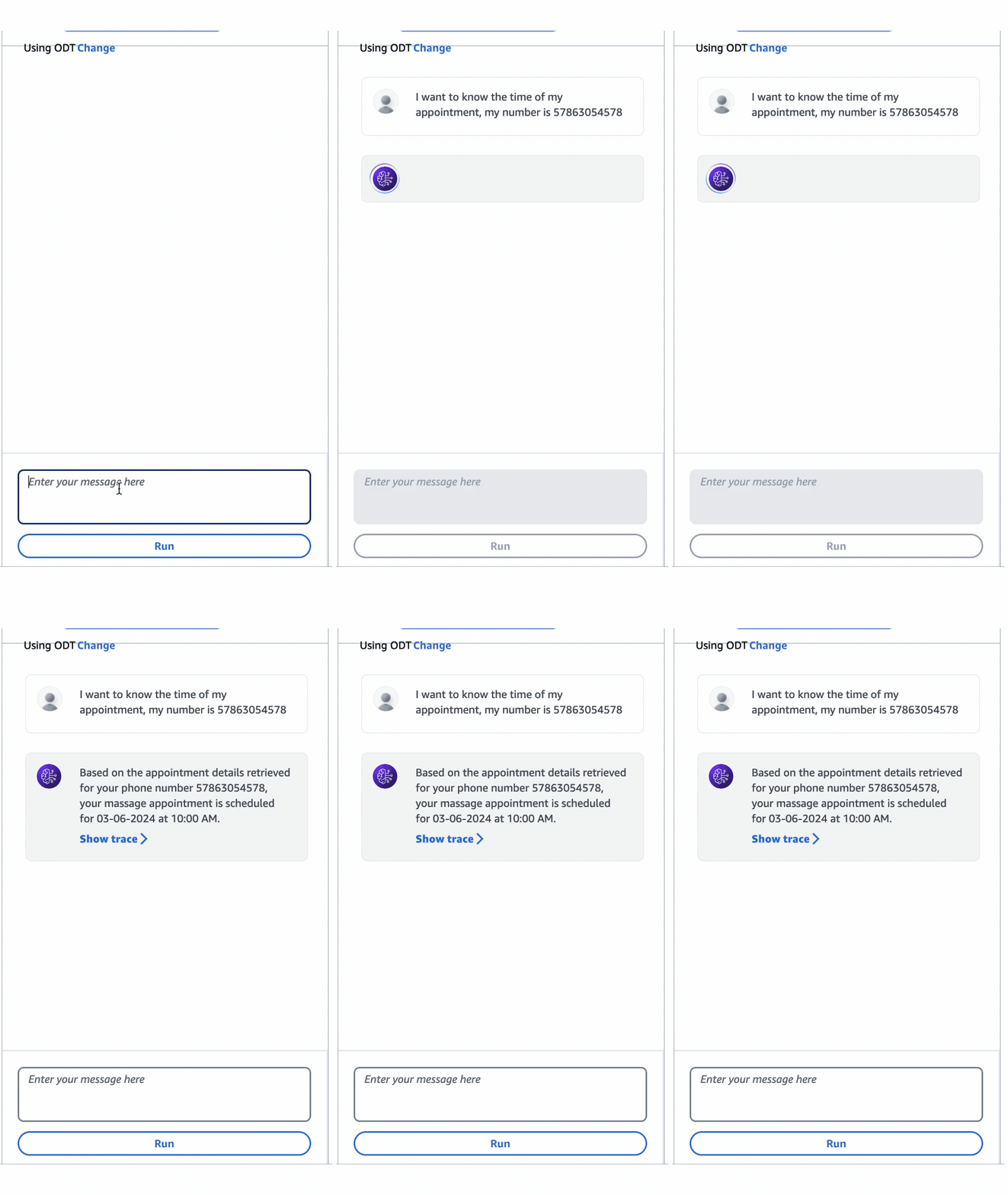
Try the agent in the Amazon Bedrock Console and improve the agent's instructions until you find the best result.
This code is designed to build three types of agents:
The type of agent being built is defined in line 130 of agent_appointment_manager_stack.py. The construction of each type of agent depends on the existence of the JSON definition files for the Knowledge Base and Action Groups.
        if kb_data and not ag_data:
            agent_name = "spa_agent_withKB"
            print("KB data")
            agent_knowledge_base_property =create_kb_property(kb_data)

            ag = CreateAgentWithKB(self, "agentwithkb",agent_name, agent_data["foundation_model"],agent_data["agent_instruction"],agent_data["description"],agent_knowledge_base_property, agent_resource_role.arn)

        elif ag_data and not kb_data:
            agent_name = "spa_agent_withag"
            print("AG data")
            agent_action_group_properties = agent_action_group_property(ag_data)
            ag = CreateAgentWithAG(self, "agentwithag",agent_name, agent_data["foundation_model"],agent_data["agent_instruction"],agent_data["description"],agent_action_group_properties, agent_resource_role.arn)

        elif ag_data and kb_data:
            agent_name = "spa_agent_with_ag_kb"
            print("AG and KB data")
            agent_action_group_properties = agent_action_group_property(ag_data)
            agent_knowledge_base_property =create_kb_property(kb_data)
            ag = CreateAgentWithKA(self, "agentwithbooth", agent_name, agent_data["foundation_model"], agent_data["agent_instruction"], agent_data["description"], agent_knowledge_base_property, agent_action_group_properties, agent_resource_role.arn)

        else:
            agent_name = "spa_agent"
            print("No data")
ag = CreateAgent(self, "agent",agent_name, agent_data["description"], agent_resource_role.arn)In this blog post, you learned how to create an Amazon Bedrock conversational agent that allows users to interact with a Amazon DynamoDB table using natural language.
The combination of Agents from Bedrock, DynamoDB, and natural language processing hrough foundation models (FMs) opens up exciting possibilities for building user-friendly applications. Users can interact with databases using plain language, making it easier for non-technical users to access and manipulate data.
I encourage you to explore further and extend the functionality of your conversational agent based on your specific requirements. With the right design and implementation, you can create intelligent agents that revolutionize the way users interact with data.
Thank you for joining me on this journey, and I hope this post has inspired you to create your own innovative solutions using Agents for Amazon Bedrock.
See CONTRIBUTING for more information.
This library is licensed under the MIT-0 License. See the LICENSE file.





