stable diffusion api server
1.0.0

The STABLE DIFFUSION model allows you to create creative images using text. Amazon offers pre-trained models for easy use of machine learning (ML) using Sagemaker JumpStart, which has been provided with additional Diffness models since October 2022. This allows you to easily create a Stable Diffness image, and also offer Sagemaker EndPoint for immediate service. Sagemaker EndPoint automatically scale when traffic increases, so it can maintain the infrastructure efficiently even when traffic fluctuations are severe and provide enhanced security on IAM.
In Stable Diffness Keywords, you can see the results of the stable difference according to the keywords.
"The Legend of Zelda Landscape Atmospheric, Hyper Realistic, 8K, Epic Composition, Cinematic, Octane Render, ArtStation Landscape Clifton & Galen Rowell, 16K Resolution, Landscape Veduta Photo by Dustin Lefevre & TDRAW, 8K Resolution Deviantart, Flickr, Rendered in Enscape, Miyazaki, Nausicaa Ghibli, Breath of the Wild, 4K Detailed Post Processing, ArtStation, Rendering by Unreal Engine "

The response obtained when requesting the STABLE DIFFUSION image provided by JumpStart with Sagemaker Endpoint is as follows. In the JSON response, the RGB information of the image is delivered to the "Generated_image" field. In order to use this in the client, you must change it to the image format. In addition, since IAM certification must be authenticated when requesting a stable difference image generation with Sagemaker Endpoint, the client must have an IAM credential, a sensitive information, and the API request through the AWS SDK. Therefore, web browsers or mobile apps are difficult to provide IAM -based services. For this reason, this post uses API Gateway and Lambda for IAM certification and image file conversion to Sagemaker Endpoint.
{
    "generated_image" : [
        [[ 221 , 145 , 108 ],[ 237 , 141 , 98 ],[ 249 , 154 , 111 ],..]
        ...
    ],
    "prompt" : "{
        predictions" :[{
            "prompt" : "astronaut on a horse" ,
            "width" : 768 ,
            "height" : 512 ,
            "num_images_per_prompt" : 1 ,
            "num_inference_steps" : 50 ,
            "guidance_scale" : 7.5
        }]
    }
}
The overall Architecture is as follows. SAGEMAKER has a STABLE DIFFUSION model provided by JumpStart to create an image from the input text. Lambda delivers the text information delivered by the user to Sagemaker Endpoint through IAM authentication and obtains the information of the resulting image in the form of Image Map. The Image Map is stored in the S3 as a JPEG format so that the user can easily use it, creating a URL for the image using CloudFront domain information. The API Gateway receives the user's request as a RESTFUL API and delivers the user's request to the Lambda, and the URL image information created by Lambda is delivered to the user. All services are distributed using AWS CDK, and Docker Container images are managed with ECR.
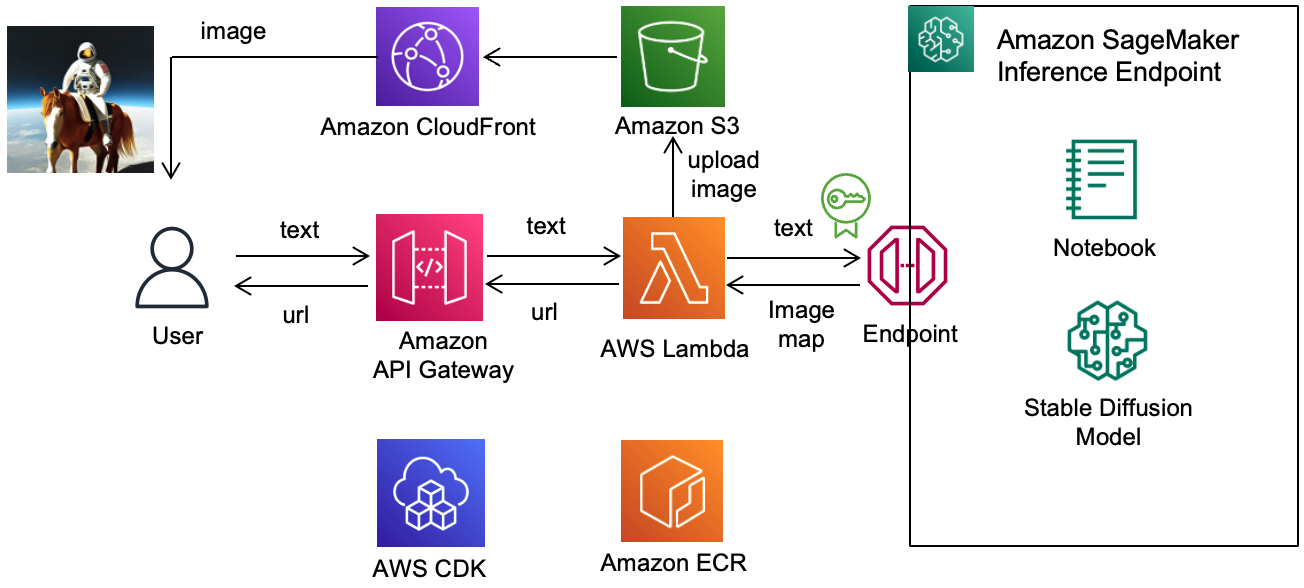
In Lambda, you must specify "ContentType" and "Accept" as shown below when requesting inference with Sagemaker Endpoint.
 "ContentType" : "application/json" ,
"Accept" : "application/json" ,
In this case, the BODY of the Request delivers the information necessary for the stable difference to the format below. WIDTH, Height should be divided into 8 to specify the size of the image. Num_Images_per_prompt is the number of images generated at once, and Num_inference_STEPS refers to the Denoising step when creating an image. Guidance_scale expresses the extent to the prompt.
{
    predictions ":[{
        " prompt ": "astronaut on a horse" ,
        "width" : 768 ,
        "height" : 512 ,
        "num_images_per_prompt" : 1 ,
        "num_inference_steps" : 50 ,
        "guidance_scale" : 7.5
    }]
}
In lambda_function.py, we make a request as shown below. Using Python's BOTO3, the request is delivered to the Sagemaker Endpoint, the contentType is "Application/JSON", and the Accept header is "Accept = 'application/json" or You can use "Accept = 'Application/JSON; JPEG".
 import boto3

runtime = boto3 . Session (). client ( 'sagemaker-runtime' )
response = runtime . invoke_endpoint ( EndpointName = endpoint , ContentType = 'application/json' , Accept = 'application/json;jpeg' , Body = json . dumps ( payload ))If the Accept is called "Application/JSON" for query at sageMaker Endpoint, Text data made of RGB comes down. The image data is extracted from JSON's "Body" and "Generated_image", and then converts to binary image data that can be stored in S3 using PIL (Pillow) and Numpy Library. The code in lambda_function.py is shown below.
 from PIL import Image
import numpy as np

def parse_response ( query_response ):
    response_dict = json . loads ( query_response )
    return response_dict [ "generated_images" ], response_dict [ "prompt" ]

response_payload = response [ 'Body' ]. read (). decode ( 'utf-8' )
generated_image , prompt = parse_response ( response_payload )

image = Image . fromarray ( np . uint8 ( generated_images [ 0 ]))
buffer = io . BytesIO ()
image . save ( buffer , "jpeg" )
buffer . seek ( 0 )

s3 = boto3 . client ( 's3' )
s3 . upload_fileobj ( buffer , mybucket , mykey , ExtraArgs = { "ContentType" : "image/jpeg" })
By the way, in Lambda, the Pillow and Numpy libraries should be added with "PIP Install -Target = [Lambda folder] Pillow Numpy" and then compressed and uploaded. It allows you to use libraries like numpy. The example of the Dockerfile at this time is as follows.
 FROM amazon / aws - lambda - python : 3.8

RUN pip3 install -- upgrade pip
RUN python - m pip install joblib awsiotsdk

RUN pip install numpy pillow

WORKDIR / var / task / lambda

COPY lambda_function . py / var / task

COPY . .

CMD [ "lambda_function.lambda_handler" ]If you set the Accept header to "Application/JSON; JPEG", Sagemaker Endpoint transmits the Encoding JPEG image to the base64. Therefore, after the base64 decoding, change it to the In -Memory Binary Stream and upload it to S3.
 response_payload = response [ 'Body' ]. read (). decode ( 'utf-8' )
generated_image , prompt = parse_response ( response_payload )

import base64
img_str = base64 . b64decode ( generated_image )
buffer = io . BytesIO ( img_str )
s3 . upload_fileobj ( buffer , mybucket , mykey , ExtraArgs = { "ContentType" : "image/jpeg" })In preparation for CDK deployment, we describe how to deploy S3, Lambda, API Gateway, and CloudFront to CDK.
STABLE DIFFUSION ENDPOINT Create Stable Diffness EndPoint in Sagemaker Jumpstart.
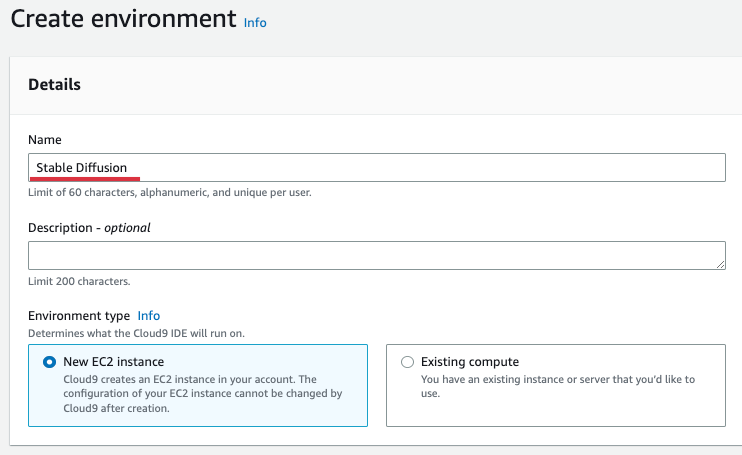
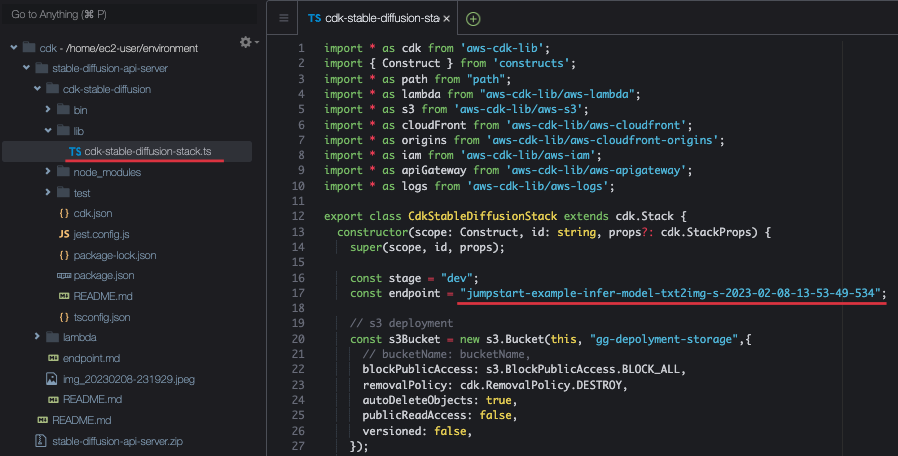
The infrastructure for reasoning is API Gateway, S3, Lambda, CloudFront, and distributed to AWS CDK. For detailed distribution information, refer to the CDK-STABLE-DIFFUSION-STACK.TS. After selecting Create Environment in Cloud9 Console to create Cloud9, enter the name as shown below. Here, I entered "Stabel Diffusion". Afterwards, keep all the rest and select [Create].
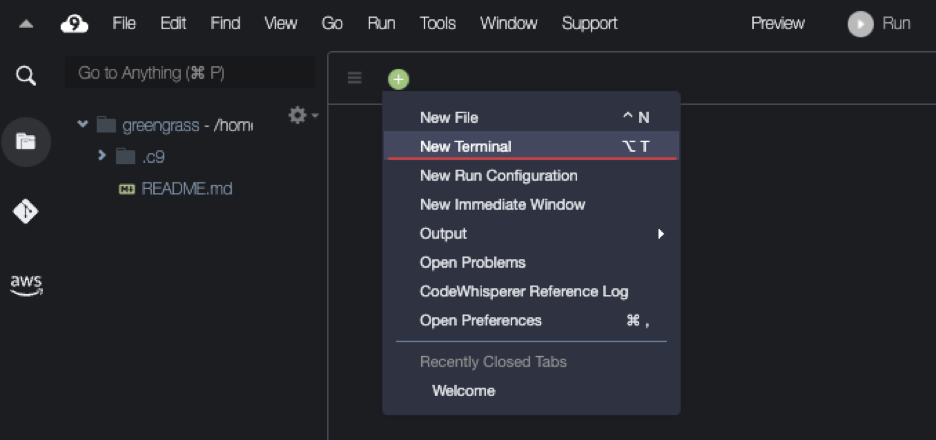
After Cloud9 is created, select [Open] and enter the terminal as shown below.
After that, download the relevant code as shown below.
git clone https : //github.com/kyopark2014/stable-diffusion-api-serverSince the Endpoint information of the sageMaker is required when creating the infrastructure, select "CDK-STABLE-DIFFUSION/LIB/LIB/LIB/LIF/LIFFUSION-DIFFUSION-DIFFUSION-STACK.TS" as shown below.
Go to the CDK-STABLE-DIFFUSION and install "AWS-CDK-LIB" and "PATH" libraries with NPM. Here, "AWS-CDK-LIB" means the CDK 2.0 library.
cd cdk - stable - diffusion && npm install aws - cdk - lib pathInstall the entire infrastructure with the following command.
cdk deployWhen the infrastructure is completed with the CDK, you can find out the information of the installed infrastructure as shown below. Where Appurl is available for calling API using the Query statement in Browser, and Curlurl is used to test in Shell.

The actual example is as follows.
 CdkStableDiffusionStack . WebUrl = https : //1r9dqh4f37.execute-api.ap-northeast-2.amazonaws.com/dev/text2image?prompt=astronaut
CdkStableDiffusionStack . curlUrl = curl - X POST https : //1r9dqh4f37.execute-api.ap-northeast-2.amazonaws.com/dev/text2image -H "Content-Type: application/json" -d '{"text":"astronaut on a horse"}'How to connect from Browser is as follows. Enter the sentence to query in the Prompt.
https : //1r9dqh4f37.execute-api.ap-northeast-2.amazonaws.com/dev/text2image?prompt=astronaut on a horseThe results at this time are as follows.
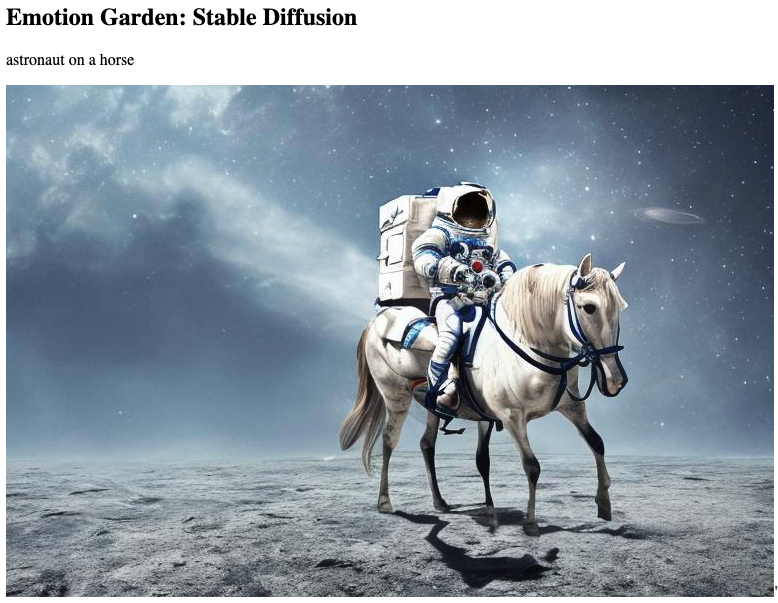
You can run as follows with the curl command.
curl - X POST https : //1r9dqh4f37.execute-api.ap-northeast-2.amazonaws.com/dev/text2image -H "Content-Type: application/json" -d '{"text":"astronaut on a horse"}'An example of the result of reasoning. "Body" has a URL of the image generated as a result of reasoning.
{ "statusCode" : 200 , "body" : "https://d283dvdglbetjo.cloudfront.net/img_20230208-014926" }Select the POST method as shown below and enter the URL.
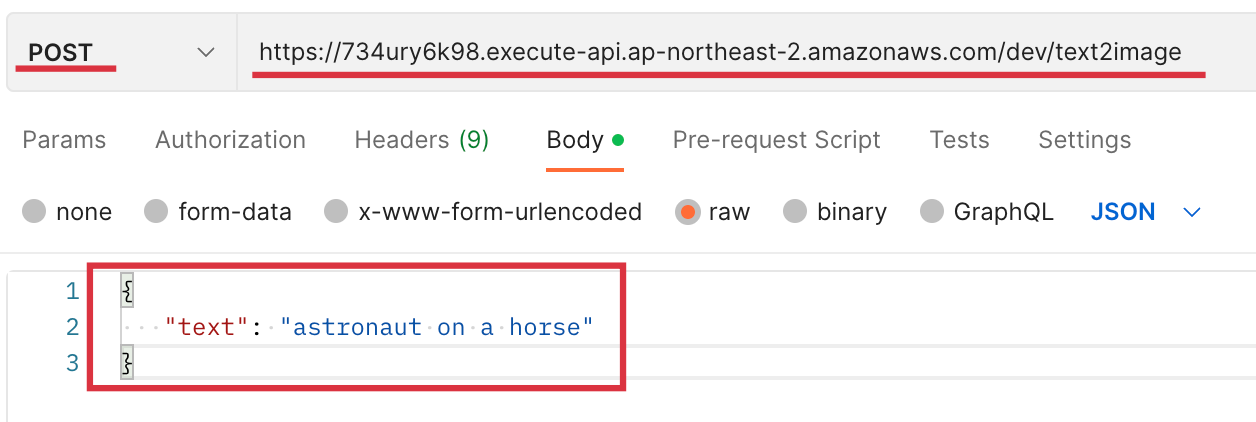
Enter in JSON in [Body] - [RAW].
{
   "text" : "astronaut on a horse"
}
Add Application/JSON to [Headers] as the conten-type as shown below.
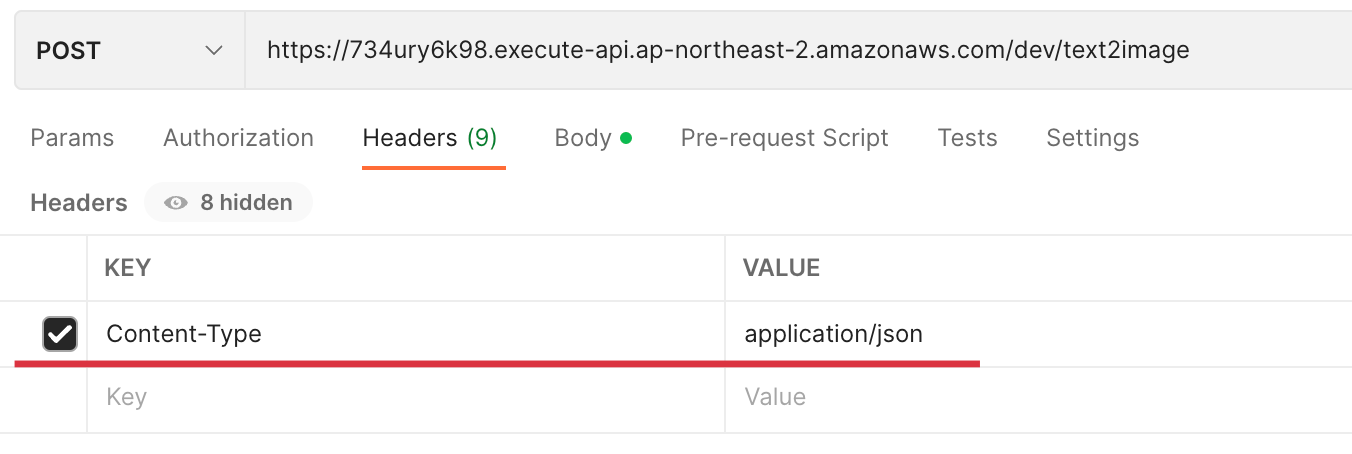
Select [SENT] and get the following results.
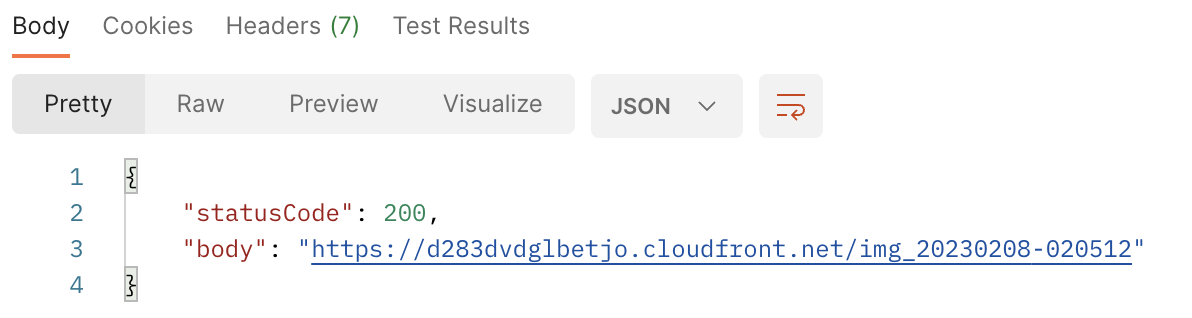
I changed the text to enter as shown below.



A Young Blonde Male Jedi with Short Hair Standing Stilling at the SunSet Concept Art by DOUG Chiang Cinematic, Realistic Painting, High Definition, Concept Art, Portait Image, Path Tracing, Serene Landscape, High Quality, Highly Detailed, 8K, Soft Colors, Warm Colors, Turbulent Sea, High Coherance, Anatomicaly Correct, Hyperrealistic, Concept Art, Defined Face, FIVE FINGERS, Symmetrical

The Eye of the Storm, Atmospheric, Hyper Realistic, 8K, EPIC Composition, Cinematic, Octane Render, ArtStation Landscape Vista Rowell, 16K Resolution, Landscape Veduta Photo by Dustin Lefevre & TDRAW, 8K Resolution, Detailed Landscape Flickr, Rendered in Enscape, Miyazaki, Nausicaa Ghibli, Breath of the Wild, 4K Detailed Post Processing

Generate Images from text with the Stable Diffness Model on Amazon SageMaker Jumpstart
Simplifying models and machine learning solutions pre -built with Amazon Sagemaker JumpStart
Introduction to JumpStart -text to Image
Sagemaker EndPoint (Single Model EndPoint)
Build and Automatize The Management of Your SageMaker Studio Users CDK
Deploying sageMaker Endpoints with CloudFormation
Running Serverless ML on AWS Lambda
Deploy Stable Diffness Models on Amazon Sagemaker EndPoint





