guidance for digital thread using graph and generative ai on aws
1.0.0

Manufacturing organizations have vast amounts of knowledge dispersed across the product lifecycle, which can result in limited visibility, knowledge gaps, and the inability to continuously improve. A digital thread offers an integrated approach to combine disparate data sources across enterprise systems to drive traceability, accessibility, collaboration, and agility.
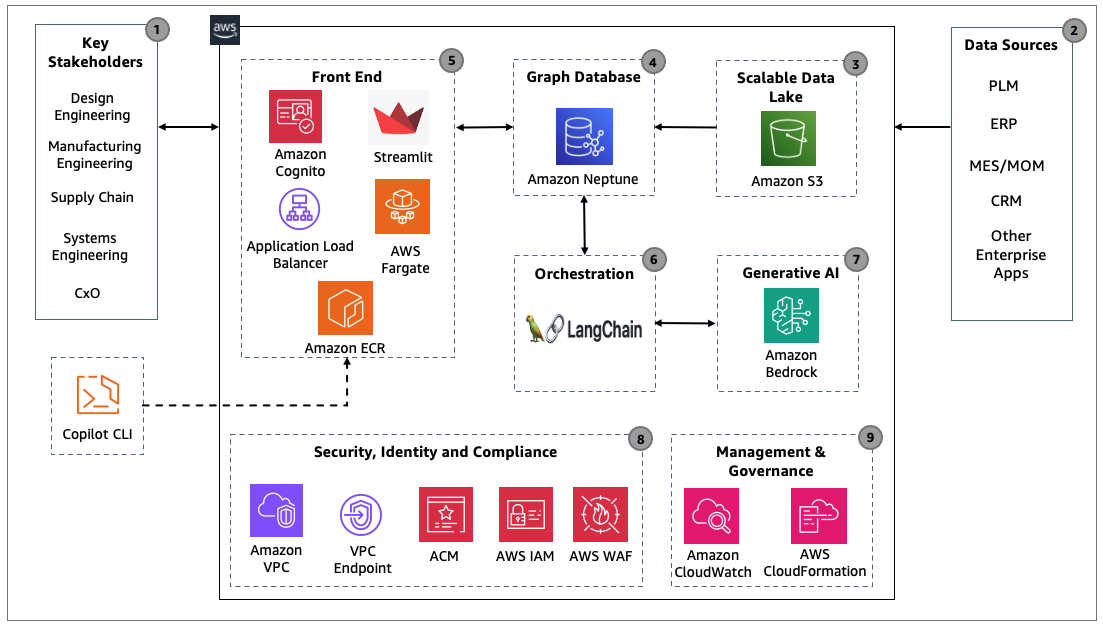
In this sample project, learn how to create an intelligent manufacturing digital thread using a combination of knowledge graph and generative AI technologies based on data generated throughout the product lifecycle, and their interconnected relationship. Explore use cases and discover actionable steps to start your intelligent digital thread journey using graph and generative AI on AWS.
To execute the steps outlined in this post, you will require the following:
Clone the repository into your environment
git clone https://github.com/aws-solutions-library-samples/guidance-for-digital-thread-using-graph-and-generative-ai-on-aws.git
cd guidance-for-digital-thread-using-graph-and-generative-ai-on-aws
To deploy this app, run:
chmod +x deploy-script.sh
./deploy-script.sh
The deploy-script.sh will set up the following resources in your account:
- Amazon Cognito User pool with a demo user account
- Amazon Neptune Serverless cluster
- Amazon Neptune workbench Sagemaker notebook
- A VPC
- Subnets/Security Groups
- Application Load Balancer
- Amazon ECR Repository
- ECS Cluster & Service running on AWS Fargate
In case if you are asked about the AWS credentials as shown below. Please read Configure AWS credentials.
Which credentials would you like to use to create demo?  [Use arrows to move, type to filter, ? for more help]
  > Enter temporary credentials
    [profile default]
Visit the URL after AWS Copilot deployment to chat with the digital thread.
✔ Deployed service genai-chatbot-app.
Recommended follow-up action:
- Your service is accessible at http://genai--Publi-xxxxxxx-111111111.xx-xxxx-x.elb.amazonaws.com over the internet.
Newly deployed Amazon Neptune clusters does not contain any data. To showcase the interaction between Amazon Bedrock Gen AI and Neptune knowledge graph based Digital Thread, please follow the below steps to import the sample data from src/knowledge-graph/data/ into the graph database.
Run below bash script to create s3 bucket and upload src/knowledge-graph/data/ files into Amazon S3
ACCOUNT_ID=$(aws sts get-caller-identity --query "Account" --output text)
S3_BUCKET_NAME="mfg-digitalthread-data-${ACCOUNT_ID}"
aws s3 mb "s3://$S3_BUCKET_NAME"
aws s3 cp ./src/knowledge-graph/data/ s3://$S3_BUCKET_NAME/sample_data/ --recursive
Visit Neptune Workbench notebook Jupyter notebook.
From AWS Console:
deploy-script.sh CloudFormationFrom URL in CloudFormation stack:
mfg-dt-neptune
NeptuneSagemakerNotebook Key to find the URL of the Neptune Sagemaker Notebook.
(e.g. https://aws-neptune-notebook-for-neptunedbcluster-xxxxxxxx.notebook.xx-xxxx-x.sagemaker.aws/)After you go into Jupyter notebook, click on Upload button on the right top corner and upload src/knowledge-graph/mfg-neptune-bulk-import.ipynb file into the Neptune notebook. (PS: click upload blue button to confirm uploading)
Go into mfg-neptune-bulk-import.ipynb and follow the steps inside the notebook to load the sample data into the Neptune database.
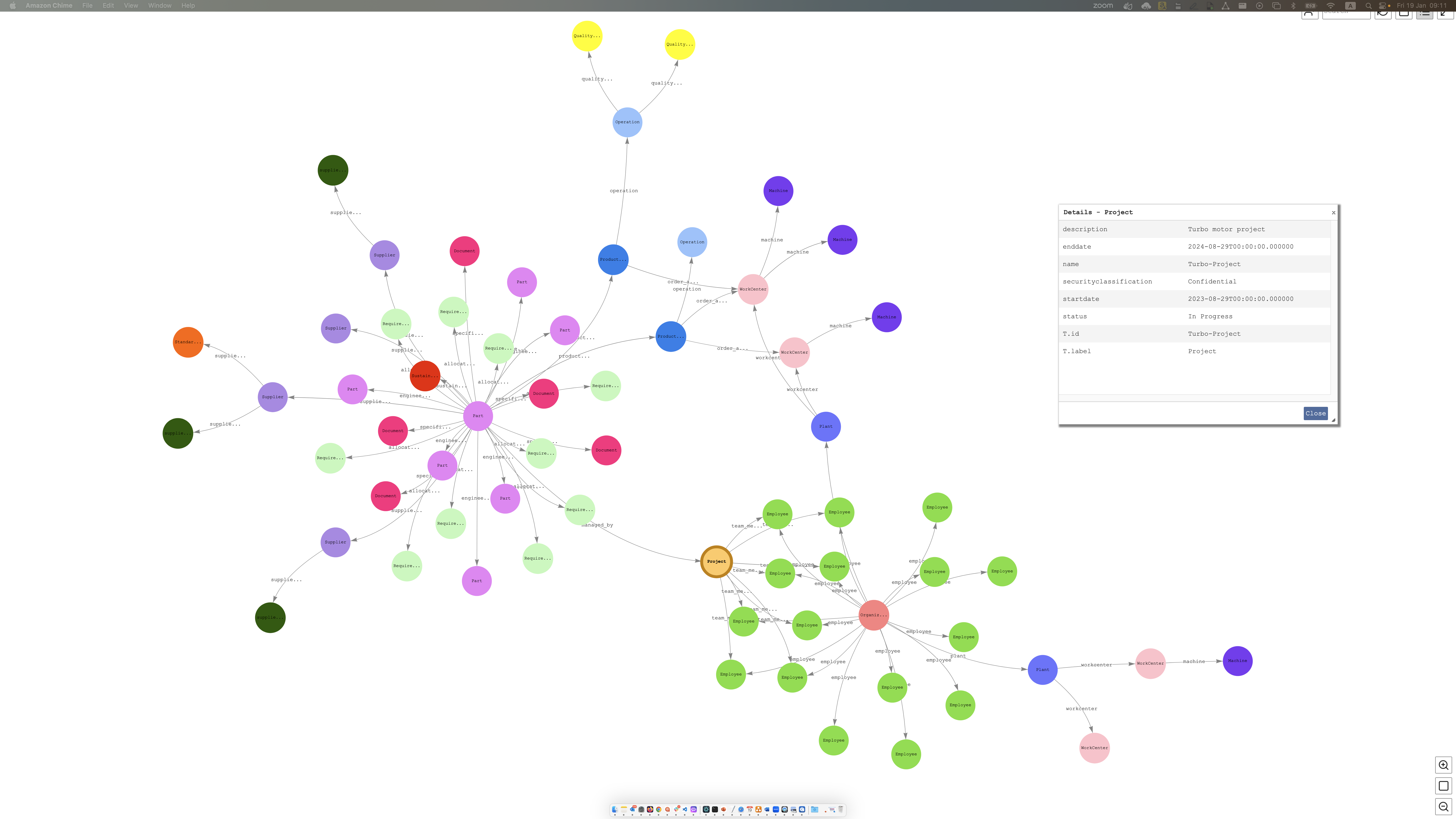
Successful data import will generate the below knowledge graph.
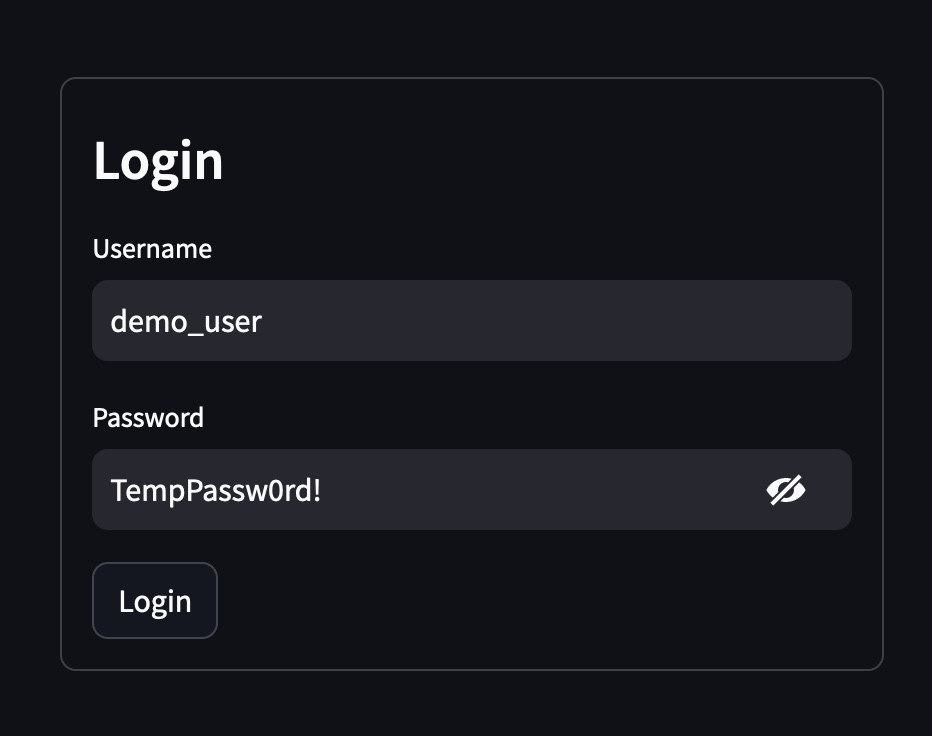
You will be asked to login with the Cognito user. In this demo, a sample user demo_user will be created with the temporary Password TempPassw0rd!.
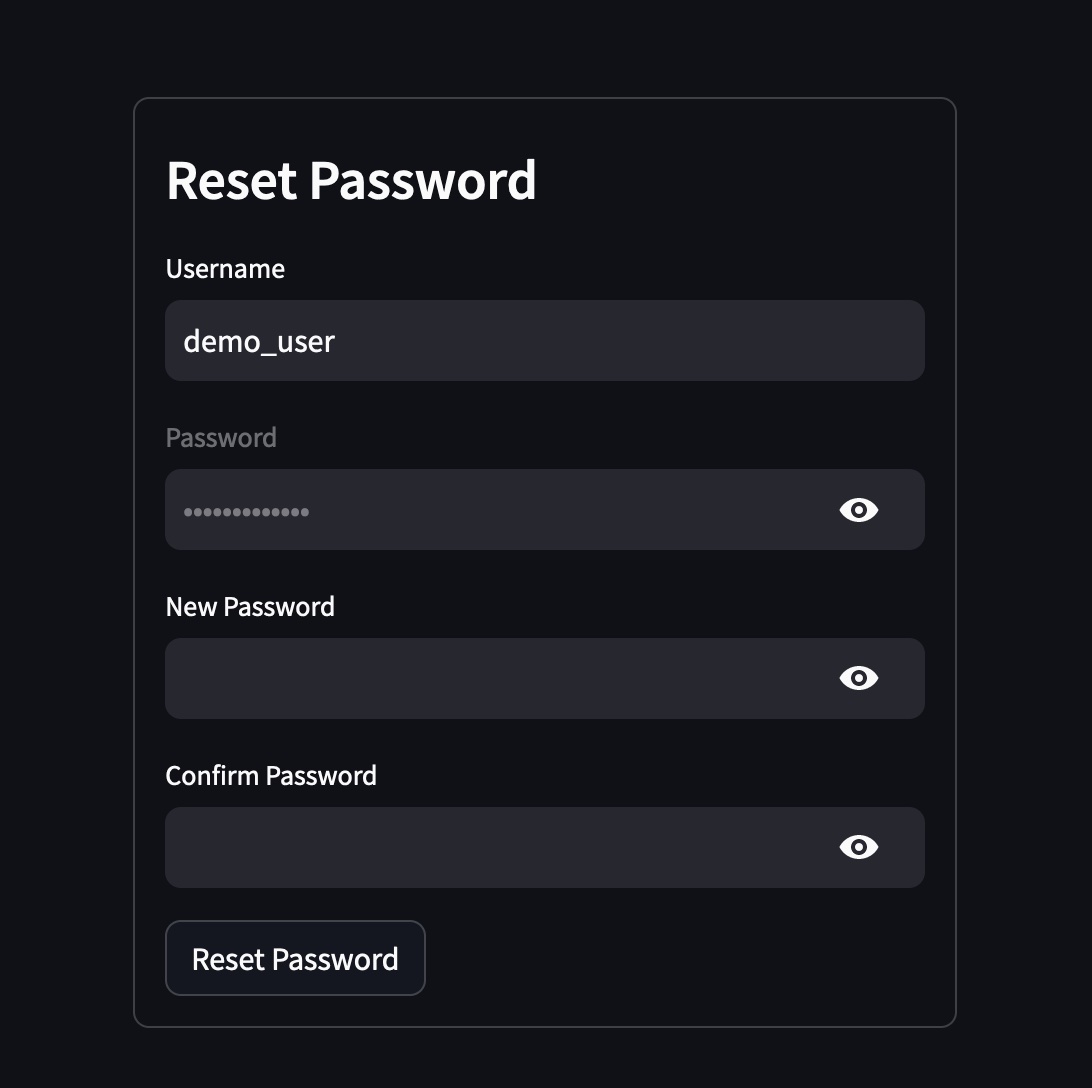
Reset Password is required when you login for the first time. Please make sure you follow the password guidelines.
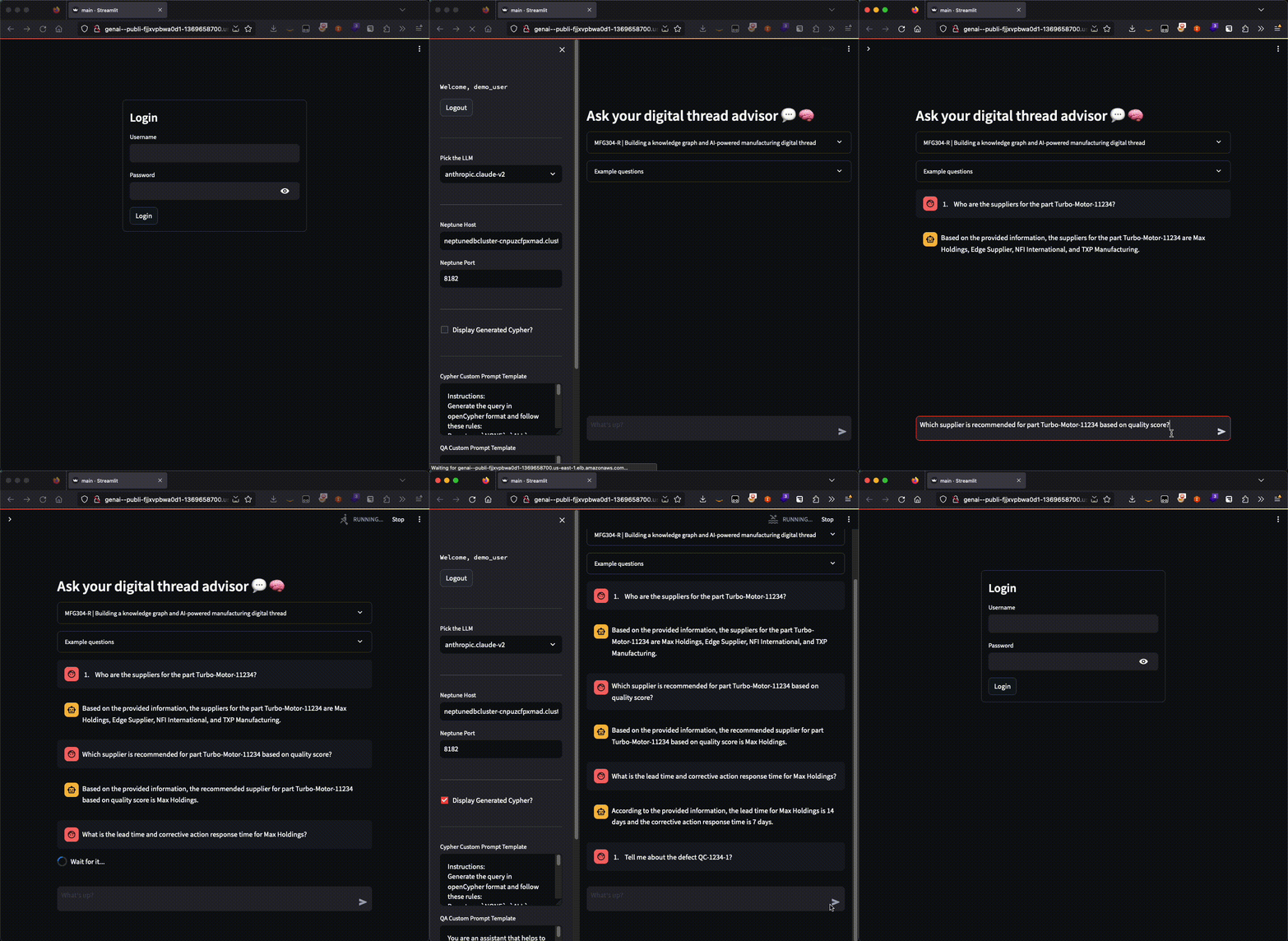
The main page will be displayed and you can chat with the digital thread Gen AI and graph application.
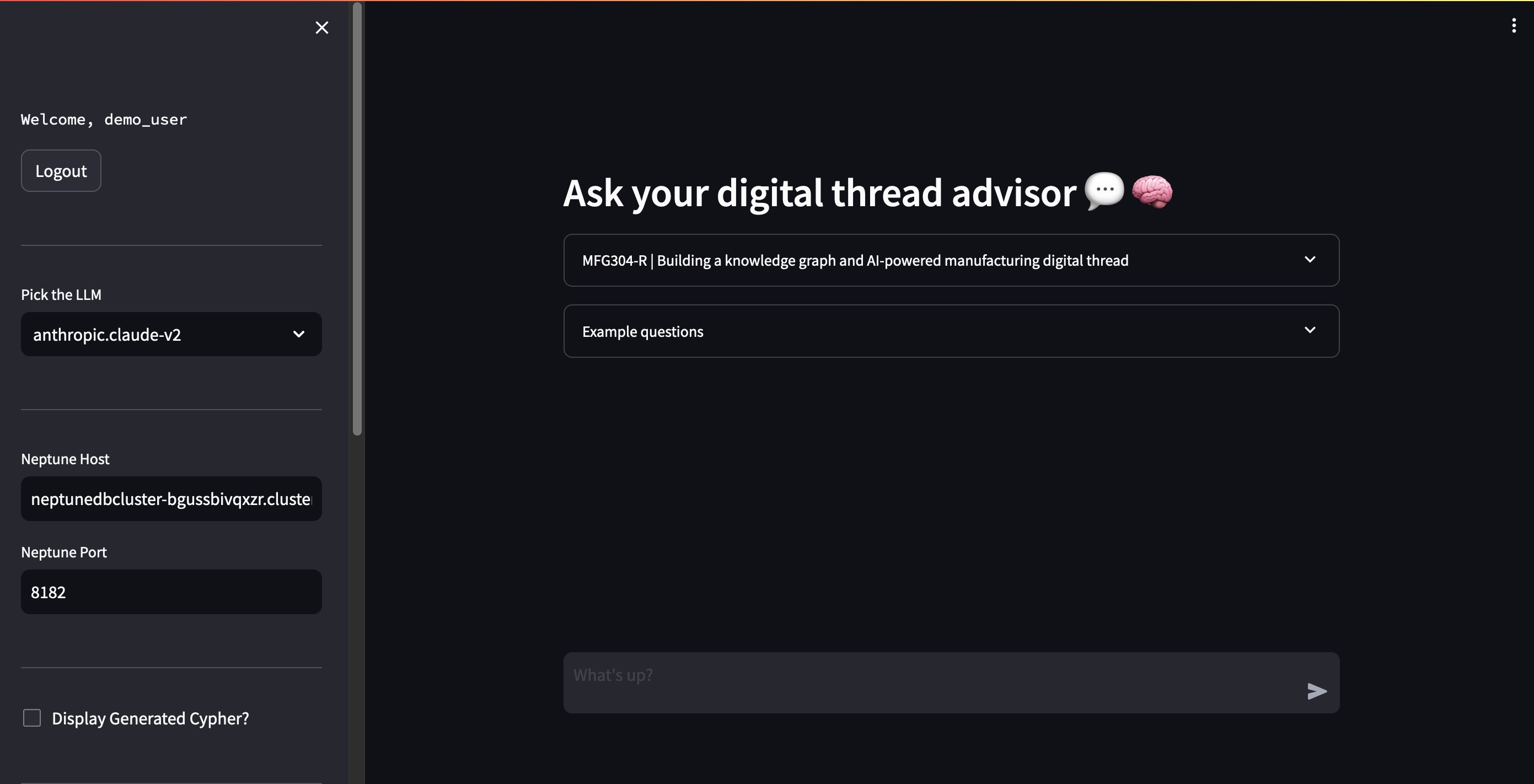
Sample questions can be found by expanding the Example questions menu.
Attention: All data in Amazon Neptune will be lost after cleaning up.
Since this demo sets up resources in your account, let's delete them so you don't get charged.
The cleanup-script.sh will delete the following resources in your account: > * Amazon Cognito User pool with a demo > * Amazon Neptune Serverless cluster > * Amazon Neptune workbrench Sagemaker notebook > * A VPC > * Subnets/Security Groups > * Application Load Balancer > * Amazon ECR Repositories > * ECS Cluster & Service running on AWS Fargate
chmod +x cleanup-script.sh
./cleanup-script.sh
Input 'y' to confirm cleanup:
This script is to clean up the Manufacturing Digital thread (Graph and Generative AI) demo application.

Are you sure to delete the demo application? (y/n): y

   Are you sure you want to delete application genai-chatbot-app? [? for help] (y/N) y


Finally, You will get a message "CloudFormation is being deleted. It will be removed in minutes. Please check the CloudFormation console https://console.aws.amazon.com/cloudformation/home".

It will take 10-15 minutes to cleanup the resources in your account.
See CONTRIBUTING for more information.
For AWS Guidance, please visit Guidance for Digital Thread Using Graph and Generative AI on AWS
Blog will be released in April 2024.
Can i execute the cleanup-script.sh if the neptune cluster is in stopped state?
No. Cloudformation deletion will fail with the error "Db cluster neptunedbcluster is in stopped state". Please start the neptune cluster either through the aws console or cli command before proceeding with the cleanup.
What to do when the CloudFormation failed to create neptune cluster with the error "The following resource(s) failed to create: [ElasticIP3, ElasticIP1, ElasticIP2]"?
Before running the Neptune Cloudformation template, ensure you have enough capacity for the creation of 3 Elastic IP's. Verify the number of Elastic IP's in the aws console https://console.aws.amazon.com/ec2/home?#Addresses: before deploying the script.
Can i create a new user apart from the demo_user?
Yes. You can navigate to the AWS Cognito user pool and create a new user using the aws console or through cli.
I got the error "jq: command not found" while running the deploy-script.sh. How to fix?
Please visit Install jq page for more information.
What do i do if i get a warning 'The requested image's platform (linux/arm64/v8) does not match the detected host platform (linux/amd64) and no specific platform was requested' followed by a failure during copilot deploy?
This error can be resolved by deploying the script from arm64 based instance. Please see the platform attribute in the manifest.yml file present under copilot/genai-chatbot-app. The platform attribute is set to linux/arm64.
Can this solution be adapted for use in other domains, and if so, what is the process?
Step 1: Identify domain specific customer problem.
Step 2: Identify relevant stakeholders.
Step 3: Understand the problem and create questions.
Step 4: Identify the relevant System and data.
Step 5: Create the edges and vertices csv files and place it in the knowledge-graph/data/edges and knowledge-graph/data/vertices folders.
Step 6: Load the files using S3 loader and run the neptune statistics using src/knowledge-graph/mfg-neptune-bulk-import.ipynb
Step 7: Chat with the graph.
Step 8: If the response is inaccurate, please update the prompt template by providing an example query and the corresponding answer.
When engaging with customers to understand their needs, use the below template.
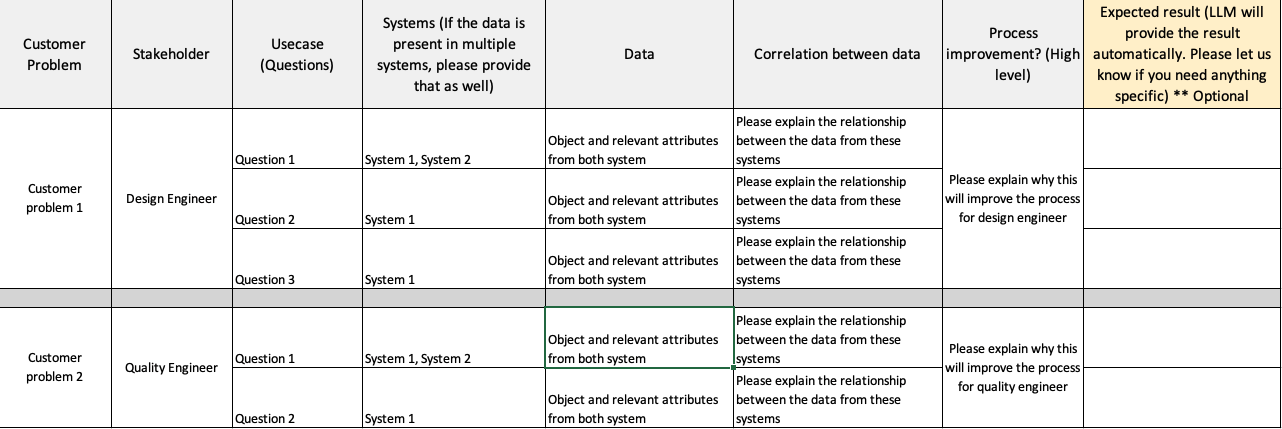
I made minor adjustments in the existing graph by adding new edges and vertices, but the chat application doesn't seem to recognize the changes. What could be the reason for this issue?
Langchain Neptune Graph gets the node and edge labels from the Neptune statistics summary. Neptune statistics are currently re-generated whenever either more than 10% of data in your graph has changed or when the latest statistics are more than 10 days old. To solve the problem, please run the statistics command "%statistics --mode refresh" immediately after loading any additional changes (Refer mfg-neptune-bulk-import.ipynb).
How do i reset neptune DB?
Please follow the "Workbench magic commands" outlined in this blog.
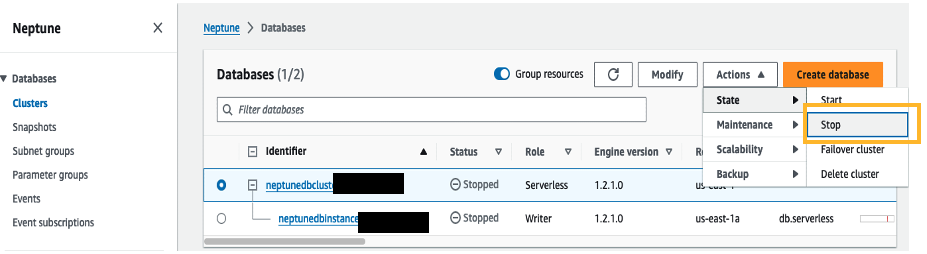
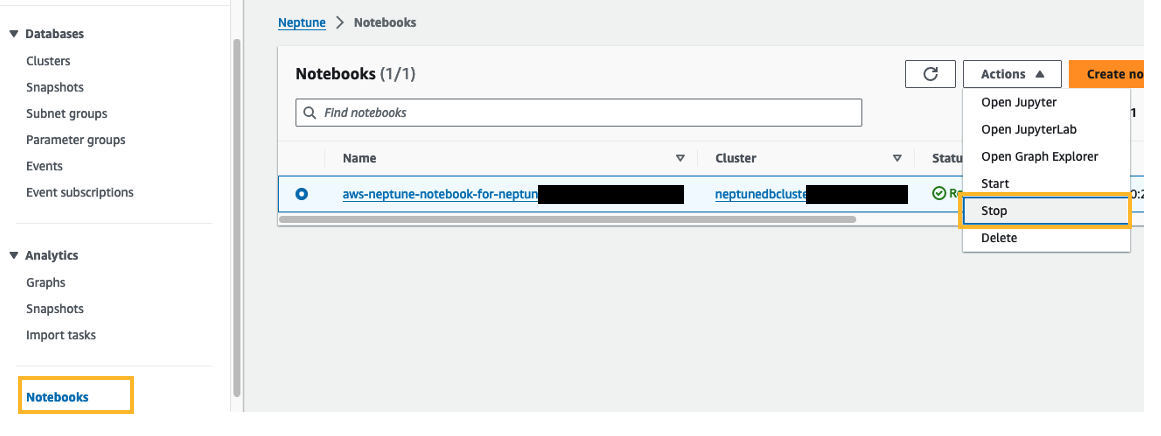
What is the procedure for stopping the Neptune cluster and notebook to avoid incurring costs?
It is a best practice to stop the Neptune cluster and notebook when you are not using it. Follow the steps outlined below.
How much does Amazon Neptune and Amazon Bedrock cost?
Please refer the Neptune Serverless pricing and Amazon Bedrock Pricing for Anthropic models.
In which AWS Regions is Amazon Bedrock available?
Please refer this page for more details.
I need to know more about Amazon Neptune and Amazon Bedrock.
Please see the Amazon Bedrock and Amazon Neptune product page for more information.
This library is licensed under the MIT-0 License. See the LICENSE file.





