chatgpt-wechat
ChatGPT personal assistant application that can be used safely on WeChat (transfer to WeChat through corporate WeChat, no risk of blocking the account) ,
This project is open source and free, does not open the Knowledge Planet, and there is no paid link. Except for the end, I advertised my own official account [Block Buildings], and did not conduct traffic diversion operations outside GitHub. Please remember that those who ask you to pay are all scammers!
Upgrade Guidelines (v1.0.0 is still in the development period, and the stable version uses v0.6.6)
- The original function is basically unaffected, but switching the database to
pgsql facilitates vectorized query - It supports Google's Gemini-pro calls of 60/m.
- Supports web bot settings, and supports publishing bots to customer service
- The web project address https://github.com/whyiyhw/agent-web The front-end hard work is all about the page written by GPT4.
- Support the latest enterprise WeChat customer service agreement
- Enterprise WeChat API supports custom domain names
- Project assistant, if you have any questions, please ask it first➡️➡️➡️

Main abilities (click to view details)
- WeChat is available: based on enterprise WeChat transit, can be used safely in WeChat
- Customer service message: Support multi-channel customer service message access
- Proxy support:
http/sock5 proxy && Reverse domain name proxy support, in addition to openai , it is also compatible with azure-openai - Session:
- Scene mode: supports dynamic modification
prompt , and predefined hundreds of prompt character templates - Continuous dialogue: Adaptive context design, allowing LLM? Have longer short-term memory, avoid manually cleaning up context
- Session switching: Multi-session support, can switch chat scenes, without losing conversation content, and can export conversations
- Speedy response: Supports segmented message response based on streaming interface
- information:
- Voice message: Supports multi-voice message and multi-language text input
- Image message: Support image message (question answering scenario)
- painting:
- Support
stable diffusion 1.5 drawing - Support
openai map making
- Private data:
milvus private vector knowledge base support - Plugin mechanism: support plug-ins, click to view
- Currently, it supports
shell , search , and wikipedia - You can also develop other capabilities (summary, weather...)
Complete installation steps (click to view details)
Detailed explanation of configuration items (click to view details)
Advanced gameplay
- Enterprise WeChat customer service
- Use of plug-ins
- Image generation-stable-diffusion
- Remotely call local services
Project architecture design (click to view)
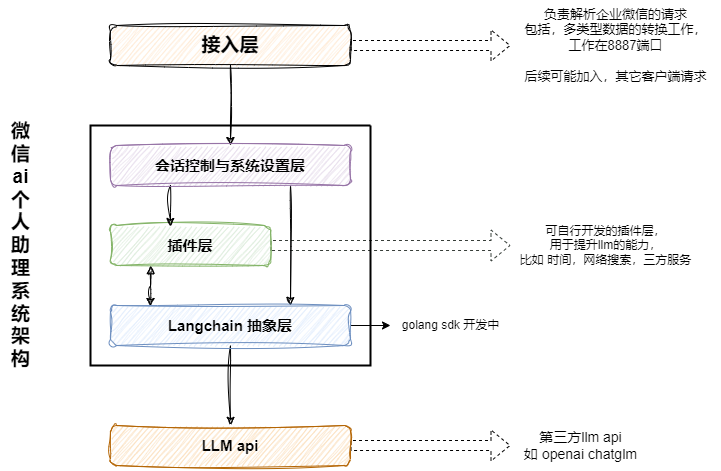
Click to view details
Implemented
- [x] Support gpt-4o, custom model name that supports one-api2024-05-14 - [x] Single service-multi-application support2023-03-05 - [x] Added proxy settings2023-03-05 - [x] Support the latest gpt3.5 and model can be switched by themselves - [x] Support propt custom configuration- [x] Imperative dynamic adjustment of dialogue parameters- [x] System settings & predefined template2023-03-17 - [x] Support server-side direct connection to enterprise WeChat, no cloud function transfer2023-03-18 - [x] Support multi-channel customer service messages2023-04-02 - [x] Support Chinese and English voice input2023-04-07 - [x] Support segmented and fast response2023-04-08 - [x] Support vector engine query, corpus-based context and intelligent recommendation 2023-04-08 - [x] Independent context environment, chat scenes can be switched arbitrarily 2023-04-09 - [x] Adaptive context length, no need to clean the context frequently manually 2023-04-09 - [x] Basic plug-in functions 2023-04-15 - [x] Support stable diffusion 1.5 drawing [service configuration] (https://help.aliyun.com/practice_detail/611227) 2023-04-25 - [x] Join search plug-in 2023-04-27 - [x] Support openai key balance query 2023-05-15 - [x] Support openai drawing2023-05-27
feature version, considered and executed
FQA
The configuration is completed, and the message sent to openai is responding, but the application does not receive a reply?
- Please confirm 5. Configure the enterprise trusted IP, configured
- If there is still no response, please check it through
docker logs -f chat_web_1 .- The keyword of the application message is
应用消息-发送失败err: - The keyword of the customer service message is
客服消息-发送失败err:
- If
Code 41001, Msg: "access token mising ... etc., etc., if access_token exception is abnormal, please confirm again whether the corresponding parameters CorpID ,agentSercret ,agentID in the installation process are correctly configured
The server is in China, connect: connection refused
- Method 1: Please install
proxy client by yourself and then enable the listening 0.0.0.0:socket mode. Do not enable authentication. Then, in the configuration file, it is OK to enable the configuration. For details, please refer to v0.2.2 - Method 2: Move the server to Hong Kong/Overseas, and the mainland will not be accessible for a long time
How to make chat-api.yaml configuration take effect
- You can restart the web service through
docker-compose restart web - Or
docker-compose build && docker-compose up -d restart the entire service
How to modify the redis password?
- First modify
chat/service/chat/api/etc/chat-api.yaml
 RedisCache :
Pass : " xxxxxx "- Modify
chat/build/redis/redis.conf again
- Finally
docker-compose down && docker-compose up -d restart the entire service
After the update, the redis service failed to start or cannot connect to redis?
Please consider deleting the files under chat/build/redis/data/ , which may be caused by the residual files in the old version of redis
- Please
docker-compose down to stop service first - Then delete the file under redis local file
chat/build/redis/data/ - Finally
docker-compose up -d restart service
Thank you to the following friends for their strong support for this project ~