GitHubSentinel
v0.8.2

English | Chinese
validate_tests.shDockerfilebuild_image.sh GitHub Sentinel is AI Agent designed for intelligent information retrieval and high-value content mining specially designed for the era of big models (LLMs). It is aimed at users who need high frequency and large amounts of information acquisition, especially open source enthusiasts, individual developers and investors.
GitHub Sentinel not only helps users automatically track and analyze the latest updates of GitHub 开源项目, but also quickly expand to other information channels, such as the popular topics of Hacker News , providing more comprehensive information mining and analysis capabilities.
GitHub project progress tracking and summary
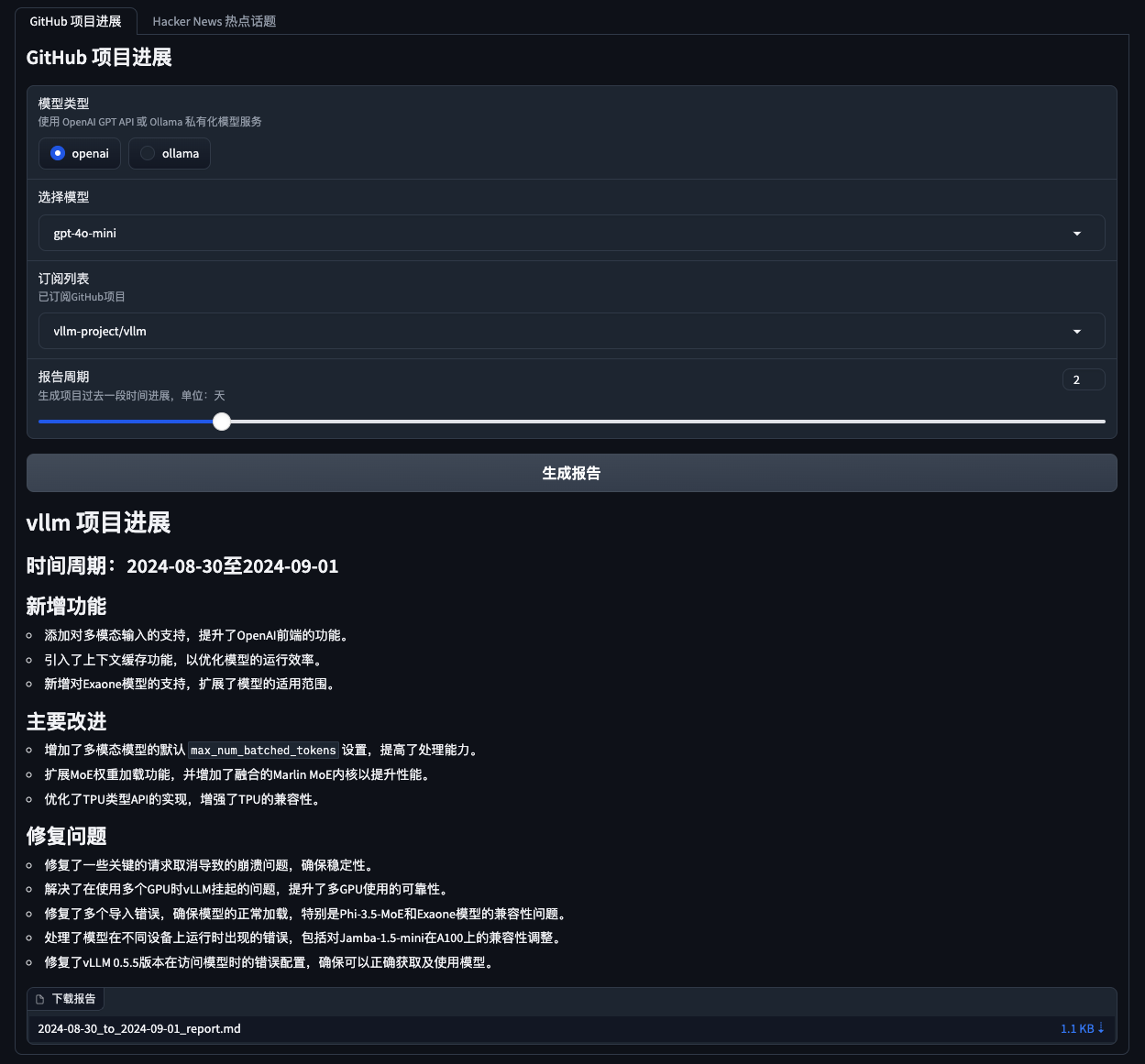
Hacker News Hot Tech Topic Mining 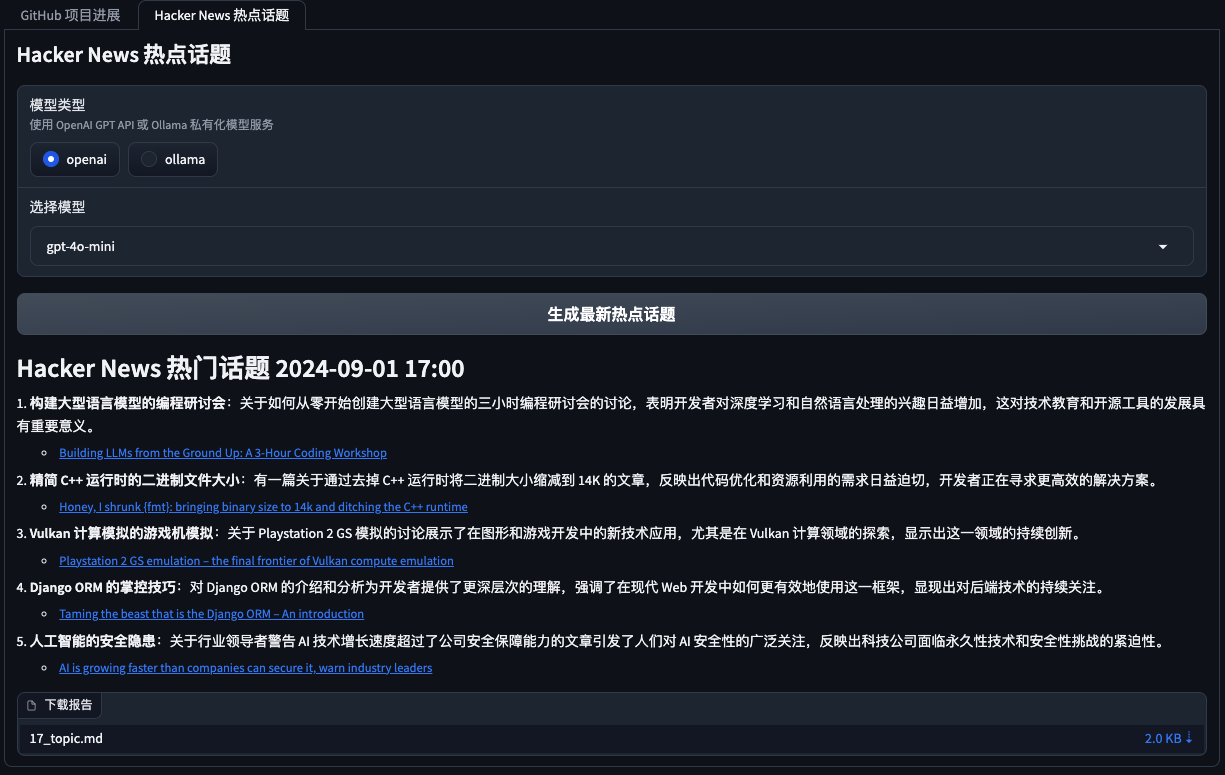
First, install the required dependencies:
pip install -r requirements.txt Edit the config.json file to set your GitHub Token, Email settings (taking Tencent WeChat Mailbox as an example), subscription files, update settings, big model service configuration (supports OpenAI GPT API and Ollama's private big model service), and automatically retrieve and generate reports (GitHub project progress, Hacker News hot topics and cutting-edge technology trends):
{
    "github" : {
        "token" : " your_github_token " ,
        "subscriptions_file" : " subscriptions.json " ,
        "progress_frequency_days" : 1 ,
        "progress_execution_time" : " 08:00 "
    },
    "email" :  {
        "smtp_server" : " smtp.exmail.qq.com " ,
        "smtp_port" : 465 ,
        "from" : " [email protected] " ,
        "password" : " your_email_password " ,
        "to" : " [email protected] "
    },
    "llm" : {
        "model_type" : " ollama " ,
        "openai_model_name" : " gpt-4o-mini " ,
        "ollama_model_name" : " llama3 " ,
        "ollama_api_url" : " http://localhost:11434/api/chat "
    },
    "report_types" : [
        " github " ,
        " hacker_news_hours_topic " ,
        " hacker_news_daily_report "
    ],
    "slack" : {
        "webhook_url" : " your_slack_webhook_url "
    }
}
For security reasons: Both GitHub Token and Email Password settings support configuration using environment variables to avoid explicitly configuring important information, as shown below:
 # Github
export GITHUB_TOKEN= " github_pat_xxx "
# Email
export EMAIL_PASSWORD= " password "GitHub Sentinel supports the following three ways of running:
You can run the app interactively from the command line:
python src/command_tool.pyIn this mode, you can manually enter commands to manage subscriptions, retrieve updates, and generate reports.
To run the app as a background service (daemon), it will be updated automatically based on the relevant configuration.
You can start, query status, close and restart directly using daemon management script daemon_control.sh:
Start the service:
$ ./daemon_control.sh start
Starting DaemonProcess...
DaemonProcess started.config.json , and send emails.logs/DaemonProcess.log file. At the same time, the historical cumulative logs will also be synchronously appended to logs/app.log log file.Query service status:
$ ./daemon_control.sh status
DaemonProcess is running.
Close the service:
$ ./daemon_control.sh stop
Stopping DaemonProcess...
DaemonProcess stopped.
Restart the service:
$ ./daemon_control.sh restart
Stopping DaemonProcess...
DaemonProcess stopped.
Starting DaemonProcess...
DaemonProcess started.To run an application using the Gradio interface, allow users to interact with the tool through the web interface:
python src/gradio_server.pyhttp://localhost:7860 , but you can share it publicly if you want. Ollama is a private big model management tool that supports local and containerized deployment, command-line interaction, and REST API calls.
For detailed instructions on the release of Ollama installation deployment and privatization mockup service, please refer to the release of Ollama installation deployment and service.
To call the private mockup service using Ollama in GitHub Sentinel, follow these steps to install and configure:
Install Ollama : Please download and install the Ollama service according to Ollama's official documentation. Ollama supports a variety of operating systems, including Linux, Windows, and macOS.
Start the Ollama service : After the installation is complete, start the Ollama service with the following command:
ollama serve By default, the Ollama API will run at http://localhost:11434 .
Configuring Ollama Use in GitHub Sentinel : In the config.json file, configure the Ollama API related information:
{
    "llm" : {
        "model_type" : " ollama " ,
        "ollama_model_name" : " llama3 " ,
        "ollama_api_url" : " http://localhost:11434/api/chat "
    }
}
Verify the configuration : Start GitHub Sentinel with the following command and generate a report to verify that the Ollama configuration is correct:
python src/command_tool.pyIf configured correctly, you will be able to generate reports through the Ollama model.
To ensure the quality and reliability of the code, GitHub Sentinel uses the unittest module for unit testing. For detailed descriptions of unittest and its related tools such as @patch and MagicMock , please refer to the unit test details.
validate_tests.sh validate_tests.sh is a Shell script that runs unit tests and validates the results. It is executed during the Docker image building process to ensure the correctness and stability of the code.
test_results.txt file.To facilitate the construction and deployment of GitHub Sentinel projects in a variety of environments, we provide Docker support. This support includes the following files and features:
Dockerfile Dockerfile is a configuration file used to define how to build a Docker image. It describes the steps to build the image, including installing dependencies, copying project files, running unit tests, etc.
python:3.10-slim as the base image and set the working directory to /app .requirements.txt file and install the Python dependencies.validate_tests.sh script execution permission.validate_tests.sh script during the build process to ensure that all unit tests pass. If the test fails, the build process will abort.src/main.py will be run by default as the entry point of the container.build_image.sh build_image.sh is a shell script for automatically building Docker images. It takes the branch name from the current Git branch and uses it as a label for the Docker image, making it easier to generate different Docker images on different branches.
docker build command to build the Docker image and use the current Git branch name as the label. chmod +x build_image.sh
./build_image.sh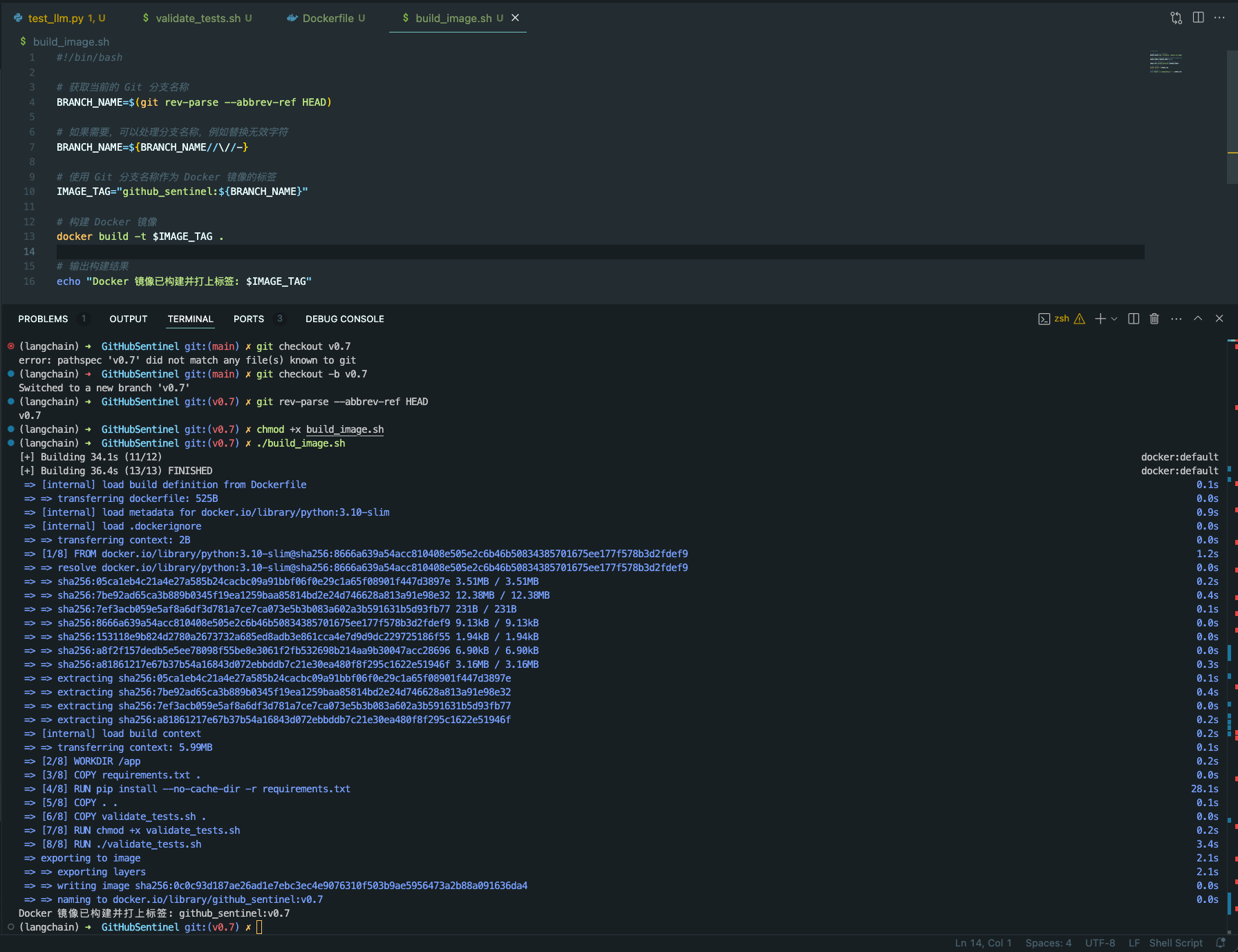
Through these scripts and configuration files, it is ensured that in different development branches, the Docker images built are based on unit-tested code, thereby improving code quality and deployment reliability.
Contribution is what makes the open source community amazing to learn, inspire and create. Thank you very much for any contribution you have made. If you have any suggestions or feature requests, please start a topic to discuss what you want to change.
The project is licensed under the terms of the Apache-2.0 license. See the LICENSE file for details.
Django Peng - [email protected]
Project link: https://github.com/DjangoPeng/GitHubSentinel





