chatarena
v0.1.18


Multi-Agent Language Game Environments for LLMs
ChatArena is a library that provides multi-agent language game environments and facilitates research about autonomous LLM agents and their social interactions. It provides the following features:
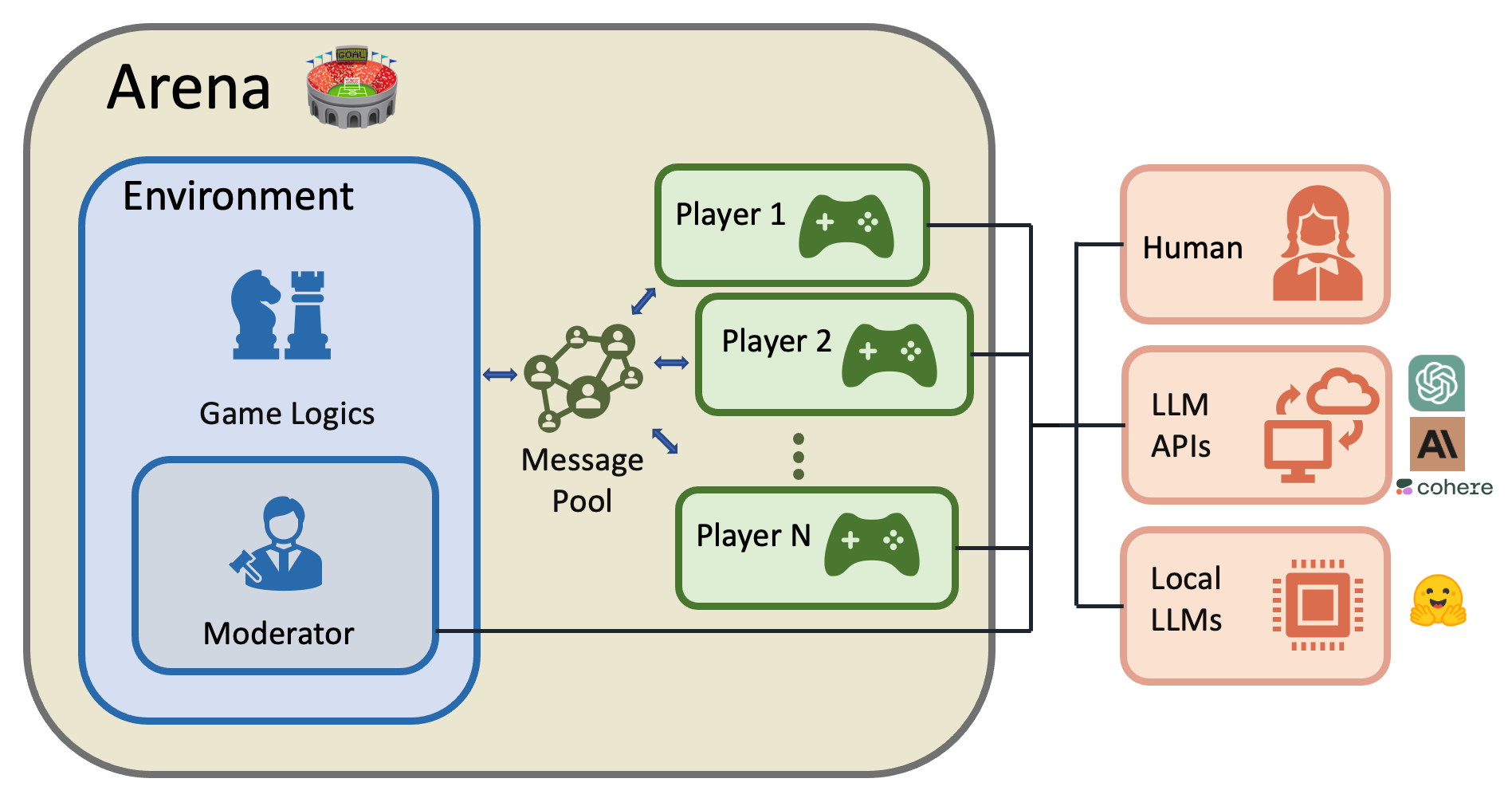
Try our online demo:
Requirements:
Install with pip:
pip install chatarenaor install from source:
pip install git+https://github.com/chatarena/chatarenaTo use GPT-3 as an LLM agent, set your OpenAI API key:
export OPENAI_API_KEY="your_api_key_here"By default pip install chatarena will only install dependencies necessary for ChatArena's core functionalities.
You can install optional dependencies with the following commands:
pip install chatarena[all_backends] # install dependencies for all supported backends: anthropic, cohere, huggingface, etc.
pip install chatarena[all_envs]     # install dependencies for all environments, such as pettingzoo
pip install chatarena[all] # install all optional dependencies for full functionalityThe quickest way to see ChatArena in action is via the demo Web UI.
To launch the demo on your local machine, you first pip install chatarena with extra gradio dependency, then git clone
this repository to your local folder, and finally call the app.py in the root directory of the repository:
pip install chatarena[gradio]
git clone https://github.com/chatarena/chatarena.git
cd chatarena
gradio app.py
This will launch a demo server for ChatArena, and you can access it from your browser (port 8080).
Check out this video to learn how to use Web UI:
For an introduction to the ChatArena framework, please refer to this document. For a walkthrough of building a new environment, check
Here we provide a compact guide on minimal setup to run the game and some general advice on customization.
Load Arena from a config file -- here we use examples/nlp-classroom-3players.json in this repository as an example:
arena = Arena.from_config("examples/nlp-classroom-3players.json")
arena.run(num_steps=10)
Run the game in an interactive CLI interface:
arena.launch_cli()Check out this video to learn how to use CLI: A more detailed guide about how to run the main interaction loop with finer-grained control can be found here
You can define your own environment by extending the Environment class. Here are the general steps:
type_name, then add the class
to ALL_ENVIRONMENTS
__init__ method (its arguments will define the corresponding config) and
initializing class attributesstep
reset, get_observation, is_terminal,
and get_rewards
We provide a detailed tutorial to demonstrate how to define a custom
environment,
using the Chameleon environment as example.
If you want to port an existing library's environment to ChatArena, check
out PettingzooChess environment as an example.
A multi-player language game environment that simulates a conversation.
Based on conversation, but with a moderator that controls the game dynamics.
A multi-player social deduction game. There are two roles in the game, chameleon and non-chameleon. The topic of the secret word will be first revealed to all the players. Then the secret word will be revealed to non-chameleons. The chameleon does not know the secret word. The objective in the game depends on the role of the player:
A two-player chess game environment that uses the PettingZoo Chess environment.
A two-player tic-tac-toe game environment that uses the PettingZoo TicTacToe environment. Differing from the
Moderator Conversation environment, this environment is driven by hard-coded rules rather than a LLM moderator.
We welcome contributions to improve and extend ChatArena. Please follow these steps to contribute:
Please ensure your code follows the existing style and structure.
If you find ChatArena useful for your research, please cite our repository (our arxiv paper is coming soon):
@software{ChatArena,
  author = {Yuxiang Wu, Zhengyao Jiang, Akbir Khan, Yao Fu, Laura Ruis, Edward Grefenstette, and Tim Rocktäschel},
  title = {ChatArena: Multi-Agent Language Game Environments for Large Language Models},
  year = {2023},
  publisher = {GitHub},
  journal = {GitHub repository},
  version = {0.1},
  howpublished = {url{https://github.com/chatarena/chatarena}},
}If you have any questions or suggestions, feel free to open an issue or submit a pull request. You can also contact us on the Farama discord server- https://discord.gg/Vrtdmu9Y8Q
Happy chatting!
We would like to thank our sponsors for supporting this project:





