cruda
1.0.0

 Cruda
Cruda
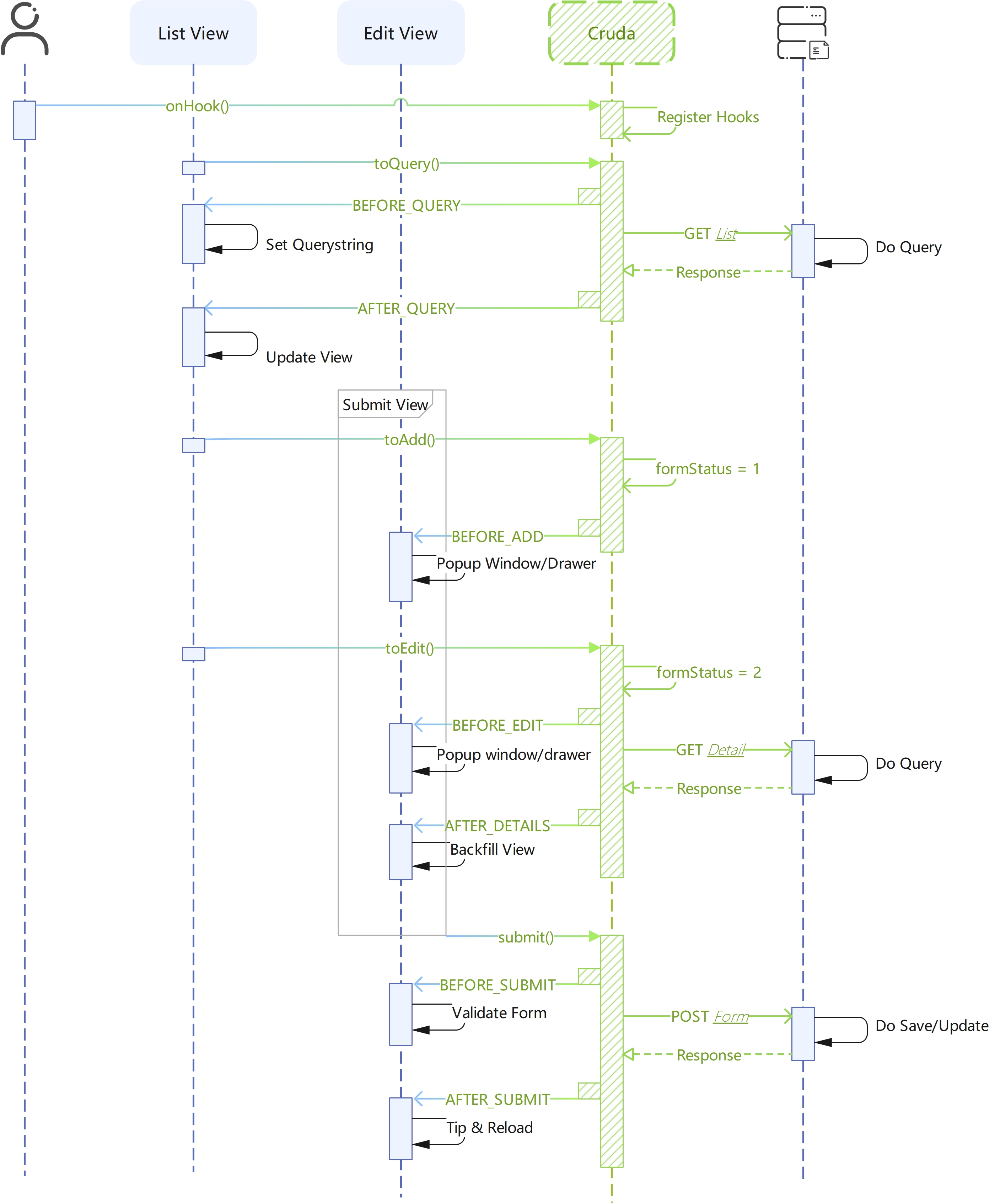
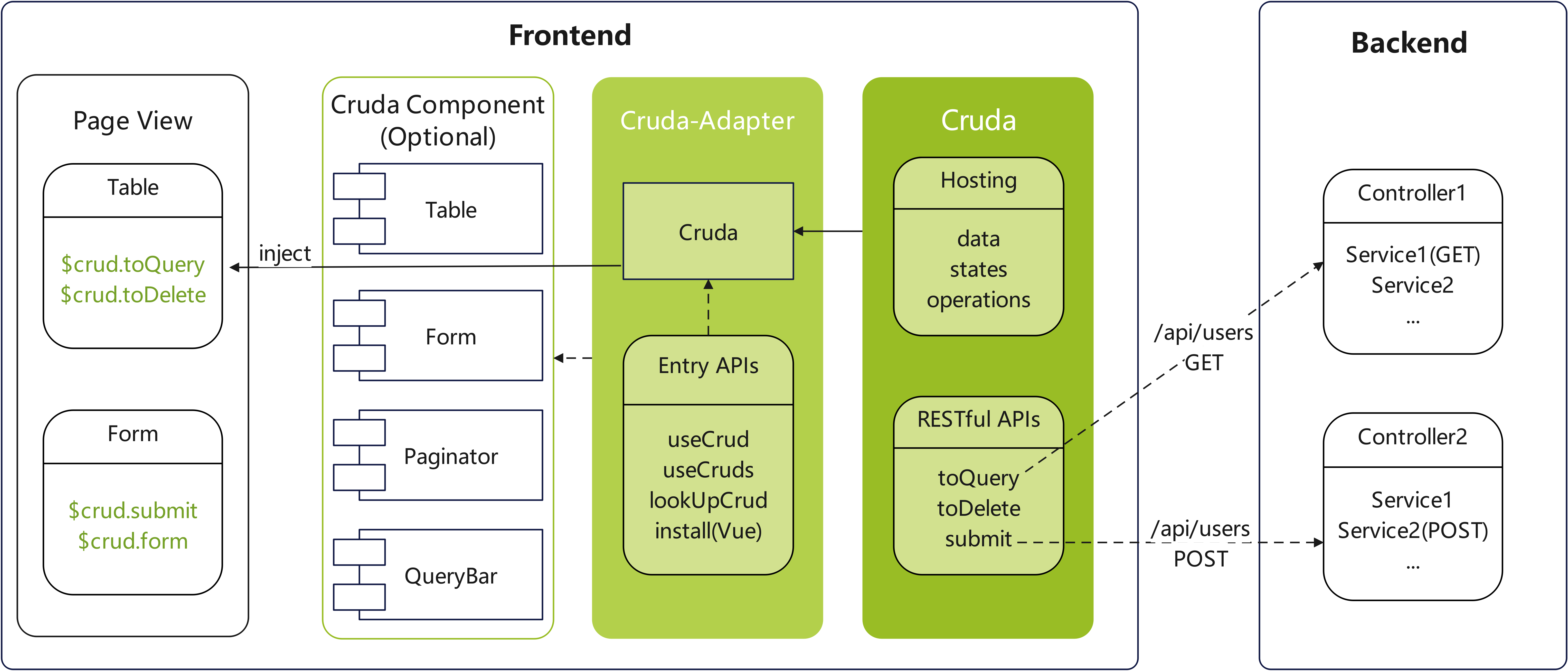
A CRUD view model provides hosting of data, states and operations like submit()/form.name/loading.table, which makes developers build CRUD view faster.
Cruda provides unified APIs for different UIFrameworks by Cruda-adapters.
<!-- $crud.query (query data hosting) -->
<el-input v-model="$crud.query.xxx"></el-input>
<!-- $crud.table.data (table data hosting) -->
<el-table v-model="$crud.table.data"></el-table>
<!-- $crud.form (form data hosting) -->
<el-form :model="$crud.form"></el-form>
<!-- $crud.table.data (tree data hosting) -->
<el-tree :model="$crud.table.data"></el-tree>$crud.submit(formEl) //submit form
$crud.reload() //reload table
$crud.cancel() //cancel form<!-- loading.query will be set automatically when reload() is called -->
<button class="..." :loading="$crud.loading.query" @click="$crud.reload()">
查询
</button>/* when you call the toQuery(), Cruda will
1. set loading.query to True
2. package query, pagination, order, ...
3. emit hooks
4. catch exceptions
5. ...
*/
$crud.toQuery()$crud.toQuery() //GET
$crud.toDelete() //DELETE
$crud.doUpdate() //PUTYou can set global defaults of Cruda if all scenes have the same behavior in your project.
//what properties does 'rs' have depends on the backend return value
CRUD.defaults[CRUD.HOOK.AFTER_QUERY] = function (crud, rs) {
  crud.pagination.total = rs.data.total
  crud.table.data = rs.data.records || []
}
CRUD.defaults.pagination.pageSize = 10
CRUD.defaults.view.opQuery = true
CRUD.defaults.table.rowKey = 'id'You can modify the URL/Method to adapt to the backend service
CRUD.RESTAPI = {
  QUERY: { url: "", method: "GET" },
  QUERY_DETAILS: { url: "/{id}", method: "GET" },//(v1.20+)
  ADD: { url: "", method: "POST" },
  UPDATE: { url: "", method: "PUT" },
  DELETE: { url: "", method: "DELETE" },
  EXPORT: { url: "/export", method: "GET" },
  IMPORT: { url: "/import", method: "POST" },
  SORT: { url: "/sort", method: "PUT" },
  COPY: { url: "/copy", method: "POST" },
  ADD_OR_UPDATE: { url: "/addorupdate", method: "POST" },//(v1.20+)
}Or set instance-only API when Activation
const $crud = useCrud({
  url:'/api/single',
  restApi:{
    //支持对象格式或字符串格式(仅能设置url)
    ADD:{url:'/add-batch',method:'POST'},
    COPY:'/copy2'
  }
})
* Note the api key must be uppercase
CRUD.xApi(apiName, apiUrl, config) is used to extend custom CRUD RESTAPI. Below is an example
//1. Extends an API. After that it will
/**
 * a. Attach a method 'toClone' to the CRUD instance
 * b. Add 'BEFORE_CLONE' and 'AFTER_CLONE' to CRUD.HOOK
 */
CRUD.xApi('clone','/clone',{method:'POST'})
//2. Add listener
onHook(this,CRUD.HOOK.AFTER_CLONE,(crud,rs)=>{
  console.log('xApi-->',rs.data)
})
//3. Call toClone
this.$crud.toClone({x:1,y:2});We can config autoResponse to refresh the table view automatically, this could help you to avoid losing the page state if you reload() the page after add/update/delete/copy submition before. A typical case is you may lose all hierarchies of TreeTable you opened before when you reload(). Below is the config
//1. Set a response validator to check if the response is valid
$crud.autoResponse.validator = (response:{status:number})=>{
  return response.status === 200
}
//2. For such an Add-Oper like add/copy/import/..., it must set a getter in order to obtain new records with primary key from backend
CRUD.defaults.autoResponse.getter = (response:any)=>{
  return [response.data]
}
//2. If primary keys are generated at frontend, you can either return submitRows
CRUD.defaults.autoResponse.getter = (response:any,submitRows?:any[])=>{
  return submitRows
}
//3. For TreeTable, you need set parentKeyField in order to find parentNode. Default 'pid'
CRUD.defaults.autoResponse.parentKeyField = 'pid'
//4. Set insert position with 'head/tail'. Default 'head'
CRUD.defaults.autoResponse.position = 'head'
//4. For TreeTable, you need set childrenKeyField in order to find childNodes. Default 'children'
CRUD.defaults.autoResponse.childrenKeyField = 'children'
After that, the table view will refreshed by CRUDA. If you want to refresh manually you can call autoProcess() in the hook below
// Other hooks which can invode autoProcess please see the doc below
onHook(CRUD.HOOK.AFTER_DELETE,(crud,rs,rows,autoProcess)=>{
  autoProcess()
})We can config pagination.frontend to enable the frontend pagination
useCrud({
  ...
  pagination:{
    //enable
    frontend:true,
  }
})
//Set global cache hook(Optional)
CRUD.defaults[CRUD.HOOK.BEFORE_CACHE] = function (crud, rs, cache) {
  //cache custom data
  cache({
    data:{
      rows:rs.data.rows,
      total:rs.data.total
    }
  })
}
CRUD.defaults[CRUD.HOOK.AFTER_QUERY] = function (crud, rs, params, slice) {
  //filter cache data
  const keyword = params.keyword
  let list = filter(defaultTo(rs.data.rows, []),(item:any)=>{
    return test(item.email, keyword) ||
    test(item.uname, keyword) ||
    test(item.ip, keyword) ||
    test(item.domain, keyword)
  })
  crud.pagination.total = defaultTo(list.length, 0);
  //use slice() to slice list. If pagination.frontend is disabled, slice() will return the list directly
  crud.table.data = slice(list);
}
After enabling pagination.frontend the method toQuery/reload no longer requests the backend, use reset instead
Display switch of Components
- opQuery
- opAdd
- opUpdate
- opDelete
- opExport
- opImport
- opSort
- opCopy
Toggle loading state
- query
- table
- del
- submit
- form
- export
- import
- sort
- copy
Query data container
Sort data container
Table data container
- data
- selection
- allColumns
- orders
- rowKey✅
Pagination container
- pageSize✅
- currentPage
- total
- frontend
Form data container
form state. 0:Normal;1:Add;2:Update;3:View;4:AddOrUpdate
crud active params
crud error msg{name,message,status}
editing id of the
table.row
crud key in multi-instance
enable/disable editing snapshot
snapshot map. The key is
table.row[rowKey]
will break the validation after first catch
will update table view automatically after you add/update/delete/copy
crud.table.data
Will merge into the GET request
Instance api that will recover the
8. RESTAPI
Enable query cache and custom cache data by hook
BEFORE_CACHEor use default backend response as the cache data. This prop will be true ifpagination.frontendis enabled.
✅ Indicates that global defaults are supported ⚡ Indicates that activation in object form is supported
(When
frontendis false) Instance query. Send GET request to the backend。The argument 'query' will merge with the $crud.query
Instance del. Send DELETE request to the backend
Instance export. Send GET request to the backend
Instance import. Use
fieldNameto specify the fileName of server request。 Send POST request to the backend
Set
formStatusto 'Add'
Set
formStatusto 'Update' and send GET (default) request to the backend
Set
formStatusto 'AddOrUpdate' and send GET (default) request to the backend
Set
formStatusto 'View' and send GET (default) request to the backend
Instance sort. Send PUT (default) request to the backend
Instance copy. Send POST (default) request to the backend
Set
formStatusto 'Normal'
Pass args to
BEFORE_SUBMIT
Same as
submit()but won't checkformStatus
Same as
submit()but won't checkformStatus
Same as
submit()but won't checkformStatus
*Depends on adapters。Will validate one or more Form or CustomComponent(which has validate() method) and then call
submit()
Reset pagination and call toQuery()
Return restUrl of instance
Set url params
Return row data
Usually used in row selection event like
selection-changeinelement-ui
Usually used in table sort event like
sort-changeinelement-ui, it will calltoQuery()automatically
Return the context of the crud
Clear cache data and call reload()
Emit before query. Can modify the params before request send. Cancellable, if be cancelled the
AFTER_QUERYwill not emit
Emit after query. Can set table data by 'rs'. If
pagination.frontendis enabled, params and slice() can be used to filter and slice cache data
Emit before delete. Cancellable, if be cancelled the
AFTER_DELETEwill not emit
Emit after delete. Use
autoProcess()to update table view
Emit before add. Can clear the form data or generate a UUID. Cancellable,if be cancelled the
formStatuswill not be change. ...args fromtoAdd()
Emit after add and before
AFTER_SUBMIT. UseautoProcess()to update table view
Emit before update. Cancellable,if be cancelled the
formStatuswill not be change. Useskip()to stop detail-query and theAFTER_DETAILSwill not emit
Emit after update and before
AFTER_SUBMIT. UseautoProcess()to update table view
Emit before add/update. Cancellable,if be cancelled the
formStatuswill not be change. UsedoView()to query details
Emit after add/update and before
AFTER_SUBMIT. UseautoProcess()to update table view
Emit before view. Cancellable,if be cancelled the
formStatuswill not be change. Useskip()to stop detail-query and theAFTER_DETAILSwill not emit
Emit after
toUpdate/toViewand is not skipped byskip()
Emit after
toUpdateandAFTER_DETAILS
Emit after
toViewandAFTER_DETAILS
Emit before form submit. Cancellable, if be cancelled the
AFTER_SUBMITwill not emit. UsesetForm(formObject)to set form-data to submit
Emit after form submit. Can reload page, send notice here. Use
autoProcess()to update table view
Emit before export. Cancellable, if be cancelled the
AFTER_EXPORTwill not emit
Emit after export complete
Emit before import. Can modify the params before request send. Cancellable, if be cancelled the
AFTER_IMPORTwill not emit
Emit after import complete
Emit before sort. Cancellable, if be cancelled the
AFTER_SORTwill not emit
Emit after sort complete
Emit before copy. Cancellable, if be cancelled the
AFTER_COPYwill not emit
Emit after copy complete. Use
autoProcess()to update table view
Emit on error
Emit after cancel() be called
Emit after submitForm() be called
Emit before recover the snapshot
Emit after query and
cacheis enabled. Usecache(data)to custom the cache data
Must specify 'crudName' when multiple instances detected
Rx 【Custom component】
form validation Xxx
Rx 【check validation rules】
Cannot find [request] in the installation options
Rx 【Install】
table.rowKey is a blank value 'Xxx', it may cause an error - toDelete/Update/View()
Rx 【set rowKey a non-empty value】