gokvadmin
1.0.0

Gokvadmin is a minimalistic web interface for managing key-value databases. It offers adding, deleting and searching for keys.
Gokvadmin allows plugging custom engines for all your enginy needs ;)
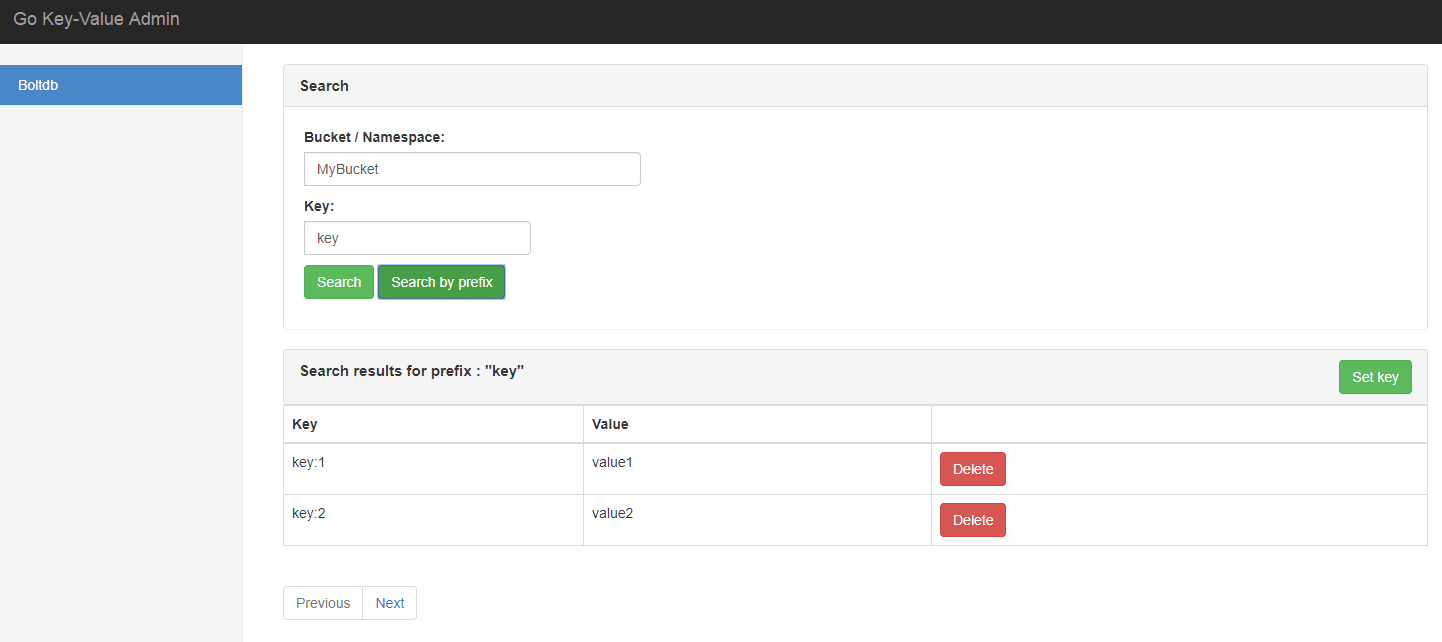
To start using Gokvadmin, install Go 1.8 or above and run go get:
$ go get github.com/sigurniv/gokvadminCurrently Gokvadmin supports a few embedded key-value databases:
Embedded storages often obtain a lock on the data files/directories. Gokvadmin allows to reuse currently existing database connection, which makes it possible to use it with running application.
Gokvadmin starts net/http webserver at :8083 by default and serves static files from
$GOPATH/github.com/sigurniv/gokvadmin/assets folder.
package main

import (
	"github.com/sigurniv/gokvadmin"
)

func main() {
  // Create database connection
  db := ... // *bolt.DB

  //Use default gokvadmin config
  config := gokvadmin.DefaultConfig
  admin, _ := gokvadmin.NewGoKVAdmin("boltdb", db, config)
  go admin.Run() // listen and serve on 0.0.0.0.:8083
}Gokvadmin uses gorilla/mux and net/http internally. Both router and server available under Router and Server fields of gokvadmin struct respectively. This allows customization of both for your needs.
package main

import (
	"github.com/sigurniv/gokvadmin"
	"time"
)

func main() {
  // Create database connection
  db := ... // *bolt.DB

  config := gokvadmin.DefaultConfig
  admin, _ := gokvadmin.NewGoKVAdmin("boltdb", db, config)

  //Customize the Server instance
  admin.Server.Addr = ":3001"
  admin.Server.WriteTimeout =  time.Second * 15
  go admin.Run() // listen and serve on 0.0.0.0.:3001
}By default Gokvadmin uses no authentication so anyone can login into the dashboard, but you can add login/password authentication.
package main

import (
	"github.com/sigurniv/gokvadmin"
)

func main() {
  // Create database connection
  db := ... // *bolt.DB

  config := gokvadmin.DefaultConfig
  config.Auth = &gokvadmin.Auth{
 		Login:"login",
 		Password:"password",
  }
  admin, _ := gokvadmin.NewGoKVAdmin("boltdb", db, config)
  go admin.Run() // listen and serve on 0.0.0.0.:8083
}To use TLS you need to pass TLS struct to config object
package main

import (
	"github.com/sigurniv/gokvadmin"
)

func main() {
  // Create database connection
  db := ... // *bolt.DB

  config := gokvadmin.DefaultConfig
  config.TLS = &gokvadmin.TLS{
  		CertFile: "server.crt",
  		KeyFile: "server.key",
  }
  admin, _ := gokvadmin.NewGoKVAdmin("boltdb", db, config)
  go admin.Run() // listen and serve on 0.0.0.0.:8083
}You can add your custom engine to use with Gokvadmin. All you need to do is implement the Engine interface and register it.
package main

import (
	"github.com/sigurniv/gokvadmin"
)

func main() {
  // Create database connection
  db := ... // Your db connection

  //Use your custom engine
  gokvadmin.RegisterEngine("custom_engine", &YourCustomEgine{})
  config := gokvadmin.DefaultConfig
  admin, _ := gokvadmin.NewGoKVAdmin("custom_engine", db, config)
  go admin.Run() // listen and serve on 0.0.0.0.:8083
}Gokvadmin uses Vue.js for frontend. Its is possible to customize a layout for you custom engine.
Gokvadmin comes with bundled assets/dist/build.js and assets/dist/bootstrap.min.css files. It uses vue.js webpack-simple
template so all you need to do to start coding the frontend part is:
$ npm init
$ npm run dev
Create your custom component in assets/src/engines folder and register it in assets/src/store/modules/engines.js file.
import YourCustomEngineComponent from '../../components/engines/YourCustomEngineComponent.vue';

const state = {
    engines: {
        'default': General,
        'boltdb': General,
        'badger': General,
        "custom_engine": YourCustomEngineComponent
    },
    ...
};
To add custom routes your engine must implement RouterEngine interface
func (e CustomEngine) AddRoutes(r *mux.Router) {
	r.HandleFunc("/api/custom-engine/hello", func(w http.ResponseWriter, r *http.Request) {
		w.Header().Set("Content-Type", "application/json")
		w.Write([]byte("hello from custome-engine"))
		return
	}).Methods(http.MethodGet)
}







