ct black dashboard pro django
v1.0.6

Django Template crafted on top of Black Dashboard PRO, a premium Bootstrap 4 design. Start your development with a modern, dark-themed Bootstrap 4 Admin template for Django. It features a huge number of components built to fit together and look fantastic. If you want to code faster, with a smooth workflow, then you should try this template carefully developed with Django, a well-known Python Framework.
NOTE: This product
requires a Licensein order to access the theme. During the purchase, aGitHub Access TOKENis provided.
Up-to-date DependenciesDesign: Django Theme Black - PRO VersionSections covered by the design:
Django.contrib.AUTH, RegistrationDockerCI/CD flow via Render
video presentation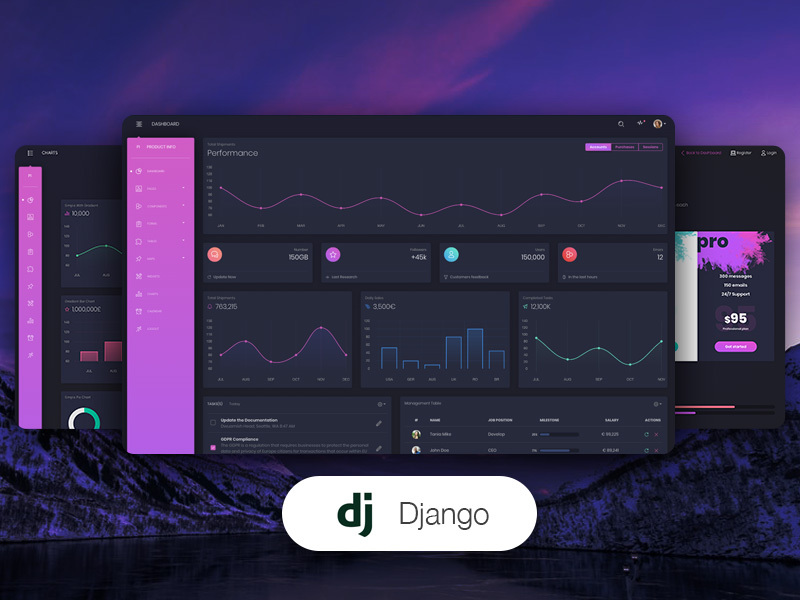
To authenticate use the default credentials test / PaSS_123 or create a new user on the registration page.
UNZIP the sources or clone this repository. After getting the code, open a terminal and navigate to the working directory, with product source code.
Export
GITHUB_TOKENin the environment. The value is provided during purchase.
This is required because the project has a private REPO dependency: github.com/app-generator/priv-django-admin-black-pro
$ export GITHUB_TOKEN='TOKEN_HERE'  # for Linux, Mac
$ set GITHUB_TOKEN='TOKEN_HERE'     # Windows CMD
$ $env:GITHUB_TOKEN = 'TOKEN_HERE'  # Windows powerShell
Install modules via
VENV.
$ virtualenv env
$ source env/bin/activate
$ pip install -r requirements.txt
Edit the
.envusing the template.env.sample.
# True for development, False for production
DEBUG=True
Set Up Database
$ python manage.py makemigrations
$ python manage.py migrate
Create the Superuser
$ python manage.py createsuperuserStart the app
$ python manage.py runserverAt this point, the app runs at http://127.0.0.1:8000/.
The documentation for the Black Dashboard PRO Django is hosted at our website.
The project is coded using a simple and intuitive structure presented below:
< PROJECT ROOT >
   |
   |-- core/
   |    |-- settings.py                  # Project Configuration
   |    |-- urls.py                      # Project Routing
   |
   |-- home/
   |    |-- views.py                     # APP Views
   |    |-- urls.py                      # APP Routing
   |    |-- models.py                    # APP Models
   |    |-- tests.py                     # Tests
   |    |-- templates/                   # Theme Customisation
   |         |-- includes                #
   |              |-- custom-footer.py   # Custom Footer
   |
   |-- requirements.txt                  # Project Dependencies
   |
   |-- env.sample                        # ENV Configuration (default values)
   |-- manage.py                         # Start the app - Django default start script
   |
|-- ************************************************************************When a template file is loaded in the controller, Django scans all template directories starting from the ones defined by the user, and returns the first match or an error in case the template is not found.
The theme used to style this starter provides the following files:
< LIBRARY_ROOT >                     # This exists in ENV: LIB/admin_black_pro
   |
   |-- templates/                    # Root Templates Folder
   |    |
   |    |-- accounts/
   |    |    |-- login.html          # Sign IN Page
   |    |    |-- register.html       # Sign UP Page
   |    |
   |    |-- includes/
   |    |    |-- footer.html         # Footer component
   |    |    |-- sidebar.html        # Sidebar component
   |    |    |-- navigation.html     # Navigation Bar
   |    |    |-- scripts.html        # Scripts Component
   |    |
   |    |-- layouts/
   |    |    |-- base.html           # Masterpage
   |    |    |-- base-auth.html      # Masterpage for Auth Pages
   |    |
   |    |-- pages/
   |         |-- index.html          # Index Page (presentation)
   |         |-- settings.html       # Settings  Page
   |         |-- dashboard.html      # Dashboard page
   |         |-- *.html              # All other pages
   |
   |-- ************************************************************************
When the project requires customization, we need to copy the original file that needs an update (from the virtual environment) and place it in the template folder using the same path.
For instance, if we want to customize the footer.html these are the steps:
Step 1: create the templates DIRECTORY inside the home appStep 2: configure the project to use this new template directory
core/settings.py TEMPLATES sectionStep 3: copy the footer.html from the original location (inside your ENV) and save it to the home/templates DIR
<YOUR_ENV>/LIB/admin_black_pro/includes/footer.html<PROJECT_ROOT>home/templates/includes/footer.htmlTo speed up all these steps, the codebase is already configured (
Steps 1, and 2) and acustom footercan be found at this location:
home/templates/includes/custom_footer.html
By default, this file is unused because the theme expects footer.html (without the custom_ prefix).
In order to use it, simply rename it to footer.html. Like this, the default version shipped in the library is ignored by Django.
In a similar way, all other files and components can be customized easily.
New Blueprint Instance button.repo which you want to deploy.Service Group Name and click on Update Existing Resources button.At this point, the product should be LIVE.
At present, we officially aim to support the last two versions of the following browsers:
We use GitHub Issues as the official bug tracker for the Black Dashboard PRO Django. Here are some advices for our users that want to report an issue:
If you have questions or need help integrating the product please contact us instead of opening an issue.
Black Dashboard PRO Django - Provided by Creative Tim and AppSeed.








