rawdog md
v0.1.8

Caveman-level simple, Markdown-to-HTML static site tooling with minimal configuration.
Inspired by motherfuckingwebsite.com, uses Go Template and HTML under the hood.
rawdog-md is available on Windows, Linux and MacOS. You can install it via package managers, manually, or build it from source.
Set-ExecutionPolicy RemoteSigned -Scope CurrentUser
iex (irm https://raw.githubusercontent.com/dwiandhikaap/rawdog-md/main/.installer/powershell/install.ps1)rawd command in your terminal.scoop install https://raw.githubusercontent.com/dwiandhikaap/rawdog-md/main/.installer/scoop/rawdog-md.jsonrawd command in your terminal.How to uninstall:
scoop uninstall rawdog-mdrawd-{version}-windows-amd64.zip filenamerawd command in your terminal.curl -fsSL https://raw.githubusercontent.com/dwiandhikaap/rawdog-md/main/.installer/bash/install.sh | bashrawd command in your terminal.rawd-{version}-linux-{architecture}.tar.gz filenamewget {copied-url} -O rawd.tar.gz
tar -xvf rawd.tar.gz
sudo mv rawd /usr/local/bin
rm rawd.tar.gzrawd command in your terminal.curl -fsSL https://raw.githubusercontent.com/dwiandhikaap/rawdog-md/main/.installer/bash/install.sh | bashrawd command in your terminal.rawd-{version}-darwin-{architecture}.tar.gz filenamewget {copied-url} -O rawd.tar.gz
tar -xvf rawd.tar.gz
sudo mv rawd /usr/local/bin
rm rawd.tar.gzrawd command in your terminal.Install Go
Install rawdog-md
go install github.com/dwiandhikaap/rawdog-md This will install the binary as rawdog-md instead of rawd
if you want to change it to rawd, you can rename the binary file in your Go bin directory.
See this reference for more information about go install.
Done!
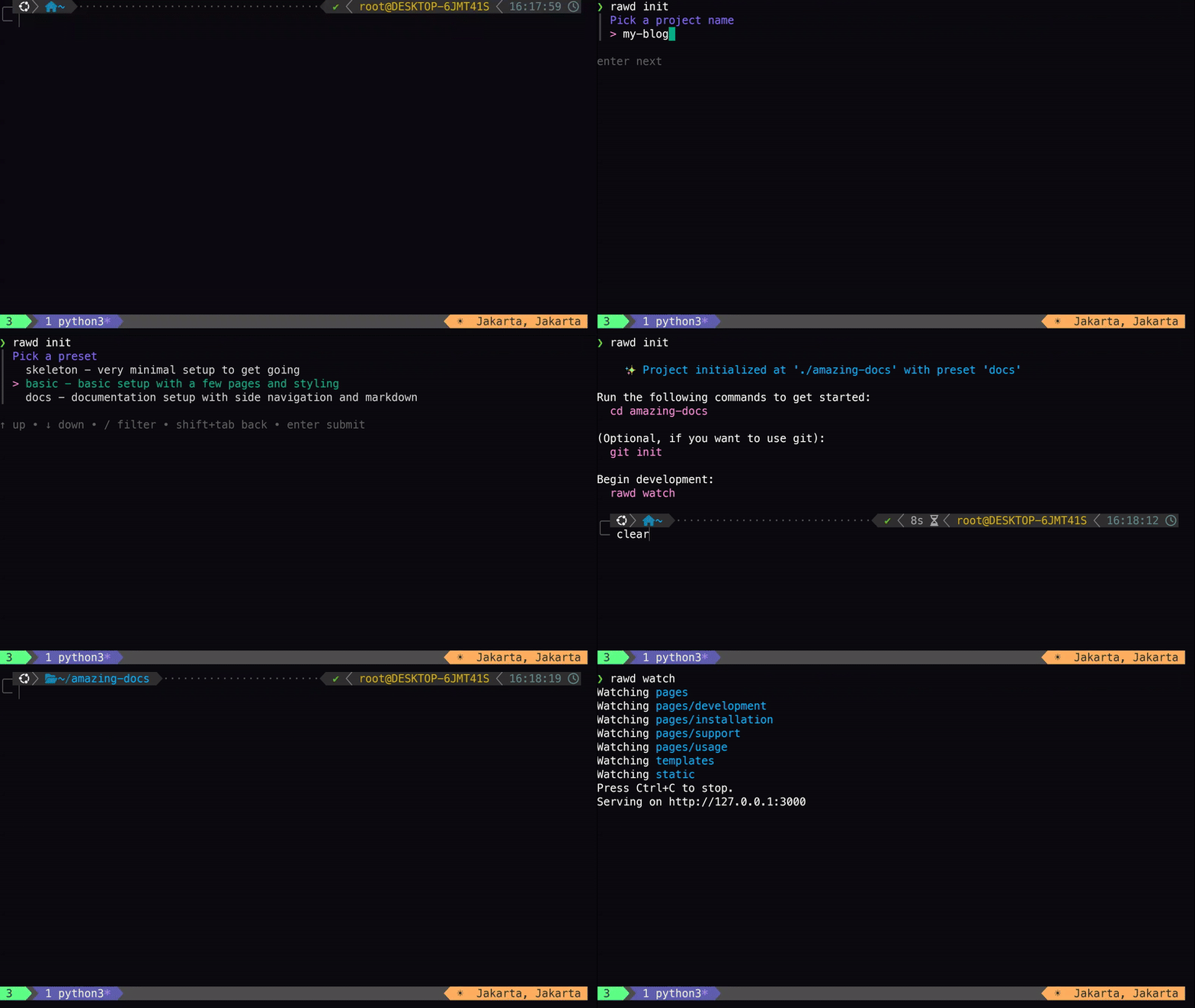
Create a new project and choose a preset template
rawd initIt will ask you for the project name and the template you want to use.
Then, go to the project directory
cd <your-project-name>Start the development server
rawd watchOpen your browser and go to http://localhost:3000
To create a new post, create a new file in the pages directory. You can use Markdown, Go Template, or HTML.
To edit the template, go to the template directory.
Each time you save your changes, the server will rebuild the site and refresh the browser.
When you're done, build the site
rawd buildPull requests are welcome. For major changes, please open an issue first to discuss what you would like to change.





