dvbstream
v2023.12.11

Objective: receive DTT television locally with a Raspberry Pi equipped with a DVB-T2 TV HAT tuner and/or RTL-SDR keys.
Test with 2 tools: dvblast and mumudvb .
In the conf/dvblast and conf/mumudvb directories are the configurations of the DTT multiplexes available in Paris with a multicast broadcast address for each channel.
We will first restrict the multicast IP range to the local loop so as not to flood the network if the switches are not optimized for multicast (see IGMP Snooping).
ip route add 239.10.10.0/24 dev lo src 127.0.0.1Then to check the network card routes:
$ route
Kernel IP routing table
Destination     Gateway         Genmask         Flags Metric Ref    Use Iface
default         lan.home        0.0.0.0         UG    202    0        0 eth0
192.168.1.0     0.0.0.0         255.255.255.0   U     202    0        0 eth0
239.10.10.0       0.0.0.0         255.255.255.0   U     0      0        0 lo
Note: the route command is part of the net-tools package under Debian .
Or
$ ip route show
default via 192.168.1.1 dev eth0 src 192.168.1.74 metric 202
192.168.1.0/24 dev eth0 proto dhcp scope link src 192.168.1.74 metric 202
239.10.10.0/24 dev lo scope link src 127.0.0.1
To make this rule persistent:
Debian create the file /etc/network/if-up.d/local-multicast (and make it executable) with the following content: #! /bin/sh
# à mettre dans /etc/network/if-up.d/local-multicast (rendre exécutable)
# le multicast ne sort pas de la boucle locale pour éviter de flooder le réseau
if [ " $IFACE " = " lo " ] ; then
ip route add 239.10.10.0/24 dev lo src 127.0.0.1
fiCentOS7 create a file /etc/sysconfig/network-scripts/route-lo with the following content: 239.10.10.0/24 via 127.0.0.1 dev lothen restart the network service
systemctl restart network dvblast 's role is to demultiplex the signal from the tuner card, and broadcast an IP stream on the network, in rtp by default.
Facility
apt install dvblastVerification
$ dvblast --version
DVBlast 3.4 (release)
mumudvb is an evolution of dvblast
Facility
apt install mumudvb Add the new user _mumudvb to the video and plugdev groups
usermod -a -G video _mumudvb
usermod -a -G plugdev _mumudvb
udp by default. for rtp use rtp_header to 1 in the configuration.
ffmpeg is the Swiss army knife of audiovisual. It allows transcoding, analysis, generation of media files. We will use it to read an rtp/udp stream and display it directly on the standard output. In flat pass mode.
Facility
apt install ffmpegVerification
$ ffmpeg 2>&1 | head -1
ffmpeg version 4.3.4-0+deb11u1+rpt3 Copyright (c) 2000-2021 the FFmpeg developers In the systemd directory, 2 service files are provided. Let's copy them to the right place:
cp systemd/[email protected] /etc/systemd/system
cp systemd/[email protected] /etc/systemd/system
systemctl daemon-reload
Note: the path of apps and logs may need to be adapted.
To start streaming a multiplex, use one of the following example commands:
systemctl start mumudvb@0_r1
systemctl enable --now dvblast@1_r15
the parameter is of the form CARD_MUX :
CARD the card identifier (0 ... 7)MUX the multiplex identifier (r1 ... r15)Link: Systemd Documentation
We can check that a multiplex is streamed on the local loop with netstat :
$ netstat -nu
Active Internet connections (w/o servers)
Proto Recv-Q Send-Q Local Address           Foreign Address         State
udp        0      0 127.0.0.1:41809         239.10.10.14:1234         ESTABLISHED
udp        0      0 127.0.0.1:52565         239.10.10.3:1234          ESTABLISHED
udp        0      0 127.0.0.1:39327         239.10.10.2:1234          ESTABLISHED
udp        0      0 127.0.0.1:45600         239.10.10.27:1234         ESTABLISHED
udp        0      0 127.0.0.1:37410         239.10.10.30:1234         ESTABLISHED
Note: with mumudvb there is not the same netstat result...
On the other hand, the iptraf tool allows you to have an overview of network traffic in a text interface.
apt install iptraf with ffmpeg
ffmpeg -i rtp://239.10.10.2:1234 -c copy -map 0 rec.ts or even better with multicat ( bitstream dependency, compiles easily)
multicat -X @239.10.10.2:1234 /dev/null 2> /dev/null > rec.tsDescription of parameters:
-X : we ask that the ts stream pass through the standard output@239.10.10.2:1234 : specify the multicast group to which you want to subscribe/dev/null : we do not want the stream to be written to disk2>/dev/null : we hide the error output-u to add if the stream is "raw" udp and not rtp> rec.ts : we redirect the flow to a file In the case of a network not compatible with multicast and to avoid flooding, it may be interesting to convert the multicast stream into unicast. However, pay attention to the network volume if many clients connect to the source.
Installing udpxy
git clone https://github.com/pcherenkov/udpxy
cd udpxy/chipmunk
make
sudo make install
Manual launch of the service:
sudo udpxy -p 80 -c 8 The service will run on port 80 ( -p ), with a maximum of 8 clients ( -c ).
Launch via systemd :
Also here is a systemd service file for udpxy.
cp conf/systemd/udpxy.service /etc/systemd/system
systemctl daemon-reload
sudo systemctl enable --now udpxy
Checking that the service is running:
$ netstat -an | grep " :80 "
tcp        0      0 0.0.0.0:80            0.0.0.0: *               LISTEN
Now, on our local network we will be able to request, in unicast and TCP, via the http protocol, a request like this:
vlc http://dvbstream/rtp/239.10.10.2:1234dvbstream being the ip/host of the machine running udpxy/rtp/ or /udp/ depending on the stream protocol used by the source239.10.10.2:1234 the ip and port of the source multicast groupHere is the complete.m3u playlist of all the channels declared in this project (all Parisian TNT multiplexes).
Example of silent mosaic with 2x2 window positioning on a 1920x1080 screen:
mpv http://dvbstream/rtp/239.10.10.2:1234  --mute=yes --no-border --geometry=960x540+0+0     --deinterlace=yes &
mpv http://dvbstream/rtp/239.10.10.27:1234 --mute=yes --no-border --geometry=960x540+960+0   --deinterlace=yes &
mpv http://dvbstream/rtp/239.10.10.10:1234 --mute=yes --no-border --geometry=960x540+0+540   --deinterlace=yes &
mpv http://dvbstream/rtp/239.10.10.11:1234 --mute=yes --no-border --geometry=960x540+960+540 --deinterlace=yes & sudo systemctl enable --now dvblast@0_r1sudo systemctl enable --now dvblast@1_r2sudo systemctl enable --now dvblast@2_r3Total: 74.4 Mb/s
sudo systemctl enable --now dvblast@0_r4sudo systemctl enable --now dvblast@1_r6sudo systemctl enable --now dvblast@2_r7Total: 74.4 Mb/s
sudo systemctl enable --now dvblast@0_r9sudo systemctl enable --now dvblast@0_r15Total: 50 Mb/s
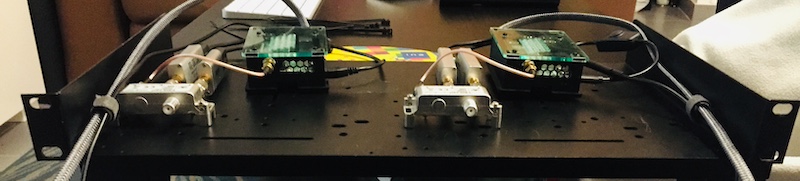
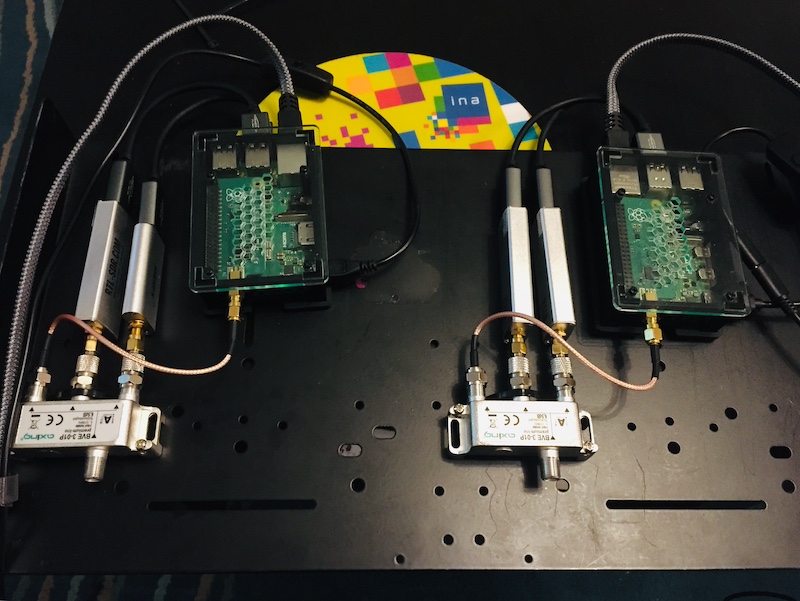
The /dev/dvb directory must contain at least one adapter :
$ ll /dev/dvb/
total 0
drwxr-xr-x 2 root root 120 Mar  8 22:41 adapter0
drwxr-xr-x 2 root root 120 Mar  8 22:41 adapter1
drwxr-xr-x 2 root root 100 Mar  8 22:41 adapter2
Viewing 2 RTL-SDR keys connected via USB:
$ lsusb | grep RTL
Bus 001 Device 004: ID 0bda:2838 Realtek Semiconductor Corp. RTL2838 DVB-T
Bus 001 Device 005: ID 0bda:2838 Realtek Semiconductor Corp. RTL2838 DVB-T




