TaipowerToSlack
1.0.0

TaipowerToSlack is a tool that fetches the "Power Information of Today" from Taipower and sends the data to a designated Slack channel, allowing users to easily monitor Taiwan's power supply status.
Taipower's "Power Information of Today" page:
Please note that this is primarily a shell script demo, with code that might be less elegant and some hard-coded values.
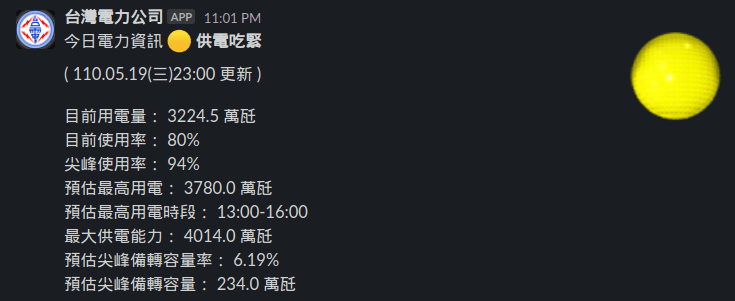
Slack Screenshot:
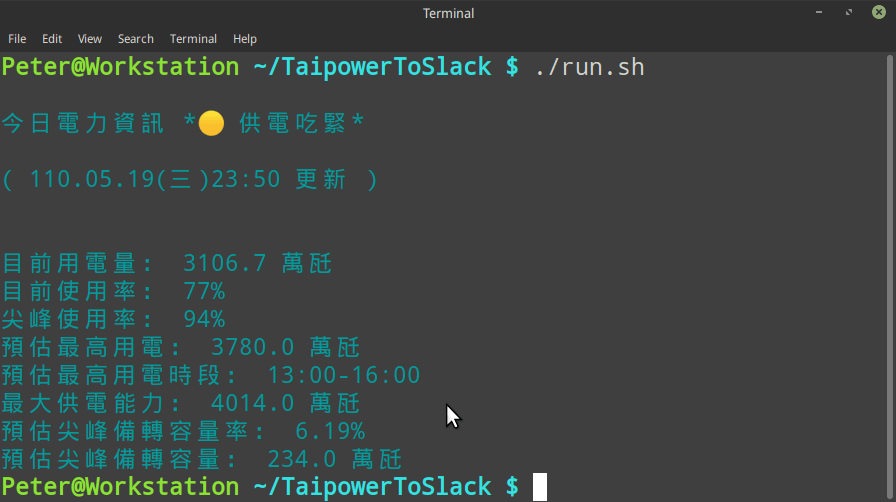
Terminal Screenshot:
Refer to Slack's Documentation for details on how to obtain an Incoming Webhook URL for your Slack channel.
Clone the repository:
git clone https://github.com/PeterDaveHello/TaipowerToSlackOr, download the run.sh script directly, and make the run.sh script executable:
curl https://github.com/PeterDaveHello/TaipowerToSlack/raw/master/run.sh -o /path/to/TaipowerToSlack/run.sh
chmod +x /path/to/TaipowerToSlack/run.shNavigate to the directory containing the run.sh script.
Set the SLACK_HOOK variable in the shell script, or pass it when running the script:
SLACK_HOOK=https://hooks.slack.com/services/T00000000/B00000000/XXXXXXXXXXXXXXXXXXXXXXXX ./run.shThe result should be displayed on your Slack channel as shown in the screenshot.
To enable this option, you can either set the STATELESS and ONLY_POST_ON_STATUS_CHANGE environment variables when running the script or modify them directly in the run.sh script:
Pass the variables when running the script:
STATELESS=false ONLY_POST_ON_STATUS_CHANGE=true ./run.shOr modify the run.sh script:
STATELESS="false"
ONLY_POST_ON_STATUS_CHANGE="true"
With either configuration, the script will use the file ~/.taipower.status to store the status and only post a message to Slack when the status changes.
jq: for parsing JSON datacurl: for fetching JSON data from the Taipower APIbash: for running the shell scriptmktemp: for creating temporary filesbc: for calculating percentages from dataIf any of these tools are missing, you can usually install them using your system's package manager (e.g., apt, yum, or pacman).
This project is released under the WTFPL v2 license.





